
Android下实现tab页个人比较推崇的方法
使用fragment实现tab页的效果:
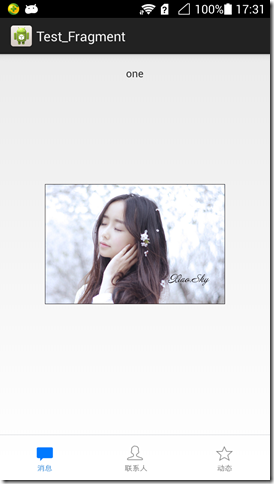
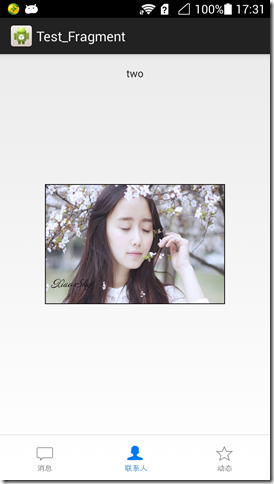

三个页面是单独的三个Fragment
主Activity的实现:
package com.hsx.tab;

import android.os.Bundle;

import android.support.v4.app.FragmentActivity;

import android.support.v4.app.FragmentManager;

import android.support.v4.app.FragmentTransaction;

import android.view.View;

import android.widget.ImageButton;

public class MainActivity extends FragmentActivity {

    protected static final String TAG = "MainActivity";

    private View currentButton;

    @Override

    protected void onCreate(Bundle savedInstanceState) {

        super.onCreate(savedInstanceState);

        setContentView(R.layout.activity_main);

        initComponents();

    }

    private void initComponents() {

        ImageButton btn_one = (ImageButton) findViewById(R.id.buttom_one);

        ImageButton btn_two = (ImageButton) findViewById(R.id.buttom_two);

        ImageButton btn_three = (ImageButton) findViewById(R.id.buttom_three);

        btn_one.setOnClickListener(new View.OnClickListener() {

            @Override

            public void onClick(View v) {

                FragmentManager fm = getSupportFragmentManager();

                FragmentTransaction ft = fm.beginTransaction();

                Fragment_One fragment_one = new Fragment_One();

                ft.replace(R.id.fl_content, fragment_one, MainActivity.TAG);

                ft.commit();

                setButton(v);

            }

        });

        btn_two.setOnClickListener(new View.OnClickListener() {

            @Override

            public void onClick(View v) {

                FragmentManager fm = getSupportFragmentManager();

                FragmentTransaction ft = fm.beginTransaction();

                Fragment_Two fragment_two = new Fragment_Two();

                ft.replace(R.id.fl_content, fragment_two, MainActivity.TAG);

                ft.commit();

                setButton(v);

            }

        });

        btn_three.setOnClickListener(new View.OnClickListener() {

            @Override

            public void onClick(View v) {

                FragmentManager fm = getSupportFragmentManager();

                FragmentTransaction ft = fm.beginTransaction();

                Fragment_Three fragment_three = new Fragment_Three();

                ft.replace(R.id.fl_content, fragment_three, MainActivity.TAG);

                ft.commit();

                setButton(v);

            }

        });

        /**

         * 默认第一个按钮点击

         */

        btn_one.performClick();

    }

    /**

     * 设置按钮的背景图片

     *

     * @param v

     */

    private void setButton(View v) {

        if (currentButton != null && currentButton.getId() != v.getId()) {

            currentButton.setEnabled(true);

        }

        v.setEnabled(false);

        currentButton = v;

    }

}
xml的代码
<RelativeLayout xmlns:android="http://schemas.android.com/apk/res/android"

    android:layout_width="match_parent"

    android:layout_height="match_parent">

    <LinearLayout

        android:id="@+id/buttom_bar_group"

        android:layout_width="match_parent"

        android:layout_height="60dp"

        android:layout_alignParentBottom="true"

        android:gravity="center_vertical"

        android:orientation="horizontal">

        <RelativeLayout style="@style/ButtomBar">

            <ImageButton

                android:id="@+id/buttom_one"

                style="@style/ButtomBarImgBtn"

                android:background="@drawable/bar_news"

                android:contentDescription="@string/app_name" />

        </RelativeLayout>

        <RelativeLayout style="@style/ButtomBar">

            <ImageButton

                android:id="@+id/buttom_two"

                style="@style/ButtomBarImgBtn"

                android:background="@drawable/bar_constact"

                android:contentDescription="@string/app_name" />

        </RelativeLayout>

        <RelativeLayout style="@style/ButtomBar">

            <ImageButton

                android:id="@+id/buttom_three"

                style="@style/ButtomBarImgBtn"

                android:background="@drawable/bar_deynaimic"

                android:contentDescription="@string/app_name" />

        </RelativeLayout>

    </LinearLayout>

    <View

        android:id="@+id/line"

        android:layout_width="match_parent"

        android:layout_height="0.5dp"

        android:layout_above="@id/buttom_bar_group"

        android:background="@color/devide_line" />

    <FrameLayout

        android:id="@+id/fl_content"

        android:layout_width="match_parent"

        android:layout_height="match_parent"

        android:layout_above="@id/line" />

</RelativeLayout>
demo下载地址:http://files.cnblogs.com/hsx514/Test_Fragment.zip
Android下实现tab页个人比较推崇的方法的更多相关文章
- Android ActionBar 关于tab的应用 以及 TabListener的方法详解
actionBar的tab标签应用以及TabListener的方法详解 package com.example.actionBarTest.actionBarTab; import android.a ...
- JS组件系列——基于Bootstrap Ace模板的菜单Tab页效果优化
前言:之前发表过一篇 JS组件系列——基于Bootstrap Ace模板的菜单和Tab页效果分享(你值得拥有) ,收到很多园友的反馈,当然也包括很多诟病,因为上篇只是将功能实现了,很多细节都没有处理 ...
- SPA项目开发之tab页实现
实现思路及细节 1.利用前面博客所讲的Vuex的知识:定义几个变量 Options:存放tab页对象的容器(主要是路由路径以及tab页的名字) activeIndex:被激活的tab页路由路径 sho ...
- Android 常用UI控件之TabHost(5)Tab栏在底部且在最上层也不盖tab页
tab栏在底部 <TabHost android:id="@android:id/tabhost" android:layout_width="match_pare ...
- Activity“ 阻止自动弹出软键盘”的方法 -尤其是对于Tab页下的!
我的activity是Tab页签下的~! 所以应把代码加在继承于TabActivity的那个activity中!!而不是由点击Tab页启动的那个activity <activity androi ...
- [原创]Android自定义View之IndicatorView,显示当前tab页所处位置的View
概述 Android IndicatorView的灵感来源于SlidingTabView,虽然有句"不重复"造轮子在先,本着练手的目的,还是写了一个功能较为简单的类似view. 其 ...
- Android UI--ViewPager扩展Tab标签指示
Android UI--ViewPager扩展Tab标签指示 2013年8月30日出来冒冒泡 ViewPager这个控件已经不算是陌生的了,各种玩Android的小伙伴们都有发表相应的文章来讲它.我看 ...
- JS组件系列——基于Bootstrap Ace模板的菜单和Tab页效果分享(你值得拥有)
前言:最近园子里多了许多谈语言.谈环境.谈逼格(格局)的文章,看看笑笑过后,殊不知其实都是然并卵.提升自己的技术才是王道.之前博主分享过多篇bootstrap组件的文章,引起了很多园友的关注和支持,看 ...
- 在bootstrap ace样式框架上修改的后台管理型模板(Tab页后台管理模板)
后台管理模板开始用frameset布局,但是有时候会遮挡比如上面导航或者左边导航的二级三级弹出菜单,因为宽度被限制了,所以有时候就用easyui或者ext的,但是样式不好看,然后看到了bootstra ...
随机推荐
- POJ2402/UVA 12050 Palindrome Numbers 数学思维
A palindrome is a word, number, or phrase that reads the same forwards as backwards. For example,the ...
- CS001: 清理浮动的几种方法以及对应规范说明
以下内容转自 http://www.w3help.org/zh-cn/casestudies/001 <!==================> 前言 浮动 Floats 是 CSS 中的 ...
- C语言一些常用内存分配函数
首先看个问题程序(这里用的是TC编译器): #include "stdlib.h" #include "stdio.h" void main() { in ...
- SSH乱码和Xshell异常断开解决方法
一.SSH Secure Shell Client中文乱码的解决方法 这是SSH Secure Shell Client多年未解决的短板,要求客户端和服务器端都要‘UTF-8’编码,我终于知道Wind ...
- lintcode:验证二叉查找树
题目 给定一个二叉树,判断它是否是合法的二叉查找树(BST) 一棵BST定义为: 节点的左子树中的值要严格小于该节点的值. 节点的右子树中的值要严格大于该节点的值. 左右子树也必须是二叉查找树. 一个 ...
- c# 委托 和 事件
当初学C#的时候,没有完全吃透的,只能现在继续了... 欠老账.... http://www.cnblogs.com/chengxingliang/archive/2013/05/21/305191 ...
- mybatis 打印日志log4j.properties
log4j.rootLogger=DEBUG, Console #Console log4j.appender.Console=org.apache.log4j.ConsoleAppender log ...
- 【golang】用container/list实现栈(Stack)
go语言中的container有heap.list.ring,没有stack. 其中heap是优先级队列,虽然有Push()/Pop()接口,但是使用heap要实现heap.Interface接口,不 ...
- Markdown语法和MWeb使用说明
Markdown 语法和 MWeb 写作使用说明 开始写博客,首先熟悉一下Markdown,以前过看GitHub里的README.MD,感受到了这种文字排版的简洁美观. 写博客是一种有效的学习总结和分 ...
- myplan
告警集成平台 – OneAlert(空) JumpServer-开源跳板机(堡垒机)搭建(空) Suricata入侵检测.防御系统搭建(空) Snort入侵检测系统搭建(空) OpenVas开放式漏洞 ...