
使用BitTorrent-Sync实现双机文件双向同步
BitTorrent-Sync是一款基于P2P的分布式文件同步工具,简称btsync,非开源软件但免费使用。本文使用btsync实现两台服务器上的软件双向同步。
安装
直接从官网下载相应的安装包,为了在Linux服务器上安装,使用的是Linux x64版本BitTorrent-Sync_x64.tar.gz。
然后解压到指定的文件夹,即可执行程序。
sudo mkdir -p /usr/local/btsync

sudo chown shenfeng /usr/local/btsync

tar -zxvf BitTorrent-Sync_x64.tar.gz -C /usr/local/btsync/
进入解压后的目录,可以看到3个文件,其中btsync为可执行文件。
$ ls

btsync  LICENSE.TXT  README
执行--help可以查看帮助信息
 ./btsync --help

BitTorrent Sync 2.3 (239)

Usage:

	  btsync [ options ... ]

Options:

	--help                    Print this message

	--config            Use a configuration file

	--storage           Storage path for identity and license

	--identity     Creates user identity

	--license           Apply owner license

	--nodaemon                Do not daemonize

	--dump-sample-config      Print a sample configuration file

	--log               Set log file

	--webui.listen : Set the webui listening interface

	--generate-secret         Generate a read/write key

	--get-ro-secret  Get the read-only key associated to a read/write key
配置
编写启动脚本。
$ sudo vi /etc/init.d/btsync

#!/bin/sh

#

# description: starts and stops the btsync client

CONF=/usr/local/btsync/btsync.cfg

PROC=/usr/local/btsync/btsync

PIDFILE=/usr/local/btsync/btsync.pid

start() {

  PID1=$(pidof btsync)

  if [ -z ${PID1} ]; then

    echo -n "Starting BitTorrent Sync: "

    ${PROC} --config ${CONF}

  else

    echo "BitTorrent Sync is already running at pid:${PID1}"

  fi

  return $?

}

stop() {

  echo -n "Stopping BitTorrent Sync: "

  PID1=$(pidof btsync)

  if [ ! -z ${PID1} ]; then

    kill -9 ${PID1}

    echo "OK"

  else

    echo "Failed"

  fi

  return $?

}

status() {

  PID1=$(pidof btsync)

  PID2=$(cat ${PIDFILE})

  echo -n "Checking BitTorrent Sync: "

  if [ ! -z ${PID1} ] && [ "${PID1}" -eq "${PID2}" ]; then

    echo "OK"

  else

    echo "Failed"

  fi

  return $?

}

case "$1" in

  start)

   start

  ;;

  stop)

    stop

  ;;

  restart)

    stop

    sleep 1

    start

  ;;

  status)

    status

  ;;

  *)

    echo $"Usage: $0 {start|stop|restart|status}"

    exit 2

esac
编写启动配置文件
{

  "device_name": "vm_2",

  "listening_port" : 8889, // 0 - randomize port

  "check_for_updates" : false,

  "use_upnp" : false,

  "storage_path" : "/usr/local/btsync",

  "pid_file" : "/usr/local/btsync/btsync.pid",

  "download_limit" : 0, // 0 - no limit

  "upload_limit" : 0,

  "webui" :

  {

    "listen" : "0.0.0.0:8888",

    "login" : "admin",

    "password" : "btsync"

  }

  ,

  "folder_rescan_interval" : 1,

  "lan_encrypt_data" : false,

}
启动程序,通过web页面进行登录和后续配置。
$ /etc/init.d/btsync start

Starting BitTorrent Sync: By using this application, you agree to our Privacy Policy, Terms of Use and End User License Agreement.

https://www.getsync.com/legal/privacy

https://www.getsync.com/legal/terms-of-use

https://www.getsync.com/legal/eula

Webui is listening on 0.0.0.0:8888

BitTorrent Sync forked to background. pid = 15002
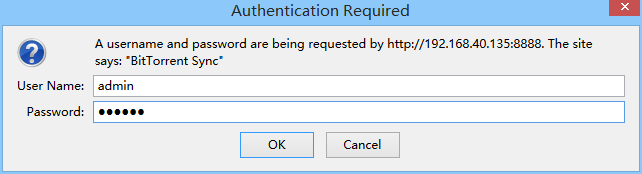
在浏览器页面登录控制页面,即服务器IP+8888端口。
使用配置文件中的账号密码进行登录。
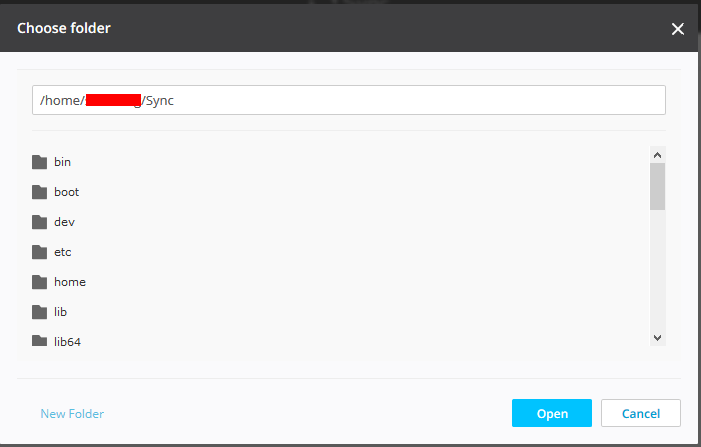
在启动一台主机上,点击左上角的Add Folder按钮,增加需要同步的目录。
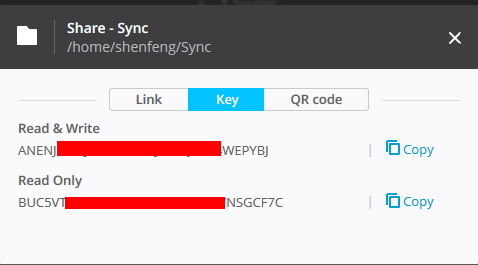
确认打开目录后,会生成该目录的Key,因为需要双向同步,那么选择READ+WRITE的Key。
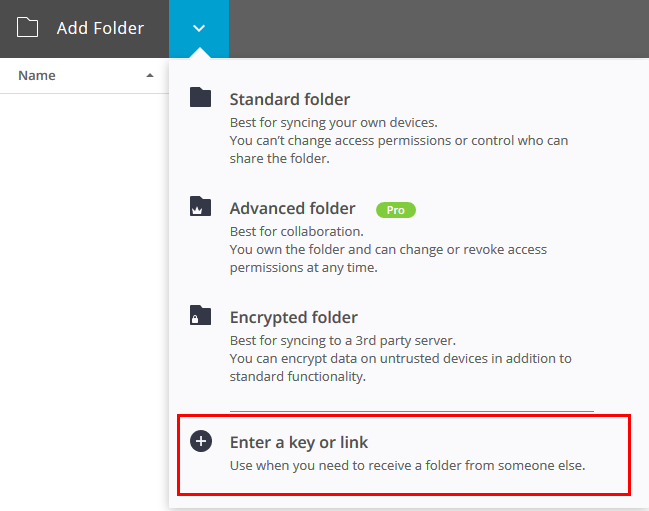
登录第二台服务器,登录后,点击Add Folder的第三个选项。填入上面复制的Key之后,选择本地用于同步的目录就可以进行同步了。

参考文档
使用BitTorrent-Sync实现双机文件双向同步的更多相关文章
- BitTorrent Sync - 神奇的文件同步软件,无需服务器让多台电脑互相同步!
176,487 微博 腾讯 空间 微信 141 49 如今人们对文件备份和同步的需求已经越来越强烈了.像 Dropbox 一样的云存储网盘有很多,但它们都有一个局限性,就是所有的文件都得经过它们的服务 ...
- Linux下 Unison 实现文件双向同步
原创作品,允许转载,转载时请务必以超链接形式标明文章 原始出处 .作者信息和本声明.否则将追究法律责任.http://hx100.blog.51cto.com/44326/612301 一.Uniso ...
- Linux下实现文件双向同步
修改的地方时:私钥和公约处. 其次 vi /root/.unison/default.prf 这个文件在这个位置 root = /tmp/test root = ssh://root@10.10.3. ...
- BitTorrent Sync 基于BT的文件同步
BitTorrent Sync 神奇的文件同步软件,无需服务器让多台电脑间无限制互相同步! BitTorrent Labs 推出的实验性项目,可以在多台电脑间进行点对点自动分享/同步文件,由于没有 ...
- 在 Linux 上安装配置 BitTorrent Sync [转]
背景介绍:目前我们线上的前端服务器数量比较多,超过200多台,每次发布新应用的时候,都是将软件包放在一台专门的Push服务器上,再由所有的前端服务器通过rsync自动同步.但随着前端服务器的数量越来越 ...
- unison + inotify 实现文件实时双向同步部署步骤
unison + inotify 实现文件实时双向同步部署步骤 一. Unison简介 Unison是Windows.Linux以及其他Unix平台下都可以使用的文件同步工具,它能使两个文件夹(本地或 ...
- 两种常用文件分享方式 - 网络硬盘快速分享, 点对点的文件共享 BitTorrent Sync
普通的用户经常通过电子邮件.QQ传递等方式进行文件的分享,但是由于不同的网络环境有的时候可能会有不同的限制,所以我们就需要寻找其他的方式来替代.今天就为大家推荐两个既常用又与众不同的分享方式. 中国论 ...
- unison+inotify实现文件双向自动同步
nfs适合存小图片和小文件,有一个致命的缺点,就是其中一台web服务挂掉之后,会直接导致web页面无法访问,动态的那种数据, 而且数据量很大的数据不适合nfs Unison是一款跨平台(window, ...
- 文件夹同步/备份软件推荐 (SyncToy/FreeFileSync/Compare Advance/GoodSync/Allway Sync/Compare Advance)
关于文件同步的文章,已经很多次出现在异次元上了,因为它们很多都能实实在在提高工作便利性.比方说有我们熟悉的云端同步软件 Dropbox.金山快盘,以及曾经还介绍过可本地使用的 Allway Sync ...
随机推荐
- Could not find artifact com.sun:tools:jar:1.5.0
问题: Failed to execute goal on project petroleum: Could not resolve dependencies for project petroleu ...
- ROS语音识别
一.语音识别包 1.安装 安装很简单,直接使用ubuntu命令即可,首先安装依赖库: $ sudo apt-get install gstreamer0.10-pocketsphinx ...
- 织梦dedecms分类信息模型上一页下一页失效办法
修改文件/include/arc.archives.class 将一下代码 $next = (is_array($nextR) ? " where arc.id={$nextR['id']} ...
- 神奇的NOIP模拟赛 T2 LGTB 学分块
LGTB 学分块 LGTB 最近在学分块,但是他太菜了,分的块数量太多他就混乱了,所以只能分成3 块今天他得到了一个数组,他突然也想把它分块,他想知道,把这个数组分成3 块,块可以为空.假设3 块各自 ...
- Delphi out 参数 string Integer
http://www.delphibasics.co.uk/RTL.asp?Name=Out http://stackoverflow.com/questions/14507310/whats-the ...
- UTF-8 有BOM和无BOM
BOM(byte order mark)是为 UTF-16 和 UTF-32 准备的,用于标记字节序(byte order).微软在 UTF-8 中使用 BOM 是因为这样可以把 UTF-8 和 AS ...
- NOP初学记录
1. 介绍的话不多说了.直接先来简单的安装跟配置先以3.6版本为例: 附带官网地址: http://www.nopcommerce.com 自行下载. 中文网:http://www.nopchi ...
- 用时间生成用户Id
用用户注册时的时间,作为新用户的Uid: /** * 生成用户id,用时间生成 * * @return */ public static String date2UserId() { SimpleDa ...
- jQuery 1.7_20120209 学习笔记
html([val|fn]) parameters: function(index,html) 此函数返回一个html字符串,接受两个参数,index为元素在集合中的索引位置,html为原先的html ...
- 新版的tomcat里面get请求通过http协议的时候似乎默认是UTF-8的编码了吗?
不在servler.xml的connector中添加URICoding=“UTF-8”,使用默认值一样没有乱码,而添加URICoding=“iso-8859-1”就是乱码了. POST请求还是用iso ...