
flash上传在spring mvc中出现的问题2
转载请注明: TheViper http://www.cnblogs.com/TheViper
这两天本屌在做flash拼图上传遇到点坑

上传原理很简单,就是把上图右边画布区域BitmapData.draw()画下来,然后用as3corelib的JPGEncoder将BitmapData编码成ByteArray,ByteArray就是要上传的图片数据。然后
            var req:URLRequest = new URLRequest("http://localhost:8080/qzone/photo/upload1?width=555&height=420");

            req.data = Data;

            req.method = URLRequestMethod.POST;

            loader = new URLLoader();

            loader.dataFormat = URLLoaderDataFormat.BINARY;

            loader.load(req);

            loader.addEventListener(Event.COMPLETE, upload_complete);
由于传的是ByteArray 对象的二进制数据,后台注入MultipartFile
    public @ResponseBody String upload1(MultipartFile filedata,HttpServletRequest request,

            HttpSession session)throws JSONException,IOException{

            ............

    }

可以看到这里首先是不能decode解码,然后是请求的content-type不是multipart.
先说解码问题,很容易想到用Base64编码图片,把编码成的字符串当成请求的参数值传给后台。
            var req:URLRequest = new URLRequest("http://localhost:8080/qzone/photo/upload");

            var variables:URLVariables = new URLVariables();

            variables.name ='puzzle_image.jpeg';

            variables.imgData =base64String;

            variables.width =555;

            variables.height =420;

            req.data = variables;
后台取出请求中的imgData参数,解码,写入文件就可以了。
而actionscript3 Base64编码要用到mx.utils包里的Base64Encoder类,这个是flex里面的,不过可以从flex里面取出来作为独立的类使用。附上下载。api.
使用时注意不能看到api里面的

就直接
            new Base64Encoder().encodeBytes(Data);

            variables.imgData =Data;
后面还写着Encodes a ByteArray in Base64 and adds the result to an internal buffer. Subsequent calls to this method add on to the internal buffer. After all data have been encoded, call toString() to obtain a Base64 encoded String.
意思是Base64编码后的字符串在Base64Encoder类里面,需要通过toString()方法去取,具体的
            var b64:Base64Encoder = new Base64Encoder();

            b64.encodeBytes(Data);

            variables.imgData =b64.toString();
这里其实已经把问题解决了,但是本屌还是要画蛇添足,试试从上面的第二个问题入手,解决图片不能上传的问题。
先试试把请求的content-type设为multipart/form-data。
            var req:URLRequest = new URLRequest("http://localhost:8080/qzone/photo/upload1?width=555&height=420");

            req.data = Data;

            req.method = URLRequestMethod.POST;

            req.contentType="multipart/form-data";
这时会出现错误org.apache.commons.fileupload.FileUploadException: the request was rejected because no multipart boundary was found。
这个平时没注意到,原来还要向post体内加东西才能让后台正确解析post里的二进制数据。比如
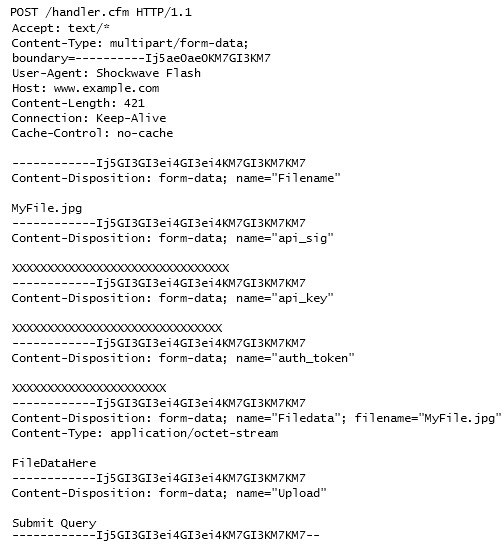
这里用到UploadPostHelper.as。
package utils

{

    import flash.display.*;

    import flash.events.*;

    import flash.net.*;

    import flash.utils.*;

    public class UploadPostHelper

    {

        private static var _boundary:String = "";

        /**

         * Get the boundary for the post.

         * Must be passed as part of the contentType of the UrlRequest

         */

        public static function getBoundary():String

        {

            if (_boundary.length == 0)

            {

                for (var i:int = 0; i < 0x20; i++)

                {

                    _boundary += String.fromCharCode( int( 97 + Math.random() * 25 ) );

                }

            }

            return _boundary;

        }

        /**

         * Create post data to send in a UrlRequest

         */

        public static function getPostData(fileName:String, byteArray:ByteArray, parameters:Object = null):ByteArray

        {

            var i:int;

            var bytes:String;

            var postData:ByteArray = new ByteArray();

            postData.endian = Endian.BIG_ENDIAN;

            //add Filename to parameters

            if (parameters == null)

            {

                parameters = new Object();

            }

            parameters.Filename = fileName;

            //add parameters to postData

            for (var name:String in parameters)

            {

                postData = BOUNDARY(postData);

                postData = LINEBREAK(postData);

                bytes = 'Content-Disposition: form-data; name="' + name + '"';

                for (i = 0; i < bytes.length; i++)

                {

                    postData.writeByte( bytes.charCodeAt(i) );

                }

                postData = LINEBREAK(postData);

                postData = LINEBREAK(postData);

                postData.writeUTFBytes(parameters[name]);

                postData = LINEBREAK(postData);

            }

            //add Filedata to postData

            postData = BOUNDARY(postData);

            postData = LINEBREAK(postData);

            bytes = 'Content-Disposition: form-data; name="Filedata"; filename="';

            for (i = 0; i < bytes.length; i++)

            {

                postData.writeByte( bytes.charCodeAt(i) );

            }

            postData.writeUTFBytes(fileName);

            postData = QUOTATIONMARK(postData);

            postData = LINEBREAK(postData);

            bytes = 'Content-Type: application/octet-stream';

            for (i = 0; i < bytes.length; i++)

            {

                postData.writeByte( bytes.charCodeAt(i) );

            }

            postData = LINEBREAK(postData);

            postData = LINEBREAK(postData);

            postData.writeBytes(byteArray, 0, byteArray.length);

            postData = LINEBREAK(postData);

            //add upload filed to postData

            postData = LINEBREAK(postData);

            postData = BOUNDARY(postData);

            postData = LINEBREAK(postData);

            bytes = 'Content-Disposition: form-data; name="Upload"';

            for (i = 0; i < bytes.length; i++)

            {

                postData.writeByte( bytes.charCodeAt(i) );

            }

            postData = LINEBREAK(postData);

            postData = LINEBREAK(postData);

            bytes = 'Submit Query';

            for (i = 0; i < bytes.length; i++)

            {

                postData.writeByte( bytes.charCodeAt(i) );

            }

            postData = LINEBREAK(postData);

            //closing boundary

            postData = BOUNDARY(postData);

            postData = DOUBLEDASH(postData);

            return postData;

        }

        //--------------------------------------

        //  EVENT HANDLERS

        //--------------------------------------

        //--------------------------------------

        //  PRIVATE & PROTECTED INSTANCE METHODS

        //--------------------------------------

        /**

         * Add a boundary to the PostData with leading doubledash

         */

        private static function BOUNDARY(p:ByteArray):ByteArray

        {

            var l:int = UploadPostHelper.getBoundary().length;

            p = DOUBLEDASH(p);

            for (var i:int = 0; i < l; i++)

            {

                p.writeByte( _boundary.charCodeAt( i ) );

            }

            return p;

        }

        /**

         * Add one linebreak

         */

        private static function LINEBREAK(p:ByteArray):ByteArray

        {

            p.writeShort(0x0d0a);

            return p;

        }

        /**

         * Add quotation mark

         */

        private static function QUOTATIONMARK(p:ByteArray):ByteArray

        {

            p.writeByte(0x22);

            return p;

        }

        /**

         * Add Double Dash

         */

        private static function DOUBLEDASH(p:ByteArray):ByteArray

        {

            p.writeShort(0x2d2d);

            return p;

        }

    }

}
使用方法
            req.method = URLRequestMethod.POST;

            req.contentType="multipart/form-data; boundary="+UploadPostHelper.getBoundary();

            req.data=UploadPostHelper.getPostData(img_name,Data);
注意到UploadPostHelper.as里面bytes = 'Content-Disposition: form-data; name="Filedata"; filename="';
    public @ResponseBody String upload1(@RequestParam("Filedata") MultipartFile filedata,HttpServletRequest request,

            HttpSession session)throws JSONException,IOException{

                 ..........

    }
这里Filedata就像FileReference.upload()

是在上载传操作中位于文件数据之前的字段名.FileReference.upload()上传时,后台也应该有@RequestParam("Filedata")注解。
flash上传在spring mvc中出现的问题2的更多相关文章
- 文件上传--基于Spring MVC框架+SmartUpload
这篇文章是介绍文件上传的,由于在spring MVC上实现起来和直接在servlet中写有些不同,所以特地写了一下这篇文章,关于不同点,大家可以先阅读一下上一篇文章.好了,下面直接上代码. jab包是 ...
- Spring MVC中,事务是否可以加在Controller层
一般而言,事务都是加在Service层的,但是爱钻牛角尖的我时常想:事务加在Controller层可不可以.我一直试图证明事务不止可以加在Service层,还可以加在Controller层,但是没有找 ...
- spring mvc中的文件上传
使用commons-fileupload上传文件所需要的架包有:commons-fileupload 和common-io两个架包支持,可以到Apache官网下砸. 在配置文件spring-mvc.x ...
- IntelliJ IDEA上创建maven Spring MVC项目
IntelliJ IDEA上创建Maven Spring MVC项目 各软件版本 利用maven骨架建立一个webapp 建立相应的目录 配置Maven和SpringMVC 配置Maven的pom.x ...
- Http请求中Content-Type讲解以及在Spring MVC中的应用
引言: 在Http请求中,我们每天都在使用Content-type来指定不同格式的请求信息,但是却很少有人去全面了解content-type中允许的值有多少,这里将讲解Content-Type的可用值 ...
- 文件上传和下载(可批量上传)——Spring(二)
针对SpringMVC的文件上传和下载.下载用之前“文件上传和下载——基础(一)”的依然可以,但是上传功能要修改,这是因为springMVC 都为我们封装好成自己的文件对象了,转换的过程就在我们所配置 ...
- Http请求中Content-Type讲解以及在Spring MVC中的应用【转】
完全引用自: http://blog.csdn.net/blueheart20/article/details/45174399#t1 此文讲得很清晰,赞! 引言: 在Http请求中,我们每天都在 ...
- Http请求中Content-Type和Accept讲解以及在Spring MVC中的应用
在Http请求中,我们每天都在使用Content-type来指定不同格式的请求信息,但是却很少有人去全面了解content-type中允许的值有多少,这里将讲解Content-Type的可用值,以及在 ...
- [转]Http请求中Content-Type讲解以及在Spring MVC中的应用
本文转自:http://blog.csdn.net/blueheart20/article/details/45174399 引言: 在Http请求中,我们每天都在使用Content-type来指定不 ...
随机推荐
- MySQL运行出错:无法连接驱动、无root访问权限解决办法
按照疯狂java讲义的13.3的程序,发现程序运行出错. 1.点开runConnMySql.cmd运行文件,出现如下结果: 2.用Editplus进行编译运行,如下结果: 报错定位到程序第18行,而第 ...
- gcc和ld 中的参数 --whole-archive 和 --no-whole-archive
首先 --whole-archive 和 --no-whole-archive 是ld专有的命令行参数,gcc 并不认识,要通gcc传递到 ld,需要在他们前面加 -Wl,字串. --whole-ar ...
- Linux下文件的压缩和解压
tar命令 解包:tar zxvf FileName.tar 打包:tar czvf FileName.tar DirName gz命令 解压1:gunzip FileName.gz 解压2:gzip ...
- 黄聪:Discuz!的SEO优化策略一:如何设置标题 & 如何去掉Powered by Discuz!尾巴
1.如何设置标题 进入 管理中心 -- 全局 -- SEO设置 -- 论坛 -- 标题 ,设置你的网站标题和描述. PS:有人问keywords要不要设置,其实现在keywords对SEO的影响已经微 ...
- python简要
python用冒号代替{}开启语句块 /usr/bin/python 加在脚本的头部, ./脚本 help("str") : 查看命令帮助 '''三引号可以打印换行字符串 prin ...
- GC学习笔记
GC学习笔记 这是我公司同事的GC学习笔记,写得蛮详细的,由浅入深,循序渐进,让人一看就懂,特转到这里. 一.GC特性以及各种GC的选择 1.垃圾回收器的特性 2.对垃圾回收器的选择 2.1 连续 V ...
- linux命令(8)kill命令
kill命令: Linux中的kill命令用来终止指定的进程(terminate a process)的运行,是Linux下进程管理的常用命令.通常,终止一个前台进程可以使用Ctrl+C键,但是,对于 ...
- Maven如何手动添加依赖的jar文件到本地Maven仓库
大家肯定遇到过想在pom文件中加入自己开发的依赖包,这些包肯定是不是在Maven仓库(http://repo1.maven.org/maven2/)的.那我们怎么将那些不存在Maven仓库中的包加入到 ...
- python argparse模块解析命令行选项简单使用
argparse模块的解析命令行选项简单使用 util.py #!/usr/bin/env python # coding=utf-8 import argparse parser = argpars ...
- ISO14229系列之一:简介
作者:autogeek 原文链接:http://www.cnblogs.com/autogeek/p/4458591.html 前言 由于工作中经常用到ISO-14229,因此决定对该协议做个总体介绍 ...