
Part 16 ng include directive in AngularJS
ng-include directive is used to embed an HTML page into another HTML page. This technique is extremely useful when you want to reuse a specific view in multiple pages in your application.
The value of ng-include directive can be the name of the HTML page that you want to reuse or a property on the $scope object that points to the reusable HTML page.
EmployeeList.html : This is the HTML page that we intend to reuse on multiple HTML pages
<table>

    <thead>

        <tr>

            <th>Name</th>

            <th>Gender</th>

            <th>Salary</th>

        </tr>

    </thead>

    <tbody>

        <tr ng-repeat="employee in employees">

            <td> {{ employee.name }} </td>

            <td> {{ employee.gender}} </td>

            <td> {{ employee.salary}} </td>

        </tr>

    </tbody>

</table>
Script.js :
var app = angular

        .module("myModule", [])

        .controller("myController", function ($scope) {

            var employees = [

                { name: "Ben", gender: "Male", salary: 55000 },

                { name: "Sara", gender: "Female", salary: 68000 },

                { name: "Mark", gender: "Male", salary: 57000 },

                { name: "Pam", gender: "Female", salary: 53000 },

                { name: "Todd", gender: "Male", salary: 60000 }

            ];

            $scope.employees = employees;

        });
HTMLPage1.html : This is the HTML page where we want to reuse EmployeeList.html. Notice that we are using ng-include directive and the value for it is the name of the HTML file that we want to reuse.
<!DOCTYPE html>

<html xmlns="http://www.w3.org/1999/xhtml">

<head>

    <title></title>

    <script src="Scripts/angular.js"></script>

    <script src="Scripts/Script.js"></script>

    <link href="Styles.css" rel="stylesheet" />

</head>

<body ng-app="myModule">

    <div ng-controller="myController">

        <div ng-include="'EmployeeList.html'">

        </div>

    </div>

</body>

</html>
In this example, we have specified the name of the HTML file in the view. You can also have a property attached to the $scope object that points to the HTML file that you want to reuse , and use that property with ng-include directive. Here are the changes required to use a model property with ng-include directive.
Script.js : Notice, in the controller function we have employeeList property attached to the $scope object. This property points to the EmployeeList.html file that we want to reuse.
var app = angular

        .module("myModule", [])

        .controller("myController", function ($scope) {

            var employees = [

                { name: "Ben", gender: "Male", salary: 55000 },

                { name: "Sara", gender: "Female", salary: 68000 },

                { name: "Mark", gender: "Male", salary: 57000 },

                { name: "Pam", gender: "Female", salary: 53000 },

                { name: "Todd", gender: "Male", salary: 60000 }

            ];

            $scope.employees = employees;

            $scope.employeeList = "EmployeeList.html";

        });
HTMLPage1.html : Set the property employeeList that you have attached to the $scope object, as the value for ng-include directive
<!DOCTYPE html>

<html xmlns="http://www.w3.org/1999/xhtml">

<head>

    <title></title>

    <script src="Scripts/angular.js"></script>

    <script src="Scripts/Script.js"></script>

    <link href="Styles.css" rel="stylesheet" />

</head>

<body ng-app="myModule">

    <div ng-controller="myController">

        <div ng-include="employeeList"></div>

    </div>

</body>

</html>
Example : Create an HTML page with a dropdownlist that allows the user to select the view - Table or List. Depending on the selection we want to load the respective HTML page into the current HTML page i.e HTMLPage1.html
If the user selects Table from the dropdownlist, the employee data should be presented using a Table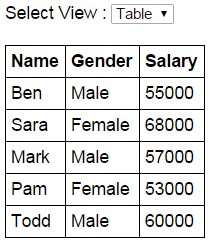
If the user selects List from the dropdownlist, the employee data should be presented using an unordered list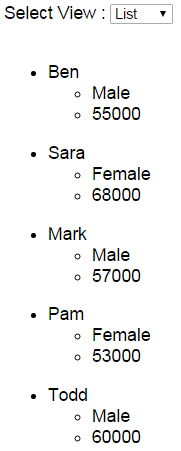
EmployeeTable.html : This HTML page presents the employee data using a table element
<table>

    <thead>

        <tr>

            <th>Name</th>

            <th>Gender</th>

            <th>Salary</th>

        </tr>

    </thead>

    <tbody>

        <tr ng-repeat="employee in employees">

            <td> {{ employee.name }} </td>

            <td> {{ employee.gender}} </td>

            <td> {{ employee.salary}} </td>

        </tr>

    </tbody>

</table>
EmployeeList.html : This HTML page presents the employee data using 2 unordered list elements
<ul ng-repeat="employee in employees">

    <li>

        {{employee.name}}

        <ul>

            <li>{{employee.gender}}</li>

            <li>{{employee.salary}}</li>

        </ul>

    </li>

</ul>
Script.js : The controller function attaches employeeView property to the $scope object and sets it to EmployeeTable.html. This means when the page is initially loaded the employee data will be presented using a table.
var app = angular

        .module("myModule", [])

        .controller("myController", function ($scope) {

            var employees = [

                { name: "Ben", gender: "Male", salary: 55000 },

                { name: "Sara", gender: "Female", salary: 68000 },

                { name: "Mark", gender: "Male", salary: 57000 },

                { name: "Pam", gender: "Female", salary: 53000 },

                { name: "Todd", gender: "Male", salary: 60000 }

            ];

            $scope.employees = employees;

            $scope.employeeView = "EmployeeTable.html";

        });
HTMLPage1.html : This HTML page loads either the EmployeeTable.html or EmployeeList.html page depending on the item the user has selected from the dropdownlist.
<!DOCTYPE html>

<html xmlns="http://www.w3.org/1999/xhtml">

<head>

    <title></title>

    <script src="Scripts/angular.js"></script>

    <script src="Scripts/Script.js"></script>

    <link href="Styles.css" rel="stylesheet" />

</head>

<body ng-app="myModule">

    <div ng-controller="myController">

        Select View :

        <select ng-model="employeeView">

            <option value="EmployeeTable.html">Table</option>

            <option value="EmployeeList.html">List</option>

        </select>

        <br /><br />

        <div ng-include="employeeView">

        </div>

    </div>

</body>

</html>
Part 16 ng include directive in AngularJS的更多相关文章
- 使用-MM生成include指令和依赖生成(make include directive and dependency generation with -MM)
I want a build rule to be triggered by an include directive if the target of the include is out of d ...
- angular报错:angular.min.js:118Error: [ng:areq] http://errors.angularjs.org/1.5.8/ng/areq
报错代码如下: <div ng-controller="HelloAngular"> <p>{{greeting.text}},angular</p& ...
- Part 6 AngularJS ng repeat directive
ng-repeat is similar to foreach loop in C#. Let us understand this with an example. Here is what we ...
- Part 15 AngularJS ng init directive
The ng-init directive allows you to evaluate an expression in the current scope. In the following e ...
- part 4 AngularJS ng src directive
- 16.语句include和require的区别是什么?为避免多次包含同一文件,可用(?)语句代替它们?
require->require是无条件包含也就是如果一个流程里加入require,无论条件成立与否都会先执行 require include->include有返回值,而require没 ...
- Vue.js(16)之 directive自定义指令
推荐阅读:Vue.directive基础,在Vue模块开发中使用 全局指令 Vue.directive('全局自定义指令名称', { /* 自定义指令配置对象 */ }) 私有指令 <templ ...
- angular.min.js:118 Error: [ng:areq] http://errors.angularjs.org/1.5.8/ng/areq?
1,错误如图所示 简单说下错误原因是:没有js没有注册进去. 解决方法: 1.看下index.html有没有引入你的js文件. 2.看下app.js有没有注册js,比如我这次就是这步没做好,合并代码时 ...
- AngularJS中angular.min.js:80 Error: [ng:areq] http://errors.angularjs.org/1.2.9/ng/areq
报出来的时候,出现这种错误,是因为在引入控制器的时候没有引入成功,我遇到这个错误是在因为没有将父控制器引入到子控制器中.
随机推荐
- P2179-[NOI2012]骑行川藏【导数,二分】
正题 题目链接:https://www.luogu.com.cn/problem/P2179 题目大意 给出\(E\)和\(n\)个\(s_i,k_i,u_i\)求一个序列\(v_i\)满足 \[\s ...
- BATJ经典软件测试面试题我连答案都告诉你了,如果你不想月薪上万,那你别看!
单项选择题:共20小题,每小题1 分,满分20分:请将答案填入题后括号中. 1. 在软件生命周期的哪一个阶段,软件缺陷修复费用最低(A) A.需求分析(编制产品说明书) B.设计 C.编码 ...
- 基于Jetpack组件构建的开源项目-WanLearning
「WanLearning App」基于 Material Design 风格构建的 玩 Android 客户端,主要是为了适应Kotlin语言开发流程. 主要特点 基于Google官方宣贯的MVVM模 ...
- dg create datafile auto failed 排除处理
1.Environment:11.2.0.4 dg 2.Symptoms:告警描述:Wed Sep 22 14:29:15 2021Errors in file /data/app/oracle/di ...
- Ubuntu20.04安装 maven并配置阿里源
Ubuntu20.04安装 maven并配置阿里源 sudo apt update sudo apt install maven #安装maven,默认安装路径为/usr/share/maven 添加 ...
- JS 开发中数组常用的方法
大家有没有想过,js数组为什么会有这么多的方法,没错,就是为了不同场景下处理数据的需要,就像设计模式一样,都是为了能更好的处理当前场景的需要. 首先怎么创建一个数组呢, // 两种方式 // 1,构造 ...
- Azure Tips 第一期: Azure 中的安全监视工具,数据存储, 动态数据屏蔽以及资源部署
# 1 Azure 中的安全监视工具 微软 Azure 云提供以下监控工具,可用于观察操作和检测异常行为. Azure 安全中心 Azure 安全中心是一个统一的基础结构安全管理系统,可以增强数据中心 ...
- Visual Studio 重置窗口布局
Visual Studio 重置窗口布局
- 解决GitHub访问慢
话不多说,上干货~~~ 1. 打开 http://tool.chinaz.com/dns/ ,在输入框中填写 github.com,然后点击检测按钮,会列出响应ip,如图: 2. 找到hosts文件, ...
- Vulnhub实战-FALL靶机👻
Vulnhub实战-FULL靶机 下载地址:http://www.vulnhub.com/entry/digitalworldlocal-fall,726/ 1.描述 通过描述我们可以知道这个靶机枚举 ...