
Part 16 ng include directive in AngularJS
ng-include directive is used to embed an HTML page into another HTML page. This technique is extremely useful when you want to reuse a specific view in multiple pages in your application.
The value of ng-include directive can be the name of the HTML page that you want to reuse or a property on the $scope object that points to the reusable HTML page.
EmployeeList.html : This is the HTML page that we intend to reuse on multiple HTML pages
<table>

    <thead>

        <tr>

            <th>Name</th>

            <th>Gender</th>

            <th>Salary</th>

        </tr>

    </thead>

    <tbody>

        <tr ng-repeat="employee in employees">

            <td> {{ employee.name }} </td>

            <td> {{ employee.gender}} </td>

            <td> {{ employee.salary}} </td>

        </tr>

    </tbody>

</table>
Script.js :
var app = angular

        .module("myModule", [])

        .controller("myController", function ($scope) {

            var employees = [

                { name: "Ben", gender: "Male", salary: 55000 },

                { name: "Sara", gender: "Female", salary: 68000 },

                { name: "Mark", gender: "Male", salary: 57000 },

                { name: "Pam", gender: "Female", salary: 53000 },

                { name: "Todd", gender: "Male", salary: 60000 }

            ];

            $scope.employees = employees;

        });
HTMLPage1.html : This is the HTML page where we want to reuse EmployeeList.html. Notice that we are using ng-include directive and the value for it is the name of the HTML file that we want to reuse.
<!DOCTYPE html>

<html xmlns="http://www.w3.org/1999/xhtml">

<head>

    <title></title>

    <script src="Scripts/angular.js"></script>

    <script src="Scripts/Script.js"></script>

    <link href="Styles.css" rel="stylesheet" />

</head>

<body ng-app="myModule">

    <div ng-controller="myController">

        <div ng-include="'EmployeeList.html'">

        </div>

    </div>

</body>

</html>
In this example, we have specified the name of the HTML file in the view. You can also have a property attached to the $scope object that points to the HTML file that you want to reuse , and use that property with ng-include directive. Here are the changes required to use a model property with ng-include directive.
Script.js : Notice, in the controller function we have employeeList property attached to the $scope object. This property points to the EmployeeList.html file that we want to reuse.
var app = angular

        .module("myModule", [])

        .controller("myController", function ($scope) {

            var employees = [

                { name: "Ben", gender: "Male", salary: 55000 },

                { name: "Sara", gender: "Female", salary: 68000 },

                { name: "Mark", gender: "Male", salary: 57000 },

                { name: "Pam", gender: "Female", salary: 53000 },

                { name: "Todd", gender: "Male", salary: 60000 }

            ];

            $scope.employees = employees;

            $scope.employeeList = "EmployeeList.html";

        });
HTMLPage1.html : Set the property employeeList that you have attached to the $scope object, as the value for ng-include directive
<!DOCTYPE html>

<html xmlns="http://www.w3.org/1999/xhtml">

<head>

    <title></title>

    <script src="Scripts/angular.js"></script>

    <script src="Scripts/Script.js"></script>

    <link href="Styles.css" rel="stylesheet" />

</head>

<body ng-app="myModule">

    <div ng-controller="myController">

        <div ng-include="employeeList"></div>

    </div>

</body>

</html>
Example : Create an HTML page with a dropdownlist that allows the user to select the view - Table or List. Depending on the selection we want to load the respective HTML page into the current HTML page i.e HTMLPage1.html
If the user selects Table from the dropdownlist, the employee data should be presented using a Table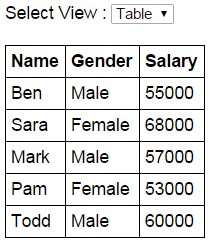
If the user selects List from the dropdownlist, the employee data should be presented using an unordered list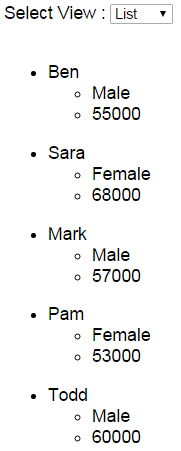
EmployeeTable.html : This HTML page presents the employee data using a table element
<table>

    <thead>

        <tr>

            <th>Name</th>

            <th>Gender</th>

            <th>Salary</th>

        </tr>

    </thead>

    <tbody>

        <tr ng-repeat="employee in employees">

            <td> {{ employee.name }} </td>

            <td> {{ employee.gender}} </td>

            <td> {{ employee.salary}} </td>

        </tr>

    </tbody>

</table>
EmployeeList.html : This HTML page presents the employee data using 2 unordered list elements
<ul ng-repeat="employee in employees">

    <li>

        {{employee.name}}

        <ul>

            <li>{{employee.gender}}</li>

            <li>{{employee.salary}}</li>

        </ul>

    </li>

</ul>
Script.js : The controller function attaches employeeView property to the $scope object and sets it to EmployeeTable.html. This means when the page is initially loaded the employee data will be presented using a table.
var app = angular

        .module("myModule", [])

        .controller("myController", function ($scope) {

            var employees = [

                { name: "Ben", gender: "Male", salary: 55000 },

                { name: "Sara", gender: "Female", salary: 68000 },

                { name: "Mark", gender: "Male", salary: 57000 },

                { name: "Pam", gender: "Female", salary: 53000 },

                { name: "Todd", gender: "Male", salary: 60000 }

            ];

            $scope.employees = employees;

            $scope.employeeView = "EmployeeTable.html";

        });
HTMLPage1.html : This HTML page loads either the EmployeeTable.html or EmployeeList.html page depending on the item the user has selected from the dropdownlist.
<!DOCTYPE html>

<html xmlns="http://www.w3.org/1999/xhtml">

<head>

    <title></title>

    <script src="Scripts/angular.js"></script>

    <script src="Scripts/Script.js"></script>

    <link href="Styles.css" rel="stylesheet" />

</head>

<body ng-app="myModule">

    <div ng-controller="myController">

        Select View :

        <select ng-model="employeeView">

            <option value="EmployeeTable.html">Table</option>

            <option value="EmployeeList.html">List</option>

        </select>

        <br /><br />

        <div ng-include="employeeView">

        </div>

    </div>

</body>

</html>
Part 16 ng include directive in AngularJS的更多相关文章
- 使用-MM生成include指令和依赖生成(make include directive and dependency generation with -MM)
I want a build rule to be triggered by an include directive if the target of the include is out of d ...
- angular报错:angular.min.js:118Error: [ng:areq] http://errors.angularjs.org/1.5.8/ng/areq
报错代码如下: <div ng-controller="HelloAngular"> <p>{{greeting.text}},angular</p& ...
- Part 6 AngularJS ng repeat directive
ng-repeat is similar to foreach loop in C#. Let us understand this with an example. Here is what we ...
- Part 15 AngularJS ng init directive
The ng-init directive allows you to evaluate an expression in the current scope. In the following e ...
- part 4 AngularJS ng src directive
- 16.语句include和require的区别是什么?为避免多次包含同一文件,可用(?)语句代替它们?
require->require是无条件包含也就是如果一个流程里加入require,无论条件成立与否都会先执行 require include->include有返回值,而require没 ...
- Vue.js(16)之 directive自定义指令
推荐阅读:Vue.directive基础,在Vue模块开发中使用 全局指令 Vue.directive('全局自定义指令名称', { /* 自定义指令配置对象 */ }) 私有指令 <templ ...
- angular.min.js:118 Error: [ng:areq] http://errors.angularjs.org/1.5.8/ng/areq?
1,错误如图所示 简单说下错误原因是:没有js没有注册进去. 解决方法: 1.看下index.html有没有引入你的js文件. 2.看下app.js有没有注册js,比如我这次就是这步没做好,合并代码时 ...
- AngularJS中angular.min.js:80 Error: [ng:areq] http://errors.angularjs.org/1.2.9/ng/areq
报出来的时候,出现这种错误,是因为在引入控制器的时候没有引入成功,我遇到这个错误是在因为没有将父控制器引入到子控制器中.
随机推荐
- kettle 多表全删全插同步数据 两种方案
背景: 接到上级指示,要从外网某库把数据全部导入到内网,数据每天更新一次即可,大约几百万条数据,两个库结构一样,mysql的,两台数据库所在服务器都是windows server的,写个java接口实 ...
- Frida-RPC调用
Python Frida RPC 调用示例 JS_CODE var base64EncodeChars = 'ABCDEFGHIJKLMNOPQRSTUVWXYZabcdefghijklmnopqrs ...
- Mybatis、maven项目中整合log4j (17)
Mybatis.maven项目总整合log4j java 中Mybatis.maven项目总整合log4j 1.pom增加log4j包引用 2.添加 log4j.properties文件 # java ...
- vue3双向数据绑定原理_demo
<!DOCTYPE html> <head> <meta charset="UTF-8" /> <meta name="view ...
- JavaScript05
显示和隐藏 元素的显示和隐藏 元素display属性可控制元素的显示和隐藏,先获取元素对象,再通过点语法调用style对象中的display属性 语法格式: 元素.style.display='non ...
- SpringMVC、Spring、MyBatis整合(IDEA版)
1 环境准备 1.1 软件架构 JDK 1.8 Spring 4.x Mybatis 3.x Maven 3.x MySQL 5.7 1.2 创建数据库 创建数据库,数据库名ssm-demo,字符集u ...
- Unity 3D手游对不同分辨率屏幕的UI自适应
目前安卓手机的屏幕大小各异,没有统一的标准,因此用Unity 3D制作的手游需要做好对不同分辨率屏幕的UI自适应,否则就会出现UI大小不一和位置错位等问题. 我们的项目在开发时的参照分辨率(Refer ...
- 软件案例分析——VS和VS Code
软件案例分析--VS和VS Code 项目 内容 这个作业属于哪个课程/ 2020年春季计算机学院软件工程(罗杰 任健) 这个作业的要求在哪里? 软件案例分析 我在这个课程的目标是? 提高代码水平,熟 ...
- java监控JVM的内存使用情况等
以下的程序监控参数的代码,有些是从网络上获取的,此处进行一个记录是为了以后如果要用到方便记录. 1.引入jar包,为了获取一些cpu的使用率等信息 <dependency> <gro ...
- C语言基础知识总结大全
1.入门程序 #include <stdio.h> int main() { printf("Hello World!"); return 0; } 2.数据类型 数据 ...