
机器视觉-EasyDL商品检测-标准版-Demo
机器视觉-EasyDL商品检测-标准版
功能:
EasyDL是百度大脑中的一个定制化训练和服务平台,EasyDL零售版是EasyDL针对零售场景推出的行业版,定制商品检测服务是EasyDL零售版的一项服务,专门用于训练货架合规性检查、自助结算台、无人零售货柜等场景下的定制化商品检测AI模型,训练出的模型将以API的形式为客户提供服务,API接口可以返回商品的名称和商品在图中的位置,适用于识别货架中的商品信息,商品计数,辅助货架商品陈列合规检查,如铺货率、陈列情况等。具体细节(包括操作步骤)请看相关API技术文档:
https://ai.baidu.com/docs#/EasyDL_Retail_Intro/top
下面是我写的Demo,目前平天上没提供相关Demo。一开始用PHP写的,后来为了兼容公司这边实际情况,改成了NODEJS了,开发过程中遇到了很多坑点,参数交互的时候,一定要细心。百度大脑后台对应的服务器有的支持Ajax跨域,有的不支持,这个是自己实际测出来的,这个要注意,还有就是我的这个Demo是本地通过请求获取token,然后在拿着token直接在本地访问百度的接口,把图片的base64编码扔了过去,实际情况可能不是这样的,比如图片的话你可能自己服务器也要存,这种情况请根据实际业务需求进行对应更改。切记不要暴露自己的 API KEY 和 Secret Key 。同时百度的EasyDL分两个模式,一个是定制版一个是标准版,我这次整理的是标准版的接口,标准版不涉及到自己训练数据。所以相对简单。同时标准版和定制版的Demo可以通用的。只是定制版本再加上自己去平台训练数据参数调整等一些额外的操作等。还有很多流程和细节,请直接看上面API文档链接。
server.js
var http = require("http");

var https = require('https');

var fs = require('fs');

var url = require('url');

function gettoken(response) { // 浏览器端发来get请求

    var apikey = "XXX换成自己的";  //API Key

    var secretkey = "XXXX换成自己的"; //Secret Key

    var url = "https://aip.baidubce.com/oauth/2.0/token?grant_type=client_credentials&client_id=" + apikey + "&client_secret=" + secretkey;

    https.get(url,function(res){  //通过get方法获取对应地址中的页面信息

        var chunks = [];

        var size = 0;

        res.on('data',function(chunk){   //监听事件 传输

            chunks.push(chunk);

            size += chunk.length;

        });

        res.on('end',function(){  //数据传输完

            var data = Buffer.concat(chunks,size);

            var html = data.toString();

            var obj = JSON.parse(html);

            var token = obj.access_token;

            console.log(token);

            response.write(token);

            response.end();

        });

    });

}

http.createServer(function(request, response) {

    response.writeHead(200, {"Content-Type": "text/html"});//text/plain

    var pathname = url.parse(request.url).pathname;

    console.log(pathname);

    if(pathname == "/token"){

        console.log("request get token!");

        gettoken(response);

    }else{

            fs.readFile(pathname.substr(1), function (err, data) {

            if (err) {

                console.log(err);

                // HTTP 状态码: 404 : NOT FOUND

                // Content Type: text/html

                response.writeHead(404, {'Content-Type': 'text/html'});

            }else{

                // HTTP 状态码: 200 : OK

                // Content Type: text/html

                response.writeHead(200, {'Content-Type': 'text/html'});

                // 响应文件内容

                response.write(data.toString());

            }

            //  发送响应数据

            response.end();

        });

    }

    //response.write("Hello World");

    //response.end();

}).listen(8888);

console.log("nodejs start listen 8888 port!");

console.log("http://127.0.0.1:8888/client.html");
client.html
<div style="width: 100%;height: 100%">

    <div style="position:absolute;left:0;top:0px;">

        <input accept="image/*"  id="upload_file" type="file">

    </div>

    <div style="background-color: #5bc0de; position:absolute;width:48%;height:200px;left:1%;top:30px;">

        <img src="" id="productimg" width="100%" height="100%" />

    </div>

    <div style="position:absolute;width:48%;height:200px;left:51%;top:30px;">

        <textarea id="base64_output"  style="height: 100%;width:100%"></textarea>

    </div>

    <div style="position:absolute;width:98%;height:400px;left:1%;top:250px;">

        <textarea id="imgmessage"  style="height: 100%;width:100%"></textarea>

    </div>

</div>

<script>

    document.getElementById("upload_file").onchange = function (e) {

        var file = e.target.files[0];

        $_("productimg").src=URL.createObjectURL(file);

        gen_base64();

    };

    function $_(id) {

        return document.getElementById(id);

    }

    function gen_base64() {

        var file = $_('upload_file').files[0];

        r = new FileReader();  //本地预览

        r.onload = function(){

            $_('base64_output').value = r.result;

            var imgbase64 = r.result;

            work(imgbase64);

        }

        r.readAsDataURL(file);    //Base64

    }

    document.getElementById("upimage").onchange = function () {

        gen_base64();

    };

</script>

<script>

    function work(imgbase64) {

        var url = "./token";

        var httpRequest = new XMLHttpRequest();

        httpRequest.open('GET', url, true);

        httpRequest.setRequestHeader("Content-type","application/json");

        httpRequest.send();

        httpRequest.onreadystatechange = function () {

            if (httpRequest.readyState == 4 && httpRequest.status == 200) {

                var token = httpRequest.responseText;//获取到json字符串,还需解析

                //console.log(json);

                //document.write(json);

                getimgmessage(imgbase64,token);

            }

        };

    }

    function getimgmessage(imgbase64,token){

        var index = imgbase64.indexOf(',');

        imgbase64 = imgbase64.substring(index+1,imgbase64.length);

        //document.write(imgbase64);

        var obj = { "image": imgbase64};

        var httpRequest = new XMLHttpRequest();

        var url = "https://aip.baidubce.com/rpc/2.0/easydl/v1/retail/drink?access_token=" + token;

        httpRequest.open('POST', url, true);

        httpRequest.setRequestHeader("Content-type","application/json");

        httpRequest.send(JSON.stringify(obj));

        /**

         * 获取数据后的处理程序

         */

        httpRequest.onreadystatechange = function () {

            if (httpRequest.readyState == 4 && httpRequest.status == 200) {

                var json = httpRequest.responseText;

                var analysisresults =unescape(json.replace(/\\u/g, '%u'));

                //console.log(json);

                //document.write(unescape(json.replace(/\\u/g, '%u')));

                var analysisresultss = JSON.parse(analysisresults);

                document.getElementById('imgmessage').value = dealstring(analysisresultss);

            }

        };

    }

    function  dealstring(analysisresultss){

        var string = "log_id:" + analysisresultss.log_id + "\n";

        string = string + "results " + analysisresultss.results.length + "\n";

        for(var index = 0 ;index <analysisresultss.results.length ;index ++){

            var strtmp = "";

            if(index < 10) strtmp = "000";

            else if(index < 100)strtmp = "00";

            else strtmp = "0";

            string = string + strtmp + index + "." + JSON.stringify(analysisresultss.results[index]) + "\n";

        }

        return string;

    }

</script>
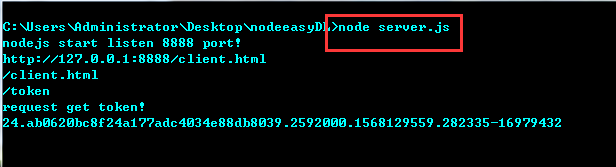
运行结果:(NODE+Win7)

机器视觉-EasyDL商品检测-标准版-Demo的更多相关文章
- 酷睿彩票合买代购网站管理系统 v2016 - 源码下载 有合买功能 有免费版 标准版 高级版
源码介绍 免费版下载地址 电信 浙江腾佑 网鼎科技 正易网络下载 联通 网鼎联通 标准版联系QQ:1395239152 彩票合买代购网站管理系统公司独立开发,完全拥有软件自主知识产权.具有电脑We ...
- Windows 2003 Server 标准版启动问题解决(资源转贴)
维护的系统之一是部署在windows2003 Server标准版的服务器上,可能是由于某个应用问题,导致远程重启失败,害得我在机房呆了一早晨,可算是够折腾的.最后按照官方文档解决,刚放文档地址是:ht ...
- Rational AppScan 标准版可扩展性和二次开发能力简介
下载:IBM® Rational® AppScan 标准版 | Web 应用安全与 IBM Rational AppScan 工具包 获取免费的 Rational 软件工具包系列,下载更多的 R ...
- oracle 11g R2 标准版 64位linux安装
安装环境:Redhat es 5.5 64位 ,系统内存8G,swap 10G ,oracle 11G R2 标准版 一,Oracle 安装前的准备检查一下包,必须全部安装:binutils-2.17 ...
- 下载-MS SQL Server 2005(大全版)含开发人员版、企业版、标准版【转】
中文名称:微软SQL Server 2005 英文名称:MS SQL Server 2005资源类型:ISO版本:开发人员版.企业版.标准版发行时间:2006年制作发行:微软公司地区:大陆语言:普通话 ...
- SQL Server 2016 SP1 标准版等同企业版?!
上周微软发布了SQL Server的历史性公告:SQL Server 标准版的SP1提供你和企业版一样得功能.你不信的话?可以点击这里. 这改变了整个关系数据库市场,重重打击了Oracle.在今天的文 ...
- 五一干货来袭!开源Moon.Orm标准版发布!
标准版源代码下载: 链接:http://pan.baidu.com/s/1i3xj0f7 因五一早过(现在中旬了),解压码获取请到: http://www.cnblogs.com/humble/p/3 ...
- SQL Server 2008 标准版不支持Reporting Services的数据驱动订阅
今天开发同事找我,说为什么Reporting Services服务器的报表管理的订阅选项里面只有"新建订阅"选项, 没有"数据驱动订阅"选项,说实话,我也基本上 ...
- SQL Server 2008 R2 企业版/开发版/标准版(中英文下载,带序列号)
一. 简体中文 1. SQL Server 2008 R2 Developer (x86, x64, ia64) – DVD (Chinese-Simplified) File Name: cn_sq ...
随机推荐
- 十一. SpringCloud Alibaba
1. SpringCloud Alibaba简介 1.1 为什么会出现SpringCloud Alibaba Spring Cloud Netflix项目进入到维护模式 什么是维护模式?=> 将 ...
- Sass/Scss 基础篇
Sass/Scss 基础篇 总结Sass学习到的内容 应用Sass/Scss前,环境配置 首先下载Ruby (http://rubyinstaller.org/downloads) 通过命令下载sas ...
- AtCoder Beginner Contest 192
A Star #include <cstdio> using namespace std; int n; int main() { scanf("%d", &n ...
- 优化自动化测试流程,使用 flask 开发一个 toy jenkins工具
1.自动化 某一天你入职了一家高大上的科技公司,开心的做着软件测试的工作,每天点点点,下班就走,晚上陪女朋友玩王者,生活很惬意. 但是美好时光一般不长,这种生活很快被女主管打破.为了提升公司测试效率, ...
- 01-Spring概述(总览)
Spring概述 前言 Spring 发展至现在,俨然成为一个生态,但要理解其余的 Spring Boot.Spring Cloud 等框架,需要先对 Spring 的整个体系有一定的理解,因为其余的 ...
- 如何让python脚本支持命令行参数--getopt和click模块
一.如何让python脚本支持命令行参数 1.使用click模块 如何使用这个模块,在我前面的博客已经写过了,可参考:https://www.cnblogs.com/Zzbj/p/11309130.h ...
- 3.DataFrame的增删改查
以此为例 一.DataFrame的初步认知 在pandas中完成数据读取后数据以DataFrame保存.在操作时要以DataFrame函数进行了解 函数 含义 示例 values 元素 index 索 ...
- shiro太复杂?快来试试这个轻量级权限认证框架!
前言 在java的世界里,有很多优秀的权限认证框架,如Apache Shiro.Spring Security 等等.这些框架背景强大,历史悠久,其生态也比较齐全. 但同时这些框架也并非十分完美,在前 ...
- HDU(1420)Prepared for New Acmer(JAVA语言)【快速幂模板】
思路:快速幂裸题. //注意用long,否则会超范围 Problem Description 集训进行了将近2个礼拜,这段时间以恢复性训练为主,我一直在密切关注大家的训练情况,目前为止,对大家的表现相 ...
- 最小生成树(Prim算法,Kruskal算法 )
声明:图片及内容基于https://www.bilibili.com/video/BV1yp4y1Q74o?from=articleDetail 最小生成树原理 . 普利姆(Prim)算法 原理 Pr ...