
Linux_NTP
- 服务器端配置
- 允许这些IP向自己同步时间
restrict x.x.x.x mask x.x.x.x nomodiy notrap
- 当前定义的所有server服务器无法同步后,和自身同步
|
server 127.127.1.0 fudge 127.127.1.0 stratum 10 |
- 局域网内的上层时间服务器
server 192.168.1.117
- 客户端配置
创建自动任务计划
crontab -e
* 2 * * * /usr/sbin/ntpdate 192.168.x.x
#分 时 日 月 星期 命令位置
- 故障排除
- 故障信息:
#[root@localhost ~]# ntpdate 192.168.70.52
#27 Sep 05:22:11 ntpdate[2392]: no server suitable for synchronization found
- 防火墙问题
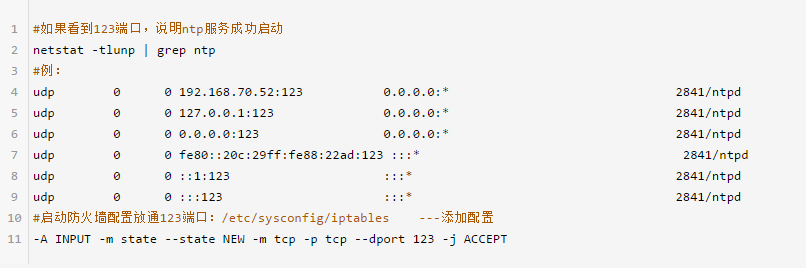
- NTP服务器和/etc/ntp.conf
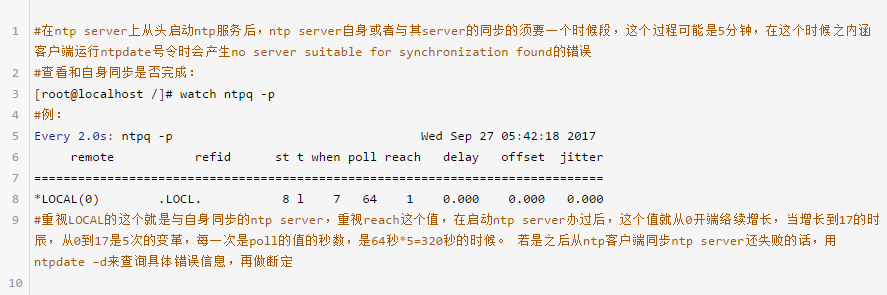
- 3.3.bug版本

- 配置说明
- Linux默认的/etc/ntp.conf
|
# For more information about this file, see the man pages # ntp.conf(5), ntp_acc(5), ntp_auth(5), ntp_clock(5), ntp_misc(5), ntp_mon(5). driftfile /var/lib/ntp/drift #系统时间与BlOS时间的偏差记录 # Permit time synchronization with our time source, but do not # permit the source to query or modify the service on this system. restrict default kod nomodify notrap nopeer noquery restrict -6 default kod nomodify notrap nopeer noquery # Permit all access over the loopback interface. This could # be tightened as well, but to do so would effect some of # the administrative functions. restrict 127.0.0.1 #服务器本身拥有任意权限,不受限制 restrict -6 ::1 # Hosts on local network are less restricted. #restrict 192.168.1.0 mask 255.255.255.0 nomodify notrap # Use public servers from the pool.ntp.org project. # Please consider joining the pool (http://www.pool.ntp.org/join.html). server 0.rhel.pool.ntp.org iburst #互联网时间服务器地址 server 1.rhel.pool.ntp.org iburst server 2.rhel.pool.ntp.org iburst server 3.rhel.pool.ntp.org iburst #broadcast 192.168.1.255 autokey # broadcast server #broadcastclient # broadcast client #broadcast 224.0.1.1 autokey # multicast server #multicastclient 224.0.1.1 # multicast client #manycastserver 239.255.254.254 # manycast server #manycastclient 239.255.254.254 autokey # manycast client # Enable public key cryptography. #crypto includefile /etc/ntp/crypto/pw # Key file containing the keys and key identifiers used when operating # with symmetric key cryptography. keys /etc/ntp/keys # Specify the key identifiers which are trusted. #trustedkey 4 8 42 # Specify the key identifier to use with the ntpdc utility. #requestkey 8 # Specify the key identifier to use with the ntpq utility. #controlkey 8 # Enable writing of statistics records. #statistics clockstats cryptostats loopstats peerstats |
- restrict 命令说明
|
#restrict 控制相关权限---语法为: restrict IP地址 mask 子网掩码 参数 其中IP地址也可以是default ,default 就是指所有的IP 参数有以下几个: ignore :关闭所有的 NTP 联机服务 nomodify:客户端不能更改服务端的时间参数,但是客户端可以通过服务端进行网络校时。 notrust :客户端除非通过认证,否则该客户端来源将被视为不信任子网 noquery :不提供客户端的时间查询:用户端不能使用ntpq,ntpc等命令来查询ntp服务器 notrap :不提供trap远端登陆:拒绝为匹配的主机提供模式 6 控制消息陷阱服务。陷阱服务是 ntpdq 控制消息协议的子系统,用于远程事件日志记录程序。 nopeer :用于阻止主机尝试与服务器对等,并允许欺诈性服务器控制时钟 kod : 访问违规时发送 KoD 包。 restrict -6 表示IPV6地址的权限设置。 |
Linux_NTP的更多相关文章
随机推荐
- paramiko 详解
Paramiko是用python语言写的一个模块,远程连接到Linux服务器,查看上面的日志状态,批量配置远程服务器,文件上传,文件下载等 初始化一些参数: host = "120.24.2 ...
- MSQL 数据完整性(约束)
0. 前言 1. 实体完整性 1.1 主键约束(primary key) 1.2 唯一约束(unique) 1.3 自动增长列(auto_increment) 2. 域完整性 数据类型 非空约束 默认 ...
- 对标 Spring Boot & Cloud ,轻量框架 Solon 1.5.2 重要发布
Solon 是一个轻量的Java基础开发框架.强调,克制 + 简洁 + 开放的原则:力求,更小.更快.更自由的体验.支持:RPC.REST API.MVC.Job.Micro service.WebS ...
- 【C++】map容器的用法
检测map容器是否为空: 1 #include <iostream> 2 #include<map> 3 #include<string> 4 using name ...
- 使用mockjs模拟分页请求
首先安装mockjs npm install mockjs --save-dev 创建mock.js //mock.js const Mock = require("mockjs" ...
- Java @SuppressWarnings:抑制编译器警告-4
Java 中的 @SuppressWarnings 注解指示被该注解修饰的程序元素(以及该程序元素中的所有子元素)取消显示指定的编译器警告,且会一直作用于该程序元素的所有子元素.例如,使用 @Supp ...
- [apue] linux 文件访问权限那些事儿
前言 说到 linux 上的文件权限,其实我们在说两个实体,一是文件,二是进程.一个进程能不能访问一个文件,其实由三部分内容决定: 文件的所有者.所在的组: 文件对所有者.组用户.其它用户设置的权限访 ...
- 后缀数组&manachar总结
洛谷题单 后缀数组 前置芝士 后缀数组 1 后缀数组 2 后缀数组 3 例题略解 P2463 [SDOI2008]Sandy的卡片 板子题... 然而我还是不会. 大概做法就是先把所有的串差分后拼成一 ...
- Web 动画原则及技巧浅析
在 Web 动画方面,有一套非常经典的原则 -- Twelve basic principles of animation,也就是关于动画的 12 个基本原则(也称之为迪士尼动画原则),网上对它的解读 ...
- N沟通场效应管深度图解(1)工作原理及Multisim实例仿真
场效应晶体管(Field Effect Transistor, FET)简称场效应管,是一种由多数载流子参与导电的半导体器件,也称为单极型晶体管,它主要分型场效应管(Junction FET, JFE ...