
WPF日积月累之文件监测与DataGrid指定Row的颜色
一、概述
关于DataGrid指定Row的颜色,我们可以使用转换器和DataGridRow的Style来实现。对于文件的检测,我们可以使用FileSystemWatcher来实现。
二、Demo
Converter代码如下:
 1 using System;

 2 using System.Windows.Data;

 3 using System.Windows.Media;

 4

 5 namespace FileWatcher

 6 {

 7     public class BGConverter : IValueConverter

 8     {

 9         public object Convert(object value, Type targetType, object parameter, System.Globalization.CultureInfo culture)

10         {

11             string operation = (string)value;

12             switch(operation)

13             {

14                 case "Created":

15                     return Brushes.Green;

16

17                 case "Deleted":

18                     return Brushes.Red;

19

20                 case "Renamed":

21                     return Brushes.Orange;

22                 default:

23                     return Brushes.Black;

24             }

25

26         }

27

28         public object ConvertBack(object value, Type targetType, object parameter, System.Globalization.CultureInfo culture)

29         {

30             return null;

31         }

32     }

33 }
前台代码如下:
 1 <Window x:Class="FileWatcher.MainWindow"

 2         xmlns="http://schemas.microsoft.com/winfx/2006/xaml/presentation"

 3         xmlns:x="http://schemas.microsoft.com/winfx/2006/xaml"

 4         xmlns:d="http://schemas.microsoft.com/expression/blend/2008"

 5         xmlns:mc="http://schemas.openxmlformats.org/markup-compatibility/2006"

 6         xmlns:local="clr-namespace:FileWatcher"

 7         mc:Ignorable="d"

 8         Title="FileWatcher" Height="434.877" Width="673.774"  Background="#FF387BB6">

 9     <Grid>

10         <Grid.RowDefinitions>

11             <RowDefinition Height="30"/>

12             <RowDefinition Height="*"/>

13         </Grid.RowDefinitions>

14         <StackPanel Orientation="Horizontal" HorizontalAlignment="Right">

15             <Label Content="文件夹路径:" Foreground="#FF224664"></Label>

16             <TextBox Width="168" Margin="2 4 2 0" Name="tbxPath" Text="D:\MyTest\Test"></TextBox>

17             <Button Content="开始监听" Margin="60 2 8 2" Click="Button_Click" Background="#FF2E76B6"/>

18         </StackPanel>

19         <DataGrid Grid.Row="1" Margin="5"  ItemsSource="{Binding FileCollection}" AutoGenerateColumns="False" Name="dataGrid"  CanUserAddRows="False">

20             <DataGrid.Resources>

21                 <local:BGConverter x:Key="bgconverter"/>

22                 <Style TargetType="DataGridRow">

23                     <Setter Property="Foreground" Value="{Binding Path=Operation, Converter={StaticResource bgconverter}}"/>

24                 </Style>

25             </DataGrid.Resources>

26             <DataGrid.Columns>

27                 <DataGridTemplateColumn>

28                     <DataGridTemplateColumn.CellTemplate>

29                         <DataTemplate>

30                             <CheckBox x:Name="cbCheck"  HorizontalAlignment="Center"

31                                       IsChecked="{Binding IsChecked, Mode=TwoWay, UpdateSourceTrigger=PropertyChanged}"

32                                       Margin="3,2,0,0" Background="#07638a"/>

33                         </DataTemplate>

34                     </DataGridTemplateColumn.CellTemplate>

35                     <DataGridTemplateColumn.Header>

36                         <CheckBox x:Name="CheckAll"  Width="auto" Content="All"  Foreground="#F33A98E7" HorizontalAlignment="Center"

37                                   Background="Red" Margin="20 0 0 0"

38                                   IsChecked="{Binding DataContext.IsAllChecked, Mode=TwoWay, RelativeSource={RelativeSource Mode=FindAncestor,AncestorType=DataGrid}, UpdateSourceTrigger=PropertyChanged}"/>

39

40                     </DataGridTemplateColumn.Header>

41                 </DataGridTemplateColumn>

42                 <DataGridTextColumn Width="100" Header="File" Binding="{Binding FileName}" IsReadOnly="True"/>

43                 <DataGridTextColumn Header="Path" Width="120"  Binding="{Binding FilePath}" IsReadOnly="True"/>

44                 <DataGridTextColumn Header="Operation" Width="100" Binding="{Binding Operation}" IsReadOnly="True"/>

45                 <DataGridTextColumn Header="Date" Width="120"  Binding="{Binding Date}" IsReadOnly="True"/>

46                 <DataGridTextColumn Header="Note" Width="150"  Binding="{Binding Note}" IsReadOnly="False"/>

47

48

49             </DataGrid.Columns>

50         </DataGrid>

51     </Grid>

52 </Window>
后台代码如下:
  1 using System;

  2 using System.Collections.Generic;

  3 using System.Collections.ObjectModel;

  4 using System.ComponentModel;

  5 using System.IO;

  6 using System.Linq;

  7 using System.Windows;

  8

  9 namespace FileWatcher

 10 {

 11     public abstract class ViewModelBase : INotifyPropertyChanged

 12     {

 13         public virtual string DisplayName { get; set; }

 14

 15         public event PropertyChangedEventHandler PropertyChanged;

 16

 17         protected void OnPropertyChanged(string propertyName)

 18         {

 19             PropertyChangedEventHandler handler = PropertyChanged;

 20

 21             if (handler != null)

 22             {

 23                 handler(this, new PropertyChangedEventArgs(propertyName));

 24             }

 25         }

 26

 27     }

 28     /// <summary>

 29     /// Interaction logic for MainWindow.xaml

 30     /// </summary>

 31     public partial class MainWindow : Window, INotifyPropertyChanged

 32     {

 33         public event PropertyChangedEventHandler PropertyChanged;

 34

 35         protected void OnPropertyChanged(string propertyName)

 36         {

 37             PropertyChangedEventHandler handler = PropertyChanged;

 38

 39             if (handler != null)

 40             {

 41                 handler(this, new PropertyChangedEventArgs(propertyName));

 42             }

 43         }

 44         private List<string> fileList = new List<string>();

 45         private ObservableCollection<FileInfo> fileCollection = new ObservableCollection<FileInfo>();

 46         public ObservableCollection<FileInfo> FileCollection

 47         {

 48             get { return fileCollection; }

 49             set

 50             {

 51                 fileCollection = value;

 52                 OnPropertyChanged("FileCollection");

 53             }

 54         }

 55         private bool isAllChecked;

 56         public bool IsAllChecked

 57         {

 58             get { return isAllChecked; }

 59             set

 60             {

 61                 isAllChecked = value;

 62                 OnPropertyChanged("IsAllChecked");

 63

 64                 for (int i = 0; i < FileCollection.Count; i++)

 65                 {

 66                     FileCollection[i].IsChecked = isAllChecked;

 67                 }

 68                 //OnPropertyChanged("FilaCalibrationProtocols");

 69             }

 70         }

 71         FileSystemWatcher fsw = new FileSystemWatcher();

 72         public MainWindow()

 73         {

 74             InitializeComponent();

 75             dataGrid.DataContext = this;

 76             fsw.Path = @"C:\";   //设置监控的文件目录

 77             fsw.Filter = "*.*";   //设置监控文件的类型

 78             fsw.NotifyFilter = NotifyFilters.FileName | NotifyFilters.DirectoryName | NotifyFilters.Size;   //设置文件的文件名、目录名及文件的大小改动会触发Changed事件

 79

 80             fsw.Created += new FileSystemEventHandler(this.fileSystemWatcher_EventHandle);  //绑定事件触发后处理数据的方法。

 81

 82             fsw.Deleted += new FileSystemEventHandler(this.fileSystemWatcher_EventHandle);

 83

 84             fsw.Changed += new FileSystemEventHandler(this.fileSystemWatcher_EventHandle);

 85

 86             fsw.Renamed += new RenamedEventHandler(this.fileSystemWatcher_Renamed);  //重命名事件与增删改传递的参数不一样。

 87

 88         }

 89         private void fileSystemWatcher_EventHandle(object sender, FileSystemEventArgs e)  //文件增删改时被调用的处理方法

 90         {

 91             this.Dispatcher.BeginInvoke(

 92                 new Action(() =>

 93                 {

 94

 95                     var fileInfo = new FileInfo() { Operation = e.ChangeType.ToString(), Date = DateTime.Now.ToString("MM/dd/yyyy HH:mm:ss"), FileName = e.Name, FilePath = e.FullPath, IsChecked = false };

 96

 97                     if(e.ChangeType.ToString() == "Created")

 98                     {

 99                         var fileName = from file in fileList.Distinct()

100                                        where file == e.Name

101                                        select file;

102                         if (fileName.Count() > 0)

103                         {

104                             fileInfo.Note = $"{e.Name} have already been {e.ChangeType} before.";

105                             MessageBox.Show($"{e.Name} have already been {e.ChangeType} before.");

106                         }

107                     }

108

109                     fileCollection.Add(fileInfo);

110

111                     fileList.Add(e.Name);

112                 })

113          );

114

115         }

116         private void fileSystemWatcher_Renamed(object sender, RenamedEventArgs e)   //文件重命名时被调用的处理方法

117         {

118             this.Dispatcher.BeginInvoke(

119                new Action(() =>

120                {

121                    fileCollection.Add(new FileInfo() { Operation = e.ChangeType.ToString(), Date = DateTime.Now.ToLongTimeString(), FileName = e.OldName + " --> " + e.Name, FilePath = e.FullPath, IsChecked = false });

122                    fileList.Add(e.Name);

123                })

124         );

125

126         }

127

128         private void Button_Click(object sender, RoutedEventArgs e)

129         {

130             if(Directory.Exists(tbxPath.Text))

131             {

132                 fsw.Path = tbxPath.Text;

133             }

134             fsw.EnableRaisingEvents = true;

135         }

136     }

137     public class FileInfo : ViewModelBase

138     {

139         private bool isChecked;

140

141         public bool IsChecked

142         { get { return isChecked; } set { isChecked = value; OnPropertyChanged("IsChecked"); } }

143

144

145         private string fileName;

146         public string FileName

147         {

148             get { return fileName; }

149             set { fileName = value; }

150         }

151

152         private string filePath;

153         public string FilePath

154         {

155             get { return filePath; }

156             set { filePath = value; }

157         }

158

159         private string operation;

160         public string Operation

161         {

162             get { return operation; }

163             set { operation = value; }

164         }

165

166         private string date;

167         public string Date

168         {

169             get { return date; }

170             set { date = value; }

171         }

172

173         private string note;

174         public string Note

175         {

176             get { return note; }

177             set { note = value; }

178         }

179

180     }

181 }
运行结果如下: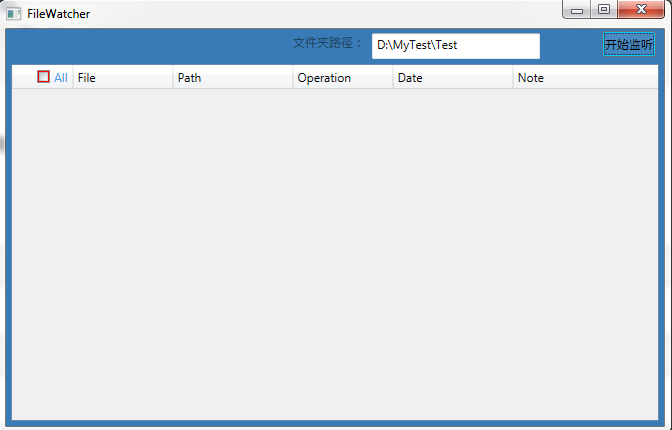
WPF日积月累之文件监测与DataGrid指定Row的颜色的更多相关文章
- WPF获取读取电脑指定文件夹中的指定文件的地址
//保存指定文件夹中的指定文件的地址 string List<string> mListUri = new List<string>(); //文件夹地址 string fol ...
- wpf将表中数据显示到datagrid示例(转)
原文:http://www.jb51.net/article/47120.htm 这篇文章主要介绍了wpf将表中数据显示到datagrid示例,需要的朋友可以参考下 a.在.xaml文件中拖入一个da ...
- WPF 中style文件的引用
原文:WPF 中style文件的引用 总结一下WPF中Style样式的引用方法: 一,内联样式: 直接设置控件的Height.Width.Foreground.HorizontalAlignment. ...
- Wpf读写Xaml文件
前言 本文主要介绍Wpf读写Xaml文件. 读写实现 首先我们使用XamlWriter将Wpf的对象转换为Xaml字符串,代码如下: var btn = sender as Button; strin ...
- WPF入门教程系列二十三——DataGrid示例(三)
DataGrid的选择模式 默认情况下,DataGrid 的选择模式为“全行选择”,并且可以同时选择多行(如下图所示),我们可以通过SelectionMode 和SelectionUnit 属性来修改 ...
- 在文件夹中 的指定类型文件中 查找字符串(CodeBlocks+GCC编译,控制台程序,仅能在Windows上运行)
说明: 程序使用 io.h 中的 _findfirst 和 _findnext 函数遍历文件夹,故而程序只能在 Windows 下使用. 程序遍历当前文件夹,对其中的文件夹执行递归遍历.同时检查遍历到 ...
- 将.war文件解压到指定目录
jar命令无法将.jar解压到指定目录,因为-C参数只在创建或更新包的时候可用 要将.jar文件解压到指定目录可以用unzip命令 unzip命令在windows下自带就有,不用另外下载安装 下面是将 ...
- [转]C#中调用资源管理器(Explorer.exe)打开指定文件夹 + 并选中指定文件 + 调用(系统默认的播放类)软件(如WMP)打开(播放歌曲等)文件
原文:http://www.crifan.com/csharp_call_explorer_to_open_destinate_folder_and_select_specific_file/ C#中 ...
- WPF下载远程文件,并显示进度条和百分比
WPF下载远程文件,并显示进度条和百分比 1.xaml <ProgressBar HorizontalAlignment="Left" Height="10&quo ...
随机推荐
- lucene Hello World
一个lucene创建索引和查找索引的样例: 创建索引: public class Indexer { private IndexWriter indexWriter; /** * 构造器实例化inde ...
- 前端开发入门到进阶附录一【JQuery中parent(),parents(),parentsUntil()区别和使用技巧】
JQuery中parent(),parents(),parentsUntil()区别和使用技巧:https://blog.csdn.net/china1223/article/details/5193 ...
- php使用curl模拟post请求
废话不多说,直接上代码,做个笔记. $url="http://localhost/header_server.php"; $body = array("mobile&qu ...
- PHP如何接收json数据
以前一直在写一些网站,很少涉及到接口的东西.最近公司在做一个平台,需要往接口上发送json数据.闲话少叙,直接上干货. 在php中可以通过如下方式获取: file_get_contents(" ...
- 什么是jstl表达式,怎么应用
1.介绍 JSTL(JSP Standard Tag Library),JSP标准标签库,可以嵌入在jsp页面中使用标签的形式完成业务逻辑等功能.jstl出现的目的同el一样也是要代替jsp页面中的脚 ...
- HTML5 socket
client: <!DOCTYPE html> <html> <head> <title></title> <meta http-eq ...
- Sql Server备份表,动态生成表名称
1.常用的数据库备份表语句 SELECT * INTO tableNameNew FROM tableName 2.动态备份表,且备份表名称后面增加三位随机字符和当前日期 1 DECLARE @bak ...
- ElasticSearch入门检索
前面简介说到 elsatic是通过RestFul API接口操作数据的,可以通过postman模拟接口请求测试一下 一._cat 1.GET /_cat/nodes:查看所有节点 2.GET /_ca ...
- 靶机CH4INRULZ_v1.0.1
nmap开路. root@kali:~# nmap -sP 192.168.1.* //拿到靶机地址192.168.1.8 root@kali:~# nmap -p- -sS -v -sV 192.1 ...
- [开源]入坑Qt,我的第一个小程序:MD5计算器
版权声明 --------- 本文仅在知乎与博客园发布.开发者为szx0427 MFC和Win32搞了好几年了,也算是懂了个皮毛,但是一直觉得用这两者开发软件都很麻烦,需要将大量的代码花费在UI等地方 ...