
Vue 双层嵌套
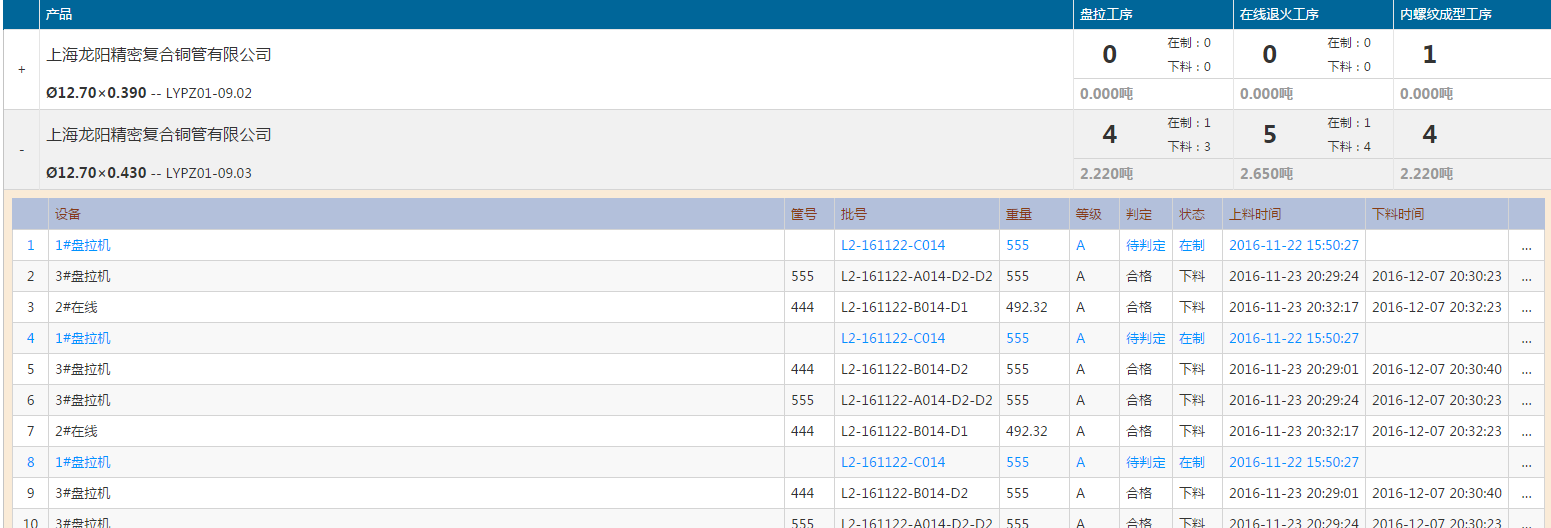
这种的需要双层嵌套。
代码:
 <table id="ict-table" class="ict-table ict-report-table blue-theme">

        <thead>

            <tr>

                <th class="width36"></th>

                <th>@L("Product")</th>

                <th class="width160" v-show="SpinnerBlock">盘拉工序</th>

                <th class="width160" v-show="InlineAnnealing">在线退火工序</th>

                <th class="width160" v-show="InnerGrooving">内螺纹成型工序</th>

                <th class="width160" v-show="Winding">精整工序</th>

                <th class="width160" v-show="Annealing">退火包装工序</th>

                <th class="width160" v-show="InnerGrooving2">内螺纹成型工序</th>

            </tr>

        </thead>

        <tbody>

            <template v-for="item in GroupInfoList">

                <tr>

                    <td class="ict-toggle-td" v-on:click="Show(item)"><span v-show="!item.IsShow">+</span><span v-show="item.IsShow">-</span></td>

                    <td>

                        <div class="lh48 f16">{{item.customerName}}</div>

                        <div class="lh30">

                            <span class="f14 fwb">{{item.specification}}</span>

                            <span> -- {{item.technology}}</span>

                        </div>

                    </td>

                    <td v-show="SpinnerBlock">

                        <div class="w45p fl lh48 f24 fwb tac">{{item.盘拉工序.num}}</div>

                        <div class="w55p fl" v-show="LastTD!='SpinnerBlock'">

                            <div class="tac lh24 f12">在制:{{item.盘拉工序.working}}</div>

                            <div class="tac lh24 f12">下料:{{item.盘拉工序.worked}}</div>

                        </div>

                        <div class="cb bst f14 gray fwb tal">{{item.盘拉工序.weight.toFixed(3)}}吨</div>

                    </td>

                    <td v-show="InlineAnnealing">

                        <div class="w45p fl lh48 f24 fwb tac">{{item.在线退火工序.num}}</div>

                        <div class="w55p fl" v-show="LastTD!='InlineAnnealing'">

                            <div class="tac lh24 f12">在制:{{item.在线退火工序.working}}</div>

                            <div class="tac lh24 f12">下料:{{item.在线退火工序.worked}}</div>

                        </div>

                        <div class="cb bst f14 gray fwb tal">{{item.在线退火工序.weight.toFixed(3)}}吨</div>

                    </td>

                    <td v-show="InnerGrooving">

                        <div class="w45p fl lh48 f24 fwb tac">{{item.内螺纹成型工序.num}}</div>

                        <div class="w55p fl"  v-show="LastTD!='InnerGrooving'">

                            <div class="tac lh24 f12">在制:{{item.内螺纹成型工序.working}}</div>

                            <div class="tac lh24 f12">下料:{{item.内螺纹成型工序.worked}}</div>

                        </div>

                        <div class="cb bst f14 gray fwb tal">{{item.内螺纹成型工序.weight.toFixed(3)}}吨</div>

                    </td>

                    <td v-show="Winding">

                        <div class="w45p fl lh48 f24 fwb tac">{{item.精整工序.num}}</div>

                        <div class="w55p fl"  v-show="LastTD!='Winding'">

                            <div class="tac lh24 f12">在制:{{item.精整工序.working}}</div>

                            <div class="tac lh24 f12">下料:{{item.精整工序.worked}}</div>

                        </div>

                        <div class="cb bst f14 gray fwb tal">{{item.精整工序.weight.toFixed(3)}}吨</div>

                    </td>

                    <td v-show="Annealing">

                        <div class="w45p fl lh48 f24 fwb tac">{{item.退火包装工序.num}}</div>

                        <div class="w55p fl" v-show="LastTD!='Annealing'">

                            <div class="tac lh24 f12">在制:{{item.退火包装工序.working}}</div>

                            <div class="tac lh24 f12">下料:{{item.退火包装工序.worked}}</div>

                        </div>

                        <div class="cb bst f14 gray fwb tal">{{item.退火包装工序.weight.toFixed(3)}}吨</div>

                    </td>

                    <td v-show="InnerGrooving2">

                        <div class="w45p fl lh48 f24 fwb tac">{{item.内螺纹成型工序.num}}</div>

                        <div class="w55p fl"  v-show="LastTD!='InnerGrooving2'">

                            <div class="tac lh24 f12">在制:{{item.内螺纹成型工序.working}}</div>

                            <div class="tac lh24 f12">下料:{{item.内螺纹成型工序.worked}}</div>

                        </div>

                        <div class="cb bst f14 gray fwb tal">{{item.内螺纹成型工序.weight.toFixed(3)}}吨</div>

                    </td>

                </tr>

                 <tr class="ict-toggle-row ict-table-extended" v-show="item.IsShow">

                     <td colspan="{{Colspan}}" v-if="!item.IsLoaded">

                         <div class="ict-loading"></div>

                     </td>

                    <td colspan="{{Colspan}}" v-if="item.IsLoaded">

                        <div class="ict-inner-td-wrapper">

                            <table class="ict-table">

                                <thead>

                                    <tr>

                                        <th class="width36"></th>

                                        <th class="">设备</th>

                                        <th class="width50">筐号</th>

                                        <th class="width160">批号</th>

                                        <th class="width70">重量</th>

                                        <th class="width50">等级</th>

                                        <th class="width50">判定</th>

                                        <th class="width50">状态</th>

                                        <th class="width110">上料时间</th>

                                        <th class="width110">下料时间</th>

                                        <th class="width36"></th>

                                    </tr>

                                </thead>

                                <tbody>

                                    <tr v-bind:class="{'in-processing':l.state==0}" v-for="l in item.list">

                                        <td class="tac">{{$index+1}}</td>

                                        <td>{{l.equipmentName}}</td>

                                        <td>{{l.basketCode}}</td>

                                        <td>{{l.code}}</td>

                                        <td>{{l.weight}}</td>

                                        <td>{{l.grade}}</td>

                                        <td>{{l.quality==0?"合格":l.quality==1?"不合格":"待判定"}}</td>

                                        <td>{{l.state==0?"在制":"下料"}}</td>

                                        <td>{{l.loadTime}}</td>

                                        <td>{{l.unloadTime}}</td>

                                        <td style="padding:0;">

                                            <a href="../../Quality/Tracing?code={{l.code}}&ticketid={{l.ticketID}}" class="ict-link tac" title="@L("PrdTracing")">…</a>

                                        </td>

                                    </tr>

                                </tbody>

                                <tfoot>

                                    <tr>

                                        <td colspan="11">

                                            <div class="ict-pager clearfix" v-show="TotalCount>0">

                                                <div class="ict-pager-navs w50p tal">

                                                    <a href="javascript:;" class="ict-pager-nav ict-pager-nav-first {{CurrentPage==1?'disabled':''}}" v-on:click="CurrentPage=1">@L("PageFirst")</a>

                                                    <a href="javascript:;" class="ict-pager-nav ict-pager-nav-prev {{CurrentPage<2?'disabled':''}}" v-on:click="CurrentPage=CurrentPage-1">@L("PagePrev")</a>

                                                    <div class="ict-pager-displayer">

                                                        <span class="ict-pager-current-page">{{CurrentPage}}</span>

                                                        <span class="ict-pager-spliter">/</span>

                                                        <span class="ict-pager-total-pages">{{TotalPages}}</span>

                                                    </div>

                                                    <a href="javascript:;" class="ict-pager-nav ict-pager-nav-next {{CurrentPage>TotalPages-1?'disabled':''}}" v-on:click="CurrentPage=CurrentPage+1">@L("PageNext")</a>

                                                    <a href="javascript:;" class="ict-pager-nav ict-pager-nav-last {{CurrentPage>TotalPages-1?'disabled':''}}" v-on:click="CurrentPage=TotalPages">@L("PageLast")</a>

                                                </div>

                                            </div>

                                        </td>

                                    </tr>

                                </tfoot>

                            </table>

                        </div>

                    </td>

                </tr>

            </template>

        </tbody>

    </table>
两行的时候使用template
Vue 双层嵌套的更多相关文章
- 使用FragmentTabHost+TabLayout+ViewPager实现双层嵌套Tab
大多数应用程序都会在底部使用3~5个Tab对应用程序的主要功能进行划分,对于一些信息量非常大的应用程序,还需要在每个Tab下继续划分子Tab对信息进行分类显示. 本文实现采用FragmentTabHo ...
- android 解决ViewPager双层嵌套的滑动问题
解决ViewPager双层嵌套的滑动问题 今天我分享一下ViewPager的双层嵌套时影响内部ViewPager的触摸滑动问题 之前在做自己的一个项目的时候,遇到广告栏图片动态切换,我第一时间想到的就 ...
- vue中嵌套页面 iframe 标签
vue中嵌套iframe,将要嵌套的文件放在static下面: <iframe src="../../../static/bear.html" width="300 ...
- vue中嵌套页面(iframe)
vue中嵌套iframe,将要嵌套的文件放在static下面.(要将打包文件整体放在statici里,我的文件名是canvas) src可以使用相对路径,也可使用服务器根路径http:localhos ...
- Vue v-for嵌套数据渲染问题
Vue v-for嵌套数据渲染问题 问题描述: 由于在获取商品子分类的时候,同时需要获取子分类下的商品,那么多层的列表渲染就只能是第一层好用 问题原因: vue在处理多层的渲染的时候,不能直接用等号赋 ...
- Vue路由嵌套
Vue路由嵌套 <!DOCTYPE html> <html lang="en"> <head> <meta charset="U ...
- vue 路由嵌套 及 router-view vue-router --》children
vue 路由嵌套 vue-router -->children 在项目的很多子页面中,我们往往需要在同一个页面做一个组件的切换,同时保存这个页面的部分数据(比如树形菜单),进而显示不同的数据 ...
- vue教程3-06 vue路由嵌套(多层路由),路由其他信息
多层嵌套: <!DOCTYPE html> <html lang="en"> <head> <meta charset="UTF ...
- vue 给嵌套的iframe子页面传数据 postMessage
Vue组件下嵌套了一个不同域下的子页面,iframe子页面不能直接获取到父页面的数据,即使数据存在localStorage中,子页面一样是获取不到的,所以只好使用postMessage传数据: < ...
随机推荐
- jq prepend() 方法在被选元素的开头(仍位于内部)插入指定内容。 提示:prepend() 和 prependTo() 方法作用相同。差异在于语法:内容和选择器的位置,以及 prependTo() 无法使用函数来插入内容。
<html><head><script type="text/javascript" src="/jquery/jquery.js" ...
- 洛谷 P1144 最短路计数 Label:水
题目描述 给出一个N个顶点M条边的无向无权图,顶点编号为1-N.问从顶点1开始,到其他每个点的最短路有几条. 输入输出格式 输入格式: 输入第一行包含2个正整数N,M,为图的顶点数与边数. 接下来M行 ...
- jS事件:target与currentTarget区别
target在事件流的目标阶段:currentTarget在事件流的捕获,目标及冒泡阶段.只有当事件流处在目标阶段的时候,两个的指向才是一样的, 而当处于捕获和冒泡阶段的时候,target指向被单击的 ...
- 【BZOJ】3916: [Baltic2014]friends
http://www.lydsy.com/JudgeOnline/problem.php?id=3916 #include <bits/stdc++.h> using namespace ...
- 【noiOJ】p8206
02:二分法求函数的零点 查看 提交 统计 提问 总时间限制: 1000ms 内存限制: 65536kB 描述 有函数: f(x) = x5 - 15 * x4+ 85 * x3- 225 * x ...
- GO语言练习:实现最简单的http helloword 服务器
用Go语言实现一个最简单的http服务器端,主要用到了package io, log, net/http 这个3个库. 用到的函数包括: http.Handle() http.HandlerFunc( ...
- DropDownList 选中change
<script language="javascript" type="text/javascript">$(function(){ $(&q ...
- Crossing River
Crossing River 题目链接:http://acm.hust.edu.cn/vjudge/problem/visitOriginUrl.action?id=26251 题意: N个人希望去过 ...
- 1022. D进制的A+B (20)
1022. D进制的A+B (20) 时间限制 100 ms 内存限制 32000 kB 代码长度限制 8000 B 判题程序 Standard 作者 CHEN, Yue 输入两个非负10进制整数A和 ...
- Java_Eclipse_Maven插件部署
方法一:在线; Eclipse-help-Install New Software 1.下载地址: m2e - http://download.eclipse.org/technology/m2e/r ...