
Vue 双层嵌套
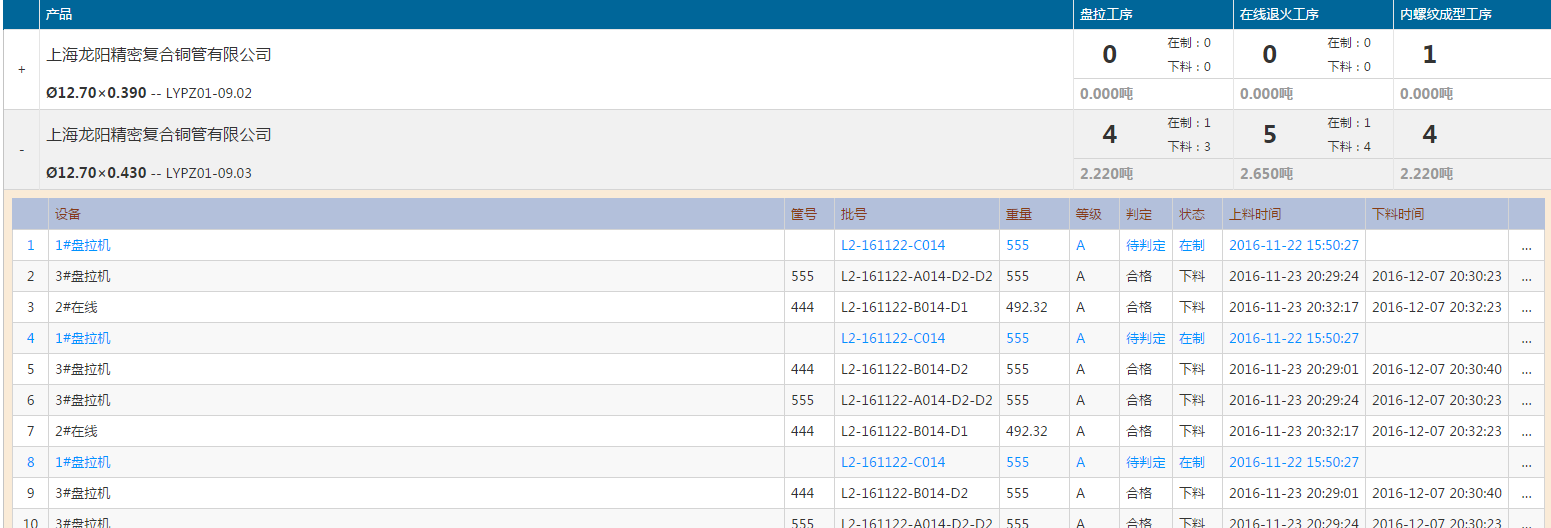
这种的需要双层嵌套。
代码:
 <table id="ict-table" class="ict-table ict-report-table blue-theme">

        <thead>

            <tr>

                <th class="width36"></th>

                <th>@L("Product")</th>

                <th class="width160" v-show="SpinnerBlock">盘拉工序</th>

                <th class="width160" v-show="InlineAnnealing">在线退火工序</th>

                <th class="width160" v-show="InnerGrooving">内螺纹成型工序</th>

                <th class="width160" v-show="Winding">精整工序</th>

                <th class="width160" v-show="Annealing">退火包装工序</th>

                <th class="width160" v-show="InnerGrooving2">内螺纹成型工序</th>

            </tr>

        </thead>

        <tbody>

            <template v-for="item in GroupInfoList">

                <tr>

                    <td class="ict-toggle-td" v-on:click="Show(item)"><span v-show="!item.IsShow">+</span><span v-show="item.IsShow">-</span></td>

                    <td>

                        <div class="lh48 f16">{{item.customerName}}</div>

                        <div class="lh30">

                            <span class="f14 fwb">{{item.specification}}</span>

                            <span> -- {{item.technology}}</span>

                        </div>

                    </td>

                    <td v-show="SpinnerBlock">

                        <div class="w45p fl lh48 f24 fwb tac">{{item.盘拉工序.num}}</div>

                        <div class="w55p fl" v-show="LastTD!='SpinnerBlock'">

                            <div class="tac lh24 f12">在制:{{item.盘拉工序.working}}</div>

                            <div class="tac lh24 f12">下料:{{item.盘拉工序.worked}}</div>

                        </div>

                        <div class="cb bst f14 gray fwb tal">{{item.盘拉工序.weight.toFixed(3)}}吨</div>

                    </td>

                    <td v-show="InlineAnnealing">

                        <div class="w45p fl lh48 f24 fwb tac">{{item.在线退火工序.num}}</div>

                        <div class="w55p fl" v-show="LastTD!='InlineAnnealing'">

                            <div class="tac lh24 f12">在制:{{item.在线退火工序.working}}</div>

                            <div class="tac lh24 f12">下料:{{item.在线退火工序.worked}}</div>

                        </div>

                        <div class="cb bst f14 gray fwb tal">{{item.在线退火工序.weight.toFixed(3)}}吨</div>

                    </td>

                    <td v-show="InnerGrooving">

                        <div class="w45p fl lh48 f24 fwb tac">{{item.内螺纹成型工序.num}}</div>

                        <div class="w55p fl"  v-show="LastTD!='InnerGrooving'">

                            <div class="tac lh24 f12">在制:{{item.内螺纹成型工序.working}}</div>

                            <div class="tac lh24 f12">下料:{{item.内螺纹成型工序.worked}}</div>

                        </div>

                        <div class="cb bst f14 gray fwb tal">{{item.内螺纹成型工序.weight.toFixed(3)}}吨</div>

                    </td>

                    <td v-show="Winding">

                        <div class="w45p fl lh48 f24 fwb tac">{{item.精整工序.num}}</div>

                        <div class="w55p fl"  v-show="LastTD!='Winding'">

                            <div class="tac lh24 f12">在制:{{item.精整工序.working}}</div>

                            <div class="tac lh24 f12">下料:{{item.精整工序.worked}}</div>

                        </div>

                        <div class="cb bst f14 gray fwb tal">{{item.精整工序.weight.toFixed(3)}}吨</div>

                    </td>

                    <td v-show="Annealing">

                        <div class="w45p fl lh48 f24 fwb tac">{{item.退火包装工序.num}}</div>

                        <div class="w55p fl" v-show="LastTD!='Annealing'">

                            <div class="tac lh24 f12">在制:{{item.退火包装工序.working}}</div>

                            <div class="tac lh24 f12">下料:{{item.退火包装工序.worked}}</div>

                        </div>

                        <div class="cb bst f14 gray fwb tal">{{item.退火包装工序.weight.toFixed(3)}}吨</div>

                    </td>

                    <td v-show="InnerGrooving2">

                        <div class="w45p fl lh48 f24 fwb tac">{{item.内螺纹成型工序.num}}</div>

                        <div class="w55p fl"  v-show="LastTD!='InnerGrooving2'">

                            <div class="tac lh24 f12">在制:{{item.内螺纹成型工序.working}}</div>

                            <div class="tac lh24 f12">下料:{{item.内螺纹成型工序.worked}}</div>

                        </div>

                        <div class="cb bst f14 gray fwb tal">{{item.内螺纹成型工序.weight.toFixed(3)}}吨</div>

                    </td>

                </tr>

                 <tr class="ict-toggle-row ict-table-extended" v-show="item.IsShow">

                     <td colspan="{{Colspan}}" v-if="!item.IsLoaded">

                         <div class="ict-loading"></div>

                     </td>

                    <td colspan="{{Colspan}}" v-if="item.IsLoaded">

                        <div class="ict-inner-td-wrapper">

                            <table class="ict-table">

                                <thead>

                                    <tr>

                                        <th class="width36"></th>

                                        <th class="">设备</th>

                                        <th class="width50">筐号</th>

                                        <th class="width160">批号</th>

                                        <th class="width70">重量</th>

                                        <th class="width50">等级</th>

                                        <th class="width50">判定</th>

                                        <th class="width50">状态</th>

                                        <th class="width110">上料时间</th>

                                        <th class="width110">下料时间</th>

                                        <th class="width36"></th>

                                    </tr>

                                </thead>

                                <tbody>

                                    <tr v-bind:class="{'in-processing':l.state==0}" v-for="l in item.list">

                                        <td class="tac">{{$index+1}}</td>

                                        <td>{{l.equipmentName}}</td>

                                        <td>{{l.basketCode}}</td>

                                        <td>{{l.code}}</td>

                                        <td>{{l.weight}}</td>

                                        <td>{{l.grade}}</td>

                                        <td>{{l.quality==0?"合格":l.quality==1?"不合格":"待判定"}}</td>

                                        <td>{{l.state==0?"在制":"下料"}}</td>

                                        <td>{{l.loadTime}}</td>

                                        <td>{{l.unloadTime}}</td>

                                        <td style="padding:0;">

                                            <a href="../../Quality/Tracing?code={{l.code}}&ticketid={{l.ticketID}}" class="ict-link tac" title="@L("PrdTracing")">…</a>

                                        </td>

                                    </tr>

                                </tbody>

                                <tfoot>

                                    <tr>

                                        <td colspan="11">

                                            <div class="ict-pager clearfix" v-show="TotalCount>0">

                                                <div class="ict-pager-navs w50p tal">

                                                    <a href="javascript:;" class="ict-pager-nav ict-pager-nav-first {{CurrentPage==1?'disabled':''}}" v-on:click="CurrentPage=1">@L("PageFirst")</a>

                                                    <a href="javascript:;" class="ict-pager-nav ict-pager-nav-prev {{CurrentPage<2?'disabled':''}}" v-on:click="CurrentPage=CurrentPage-1">@L("PagePrev")</a>

                                                    <div class="ict-pager-displayer">

                                                        <span class="ict-pager-current-page">{{CurrentPage}}</span>

                                                        <span class="ict-pager-spliter">/</span>

                                                        <span class="ict-pager-total-pages">{{TotalPages}}</span>

                                                    </div>

                                                    <a href="javascript:;" class="ict-pager-nav ict-pager-nav-next {{CurrentPage>TotalPages-1?'disabled':''}}" v-on:click="CurrentPage=CurrentPage+1">@L("PageNext")</a>

                                                    <a href="javascript:;" class="ict-pager-nav ict-pager-nav-last {{CurrentPage>TotalPages-1?'disabled':''}}" v-on:click="CurrentPage=TotalPages">@L("PageLast")</a>

                                                </div>

                                            </div>

                                        </td>

                                    </tr>

                                </tfoot>

                            </table>

                        </div>

                    </td>

                </tr>

            </template>

        </tbody>

    </table>
两行的时候使用template
Vue 双层嵌套的更多相关文章
- 使用FragmentTabHost+TabLayout+ViewPager实现双层嵌套Tab
大多数应用程序都会在底部使用3~5个Tab对应用程序的主要功能进行划分,对于一些信息量非常大的应用程序,还需要在每个Tab下继续划分子Tab对信息进行分类显示. 本文实现采用FragmentTabHo ...
- android 解决ViewPager双层嵌套的滑动问题
解决ViewPager双层嵌套的滑动问题 今天我分享一下ViewPager的双层嵌套时影响内部ViewPager的触摸滑动问题 之前在做自己的一个项目的时候,遇到广告栏图片动态切换,我第一时间想到的就 ...
- vue中嵌套页面 iframe 标签
vue中嵌套iframe,将要嵌套的文件放在static下面: <iframe src="../../../static/bear.html" width="300 ...
- vue中嵌套页面(iframe)
vue中嵌套iframe,将要嵌套的文件放在static下面.(要将打包文件整体放在statici里,我的文件名是canvas) src可以使用相对路径,也可使用服务器根路径http:localhos ...
- Vue v-for嵌套数据渲染问题
Vue v-for嵌套数据渲染问题 问题描述: 由于在获取商品子分类的时候,同时需要获取子分类下的商品,那么多层的列表渲染就只能是第一层好用 问题原因: vue在处理多层的渲染的时候,不能直接用等号赋 ...
- Vue路由嵌套
Vue路由嵌套 <!DOCTYPE html> <html lang="en"> <head> <meta charset="U ...
- vue 路由嵌套 及 router-view vue-router --》children
vue 路由嵌套 vue-router -->children 在项目的很多子页面中,我们往往需要在同一个页面做一个组件的切换,同时保存这个页面的部分数据(比如树形菜单),进而显示不同的数据 ...
- vue教程3-06 vue路由嵌套(多层路由),路由其他信息
多层嵌套: <!DOCTYPE html> <html lang="en"> <head> <meta charset="UTF ...
- vue 给嵌套的iframe子页面传数据 postMessage
Vue组件下嵌套了一个不同域下的子页面,iframe子页面不能直接获取到父页面的数据,即使数据存在localStorage中,子页面一样是获取不到的,所以只好使用postMessage传数据: < ...
随机推荐
- POJ1419 & 最大团
题意: 求一个图的最大点独立集.SOL: 转化为补图的最大团,最大团似乎是一个NP问题,那么只好爆搜了. 补一补图论基础,代码不想打了,来自某blog #include <iostream> ...
- 串 & 容斥原理
题意: 给出n (n<=50000) 个长度为4的字符串,问有且仅有d(1<=d<=4)处不相同的字符串有几对. SOL: 一直对着4发呆,这么小的字符串背后有什么玄学呢= =... ...
- iOS单例的作用和使用
单例 单例模式的意思就是只有一个实例.单例模式确保某一个类只有一个实例,而且自行实例化并向整个系统提供这个实例.这个类称为单例类. 一是某个类只能有一个实例:二是它必须自行创建这个实例:三是它必须自行 ...
- BZOJ 3732 题解
3732: Network Description 给你N个点的无向图 (1 <= N <= 15,000),记为:1…N. 图中有M条边 (1 <= M <= 30,000) ...
- 【BZOJ】3834: [Poi2014]Solar Panels
http://www.lydsy.com/JudgeOnline/problem.php?id=3834 题意:求$max\{(i,j)\}, smin<=i<=smax, wmin< ...
- Thymeleaf基本知识
Thymeleaf是个XML/XHTML/HTML5模板引擎,可以用于Web与非Web应用. Thymeleaf的主要目标在于提供一种可被浏览器正确显示的.格式良好的模板创建方式,因此也可以用作静态建 ...
- phpMyAdmin:无法在发生错误时创建会话,请检查 PHP 或网站服务器日志,并正确配置 PHP 安装。
一:错误提示 英文:Cannot start session without errors, please check errors given in your PHP and/or webserve ...
- Linux_文件打包,压缩,解压
一.压缩命令 文件格式:*.gz 命令:gzip 文件名 (ps:不能压缩目录,切压缩后不保留原文件) 压缩前 -rw-r--r--. 1 root root 315 Sep 6 21:03 df.t ...
- B-树的插入、查找、删除
转自:http://blog.163.com/zhoumhan_0351/blog/static/39954227200910231032917/ 前面讨论的查找都是内查询算法,被查询的数据都在内存. ...
- log4net 添加自定义日志到数据库
添加操作日志到数据库举例: (一)建立数据库的操作日志表,如下我建立了一个简单的日志表 (二)配置文件中的配置如下 <log4net> <!--错误日志记录数据库--> < ...