
Android课程---课下练习(表格、线性和相对布局)
1.表格布局
练习代码:
<?xml version="1.0" encoding="utf-8"?>

<TableLayout xmlns:android="http://schemas.android.com/apk/res/android"

    android:layout_width="match_parent"

    android:layout_height="match_parent"

    android:stretchColumns="4,2">

    <TableRow>

        <EditText

            android:layout_width="wrap_content"

            android:layout_height="wrap_content"

            android:hint="To:"

            android:layout_span="4"/>

        </TableRow>

    <TableRow>

        <EditText

            android:layout_width="wrap_content"

            android:layout_height="wrap_content"

            android:hint="Subject:"

            android:layout_span="4"/>

    </TableRow>

    <TableRow>

        <EditText

            android:layout_width="wrap_content"

            android:layout_height="wrap_content"

            android:hint="Message:"

            android:layout_span="4"

            android:paddingBottom="340dp"/>

    </TableRow>

    <TableRow>

        <Button

            android:layout_width="wrap_content"

            android:layout_height="wrap_content"

            android:text="Reset"

            android:layout_weight="1"/>

        <Button

            android:layout_width="wrap_content"

            android:layout_height="wrap_content"

            android:text="Send"

            android:layout_weight="1"/>

    </TableRow>

</TableLayout>
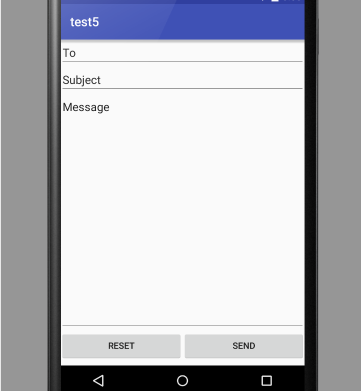
效果图:
2.线性布局
练习代码:
<?xml version="1.0" encoding="utf-8"?>

<LinearLayout xmlns:android="http://schemas.android.com/apk/res/android"

    android:layout_width="match_parent"

    android:layout_height="match_parent"

    android:orientation="vertical">

    <LinearLayout

        android:layout_width="match_parent"

        android:layout_height="wrap_content">

    <EditText

        android:layout_width="match_parent"

        android:layout_height="wrap_content"

        android:hint="To:"/>

    </LinearLayout>

    <LinearLayout

        android:layout_width="match_parent"

        android:layout_height="wrap_content">

    <EditText

        android:layout_width="match_parent"

        android:layout_height="wrap_content"

        android:hint="Subject:"/>

    </LinearLayout>

    <LinearLayout

        android:layout_width="match_parent"

        android:layout_height="wrap_content">

    <EditText

        android:layout_width="match_parent"

        android:layout_height="wrap_content"

        android:hint="Message:"

        android:paddingBottom="340dp"/>

    </LinearLayout>

    <LinearLayout

        android:layout_width="match_parent"

        android:layout_height="wrap_content"

        android:layout_gravity="center_horizontal">

    <Button

        android:layout_width="wrap_content"

        android:layout_height="wrap_content"

        android:text="Reset"

        android:layout_weight="1"/>

    <Button

        android:layout_width="wrap_content"

        android:layout_height="wrap_content"

        android:text="Send"

        android:layout_weight="1"/>

    </LinearLayout>

</LinearLayout>
效果图:

3.相对布局
练习代码:
<?xml version="1.0" encoding="utf-8"?>

<RelativeLayout xmlns:android="http://schemas.android.com/apk/res/android"

    android:layout_width="match_parent"

    android:layout_height="match_parent">

    <EditText

        android:layout_width="match_parent"

        android:layout_height="wrap_content"

        android:hint="To:"

        android:id="@+id/to"/>

    <EditText

        android:layout_width="match_parent"

        android:layout_height="wrap_content"

        android:hint="Subject:"

        android:layout_below="@+id/to"

        android:id="@+id/su"/>

    <EditText

        android:layout_width="match_parent"

        android:layout_height="wrap_content"

        android:hint="Message:"

        android:layout_below="@+id/su"

        android:paddingBottom="350dp"/>

    <Button

        android:layout_width="wrap_content"

        android:layout_height="wrap_content"

        android:text="Reset"

        android:layout_alignParentBottom="true"

        android:id="@+id/re"

        android:layout_marginLeft="90dp"

        />

    <Button

        android:layout_width="wrap_content"

        android:layout_height="wrap_content"

        android:text="Send"

        android:layout_alignParentBottom="true"

        android:layout_centerInParent="true"

        android:layout_toRightOf="@+id/re"

        />

</RelativeLayout>
效果图:

ps:是不是发现最后一张效果图与前面2张不一样了,其实前面那2张才是正确的,那你就该问了,为什么最后一个不一样啊?事实是我试了好多办法,练习了好久,遗憾的是最后用相对布局方法还是没能做出来,只能放上我做的这张图了
Android课程---课下练习(表格、线性和相对布局)的更多相关文章
- android从放弃到坚持放弃第二课(下)
续第二课( 下) 续第二课 下 活动的生命周期 返回栈 活动状态 活动的生存期 体验活动的生命周期 活动被回收怎么办 活动的启动模式 standard singleTop singleTask sin ...
- 【Xamarin开发 Android 系列 7】 Android 结构基础(下)
原文:[Xamarin开发 Android 系列 7] Android 结构基础(下) *******前期我们不打算进行太深入的东西,省的吓跑刚进门的,感觉门槛高,so,我们一开始就是跑马灯一样,向前 ...
- android第二课:运行你的应用
如果你按照前面课程创建了 Android 项目,它包含了可以立即运行的 "Hello World"源代码文件. 由两该条件来决定如何运行你的应用:你是否拥有运行着 Android ...
- 20175234 数据库MySQL(课下作业)
20175234 数据库MySQL(课下作业) 内容: 1.下载附件中的world.sql.zip, 参考http://www.cnblogs.com/rocedu/p/6371315.html#SE ...
- 课下测试补交(ch01、ch02、ch07)
课下测试补交(ch01.ch02.ch07) 课下测试ch01 1.Amdahl定律说明,我们对系统的某个部分做出重大改进,可以显著获得一个系统的加速比.(B) A . 正确 B . 错误 解析:课本 ...
- # 课下测试补交(ch01)20155337
课下测试补交(ch01) 1.Amdahl定律说明,我们对系统的某个部分做出重大改进,可以显著获得一个系统的加速比.(B) A .正确 B .错误 解析:Amdahl定律,该定律的主要思想是,当我们对 ...
- 2017-2018-1 20155327 《信息安全系统设计基础》课堂测试&课下作业
2017-2018-1 20155327 <信息安全系统设计基础>课堂测试&课下作业 学习使用stat(1),并用C语言实现 提交学习stat(1)的截图 man -k ,grep ...
- 课下测试CH01补交
课下测试CH01补交 ( 单选题 | 1 分) Amdahl定律说明,我们对系统的某个部分做出重大改进,可以显著获得一个系统的加速比. A . 正确 B . 错误 正确答案: B 你的答案: 未作答 ...
- Android课程设计第一天Android Studio安装
注意:课程设计只为完成任务,不做细节描述~ 学校有一个Android的课设,所以顺便把Android Studio安装了上去. 实际上安装过程并不复杂,只有几个地方需要注意~ 安装包可以去http:/ ...
随机推荐
- 判断App是否在后台运行
在一些场景中,经常会需要判断App是否在后台运行,比如是否显示解锁界面,收到新消息是否显示Notification等.需求可能是多样化的,但所依仗的原理是相通的,今天Stay打算说说这些需求的最优解. ...
- (转)qsort和sort
1.qsort函数: 原 型: void qsort(void *base, int nelem, int width, int (*fcmp)(const void *,const void *)) ...
- POJ 1971 统计平行四边形 HASH
题目链接:http://poj.org/problem?id=1971 题意:给定n个坐标.问有多少种方法可以组成平行四边形.题目保证不会有4个点共线的情况. 思路:可以发现平行四边形的一个特点,就是 ...
- express-8 Handlebars模板引擎(1)
简介 使用JavaScript生成一些HTML document.write('<h1>Please Don\'t Do This</h1>'); document.write ...
- iOS10 UI教程视图的边界与视图的框架
iOS10 UI教程视图的边界与视图的框架 iOS10 UI视图的边界 在视图的几何形状中我们提到了视图属性中的一部分属性可以将定义的视图绘制在屏幕上.其中典型的3个属性为边界属性.框架属性以及中心位 ...
- Swift3.0语言教程使用Unicode范式标准化获取字符串
Swift3.0语言教程使用Unicode范式标准化获取字符串 Swift3.0语言教程使用Unicode范式标准化获取字符串,在NSString中可以使用4个属性去使用Unicode范式标准化获取字 ...
- .NET方向高级开发人员面试时应该事先考虑的问题
(澄清一下,我发帖的目的不是用来专门给人评价这些问题的好坏的,实际上我所在 的公司就考察这些问题.而能够基本上答出来的可以说百里挑一.如果各位觉得这些问题很简单,那么基本上在.NET面试环节就没有什么 ...
- The name does not exist in the namespace error in XAML
方法1:In the solution property page, check the platform of the assembly that contains "UpdatingMe ...
- BZOJ 2527 & 整体二分
Byteotian Interstellar Union有N个成员国.现在它发现了一颗新的星球,这颗星球的轨道被分为M份(第M份和第1份相邻),第i份上有第Ai个国家的太空站. 这个星球经常会下陨石雨 ...
- 封装一个通用递归算法,使用TreeIterator和TreeMap来简化你的开发工作。
在实际工作中,你肯定会经常的对树进行遍历,并在树和集合之间相互转换,你会频繁的使用递归. 事实上,这些算法在逻辑上都是一样的,因此可以抽象出一个通用的算法来简化工作. 在这篇文章里,我向你介绍,我封装 ...