
23、css的定位问题
1、positon:relative相对定位
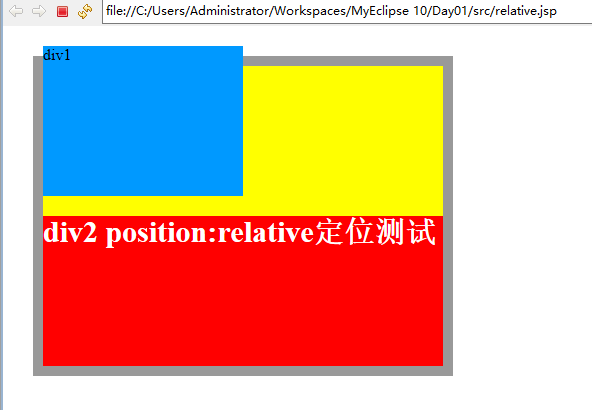
<!DOCTYPE html PUBLIC "-//W3C//DTD XHTML 1.0 Transitional//EN" "http://www.w3.org/TR/xhtml1/DTD/xhtml1-transitional.dtd">

<html xmlns="http://www.w3.org/1999/xhtml">

<head>

<meta http-equiv="Content-Type" content="text/html; charset=utf-8" />

<title>position:relative定位</title>

<style type="text/css">

    html,body,div{

                    margin:0;

                    padding:0;

                    list-style:none;

    }

    .center{

                margin:30px;

                border:#999999 solid 10px;

                width:400px;

                height:300px;

                background:#FFFF00;

    }

    .div1{

            width:200px;

            height:150px;

            background:#0099FF;

            position:relative;/*相对于元素本身在文档中应该出现的位置来移动这个元素*/

            top:-20px;

            left:0px;

    }

    .div2{

            width:400px;

            height:150px;

            font-size:30px;

            font-weight:bold;

            color:#fff;

            background:#FF0000;

    }

</style>

</head>

<body>

    <div class="center">

        <div class="div1">div1</div>

        <div class="div2">div2 position:relative定位测试</div>

    </div>

</body>

</html>
2、postion:absolute绝对定位
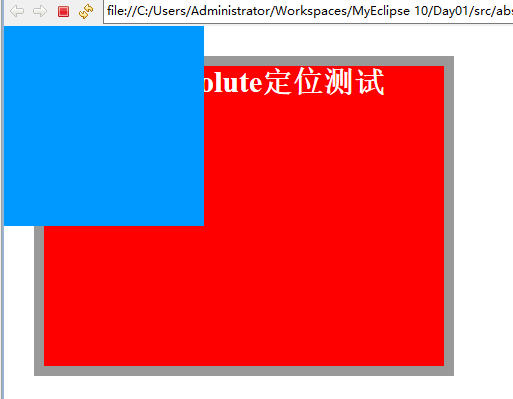
<!DOCTYPE html PUBLIC "-//W3C//DTD XHTML 1.0 Transitional//EN" "http://www.w3.org/TR/xhtml1/DTD/xhtml1-transitional.dtd">

<html xmlns="http://www.w3.org/1999/xhtml">

<head>

<meta http-equiv="Content-Type" content="text/html; charset=utf-8" />

<title>position:absolute定位</title>

<style type="text/css">

    html,body,div{

                    margin:0;

                    padding:0;

                    list-style:none;

    }

    .center{

                margin:30px;

                border:#999999 solid 10px;

                width:400px;

                height:300px;

    }

    .div1{

            width:200px;

            height:200px;

            background:#0099FF;

            /*设定TRBL  //设定了absolute之后,会相对于static定位以外的第一个父元素进行定位

                1、当设定了left和top时会根据浏览器左上角来进行定位,

                2、否则会根据其父元素的左上角来进行定位

            */

            position:absolute;

            left:0px;

            top:0px;

    }

    .div2{

            width:400px;

            height:300px;

            font-size:30px;

            font-weight:bold;

            color:#fff;

            background:#FF0000;

    }

</style>

</head>

<body>

    <div class="center">

        <div class="div1"></div>

        <div class="div2">position:absolute定位测试</div>

    </div>

</body>

</html>
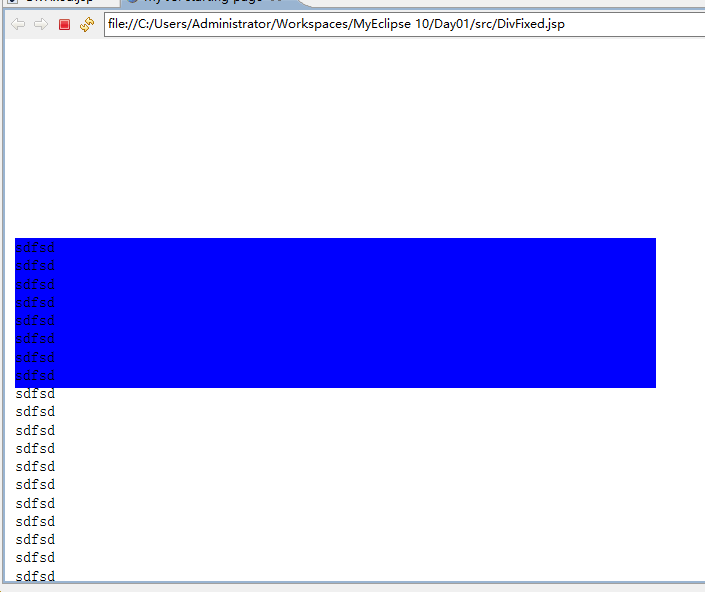
3、 这回是真的定住不动啦
<html>

  <head>

    <base href="<%=basePath%>">

    <title>My JSPstarting page</title>

    <style type="text/css">

        div{

            width:50%;

            height:150px;

            position:absolute;

            top:200px;

            left:10px;

            background-color: blue;

        }

    </style>

    <script type="text/javascript" src="jquery-1.4.2.js"></script>

    <script type="text/javascript">

        $(document).ready(function(){

        var top=$("#fixed").offset().top;

            $(window).scroll(function(){

                 var offset = top + $(document).scrollTop();

                 $("#fixed").offset({top:offset});

            })

        })

    </script>

  </head>

  <body>

    <div id="fixed">

        sdfsd<br>

        sdfsd<br>

        sdfsd<br>

        sdfsd<br>

        sdfsd<br>

        sdfsd<br>

        sdfsd<br>

        sdfsd<br>

        sdfsd<br>

        sdfsd<br>

        sdfsd<br>

        sdfsd<br>

        sdfsd<br>

        sdfsd<br>

        sdfsd<br>

        sdfsd<br>

        sdfsd<br>

        sdfsd<br>

        sdfsd<br>

        sdfsd<br>

        sdfsd<br>

        sdfsd<br>

        sdfsd<br>

        sdfsd<br>

        sdfsd<br>

                sdfsd<br>

        sdfsd<br>

        sdfsd<br>

        sdfsd<br>

        sdfsd<br>

        sdfsd<br>

        sdfsd<br>

        sdfsd<br>

        sdfsd<br>

        sdfsd<br>

        sdfsd<br>

        sdfsd<br>

        sdfsd<br>

        sdfsd<br>

        sdfsd<br>

        sdfsd<br>

        sdfsd<br>

        sdfsd<br>

        sdfsd<br>

        sdfsd<br>

        sdfsd<br>

        sdfsd<br>

        sdfsd<br>

        sdfsd<br>

        sdfsd<br>

                sdfsd<br>

        sdfsd<br>

        sdfsd<br>

        sdfsd<br>

        sdfsd<br>

        sdfsd<br>

        sdfsd<br>

        sdfsd<br>

        sdfsd<br>

        sdfsd<br>

        sdfsd<br>

        sdfsd<br>

        sdfsd<br>

        sdfsd<br>

        sdfsd<br>

        sdfsd<br>

        sdfsd<br>

        sdfsd<br>

        sdfsd<br>

        sdfsd<br>

        sdfsd<br>

        sdfsd<br>

        sdfsd<br>

        sdfsd<br>

        sdfsd<br>

                sdfsd<br>

        sdfsd<br>

        sdfsd<br>

        sdfsd<br>

        sdfsd<br>

        sdfsd<br>

        sdfsd<br>

        sdfsd<br>

        sdfsd<br>

        sdfsd<br>

        sdfsd<br>

        sdfsd<br>

        sdfsd<br>

        sdfsd<br>

        sdfsd<br>

        sdfsd<br>

        sdfsd<br>

        sdfsd<br>

        sdfsd<br>

        sdfsd<br>

        sdfsd<br>

        sdfsd<br>

        sdfsd<br>

        sdfsd<br>

        sdfsd<br>

                sdfsd<br>

        sdfsd<br>

        sdfsd<br>

        sdfsd<br>

        sdfsd<br>

        sdfsd<br>

        sdfsd<br>

        sdfsd<br>

        sdfsd<br>

        sdfsd<br>

        sdfsd<br>

        sdfsd<br>

        sdfsd<br>

        sdfsd<br>

        sdfsd<br>

        sdfsd<br>

        sdfsd<br>

        sdfsd<br>

        sdfsd<br>

        sdfsd<br>

        sdfsd<br>

        sdfsd<br>

        sdfsd<br>

        sdfsd<br>

        sdfsd<br>

                sdfsd<br>

        sdfsd<br>

        sdfsd<br>

        sdfsd<br>

        sdfsd<br>

        sdfsd<br>

        sdfsd<br>

        sdfsd<br>

        sdfsd<br>

        sdfsd<br>

        sdfsd<br>

        sdfsd<br>

        sdfsd<br>

        sdfsd<br>

        sdfsd<br>

        sdfsd<br>

        sdfsd<br>

        sdfsd<br>

        sdfsd<br>

        sdfsd<br>

        sdfsd<br>

        sdfsd<br>

        sdfsd<br>

        sdfsd<br>

        sdfsd<br>

                sdfsd<br>

        sdfsd<br>

        sdfsd<br>

        sdfsd<br>

        sdfsd<br>

        sdfsd<br>

        sdfsd<br>

        sdfsd<br>

        sdfsd<br>

        sdfsd<br>

        sdfsd<br>

        sdfsd<br>

        sdfsd<br>

        sdfsd<br>

        sdfsd<br>

        sdfsd<br>

        sdfsd<br>

        sdfsd<br>

        sdfsd<br>

        sdfsd<br>

        sdfsd<br>

        sdfsd<br>

        sdfsd<br>

        sdfsd<br>

        sdfsd<br>

                sdfsd<br>

        sdfsd<br>

        sdfsd<br>

        sdfsd<br>

        sdfsd<br>

        sdfsd<br>

        sdfsd<br>

        sdfsd<br>

        sdfsd<br>

        sdfsd<br>

        sdfsd<br>

        sdfsd<br>

        sdfsd<br>

        sdfsd<br>

        sdfsd<br>

        sdfsd<br>

        sdfsd<br>

        sdfsd<br>

        sdfsd<br>

        sdfsd<br>

        sdfsd<br>

        sdfsd<br>

        sdfsd<br>

        sdfsd<br>

        sdfsd<br>

                sdfsd<br>

        sdfsd<br>

        sdfsd<br>

        sdfsd<br>

        sdfsd<br>

        sdfsd<br>

        sdfsd<br>

        sdfsd<br>

        sdfsd<br>

        sdfsd<br>

        sdfsd<br>

        sdfsd<br>

        sdfsd<br>

        sdfsd<br>

        sdfsd<br>

        sdfsd<br>

        sdfsd<br>

        sdfsd<br>

        sdfsd<br>

        sdfsd<br>

        sdfsd<br>

        sdfsd<br>

        sdfsd<br>

        sdfsd<br>

        sdfsd<br>

                sdfsd<br>

        sdfsd<br>

        sdfsd<br>

        sdfsd<br>

        sdfsd<br>

        sdfsd<br>

        sdfsd<br>

        sdfsd<br>

        sdfsd<br>

        sdfsd<br>

        sdfsd<br>

        sdfsd<br>

        sdfsd<br>

        sdfsd<br>

        sdfsd<br>

        sdfsd<br>

        sdfsd<br>

        sdfsd<br>

        sdfsd<br>

        sdfsd<br>

        sdfsd<br>

        sdfsd<br>

        sdfsd<br>

        sdfsd<br>

        sdfsd<br>

                sdfsd<br>

        sdfsd<br>

        sdfsd<br>

        sdfsd<br>

        sdfsd<br>

        sdfsd<br>

        sdfsd<br>

        sdfsd<br>

        sdfsd<br>

        sdfsd<br>

        sdfsd<br>

        sdfsd<br>

        sdfsd<br>

        sdfsd<br>

        sdfsd<br>

        sdfsd<br>

        sdfsd<br>

        sdfsd<br>

        sdfsd<br>

        sdfsd<br>

        sdfsd<br>

        sdfsd<br>

        sdfsd<br>

        sdfsd<br>

        sdfsd<br>

                sdfsd<br>

        sdfsd<br>

        sdfsd<br>

        sdfsd<br>

        sdfsd<br>

        sdfsd<br>

        sdfsd<br>

        sdfsd<br>

        sdfsd<br>

        sdfsd<br>

        sdfsd<br>

        sdfsd<br>

        sdfsd<br>

        sdfsd<br>

        sdfsd<br>

        sdfsd<br>

        sdfsd<br>

        sdfsd<br>

        sdfsd<br>

        sdfsd<br>

        sdfsd<br>

        sdfsd<br>

        sdfsd<br>

        sdfsd<br>

        sdfsd<br>

                sdfsd<br>

        sdfsd<br>

        sdfsd<br>

        sdfsd<br>

        sdfsd<br>

        sdfsd<br>

        sdfsd<br>

        sdfsd<br>

        sdfsd<br>

        sdfsd<br>

        sdfsd<br>

        sdfsd<br>

        sdfsd<br>

        sdfsd<br>

        sdfsd<br>

        sdfsd<br>

        sdfsd<br>

        sdfsd<br>

        sdfsd<br>

        sdfsd<br>

        sdfsd<br>

        sdfsd<br>

        sdfsd<br>

        sdfsd<br>

        sdfsd<br>

    </div>

  </body>

</html>
23、css的定位问题的更多相关文章
- css绝对定位问题
<!doctype html> <html lang="en"> <head> <meta charset="UTF-8&quo ...
- 3月23.CSS表格布局
360表格布局: CSS定义标签: @charset "utf-8";/* CSS Document */.bt1{ border:#309 solid 1px; height:1 ...
- 23 , CSS 构造列表与导航
1. 列表图片 2. 背景列表 3. 翻转列表 4. 水平导航 1. 内边距与外边距 Ul { Margin: 0; Padding: 0; } 2. 使用图片作为列表图标 Ul { Margin: ...
- CSS的定位问题总结
CSS 定位和浮动 CSS 为定位和浮动提供了一些属性,利用这些属性,可以建立列式布局,将布局的一部分与另一部分重叠,还可以完成多年来通常需要使用多个表格才能完成的任务. 定位的基本思想很简单,它允许 ...
- CSS中定位问题
通过使用 position 属性,我们可以选择 4 种不同类型的定位,这会影响元素框生成的方式. position 属性值的含义: static 元素框正常生成.块级元素生成一个矩形框,作为文档流的一 ...
- div+css页面右侧底部悬浮层
效果体验:http://hovertree.com/texiao/css/23/ 效果图: 代码如下: <!DOCTYPE html> <html> <head> ...
- IE和firefox火狐在JS、css兼容区别
1.firefox不能对innerText支持. firefox支持innerHTML但却不支持innerText,它支持textContent来实现innerText,不过默认把多余的空格也保留了. ...
- FF与IE对JavaScript和CSS的区别
一.FF与IE对JavaScript的区别 1. document.formName.item("itemName") 问题 说明:IE下,可以使用document.formNam ...
- Firefox 与 IE 对Javascript和CSS的区别
1. document.formName.item("itemName") 问题 说明:IE下,可以使用document.formName.item("itemName& ...
随机推荐
- PHP导出大量数据到csv表
对于做后台开发的码农来说,从excel导入数据到数据库亦或者是从数据库导出数据到excel都是很常见的操作.由于经常遇到这样的场景,也因为从数据库导出数据到表格所遇到的坑有很多,所以需要另辟途径来进行 ...
- MySQL 关于case when结合group by用时的写法举例
原表是个员工档案,共583人,但case when结合group by用时,写法不同,其出来的结果也不同 例1: select distinct a.Branch,case when kultur = ...
- HTML5: 目录
ylbtech-HTML5: 目录 1.返回顶部 1. http://www.runoob.com/html/html5-intro.html 2. http://www.w3school.com.c ...
- Codeforces Round #499 (Div. 2) Problem-A-Stages(水题纠错)
CF链接 http://codeforces.com/contest/1011/problem/A Natasha is going to fly to Mars. She needs to bui ...
- 调用WPF程序时传入参数
http://blog.csdn.net/martin_cheng/article/details/41351013 http://blog.csdn.net/libby1984/article/de ...
- python基础【第十篇】
Python文件操作 1.常规格式 f = open(file="文件所在路径/文件名",mode="操作模式",encoding="选择的编码&qu ...
- application/json和application/x-www-form-urlencoded参数接收
application/json ajax请求中content-type:application/json代表参数以json字符串传递给后台,controller接收需要@RequestBody 接收 ...
- html iframe js frame
<iframe> 语法<iframe id="productList" src=""../common/emxTable.jsp?table= ...
- 【记录】eclipse / STS 设置注释模版格式/导入注释模版格式
设置注释模板的入口:Window->Preference->Java->Code Style->Code Template 将如下保存在新创建的xml文件中,导入进去 < ...
- 在linux上安装jdk
一.环境 1. VMware虚拟机 2. Linux系统(centos7) 安装步骤: 1. 先安装VMtools 2. 查看是否有openjdk,若有先将系统内的openJDK删除(采用 r ...