
apache源码安装 转载
1.先进入/usr/local/中创建三个文件夹 apr apr-util apache
cd /usr/local目录
mkdir apr
mkdir apr-util
mkdir apache
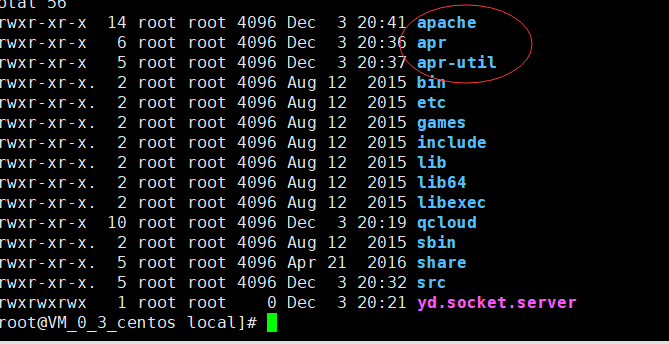
2.再进入 src中 cd src
3.在 src中 下载apr-1.6.5 apr-util-1.6.1 httpd-2.4.37源码包
wget http://archive.apache.org/dist/apr/apr-1.6.5.tar.gz
wget http://archive.apache.org/dist/apr/apr-util-1.6.1.tar.gz
wget http://archive.apache.org/dist/httpd/httpd-2.4.37.tar.gz
4.分别解压它们
tar -zxvf apr-1.6.5.tar.gz
tar -zxvf apr-util-1.6.1.tar.gz
tar -zxvf httpd-2.4.37.tar.gz

5. 先不要急着安装,先确保它所依赖的库是否有,怎样查看软件是否安装(rpm -q xxx),如果没有安装依赖则进行安装(笔者一般安装依赖库直接使用yum 默认安装,这样在软件安装的时候就不需要知道依赖库的安装路径,省去不少麻烦)
需要安装的依赖包有 gcc expat-devel openssl-devel pcre pcre-devel

在src目录下 yum install gcc
yum install -y expat-devel
yum install openssl-devel
yum install -y pcre pcre-devel
yum install pcre-devel
6.接下来就是编译安装了,步骤四步: 下载wget --- 加压tar ------ 编译 make ----安装 make install
进入 apr-1.6.5目录中
cd apr-1.6.5
./configure --prefix=/usr/local/apr/
make && make install
(此时没有报任何error错误)
7. 退出apr-1.6.5目录,进入 apr-util-1.6.1目录中
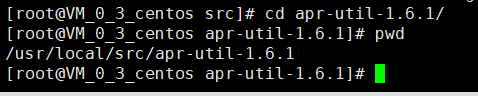
cd apr-util-1.6.1
./configure --prefix=/usr/local/apr-util --with-apr=/usr/local/apr/
make && make install
(此时也没有任何error错误)
8.下面开始对Apache进行安装配置,可以使用
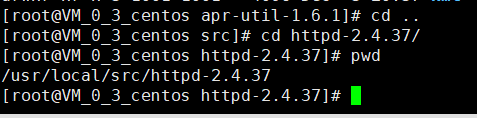
cd httpd-2.4.37
./configure \
--prefix=/usr/local/apache/ \
--with-apr=/usr/local/apr/ \
--with-apr-util=/usr/local/apr-util/ \
--enable-so \
--enable-ssl\
--enable-deflate=shared \
--enable-expires=shared \
--enable-rewrite=shared \
--enable-static-support
检查无误,然后开始编译安装
make && make install
9.等安装完以后进入到安装目录,开启apache服务
cd /usr/local/apache/bin/
./apachectl start
10. 哎,发现报错
AH00558: httpd: Could not reliably determine the server's fully qualified domain name, using localhost.localdomain. Set the 'ServerName' directive globally to suppress this message
额,原来就是配置文件中没有serverName,那就在httpd.conf 中增加 ServerName
11. vim /usr/local/apache/conf/httpd.conf
#增加
ServerName wx.xxxx.club (就是增加域名)
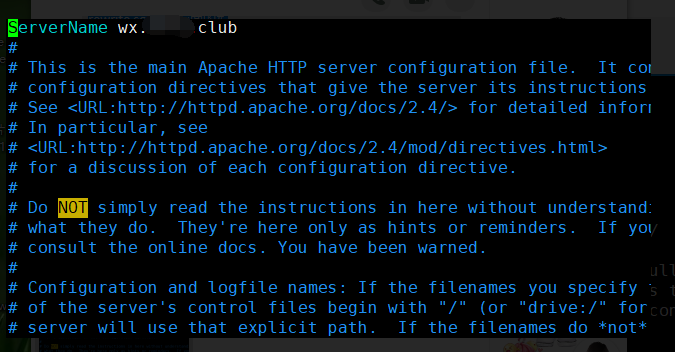
12. 完了之后再重新启动apache,发现一切正常,然后我们访问下看看是否OK

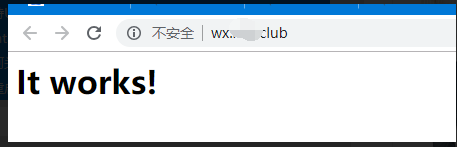
当输入域名时显示it works! ,就表示apache源码安装就此完成,
记住 想要重启apache 必须切换到
cd /usr/local/apache/bin/ 目录
使用
./apachectl start 开启apache
./apachectl restart 重启apache
./apachectl configtest 检测apache配置文件语法是否正确

apache源码安装 转载的更多相关文章
- apache源码安装必须依赖的库apr----/etc/ld.so.conf 文件介绍
Apache所依赖的库,封装了各个系统相关的API等.虽然都是Apache开发的,但是现在最新版本的Apache和APR源码是分开的.要编Apache就必须使用APR. /etc/ld.so.conf ...
- Apache源码安装--httpd-2.2.34
一.下载源码包 二.将源码包移动/usr/src/目录 三.解压源码包,并进入目录:tar -xzvf httpd-2.2.34.tar.gz,cd httpd-2.2.34 四.安装依赖包:yum ...
- centos apache源码安装过程记录
1.下载相关源文件 wget http://mirror.bjtu.edu.cn/apache/httpd/httpd-2.4.18.tar.gzwget http://mirrors.hust.ed ...
- win7 php5.5 apache 源码安装 imagick扩展
最近公司项目有用到php 的imagick,折腾了好长时间才把扩展装上,最主要的就是最新的不一定是最合适的,最开始一直找最新包安装,一直都不成功,经过google了好长时间,终于找到一个有用的,灵机一 ...
- Apache 源码安装
8.20]# make[root@yahoo pcre-8.20]# make install 二.安装apache1.下载httpd-2.4.3.tar.gz,地址是:http://httpd.ap ...
- apache源码安装
1.apr和apr-util,下载地址: http://apr.apache.org/download.cgi yum install gcc yum install libtool yum inst ...
- linux下源码安装apache服务
1.搭建静态网站是,我们只需要搭建apache服务即可满足要求. 例如:如果我再客户端游览器输入地址,他会找到192.168.1.100这个服务器,然后根据端口会找到apache服务器.apache他 ...
- CentOS 6.3下源码安装LAMP(Linux+Apache+Mysql+Php)环境【转载】
本文转载自 园友David_Tang的博客,如有侵权请联系本人及时删除,原文地址: http://www.cnblogs.com/mchina/archive/2012/11/28/2778779.h ...
- 烂泥:php5.6源码安装与apache集成
本文由秀依林枫提供友情赞助,首发于烂泥行天下. apache对php的支持是通过apache的mod_php5模块来支持的,这点与nginx不同.nginx是通过第三方的fastcgi处理器才可以对p ...
随机推荐
- 防抖与节流函数<转>
参考连接:https://www.cnblogs.com/zhuanzhuanfe/p/10633019.html https://blog.csdn.net/Beijiyang999/article ...
- Delphi 适合于文本文件的基本操作
- deep_learning_Function_rnn_cell.BasicLSTMCell
tf.nn.rnn_cell.BasicLSTMCell(n_hidden, forget_bias=1.0, state_is_tuple=True): n_hidden表示神经元的个数,forge ...
- PHP随机产生10个100以内互不相同的正整数按从小到大的顺序输出
<?php //产生1~100的正整数 $numbers = range(1,100); //从1~100中选出10个不重复的整数,并使用函数进行排序 $randNumbers = array_ ...
- linux系统查看某个用户错误登录次数
pam_tally2 --user user_name 查看user_name用户的错误登录次数 pam_tally2 --user user_name --reset 清空user_name用户的错 ...
- osworkflow 入门基础
OSWorkFlow入门指南目的 这篇指导资料的目的是介绍OSWorkflow的所有概念,指导你如何使用它,并且保证你逐步理解OSWorkflow的关键内容. 本指导资料假定你已经部署OSWorkfl ...
- Vue自行封装常用组件-弹出框
使用方法: 1.在父组件中引入"box.vue" //import popUpBox from "./box.vue"; 2.在父组件中注册 popUpBo ...
- url 中的转义字符
# 在使用 wireshark 进行抓包的时候,发现url中有一些特殊字符:%20 之类的. # 搜了一下,我理解的是url中会把特殊字符进行编码,规则是 % + 特殊字符的十六进制数: 比如空格的 ...
- nginx搭建及加固
系统使用的是centos7 Nginx安装及配置 Nginx (engine x) 是一个高性能的HTTP和反向代理web服务器,同时也提供了IMAP/POP3/SMTP服务 安装 我是用的环境是ce ...
- java同步锁实现方法
1.synchronized关键字修饰 当用此关键字修饰方法时, 内置锁会保护整个方法.在调用该方法前,需要获得内置锁,否则就处于阻塞状态 synchronized关键字也可以修饰静态方法,此 ...