
基于官方postgres docker镜像制作自己的镜像
1、Dockerfile
FROM library/postgres

MAINTAINER wenbin.ouyang

#初始化PostgreSQL

ENV POSTGRES_USER root

ENV POSTGRES_PASSWORD root

ENV POSTGRES_DB noah

ADD ./noah_pgsql_init.sql /docker-entrypoint-initdb.d/

#容器运行时监听的端口

EXPOSE
2、构建镜像
docker build -f ./Dockerfile -t oy/pgsql:1.0. .
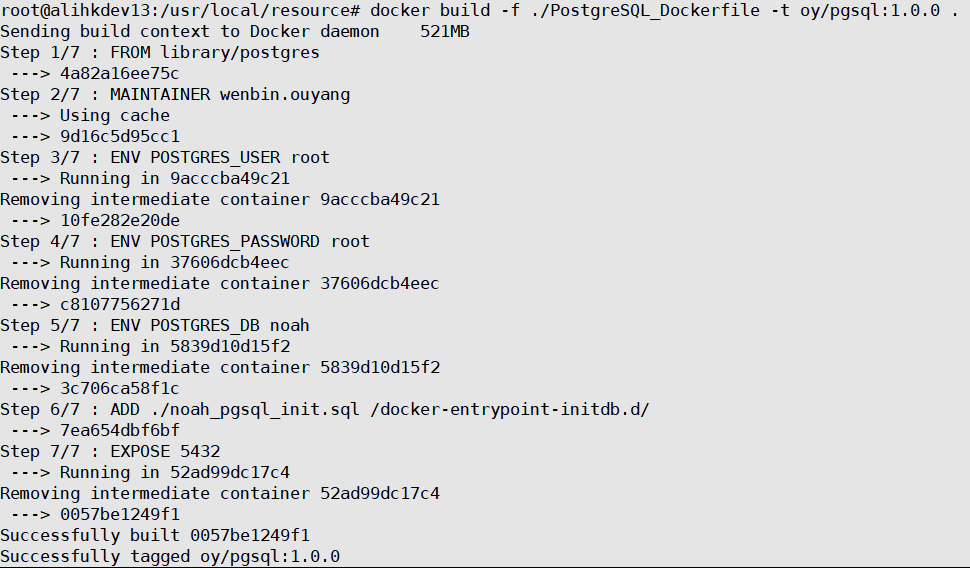
docker images: 查看镜像

3、创建容器
容器中postgresql的数据存放位置:/var/lib/postgresql/data,通过容器添加卷指令将容器数据存放位置映射到宿主机:-v /var/lib/postgresql/oy_PostgreSQL_1.0.0_data:/var/lib/postgresql/data
docker run -it -p : -v /var/lib/postgresql/oy_PostgreSQL_1..0_data:/var/lib/postgresql/data oy/pgsql:1.0.
docker ps: 查看运行的容器

docker exec -it 容器id /bin/bash:进入到容器
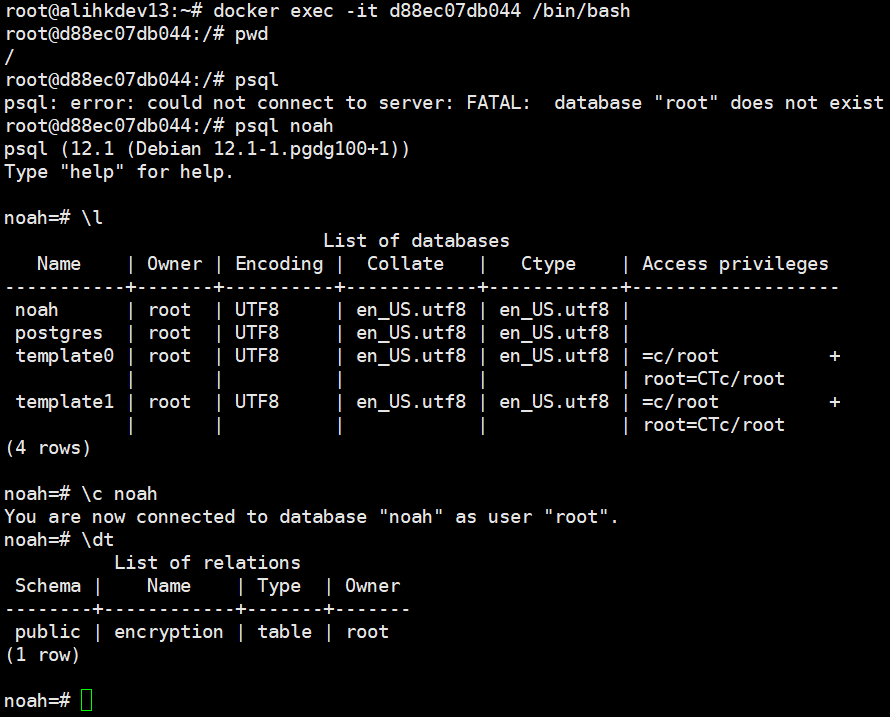
创建容器时的打印:
root@alihkdev13:/usr/local/resource# docker run -it -p 9001:5432 -v /var/lib/postgresql/oy_PostgreSQL_1.0.0_data:/var/lib/postgresql/data oy/pgsql:1.0.0

The files belonging to this database system will be owned by user "postgres".

This user must also own the server process.

The database cluster will be initialized with locale "en_US.utf8".

The default database encoding has accordingly been set to "UTF8".

The default text search configuration will be set to "english".

Data page checksums are disabled.

fixing permissions on existing directory /var/lib/postgresql/data ... ok

creating subdirectories ... ok

selecting dynamic shared memory implementation ... posix

selecting default max_connections ...

selecting default shared_buffers ... 128MB

selecting default time zone ... Etc/UTC

creating configuration files ... ok

running bootstrap script ... ok

performing post-bootstrap initialization ... ok

syncing data to disk ... ok

initdb: warning: enabling "trust" authentication for local connections

You can change this by editing pg_hba.conf or using the option -A, or

--auth-local and --auth-host, the next time you run initdb.

Success. You can now start the database server using:

    pg_ctl -D /var/lib/postgresql/data -l logfile start

waiting for server to start....-- ::08.792 UTC [] LOG:  starting PostgreSQL 12.1 (Debian 12.1-.pgdg100+) on x86_64-pc-linux-gnu, compiled by gcc (Debian 8.3.-) 8.3., -bit

-- ::08.803 UTC [] LOG:  listening on Unix socket "/var/run/postgresql/.s.PGSQL.5432"

-- ::08.861 UTC [] LOG:  database system was shut down at -- :: UTC

-- ::08.881 UTC [] LOG:  database system is ready to accept connections

 done

server started

CREATE DATABASE

/usr/local/bin/docker-entrypoint.sh: running /docker-entrypoint-initdb.d/noah_pgsql_init.sql

psql:/docker-entrypoint-initdb.d/noah_pgsql_init.sql:: NOTICE:  table "encryption" does not exist, skipping

DROP TABLE

CREATE TABLE

COMMENT

COMMENT

COMMENT

COMMENT

COMMENT

COMMENT

COMMENT

-- ::09.409 UTC [] LOG:  received fast shutdown request

waiting for server to shut down....-- ::09.429 UTC [] LOG:  aborting any active transactions

-- ::09.430 UTC [] LOG:  background worker "logical replication launcher" (PID ) exited with exit code

-- ::09.431 UTC [] LOG:  shutting down

-- ::09.526 UTC [] LOG:  database system is shut down

 done

server stopped

PostgreSQL init process complete; ready for start up.

-- ::09.653 UTC [] LOG:  starting PostgreSQL 12.1 (Debian 12.1-.pgdg100+) on x86_64-pc-linux-gnu, compiled by gcc (Debian 8.3.-) 8.3., -bit

-- ::09.653 UTC [] LOG:  listening on IPv4 address "0.0.0.0", port

-- ::09.653 UTC [] LOG:  listening on IPv6 address "::", port

-- ::09.670 UTC [] LOG:  listening on Unix socket "/var/run/postgresql/.s.PGSQL.5432"

-- ::09.718 UTC [] LOG:  database system was shut down at -- :: UTC

-- ::09.737 UTC [] LOG:  database system is ready to accept connections
基于官方postgres docker镜像制作自己的镜像的更多相关文章
- docker commit 制作自定义tomcat镜像
官网下载的tomcat一般存在漏洞,在生产环境中一般是自己下载jdk和tomcat制作成一个新的镜像使用 1.将jdk和tomcat上传 2.生成 c3 容器 3.将jdk和tomcat拷贝到c3容器 ...
- 基于docker的centos:latest镜像制作nginx的镜像
Dockerfile和nginx.repo在同一目录下 先创建nginx.repo [root@localhost nginx]# cat nginx.repo [nginx] name=nginx ...
- Docker下制作一个容器镜像
操作过程描述: (1)先基于centos的镜像启动一个centos容器 (2)在这个容器中安装nginx (3)然后把这个已经安装了nginx的容器制作成一个docker的镜像 操作:docker c ...
- 使用centos官方镜像制作jdk8环境镜像
首先将jdk文件或者tar包放在/var/local路径下 然后Dockerfile中写 # 以 centos7 为基础镜像 FROM centos:latest MAINTAINER chen # ...
- windows 10专业版14393.447 64位纯净无广告版系统 基于官方稳定版1607制作 更新于20161112
系统特点: 447更新日志(Win10 PC一周年更新正式版14393.447 32位/64位更新补丁KB3200970下载 Flash补丁Kb3202790下载): 1.通过网友的反馈,保留了Edg ...
- Docker镜像管理基础与基于容器的镜像制作示例
一.Docker镜像 Docker镜像是启动Docker容器的一个非常重要的组件.Docker各组件之间的关系如图: Docker镜像含有启动容器所需要的文件系统及其内容,因此Docker镜像用于创建 ...
- 测试环境docker化(一)—基于ndp部署模式的docker基础镜像制作
本文来自网易云社区 作者:孙婷婷 背景 我所在测试项目组目前的测试环境只有一套,在项目版本迭代过程中,开发或产品偶尔会在测试环境进行数据校验,QA人数在不断增加,各个人员在负责不同模块工作时也会产生脏 ...
- 基于url-to-pdf-api构建docker镜像,制作一个网页另存服务
基于url-to-pdf-api构建docker镜像,制作一个网页另存服务 业务背景: 需要根据一个url路径打印这个网页的内容 解决方案: 1.使用wkhtml2pdf 2.使用puppeteer ...
- 为openstack制作CoreOS虚拟机镜像(基于CoreOS官方提供镜像)
OpenStack源码交流群: 538850354 1.下载CoreOS镜像(633.1.0版本) CoreOS官网已经有openstack使用的虚拟机镜像,可以直接下载,然后进行修改 http:// ...
随机推荐
- "alert(1) to win" writeup
地址:http://escape.alf.nu/ level 0: 注意补全,");alert(1)// level 1: 通过添加反斜线使用来转义的反斜线变为字符,\");ale ...
- C关于字符串操作的库函数实现总结
常用C关于字符串操作的库函数实现: //获取字符串长度 int Strlen(const char* s) { assert(s != NULL); ; while (*s++ != '\0') { ...
- 使用CompletableFuture进行异步任务编排
1.JDK5引入了Future进行异步任务的处理,Future 的接口主要方法有以下几个: (1)boolean cancel (boolean mayInterruptIfRunning) 取消任务 ...
- python 学习笔记三 (函数)
1.把函数视为对象 def factorial(n): '''return n!''' return 1 if n < 2 else n*factorial(n-1) print(factori ...
- springboot 用redis缓存整合spring cache注解,使用Json序列化和反序列化。
springboot下用cache注解整合redis并使用json序列化反序列化. cache注解整合redis 最近发现spring的注解用起来真的是很方便.随即产生了能不能吧spring注解使用r ...
- C++11智能指针原理和实现
一.智能指针起因 在C++中,动态内存的管理是由程序员自己申请和释放的,用一对运算符完成:new和delete. new:在动态内存中为对象分配一块空间并返回一个指向该对象的指针: delete:指向 ...
- 2019CCPC-江西省赛 -A Cotree (树形DP,求树上一点到其他点的距离之和)
我是傻逼我是傻逼 #include<bits/stdc++.h> using namespace std; const int maxn=4e5+50; typedef long long ...
- sublime集成MinGW,打造C/C++开发环境
MinGW是是将GCC编译器和GNU Binutils移植到Win32平台下的产物,包括一系列头文件(Win32API).库和可执行文件.MinGW是从Cygwin(1.3.3版)基础上发展而来.GC ...
- mongodb 添加用户
use admindb.createUser({ user:"admin", pwd:"abc123456", roles:[{role:"root& ...
- python 运算和流程控制
写在之前 今天突发奇想,想要弄一个微信自动抢红包的程序,首先去百度这个,找到了有两种方法 一种是安装「pocoui」这个第三方库,但没有给出详细代,我就没有使用这个方法. 我用使用的是第二种借助「Ai ...