
jq完成省市区街道四级联动
之前看的省市区街道四级联动的插件,感觉和公司要求的有些不符合,就自己写了一个
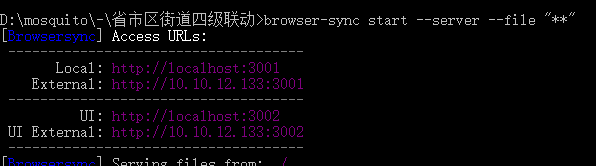
因为要读取本地json文件,所以要跑下服务器
下载browser-sync
然后在项目目录下运行browser-sync start --server --file "**"
html
    <div>

        <div class="field">

            地址

        </div>

        <div id="area" class="field-value">

            <p>

                <select name="province">

                    <option value=""> - 请选择 - </option>

                </select>

                <select name="city" disabled>

                    <option value=""> - 请选择 - </option>

                </select>

                <select name="area" disabled>

                    <option value=""> - 请选择 - </option>

                </select>

                <select name="town" disabled>

                    <option value=""> - 请选择 - </option>

                </select>

            </p>

            <!-- <p id="place">请选择地区</p> -->

        </div>

    </div>
css
        .field-value {

            float: left;

        }

        .field-value select {

            width: 115.5px;

            height: 35px;

            border: 1px solid #dddddd;

            font-size: 14px;

        }

        .field-value option {

            width: 117.5px;

            height: 35px;

        }
js
$(document).ready(function () {

    var $this = $("#area");

    var $province = $this.find('select[name="province"]'),

        $city = $this.find('select[name="city"]'),

        $area = $this.find('select[name="area"]'),

        $town = $this.find('select[name="town"]');

    $.getJSON("./js/city.json", function (result) {

        console.log(result)

        if (result.rc == 0) {

            var formatProvince = [], provinceField = [], currentProvince = null, cityField = [], currentCity = null, areaField = [], currentArea = null, townField = [];

            formatProvince = result.data.province_list;

            formatProvince.map(function (value, index) {

                provinceField.push(value.area_name);

            })

            var format = {

                province: function () {

                    $province.empty();

                    $province.append('<option value=""> - 请选择 - </option>');

                    $province.prop('disabled', provinceField.length === 0);

                    for (var i in provinceField) {

                        $province.append('<option value="' + i + '" data-code="' + i + '">' + provinceField[i] + '</option>');

                    }

                    this.city();

                },

                city: function () {

                    $city.empty();

                    $city.append('<option value=""> - 请选择 - </option>');

                    $city.prop('disabled', cityField.length === 0);

                    for (var i in cityField) {

                        $city.append('<option value="' + i + '" data-code="' + i + '">' + cityField[i] + '</option>');

                    }

                    this.area();

                },

                area: function () {

                    $area.empty();

                    $area.append('<option value=""> - 请选择 - </option>');

                    $area.prop('disabled', areaField.length === 0);

                    for (var i in areaField) {

                        $area.append('<option value="' + i + '" data-code="' + i + '">' + areaField[i] + '</option>');

                    }

                    this.town();

                },

                town: function () {

                    $town.empty();

                    $town.append('<option value=""> - 请选择 - </option>');

                    $town.prop('disabled', townField.length === 0);

                    for (var i in townField) {

                        $town.append('<option value="' + i + '" data-code="' + i + '">' + townField[i] + '</option>');

                    }

                }

            };

            format.province();

            //事件绑定

            $province.on('change', function () {

                currentProvince = null, cityField = [], cityId = 0, currentCity = null, areaField = [], areaId = 0, currentArea = null, townField = [], townId = 0;

                currentProvince = formatProvince[$province.find('option:selected').attr('data-code')]

                provinceId = currentProvince.area_id;

                // cityId = currentProvince.city_list[0].area_id;

                currentProvince.city_list.map(function (value, index) {

                    cityField.push(value.area_name);

                });

                format.city();

            });

            $city.on('change', function () {

                currentCity = null, areaField = [], areaId = 0, currentArea = null, townField = [], townId = 0;

                currentCity = currentProvince.city_list[$city.find('option:selected').attr('data-code')]

                cityId = currentCity.area_id;

                // areaId=currentCity.county_list[0].area_id;

                currentCity.county_list.map(function (value, index) {

                    areaField.push(value.area_name);

                });

                format.area();

            });

            $area.on('change', function () {

                areaId = 0, currentArea = null, townField = [], townId = 0;

                currentArea = currentCity.county_list[$area.find('option:selected').attr('data-code')]

                areaId = currentArea.area_id;

                // townId =currentArea.town_list[0].area_id;

                currentArea.town_list.map(function (value, index) {

                    townField.push(value.area_name);

                });

                format.town();

                // console.log(townField)

            });

            $town.on('change', function () {

                townId = currentArea.town_list[$town.find('option:selected').attr('data-code')].area_id;

            })

        }

    })

});
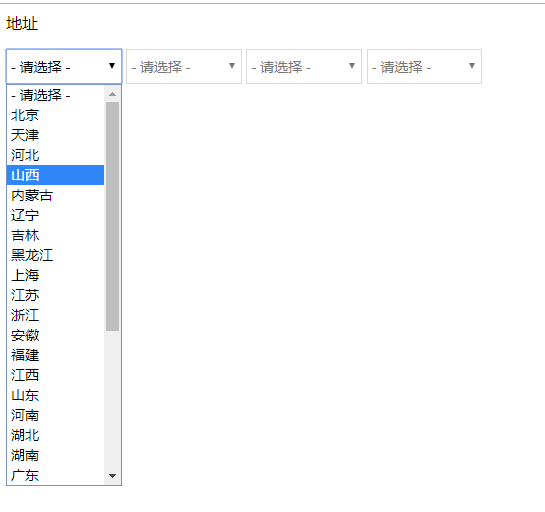
运行结果
jq完成省市区街道四级联动的更多相关文章
- vue mint-ui 实现省市区街道4级联动(仿淘宝京东收货地址4级联动)
demo及源码地址 https://github.com/artiely/citypicker 先去下载一个“省份.城市.区县.乡镇” 四级联动数据,然后 引入 import { Picker } f ...
- JQuery实现省市区的三级联动
JQuery实现省市区的三级联动 <!DOCTYPE html PUBLIC "-//W3C//DTD HTML 4.01 Transitional//EN" "h ...
- JavaScript实现省市区的三级联动
JavaScript实现省市区的三级联动 <!DOCTYPE html PUBLIC "-//W3C//DTD HTML 4.01 Transitional//EN" &qu ...
- 省市区(县)三级联动代码(js 数据源)
ylbtech-JavaScript-Utility:省市区(县)三级联动代码(js 数据源) 省市区(县)三级联动代码(js 数据源) 1.A,源代码(Source Code)返回顶部 1.A.1, ...
- C# 使用winForm的TreeView显示中国城镇四级联动
直接上代码吧,这里 MySql.Data.MySqlClient;需要到mysql官网下载mysql-connector-net-6.9.8-noinstall.zip 访问密码 6073 usi ...
- 中国省市区地址三级联动jQuery插件 案例下载
中国省市区地址三级联动jQuery插件 案例下载 distpicker 是一款可以实现中国省市区地址三级联动jQuery插件.它使用简单,简单设置即可完成中国省市区地址联动效果. 安装 可以通过npm ...
- js之省市区(县)三级联动效果
省市区(县)三级联动效果,是我们软件开发比较常用的,特别是对一些crm,erp之类,当然也包括其他的后台管理系统,基本都涉及到,今天贴出这个常用的,方便个人复用和大家使用 <!DOCTYPE h ...
- 中国省市区地址三级联动插件---jQuery Distpicker
插件描述:distpicker是一款可以实现中国省市区地址三级联动jQuery插件.它使用简单,简单设置即可完成中国省市区地址联动效果. [官网]https://fengyuanchen.github ...
- discuz 自带的地区四级联动调用方法
首先,DZ提供了专门处理地区信息的函数,在source/function/function_profile.php(第14行)文件中:function profile_setting(){}那么,我们 ...
随机推荐
- IDEA怎么关闭暂时不用的工程
一.隐藏 二.隐藏之后显示显示模块 原文地址:https://blog.csdn.net/woshilovetg/article/details/82774437
- JavaEE--EL表达式
EL(Expression Language)是为了使JSP写起来更加简单.表达式语言的灵感来自于 ECMAScript 和 XPath 表达式语言,它提供了在 JSP 中简化表达式的方法,使得用户对 ...
- js自执行函数
5.1对于函数表达式,在后面加括号即可以让函数立即执行:例如下面这个函数,至于为什么加了括号就可以立即执行,我们可以这么理解,就是像fn1():这样写的话,函数 可以立即执行是没问题的,我们在经常会用 ...
- HTML-复杂动画和变形
1.复杂动画 (1)涉及到的属性: animation-name:动画名称: animation-duration:单次动画总时长: animation-timing-function:时间函数: a ...
- vue项目报错1 Vue is a constructor and should be called with the `new` keyword && jquery.js?eedf:3850 Uncaught TypeError: this._init is not a function...
Vue is a constructor and should be called with the `new` keyword Uncaught TypeError: this._init is n ...
- vue与angular 区别
1.vue的双向数据绑定是基于 Es5中的getter和setter来实现的,而angular而是由自己实现的一套模板编译规则,需要进行 ‘脏’ 检查,vue则不需要,因此,vue性能上更高一些,但是 ...
- iconv_close - 关闭字符转换描述符
总览 (SYNOPSIS) #include <iconv.h> int iconv_close (iconv_t cd); 描述 (DESCRIPTION) iconv_close 函数 ...
- Codeforces 989 P循环节01构造 ABCD连通块构造 思维对云遮月参考系坐标轴转换
A 直接判存不存在连续的三个包含A,B,C就行 /*Huyyt*/ #include<bits/stdc++.h> #define mem(a,b) memset(a,b,sizeof(a ...
- nginx的反向代理和配置
最近有打算研读nginx源代码,看到网上介绍nginx可以作为一个反向代理服务器完成负载均衡.所以搜罗了一些关于反向代理服务器的内容,整理综合. 一 概述 反向代理(Reverse Proxy)方式 ...
- bootstrap-table给每一行数据添加按钮,并绑定事件
https://blog.csdn.net/mht1829/article/details/72633100 https://blog.csdn.net/qq_39215166/article/det ...