
netty学习第5章 netty整合websocket
在学完netty基础部分后,你可能很难想到它的使用场景,本章就介绍一个netty的使用场景--websocket协议的应用。
WebSocket是一种在单个TCP连接上进行全双工通信的协议。WebSocket使得客户端和服务器之间的数据交换变得更加简单,允许服务端主动向客户端推送数据。在WebSocket API中,浏览器和服务器只需要完成一次握手,两者之间就直接可以创建持久性的连接,并进行双向数据传输。
其次websocke支持很多种数据传输,如:二进制流、文件、文本信息等等。
一、服务端模块
1.引入maven与启动类
本文是基于spring boot 2.0,netty4.0开发的,这里只展示netty的包
        <dependency>

            <groupId>io.netty</groupId>

            <artifactId>netty-all</artifactId>

            <version>4.1.25.Final</version>

        </dependency>
因为是服务端,所以需要在spring boot自带的启动类中同时启动netty服务
/**

 * 声明CommandLineRunner接口,实现run方法,就能给启动项目同时启动netty服务

 */

@SpringBootApplication

public class ThemApplication implements CommandLineRunner {

    /**

     * netty服务

     */

    @Autowired

    ServerByNetty serverByNetty;

    public static void main(String[] args) {

        SpringApplication.run(ThemApplication.class, args);

    }

    @Override

    public void run(String... args) throws Exception {

        serverByNetty.startServer();

    }

}
2.netty服务端类
/**

 * 基于websocket的服务端代码

 */

@Configuration

public class ServerByNetty {

    /**

     * 服务端启动类

     * @throws Exception

     */

    public void startServer() throws Exception {

        // netty基本操作,两个线程组

        EventLoopGroup bossGroup = new NioEventLoopGroup();

        EventLoopGroup wokerGroup = new NioEventLoopGroup();

        try{

            //netty的启动类

            ServerBootstrap serverBootstrap = new ServerBootstrap();

            serverBootstrap.group(bossGroup,wokerGroup).channel(NioServerSocketChannel.class)

                    //记录日志的handler,netty自带的

                    .handler(new LoggingHandler(LogLevel.INFO))

                    .option(ChannelOption.SO_KEEPALIVE,true)

                    .option(ChannelOption.SO_BACKLOG,1024*1024*10)

                    //设置handler

                    .childHandler(new ChannelInitializer< SocketChannel >(){

                        @Override

      protected void initChannel(SocketChannel socketChannel) throws Exception {

         ChannelPipeline pipeline = socketChannel.pipeline();

   //websocket协议本身是基于Http协议的,所以需要Http解码器

  pipeline.addLast("http-codec",new HttpServerCodec());

  //以块的方式来写的处理器

  pipeline.addLast("http-chunked",new ChunkedWriteHandler());

  //netty是基于分段请求的,HttpObjectAggregator的作用是将请求分段再聚合,参数是聚合字节的最大长度

  pipeline.addLast("aggregator",new HttpObjectAggregator(1024*1024*1024));

  //这个是websocket的handler,是netty提供的,也可以自定义,建议就用默认的

  pipeline.addLast(new WebSocketServerProtocolHandler("/hello",null,true,65535));

  //自定义的handler,处理服务端传来的消息

  pipeline.addLast(new WebSocketHandle());

                        }

                    });

            ChannelFuture channelFuture = serverBootstrap.bind(new InetSocketAddress(8899)).sync();

            channelFuture.channel().closeFuture().sync();

        }finally {

            bossGroup.shutdownGracefully();

            wokerGroup.shutdownGracefully();

        }

    }

}
在服务端类中需要注意的是使用的handler,一共有5个,前面三个都是HTTP的编解码器,WebSocketServerProtocolHandler则是websocket的handler,这个的作用主要是用来解决HTTP握手等问题。虽然可以自己实现,但是推荐采用这个默认的handler,它能够解决很多未知的问题。
3.自定义的业务处理handler
这里最主要的地方就是消息推送,其实只要你把IP存起来,发送消息就会非常简单。
/**

 * 自定义的handler类

 */

@Configuration

public class WebSocketHandle extends SimpleChannelInboundHandler<Object> {

    //客户端组

    public  static ChannelGroup channelGroup;

    static {

        channelGroup=new DefaultChannelGroup(GlobalEventExecutor.INSTANCE);

    }

    //存储ip和channel的容器

    private static ConcurrentMap<String, Channel> channelMap = new ConcurrentHashMap<>();

    /**

     * Handler活跃状态,表示连接成功

     *

     * @param ctx

     * @throws Exception

     */

    @Override

    public void channelActive(ChannelHandlerContext ctx) throws Exception {

        System.out.println("与客户端连接成功");

        channelGroup.add(ctx.channel());

    }

    /**

     *

     * @param ctx

     * @param msg

     * @throws Exception

     */

    protected void channelRead0(ChannelHandlerContext ctx, Object msg) throws Exception {

        //文本消息

        if (msg instanceof TextWebSocketFrame) {

            //第一次连接成功后,给客户端发送消息

            sendMessageAll();

            //获取当前channel绑定的IP地址

            InetSocketAddress ipSocket = (InetSocketAddress)ctx.channel().remoteAddress();

            String address = ipSocket.getAddress().getHostAddress();

            System.out.println("address为:"+address);

            //将IP和channel的关系保存

            if (!channelMap.containsKey(address)){

                channelMap.put(address,ctx.channel());

            }

        }

        //二进制消息

        if (msg instanceof BinaryWebSocketFrame) {

            System.out.println("收到二进制消息:" + ((BinaryWebSocketFrame) msg).content().readableBytes());

            BinaryWebSocketFrame binaryWebSocketFrame = new BinaryWebSocketFrame(Unpooled.buffer().writeBytes("hello".getBytes()));

            //给客户端发送的消息

            ctx.channel().writeAndFlush(binaryWebSocketFrame);

        }

        //ping消息

        if (msg instanceof PongWebSocketFrame) {

            System.out.println("客户端ping成功");

        }

        //关闭消息

        if (msg instanceof CloseWebSocketFrame) {

            System.out.println("客户端关闭,通道关闭");

            Channel channel = ctx.channel();

            channel.close();

        }

    }

    /**

     * 未注册状态

     *

     * @param ctx

     * @throws Exception

     */

    @Override

    public void channelUnregistered(ChannelHandlerContext ctx) throws Exception {

        System.out.println("等待连接");

    }

    /**

     * 非活跃状态,没有连接远程主机的时候。

     *

     * @param ctx

     * @throws Exception

     */

    @Override

    public void channelInactive(ChannelHandlerContext ctx) throws Exception {

        System.out.println("客户端关闭");

        channelGroup.remove(ctx.channel());

    }

    /**

     * 异常处理

     * @param ctx

     * @param cause

     * @throws Exception

     */

    @Override

    public void exceptionCaught(ChannelHandlerContext ctx, Throwable cause) throws Exception {

        System.out.println("连接异常:"+cause.getMessage());

        ctx.close();

    }

    /**

     * 给指定用户发内容

     * 后续可以掉这个方法推送消息给客户端

     */

    public void  sendMessage(String address){

        Channel channel=channelMap.get(address);

        String message="你好,这是指定消息发送";

        channel.writeAndFlush(new TextWebSocketFrame(message));

    }

    /**

     * 群发消息

     */

    public void  sendMessageAll(){

        String meesage="这是群发信息";

        channelGroup.writeAndFlush(new TextWebSocketFrame(meesage));

    }

}
因为我们采用了websocket自带的handler,所以不需要我自己再去解决HTTP握手的问题,我们只需要对客户端发送过来的数据进行转换和业务处理。
至此,服务端的代码就已经完成了。
二、客户端模块
客户端模块中,就可以有多种实现了。可以采用JS实现网页版的聊天工具,也可以在安卓端实现客户端。这里使用的java实现一个客户端。
1.客户端类
/**

 * 基于websocket的netty客户端

 *

 */

public class ClientByNetty {

    public static void main(String[] args) throws Exception {

        //netty基本操作,线程组

        EventLoopGroup group = new NioEventLoopGroup();

        //netty基本操作,启动类

        Bootstrap boot = new Bootstrap();

        boot.option(ChannelOption.SO_KEEPALIVE, true)

                .option(ChannelOption.TCP_NODELAY, true)

                .group(group)

                .handler(new LoggingHandler(LogLevel.INFO))

                .channel(NioSocketChannel.class)

                .handler(new ChannelInitializer<SocketChannel>() {

                    protected void initChannel(SocketChannel socketChannel) throws Exception {

                        ChannelPipeline pipeline = socketChannel.pipeline();

                        pipeline.addLast("http-codec",new HttpClientCodec());

                        pipeline.addLast("aggregator",new HttpObjectAggregator(1024*1024*10));

                        pipeline.addLast("hookedHandler", new WebSocketClientHandler());

                    }

                });

        //websocke连接的地址,/hello是因为在服务端的websockethandler设置的

        URI websocketURI = new URI("ws://localhost:8899/hello");

        HttpHeaders httpHeaders = new DefaultHttpHeaders();

        //进行握手

        WebSocketClientHandshaker handshaker = WebSocketClientHandshakerFactory.newHandshaker(websocketURI, WebSocketVersion.V13, (String) null, true, httpHeaders);

       //客户端与服务端连接的通道,final修饰表示只会有一个

        final Channel channel = boot.connect(websocketURI.getHost(), websocketURI.getPort()).sync().channel();

        WebSocketClientHandler handler = (WebSocketClientHandler) channel.pipeline().get("hookedHandler");

        handler.setHandshaker(handshaker);

        handshaker.handshake(channel);

        //阻塞等待是否握手成功

        handler.handshakeFuture().sync();

        System.out.println("握手成功");

        //给服务端发送的内容,如果客户端与服务端连接成功后,可以多次掉用这个方法发送消息

        sengMessage(channel);

    }

    public static void sengMessage(Channel channel){

        //发送的内容,是一个文本格式的内容

        String putMessage="你好,我是客户端";

        TextWebSocketFrame frame = new TextWebSocketFrame(putMessage);

        channel.writeAndFlush(frame).addListener(new ChannelFutureListener() {

            public void operationComplete(ChannelFuture channelFuture) throws Exception {

                if (channelFuture.isSuccess()) {

                    System.out.println("消息发送成功,发送的消息是:"+putMessage);

                } else {

                    System.out.println("消息发送失败 " + channelFuture.cause().getMessage());

                }

            }

        });

    }

}
客户端代码中需要注意很多地方:
(1) 客户端的http编解码器是HttpClientCodec与服务端是不一样的,服务端是HttpServerCodec
(2) URI中的地址用的websocket的协议 ws:,而/hello则是服务端设置的通道地址,类似于HTTP的接口地址
(3) 当客户端与服务端连接成功后,就可以通过调用sengMessage方法给服务端发送消息,只要这个连接没有断开就能够一直发
(4) 调用发送消息的方法,一定要等待握手成功后发送
2.客户端的业务handler
public class WebSocketClientHandler extends SimpleChannelInboundHandler<Object> {

    //握手的状态信息

    WebSocketClientHandshaker handshaker;

    //netty自带的异步处理

    ChannelPromise handshakeFuture;

    @Override

    protected void channelRead0(ChannelHandlerContext ctx, Object msg) throws Exception {

        System.out.println("当前握手的状态"+this.handshaker.isHandshakeComplete());

        Channel ch = ctx.channel();

        FullHttpResponse response;

        //进行握手操作

        if (!this.handshaker.isHandshakeComplete()) {

            try {

                response = (FullHttpResponse)msg;

                //握手协议返回,设置结束握手

                this.handshaker.finishHandshake(ch, response);

                //设置成功

                this.handshakeFuture.setSuccess();

                System.out.println("服务端的消息"+response.headers());

            } catch (WebSocketHandshakeException var7) {

                FullHttpResponse res = (FullHttpResponse)msg;

                String errorMsg = String.format("握手失败,status:%s,reason:%s", res.status(), res.content().toString(CharsetUtil.UTF_8));

                this.handshakeFuture.setFailure(new Exception(errorMsg));

            }

        } else if (msg instanceof FullHttpResponse) {

            response = (FullHttpResponse)msg;

            throw new IllegalStateException("Unexpected FullHttpResponse (getStatus=" + response.status() + ", content=" + response.content().toString(CharsetUtil.UTF_8) + ')');

        } else {

            //接收服务端的消息

            WebSocketFrame frame = (WebSocketFrame)msg;

            //文本信息

            if (frame instanceof TextWebSocketFrame) {

                TextWebSocketFrame textFrame = (TextWebSocketFrame)frame;

                System.out.println("客户端接收的消息是:"+textFrame.text());

            }

            //二进制信息

            if (frame instanceof BinaryWebSocketFrame) {

                BinaryWebSocketFrame binFrame = (BinaryWebSocketFrame)frame;

                System.out.println("BinaryWebSocketFrame");

            }

            //ping信息

            if (frame instanceof PongWebSocketFrame) {

                System.out.println("WebSocket Client received pong");

            }

            //关闭消息

            if (frame instanceof CloseWebSocketFrame) {

                System.out.println("receive close frame");

                ch.close();

            }

        }

    }

    /**

     * Handler活跃状态,表示连接成功

     *

     * @param ctx

     * @throws Exception

     */

    @Override

    public void channelActive(ChannelHandlerContext ctx) throws Exception {

        System.out.println("与服务端连接成功");

    }

    /**

     * 非活跃状态,没有连接远程主机的时候。

     *

     * @param ctx

     * @throws Exception

     */

    @Override

    public void channelInactive(ChannelHandlerContext ctx) throws Exception {

        System.out.println("主机关闭");

    }

    /**

     * 异常处理

     * @param ctx

     * @param cause

     * @throws Exception

     */

    public void exceptionCaught(ChannelHandlerContext ctx, Throwable cause) throws Exception {

        System.out.println("连接异常:"+cause.getMessage());

        ctx.close();

    }

    public void handlerAdded(ChannelHandlerContext ctx) {

        this.handshakeFuture = ctx.newPromise();

    }

    public WebSocketClientHandshaker getHandshaker() {

        return handshaker;

    }

    public void setHandshaker(WebSocketClientHandshaker handshaker) {

        this.handshaker = handshaker;

    }

    public ChannelPromise getHandshakeFuture() {

        return handshakeFuture;

    }

    public void setHandshakeFuture(ChannelPromise handshakeFuture) {

        this.handshakeFuture = handshakeFuture;

    }

    public ChannelFuture handshakeFuture() {

        return this.handshakeFuture;

    }

}
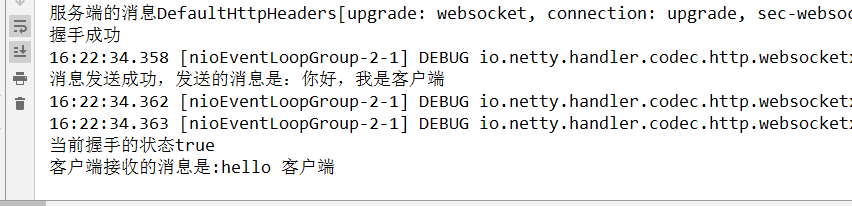
在handler中,我们可以验证握手是否成功,就使用handshaker.isHandshakeComplete()的方法,如果false就表示握手失败。如果是握手失败客户端就无法接收服务端的消息,所以如果当你要验证消息是否成功到达客户端的时候,可以采用这个方法。
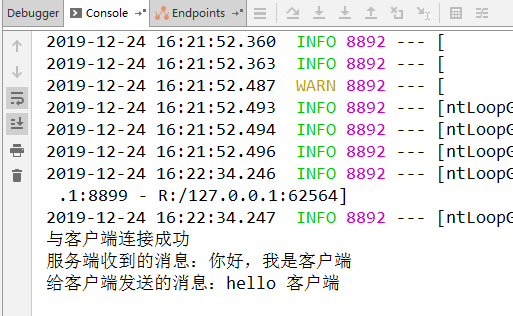
运行结果,先运行服务端,再运行客户端:
服务端界面
客户端界面:
netty学习第5章 netty整合websocket的更多相关文章
- Netty学习第四章 spring boot整合netty的使用
现在大多数项目都是基于spring boot进行开发,所以我们以spring boot作为开发框架来使用netty.使用spring boot的一个好处就是能给将netty的业务拆分出来,并通过spr ...
- Netty学习摘记 —— 深入了解Netty核心组件
本文参考 本篇文章是对<Netty In Action>一书第三章"Netty的组件和设计"的学习摘记,主要内容为Channel.EventLoop.ChannelFu ...
- Netty学习摘记 —— 初步认识Netty核心组件
本文参考 我在博客内关于"Netty学习摘记"的系列文章主要是对<Netty in action>一书的学习摘记,文章中的代码也大多来自此书的github仓库,加上了一 ...
- Netty 学习 一、初识Netty【原创】
在过去几年的工作和学习中,比较关注高层次的应用开发,对底层探究较少.实现Web应用的开发,主要依赖Tomcat.Apache等应用服务器,程序员无需了解底层协议,但同样限制了应用的性能和效率.现在开始 ...
- Netty学习第三章 Linux网络编程使用的I/O模型
一.同步阻塞IO:blocking IO(BIO) 1.过程分析: 当进程进行系统调用时,内核就会去准备数据,当数据准备好后就复制数据到内核缓冲器,复制完成后将数据拷贝到用户进程内存,整个过程都是阻塞 ...
- Netty学习笔记之一(Netty解析简单的Http Post Json 请求)
一,HTTP解码器可能会将一个HTTP请求解析成多个消息对象. ch.pipeline().addLast(new HttpServerCodec()); ch.pipeline().addLast( ...
- Netty学习(二)-Helloworld Netty
这一节我们来讲解Netty,使用Netty之前我们先了解一下Netty能做什么,无为而学,岂不是白费力气! 1.使用Netty能够做什么 开发异步.非阻塞的TCP网络应用程序: 开发异步.非阻塞的UD ...
- Netty学习笔记(五) 使用Netty构建静态网页服务器
昨天在继续完善基于Netty构建的聊天室系统的过程中,发现了一个有意思的知识点,特此拿来做一个简单的静态网页服务器,好好的玩一玩Netty. 但是不管怎么说利用netty实现各种功能的流程都是类似的 ...
- Netty学习第一节Netty的总体概况
一.Netty简介 什么是Netty? 1.高性能事件驱动,异步非阻塞的IO加载开源框架. 它是由JBoss提供,用于建立TCP等底层链接.基于Netty可以建立高性能的HTTP服务器,快速开发高性能 ...
随机推荐
- idea报错及解决
<b>root project 'test2': Web Facets/Artifacts will not be configured properly</b>Details ...
- jenkisn Pipeline的流水线发布,自动化部署
创建一个流水线job,这只是个简单的流水线发布教程,写的不好~
- 交换机安全学习笔记 第四章 VLAN
Trunk 口 思科称为:native VLAN 华为称为:PVID 说白了就是Trunk端口本身所属的VLAN,因为,Trunk端口要"透传"多个VLAN的流量,其本 ...
- Linux上面执行 Windows 命令(比如 重启服务)的简单方法
1. 首先 基础是:openssh 还有 expect的包 2. 方法 安装openssh 转帖来自: https://www.jianshu.com/p/6e5bc39d386e 最近项目在搞Jen ...
- vue.js之过渡动画
vue提供了一个封装动画的组件 <transition name="tr"></transition>,将需要执行动画的元素包裹在该组件中,在通过css修改 ...
- [..net core]4.入口,Main方法 及InProcess
通常控件台程序都有一个main方法, public class Program { public static void Main(string[] args) { CreateWebHostBuil ...
- RS chap1:好的推荐系统
一.什么是推荐系统 1.个性化推荐系统:从庞大的电影库中找几部符合你兴趣的电影供你选择. 2.推荐系统是帮助用户快速发现有用信息的工具.和搜索引擎不同的是,推荐系统不需要用户提供明确的需求,而是通过分 ...
- js对时间戳的处理 获取时间,昨天,今天,明天,时间不同格式
1.获取昨天,今天,明天的时间 //昨天的时间 var day1 = new Date(); day1.setTime(day1.getTime()-24*60*60*1000); var s1 = ...
- cx_Oracle 操作oracle数据库
cx_Oracle 操作oracle数据库 class MyOracle(): def __init__(self, host_name="ip", port=1521, sid= ...
- 日语能力考试N2级必备外来语
日语能力考试N2级必备外来语 ア行外来语アンテナ:(antenna) 天线インタビュー :(interview) 采访,访谈ウイルス:(virus ) 病 ...