
Centos7安装Redis3.X
本文只是简单搭建Redis,为了整合ELK用,后面会详细写。
Redis:REmote DIctionary Server(远程字典服务器)
是完全开源免费的,用C语言编写的,遵守BSD协议,是一个高性能的(key/value)分布式内存数据库,基于内存运行并支持持久化的NoSQL数据库,是当前最热门的NoSql数据库之一,也被人们称为数据结构服务器
Redis 与其他 key - value 缓存产品有以下三个特点
1:Redis支持数据的持久化,可以将内存中的数据保持在磁盘中,重启的时候可以再次加载进行使用
2:Redis不仅仅支持简单的key-value类型的数据,同时还提供list,set,zset,hash等数据结构的存储
3:Redis支持数据的备份,即master-slave模式的数据备份
Redis的功能
内存存储和持久化:redis支持异步将内存中的数据写到硬盘上,同时不影响继续服务。
取最新N个数据的操作,如:可以将最新的10条评论的ID放在Redis的List集合里面。
模拟类似于HttpSession这种需要设定过期时间的功能。
发布、订阅消息系统。
定时器、计数器。
上传压缩包,并解压

安装GCC
gcc是linux下的一个编译程序,是C程序的编译工具。
GCC(GNU Compiler Collection) 是 GNU(GNU's Not Unix) 计划提供的编译器家族,它能够支持 C, C++, Objective-C, Fortran, Java 和 Ada 等等程序设计语言前端,同时能够运行在 x86, x86-64, IA-64, PowerPC, SPARC 和 Alpha 等等几乎目前所有的硬件平台上。鉴于这些特征,以及 GCC 编译代码的高效性,使得 GCC 成为绝大多数自由软件开发编译的首选工具。虽然对于程序员们来说,编译器只是一个工具,除了开发和维护人员,很少有人关注编译器的发展,但是 GCC 的影响力是如此之大,它的性能提升甚至有望改善所有的自由软件的运行效率,同时它的内部结构的变化也体现出现代编译器发展的新特征。
[root@topcheer redis-3.0.4]# yum install gcc-c++

已加载插件:fastestmirror, langpacks

Loading mirror speeds from cached hostfile

epel/x86_64/metalink                                                                                                 | 9.4 kB  00:00:00

 * base: mirrors.aliyun.com

 * epel: mirrors.aliyun.com

 * extras: mirrors.aliyun.com

 * updates: mirrors.cn99.com

base                                                                                                                 | 3.6 kB  00:00:00

epel                                                                                                                 | 5.3 kB  00:00:00

extras                                                                                                               | 2.9 kB  00:00:00

gitlab_gitlab-ce/x86_64/signature                                                                                    |  836 B  00:00:00

gitlab_gitlab-ce/x86_64/signature                                                                                    | 1.0 kB  00:00:00 !!!

gitlab_gitlab-ce-source/signature                                                                                    |  836 B  00:00:00

gitlab_gitlab-ce-source/signature                                                                                    |  951 B  00:00:00 !!!

updates                                                                                                              | 2.9 kB  00:00:00

软件包 gcc-c++-4.8.5-39.el7.x86_64 已安装并且是最新版本

无须任何处理
执行make
[root@topcheer redis-3.0.4]# make

cd src && make all

make[1]: 进入目录“/mnt/redis-3.0.4/src”

rm -rf redis-server redis-sentinel redis-cli redis-benchmark redis-check-dump redis-check-aof *.o *.gcda *.gcno *.gcov redis.info lcov-html

(cd ../deps && make distclean)

make[2]: 进入目录“/mnt/redis-3.0.4/deps”

(cd hiredis && make clean) > /dev/null || true

(cd linenoise && make clean) > /dev/null || true

(cd lua && make clean) > /dev/null || true

(cd jemalloc && [ -f Makefile ] && make distclean) > /dev/null || true

(rm -f .make-*)

make[2]: 离开目录“/mnt/redis-3.0.4/deps”

(rm -f .make-*)

echo STD=-std=c99 -pedantic >> .make-settings
执行make install
root@topcheer redis-3.0.4]# make install

cd src && make install

make[1]: 进入目录“/mnt/redis-3.0.4/src”

Hint: It's a good idea to run 'make test' ;)

    INSTALL install

    INSTALL install

    INSTALL install

    INSTALL install

    INSTALL install

make[1]: 离开目录“/mnt/redis-3.0.4/src”

[root@topcheer redis-3.0.4]#
查看目录层级
[root@topcheer bin]# ll

总用量 24612

-rwxr-xr-x 1 root root 16168192 11月 28 15:36 docker-compose

-rwxr-xr-x 1 root root     2363 10月  4 21:40 pcre-config

-rwxr-xr-x 1 root root   100136 10月  4 21:40 pcregrep

-rwxr-xr-x 1 root root   197584 10月  4 21:40 pcretest

-rwxr-xr-x 1 root root  2077160 12月  3 16:20 redis-benchmark

-rwxr-xr-x 1 root root    25080 12月  3 16:20 redis-check-aof

-rwxr-xr-x 1 root root    55912 12月  3 16:20 redis-check-dump

-rwxr-xr-x 1 root root  2201176 12月  3 16:20 redis-cli

lrwxrwxrwx 1 root root       12 12月  3 16:20 redis-sentinel -> redis-server

-rwxr-xr-x 1 root root  4351984 12月  3 16:20 redis-server

[root@topcheer bin]#
Redis-check-aof:修复有问题的AOF文件
Redis-benchmark:性能测试工具
Redis-check-dump:修复有问题的dump.rdb文件
Redis-cli:客户端,操作入口
Redis-sentinel:redis集群使用
Redis-server:Redis服务器启动命令
启动Redis
[root@topcheer bin]# cd /mnt/redis-3.0.4/

[root@topcheer redis-3.0.4]# ll

总用量 148

-rw-rw-r--  1 root root 31391 9月   8 2015 00-RELEASENOTES

-rw-rw-r--  1 root root    53 9月   8 2015 BUGS

-rw-rw-r--  1 root root  1439 9月   8 2015 CONTRIBUTING

-rw-rw-r--  1 root root  1487 9月   8 2015 COPYING

drwxrwxr-x  6 root root   175 12月  3 16:10 deps

-rw-rw-r--  1 root root    11 9月   8 2015 INSTALL

-rw-rw-r--  1 root root   151 9月   8 2015 Makefile

-rw-rw-r--  1 root root  4223 9月   8 2015 MANIFESTO

-rw-rw-r--  1 root root  5201 9月   8 2015 README

-rw-rw-r--  1 root root 41403 9月   8 2015 redis.conf

-rwxrwxr-x  1 root root   271 9月   8 2015 runtest

-rwxrwxr-x  1 root root   280 9月   8 2015 runtest-cluster

-rwxrwxr-x  1 root root   281 9月   8 2015 runtest-sentinel

-rw-rw-r--  1 root root  7109 9月   8 2015 sentinel.conf

drwxrwxr-x  2 root root  8192 12月  3 16:11 src

drwxrwxr-x 10 root root   167 9月   8 2015 tests

drwxrwxr-x  5 root root  4096 9月   8 2015 utils

[root@topcheer redis-3.0.4]# vim redis.conf      #修改redis.conf文件将里面的daemonize no 改成 yes,让服务在后台启动

[root@topcheer redis-3.0.4]# redis-server redis.conf

[root@topcheer redis-3.0.4]# lsof -i:6379

COMMAND     PID USER   FD   TYPE   DEVICE SIZE/OFF NODE NAME

redis-ser 36084 root    4u  IPv6 94818859      0t0  TCP *:6379 (LISTEN)

redis-ser 36084 root    5u  IPv4 94818860      0t0  TCP *:6379 (LISTEN)

[root@topcheer redis-3.0.4]# redis-cli

127.0.0.1:6379>
关闭Redis
[root@topcheer redis-3.0.4]# redis-cli shutdown

[root@topcheer redis-3.0.4]# lsof -i:6379

[root@topcheer redis-3.0.4]#
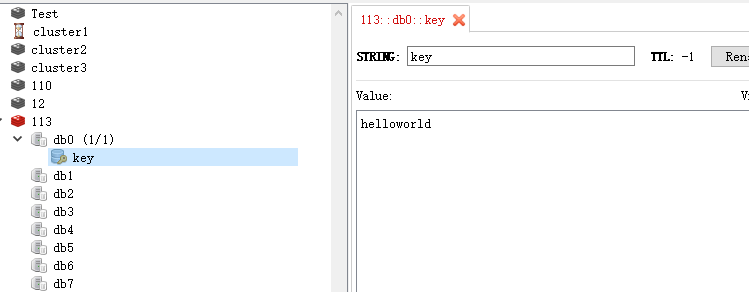
HelloWorld
[root@topcheer redis-3.0.4]# redis-server redis.conf

[root@topcheer redis-3.0.4]# redis-cli

127.0.0.1:6379> set key helloworld

OK

127.0.0.1:6379>
Centos7安装Redis3.X的更多相关文章
- centos7安装redis3.0和phpredis扩展详细教程(图文)
整理一下centos7安装redis3.0和phpredis扩展的过程,有需要的朋友可以拿去使用. 一.安装redis3.0 1.安装必要的包 yum install gcc 2.centos7安装r ...
- centos7安装redis3.2.5
安装redis 1官方介绍 Installation Download, extract and compile Redis with: $ wget http://download.redis.io ...
- Centos7 安装redis3.2.3 过程
1:安装wget: yum install wget2:安装pip: 1:sudo yum -y install epel-release 2:sudo yum -y install py ...
- Centos7安装Redis3.2.8
一.系统环境和版本说明 Redis的版本选取目前的官网版本redis-3.2.8. 二.Redis的安装步骤 2.1 在线下载Redis的安装包 [root@localhost lzh]# ...
- centOS7 安装redis-3.2.6
0.下载tar.gz包并解压到某个位置,然后cd进入解压后的目录(redis-3.2.6)下 1.安装 make MALLOC=libc 关于为什么这样做,参考redis-3.2.6目录下的READM ...
- centos7安装redis3.2.5集群
安装参照 https://blog.csdn.net/mingliangniwo/article/details/54600640 https://blog.csdn.net/u013820 ...
- centos7安装redis3.2.12
1.准备安装包,放在/usr/local/src/ 2.解压安装包,解压到/usr/local/ tar zxf redis-3.2.12.tar.gz -C /usr/local/ 3.cd /us ...
- centos7安装PHP7的redis扩展
前言: 在本篇博客中,我将给大家介绍如何在Centos7上安装PHP-Redis扩展,关于如何在Centos上安装redis的,可以参考另外一篇博客:Centos7安装redis 想要在php中操作r ...
- HP服务器 hp 360g5 centos7安装问题
HP服务器 hp 360g5 centos7安装问题 一 :启动盘无法识别硬盘 1.进入安装光盘,用上下键选择安装centos--Install Centos7(注意不可按Enter键),如图: 2 ...
随机推荐
- mybati代码生成器 mybatis-generator
Mybatis代码生成器,用于快速生成代码 代码 https://github.com/wangxinforme/mybatis-generator
- Fescar使用(资料)
fescar源码走读1:业务调用方 https://zhuanlan.zhihu.com/p/54659540 fescar源码走读2:fescar服务端 https://zhuanlan.zhi ...
- Kettle的Kitchen和Span
Kitchen——工作(job)执行器 (命令行方式) -rep : Repository name 任务包所在存储名 -user : Repository username 执行人 ...
- vs 小贴士
1. ubuntu上vs code root执行 sudo code --user-data-dir="~/.vscode-root" 2. 设置vs code 打开在新的标签页打 ...
- javaweb:关于HttpServletResponse介绍 (转)
出处: https://www.cnblogs.com/xdp-gacl/p/3789624.html Web服务器收到客户端的http请求,会针对每一次请求,分别创建一个用于代表请求的request ...
- Maven出错的问题处理
1:使用Maven部署dubbox.jar包到maven本地仓库 由于Dubbox的jar包并没有部署到Maven的中央仓库中,大家在Maven的中央仓库中可以查找到Dubbo的最终版本是2.5.3 ...
- tarjan算法求无向图的桥、边双连通分量并缩点
// tarjan算法求无向图的桥.边双连通分量并缩点 #include<iostream> #include<cstdio> #include<cstring> ...
- [Vue] vue的一些面试题2
1.Vue.observable 你有了解过吗?说说看 vue2.6 发布一个新的 API,让一个对象可响应.Vue 内部会用它来处理 data 函数返回的对象.返回的对象可以直接用于渲染函数和计算属 ...
- Java Script 基本知识点
JavaScript是一种基于对象和事件驱动的脚本语言,它提供了一些专有的类.对象及函数 1.基本数据类型 JavaScript提供了4种基本的数据类型用来 ...
- 08.AutoMapper 之嵌套映射(Nested Mappings)
https://www.jianshu.com/p/013715d2352d 嵌套映射(Nested Mappings) 当映射引擎执行映射时,它可以使用各种方法之一来解析目标成员值.其中一种方法 ...