
bootstrap modal垂直居中(简单封装)
1.使用modal 弹出事件方法;
未封装前:
<!DOCTYPE html>
<html lang="en">
<head>
<meta charset="UTF-8">
<title>Title</title>
<link rel="stylesheet" href="css/bootstrap.min.css">
<script src="js/jquery.min.js"></script>
<script src="js/bootstrap.js"></script>
</head>
<body> <button type="button" id="modalBtn" class="btn btn-primary">点击弹出modal</button> <div class="modal fade" id="myModal">
<div class="modal-dialog">
<div class="modal-content">
<div class="modal-header">
<button type="button" class="close" data-dismiss="modal" aria-label="Close"><span aria-hidden="true">×</span></button>
<h4 class="modal-title">Modal 标题</h4>
</div>
<div class="modal-body">
<p>内容…</p>
<p>内容…</p>
<p>内容…</p> </div>
<div class="modal-footer">
<button type="button" class="btn btn-default" data-dismiss="modal">关闭</button>
<button type="button" class="btn btn-primary">确定</button>
</div>
</div>
</div>
</div> <script type="text/javascript">
$(function(){
var $m_btn = $('#modalBtn');
var $modal = $('#myModal');
$m_btn.on('click', function(){
$modal.modal({backdrop: 'static'});
}); $modal.on('show.bs.modal', function(){
var $this = $(this);
var $modal_dialog = $this.find('.modal-dialog');
// 关键代码,如没将modal设置为 block,则$modala_dialog.height() 为零
$this.css('display', 'block');
$modal_dialog.css({'margin-top': Math.max(0, ($(window).height() - $modal_dialog.height()) / 2) });
}); });
</script> </body>
</html>
封装后:
<!DOCTYPE html>
<html lang="en">
<head>
<meta charset="UTF-8">
<title>Title</title>
<link rel="stylesheet" href="css/bootstrap.min.css">
<script src="js/jquery.min.js"></script>
<script src="js/bootstrap.js"></script>
</head>
<body> <button type="button" id="modalBtn" class="btn btn-primary">点击弹出modal</button> <div class="modal fade" id="myModal">
<div class="modal-dialog">
<div class="modal-content">
<div class="modal-header">
<button type="button" class="close" data-dismiss="modal" aria-label="Close"><span aria-hidden="true">×</span></button>
<h4 class="modal-title">Modal 标题</h4>
</div>
<div class="modal-body">
<p>内容…</p>
<p>内容…</p>
<p>内容…</p> </div>
<div class="modal-footer">
<button type="button" class="btn btn-default" data-dismiss="modal">关闭</button>
<button type="button" class="btn btn-primary">确定</button>
</div>
</div>
</div>
</div> <script type="text/javascript">
$(function(){
$('#myModal').myfunction({
$m_btn:$('#modalBtn'), //触发事件元素
$modal:$('#myModal'), //响应事件元素
eventType:'click' //事件类型
});
});
;(function ($) {
$.fn.myfunction=function (options) {
var defaults={
$m_btn : $('#modalBtn'),
$modal : $('#myModal'),
eventType:'click'
};
var setting=$.extend({},defaults,options);
this.each(function(){
var my_btn = setting.$m_btn;
var _modal = setting.$modal;
var _event = setting.eventType;
my_btn.on(_event, function(){
_modal.modal({backdrop: 'static'});
}); _modal.on('show.bs.modal', function(){
var $this = $(this);
var $modal_dialog = $this.find('.modal-dialog');
$this.css('display', 'block');
$modal_dialog.css({'margin-top': Math.max(0, ($(window).height() - $modal_dialog.height()) / 2) });
});
});
}
})(jQuery);
</script> </body>
</html>
2.修改bootstrap.js 源码;
打开bootstrap.js ctrl+f 找到 modal对应代码:

弹出框出现时, 调用的自然是 Modal.prototype.show() 方法, 而show 方法中又调用了 that.adjustDialog() 方法:
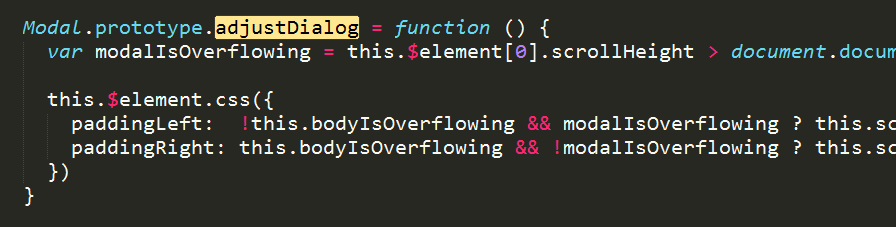
加上少量代码:
Modal.prototype.adjustDialog = function () {

    var modalIsOverflowing = this.$element[0].scrollHeight > document.documentElement.clientHeight

    this.$element.css({

      paddingLeft:  !this.bodyIsOverflowing && modalIsOverflowing ? this.scrollbarWidth : '',

      paddingRight: this.bodyIsOverflowing && !modalIsOverflowing ? this.scrollbarWidth : ''

    })

    // 是弹出框居中。。。

    var $modal_dialog = $(this.$element[0]).find('.modal-dialog');

    var m_top = ( $(window).height() - $modal_dialog.height() )/2;

    $modal_dialog.css({'margin': m_top + 'px auto'});

  }
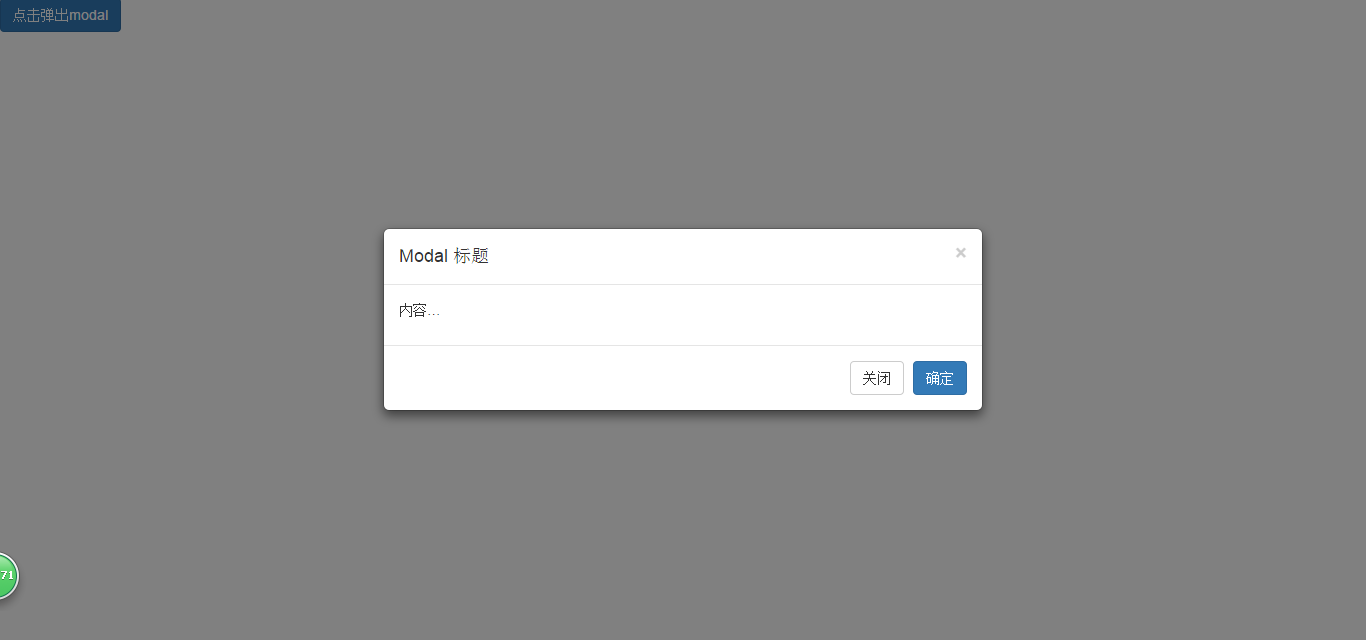
然后就实现modal垂直居中了, 效果图:
bootstrap modal垂直居中(简单封装)的更多相关文章
- 对bootstrap modal的简单扩展封装
对bootstrap modal的简单扩展封装 参考自:http://www.muzilei.com/archives/677 注:原文不支持bootstrap新版本,并且居中等存在问题 此段时间 ...
- Bootstrap modal垂直居中
Bootstrap modal垂直居中 在网上看到有Bootstrap2的Modal dialog垂直居中问题解决方法,这种方法自己试了一下,并不能完全居中,并且窗口的大小不一样的话,每次显示的m ...
- bootstrap modal 垂直居中对齐
bootstrap modal 垂直居中对齐 文章参考 http://www.bubuko.com/infodetail-666582.html http://v3.bootcss.com/Jav ...
- Bootstrap Modal 垂直居中
Bootstrap 的 modal 正文中如果内容较少的话,并不会垂直居中,而是偏上, 如果想要达到垂直居中的效果,需要自动动手了. 可以在初始显示时设置垂直居中,可以这样做: $('#YourMod ...
- bootstrap modal垂直居中 (转)
根据博友的经验,总结后请使用方法一就行了 一,修改bootstrap.js 源码 原来的: Modal.prototype.adjustDialog = function () { ].scrollH ...
- Bootstrap模态框(modal)垂直居中
http://v3.bootcss.com/ 自己也试了改了几种方式也不容乐观,发现在窗口弹出之前是获取不到$(this).height()的值,本想着是用($(window).height()-$( ...
- Bootstrap(v3.2.0)模态框(modal)垂直居中
Bootstrap(v3.2.0)模态框(modal)垂直居中方法: 在bootstrap.js文件900行后面添加如下代码,便可以实现垂直居中. that.$element.children().e ...
- bootstrap Modal 模态框垂直居中
解决 Modal 垂直居中的问题,上网找了好多博客,有好多说改源码的,这个并没有实践. 但发现另一种解决办法,可以实现,代码如下: function centerModals(){ $('.modal ...
- bootstrap插件学习-bootstrap.modal.js
bootstrap插件学习-bootstrap.modal.js 先从bootstrap.modal.js的结构看起. function($){ var Modal = function(){} // ...
随机推荐
- JavaScript判断数据类型的方法
typeof操作符 typeof 操作符作用:是用来检测变量的数据类型.对于值或变量使用 typeof 操作符会返回如下字符串. 数据类型undefined的判断示例 变量定义了但未初始化,就是und ...
- CF700E Cool Slogans
CF700E Cool Slogans 题目描述 给出一个长度为n的字符串\(s[1]\),由小写字母组成.定义一个字符串序列\(s[1....k]\),满足性质:\(s[i]\)在\(s[i-1] ...
- 如何生成git ssh key
公司有自己的git版本控制,自己注册账号后,管理员同意,就可以查看项目代码了,但是要克隆的话需要在本地生成git ssh key 一.进入.ssh文件夹. cd ~/.ssh 若没有.ssh文件夹,则 ...
- Linux中的零拷贝技术
转载:https://www.jianshu.com/p/fad3339e3448 引文## 在写一个服务端程序时(Web Server或者文件服务器),文件下载是一个基本功能.这时候服务端的任务是: ...
- 微信硬件平台(八) 3 ESP8266向微信服务器请求设备绑定的用户
https://api.weixin.qq.com/device/get_openid?access_token=自己申请微信token&device_type=gh_e93c1b3098b9 ...
- ogg-01027(长事务)
OGG-01027(长事务) 示例9-25: WARNING OGG-01027 Long Running Transaction: XID 82.4.242063, Items 0, Extra ...
- [MicroPython]TurniBit开发板DIY自动窗帘模拟系统
一.准备工作 üTurnipBit 开发板 一块 ü下载数据线 一条 ü微型步进电机(28BYJ-48) 一个 ü步进电机驱动板(ULN2003APG) 一块 ü光敏传感器 一个 üTurnipBit ...
- Mybatis学习总结(八)——延迟加载
一.什么是延迟加载 resultMap可以实现高级映射(使用association.collection实现一对一及一对多映射),association.collection具备延迟加载功能. 需求: ...
- java 加密 解密 Illegal key size
java.security.InvalidKeyException: Illegal key size 今天遇到一个奇怪的问题. 自己做的加签验签功能已经没有问题了,本地测试通过,同事放到服务器上 ...
- Luogu P5168 xtq玩魔塔
这题不错啊,结合了一些不太传统的姿势. 首先看到题目有一问从一个点到另一个点边权最小值.想到了什么? 克鲁斯卡尔生成树+倍增?好吧其实有一个更常用NB的算法叫克鲁斯卡尔重构树 (不会的可以看dalao ...