
flutter 访问网页+http请求
一、目录
1、访问网页
2、http请求
-----------------------------这是分割线-----------------------------
1、访问网页
基于url_launcher库实现,最新版本号 5.0.2,没有的话需要添加到pubspec.yaml中
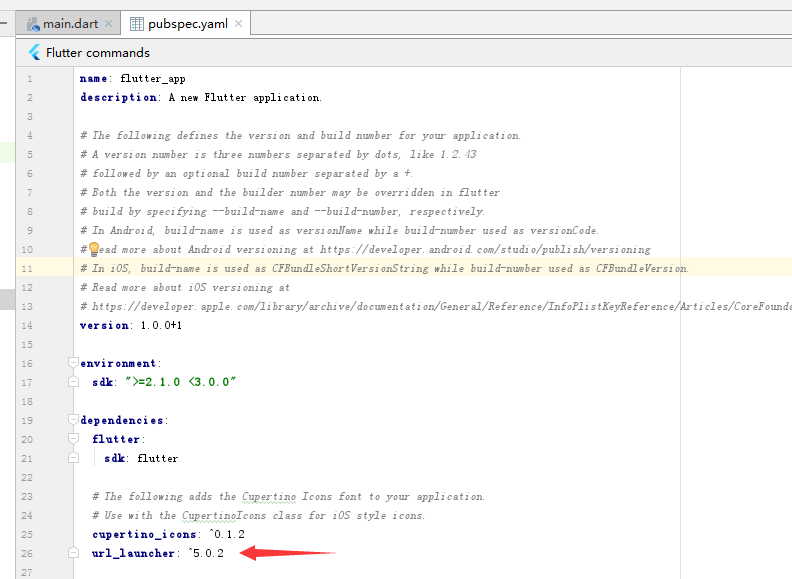
然后get 该package
只要引入不报错就ok了。
ex.dart
/*

  time: 2019-4-3

 */

// 引入资源包

import 'package:flutter/material.dart';

import 'package:url_launcher/url_launcher.dart';

// main fun

void main() => runApp(new MyApp());

class MyApp extends StatelessWidget {

  @override

  Widget build(BuildContext context) {

    // TODO: implement build

    return new MaterialApp(

        title: 'url请求',

        home: new Scaffold(

          appBar: new AppBar(

            title: new Text('Example of packages'),

          ),

          body: new Center(

            child: new RaisedButton(

              onPressed: () {

                print();

                // url

                const url = "https://www.baidu.com";

                launch(url); // 打开浏览器跳转至百度网页

              },

              child: new Text('baidu'),

            ),

          ),

        ));

  }

}
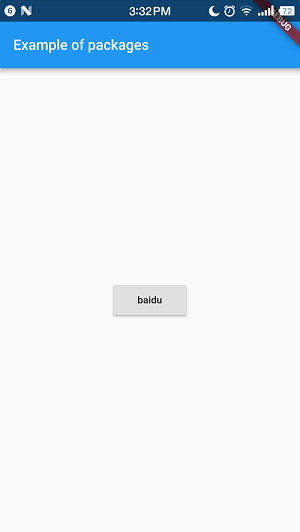
运行效果如下
点击baidu按钮,打开网页


2、http请求
2.1、Http请求
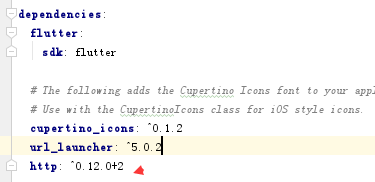
下载Http库 版本号 0.12.0+2
ex.dart
/*

  time: 2019-4-3

  title: htttp请求

 */

// 引入资源包

import 'package:flutter/material.dart';

//import 'package:url_launcher/url_launcher.dart';

import 'package:http/http.dart' as http;

// main fun

void main () => runApp(new MyApp());

class MyApp extends StatelessWidget {

  @override

  Widget build(BuildContext context) {

    // TODO: implement build

    return new MaterialApp(

        title: 'Http 请求示例',

        home: new Scaffold(

          appBar: new AppBar(

            title:  new Text('Http 请求示例'),

          ),

          body: new Center(

            child: new RaisedButton(

              onPressed: () {

                print();

                var url = 'http://www.cnblogs.com/';

                // get

                http.get(url).then((response) {

                  print("Response status: ${response.statusCode}");

                  print("Response body: ${response.body[10]}");

                });

                // post

                http.post(url,body: {"key": "value"}).then((response) {

                  print('this is post');

                  print("Response status: ${response.statusCode}");

                  print("Response body: ${response.body}");

                });

              },

              child: new Text('发送请求'),

            ),

          ),

        )

    );

  }

}
运行效果
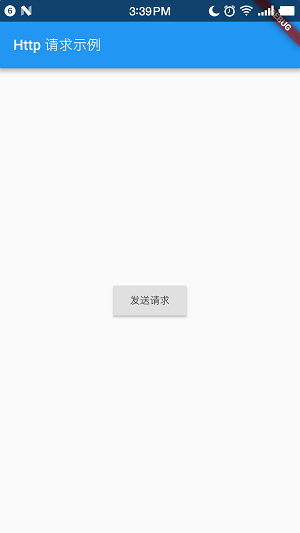
我点击发送请求之后,控制台输出
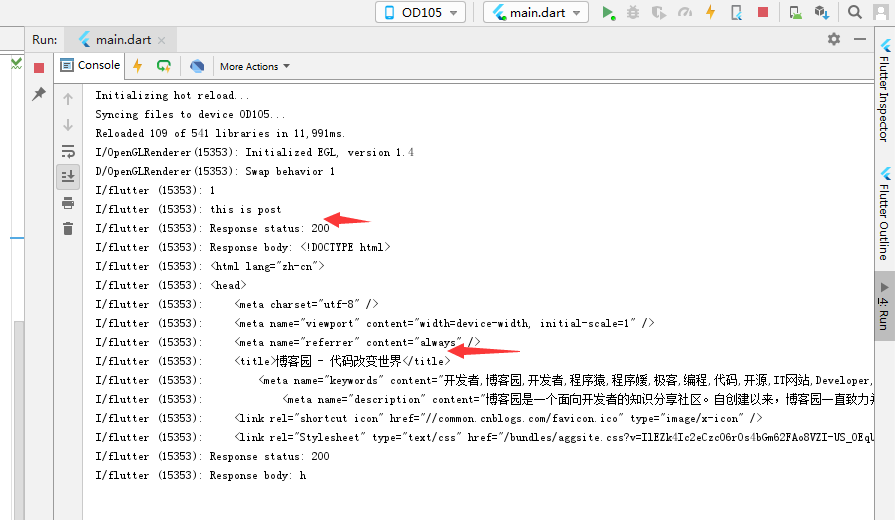
请求成功,并返回了内容。
2.1、HttpClient请求
ex.dart
/*

  time: 2019-4-3

  title: htttpClient请求

 */

// 引入资源包

import 'package:flutter/material.dart';

import 'dart:convert';

import 'dart:io';

// main fun

void main () => runApp(new MyApp());

class MyApp extends StatelessWidget {

  // 获取天气数据

  void getWeatherData() async {

    try {

      // 实例化一个HttpCLient对象

      HttpClient  httpClient = new HttpClient();

      // 发起请求

      HttpClientRequest request = await httpClient.getUrl(

          Uri.parse("http://wthrcdn.etouch.cn/weather_mini?city=重庆市")

      );

      // 等待服务器返回数据

      HttpClientResponse response = await request.close();

      // 使用utf-8.decoder从response解析数据

      var result = await response.transform(utf8.decoder).join();

      // 输出

      print(result);

      // 关闭

      httpClient.close();

    } catch (e) {

      print("请求失败:$e");

    }

  }

  @override

  Widget build(BuildContext context) {

    // TODO: implement build

    return new MaterialApp(

      title: 'HttpClient 请求示例',

      home: new Scaffold(

        appBar: new AppBar(

          title:  new Text('HttpClient 请求示例'),

        ),

        body: new Center(

          child: new RaisedButton(

              onPressed: getWeatherData,

              child: new Text('获取天气数据'),

          ),

        ),

      )

    );

  }

}
运行效果如下:

点击按钮之后,控制台输出:
I/flutter (15353): {"data":{"yesterday":{"date":"6日星期六","high":"高温 30℃","fx":"无持续风向","low":"低温 14℃","fl":"<![CDATA[<3级]]>","type":"晴"},"city":"重庆","forecast":[{"date":"7日星期天","high":"高温 32℃","fengli":"<![CDATA[<3级]]>","low":"低温 15℃","fengxiang":"无持续风向","type":"晴"},{"date":"8日星期一","high":"高温 32℃","fengli":"<![CDATA[<3级]]>","low":"低温 18℃","fengxiang":"无持续风向","type":"多云"},{"date":"9日星期二","high":"高温 29℃","fengli":"<![CDATA[<3级]]>","low":"低温 19℃","fengxiang":"无持续风向","type":"多云"},{"date":"10日星期三","high":"高温 24℃","fengli":"<![CDATA[<3级]]>","low":"低温 18℃","fengxiang":"无持续风向","type":"阴"},{"date":"11日星期四","high":"高温 25℃","fengli":"<![CDATA[<3级]]>","low":"低温 18℃","fengxiang":"无持续风向","type":"多云"}],"ganmao":"各项气象条件适宜,发生感冒机率较低。但请避免长期处于空调房间中,以防感冒。","wendu":"3}
flutter 访问网页+http请求的更多相关文章
- 浅谈 php 采用curl 函数库获取网页 cookie 和 带着cookie去访问 网页的方法!!!!
由于近段时间帮朋友开发一个能够查询正方教务系统的微信公众平台号.有所收获.这里总结下个人经验. 开讲前,先吐槽一下新浪云服务器,一个程序里的 同一个函数 在PC测试可以正常运行,在它那里就会挂的 ...
- 访问网页时提示的503错误信息在IIS中怎么设置
访问网页时提示的503错误信息在IIS中怎么设置 503是一种常见的HTTP状态码,出现此提示信息的原因是由于临时的服务器维护或者过载,服务器当前无法处理请求则导致了访问网页时出现了503错误.那么当 ...
- Android网络:HTTP之利用HttpURLConnection访问网页、获取网络图片实例 (附源码)
http://blog.csdn.net/yanzi1225627/article/details/22222735 如前文所示的TCP局域网传送东西,除了对传输层的TCP/UDP支持良好外,Andr ...
- WiFi-ESP8266入门http(3-4)网页一键配网(1若为普通wifi直连 2若为西电网页认证自动网页post请求连接)+网页按钮灯控+MQTT通信
网页一键配网(1若为普通wifi直连 2若为西电网页认证自动网页post请求连接)+网页按钮灯控+MQTT通信 工程连接:https://github.com/Dongvdong/ESP8266_H ...
- Python3 定时访问网页
本系列文章由 @YhL_Leo 出品,转载请注明出处. 文章链接: http://blog.csdn.net/yhl_leo/article/details/50358695 如果我有一组网站,想要定 ...
- Python爬虫笔记【一】模拟用户访问之设置请求头 (1)
学习的课本为<python网络数据采集>,大部分代码来此此书. 网络爬虫爬取数据首先就是要有爬取的权限,没有爬取的权限再好的代码也不能运行.所以首先要伪装自己的爬虫,让爬虫不像爬虫而是像人 ...
- apache启动但是无法访问网页
apache启动但是访问不了的问题排除??? 端口没有被占用,则需要考虑防火墙问题. 首先我们需要确保远程的Linux系统已经安装好,我们使用xshell远程SSH登录到Linux系统里,同时我们也要 ...
- 第14.6节 使用Python urllib.request模拟浏览器访问网页的实现代码
Python要访问一个网页并读取网页内容非常简单,在利用<第14.5节 利用浏览器获取的http信息构造Python网页访问的http请求头>的方法构建了请求http报文的请求头情况下,使 ...
- Flutter学习(7)——网络请求框架Dio简单使用
原文地址: Flutter学习(7)--网络请求框架Dio简单使用 | Stars-One的杂货小窝 Flutter系列学习之前都是在个人博客发布,感兴趣可以过去看看 网络请求一般APP都是需要的,在 ...
随机推荐
- mysql 数据库导出与导入
1.数据库导出 语句:mysqldump -u用戶名 -p密码 -d 数据库名 表名 > 脚本名; 1.导出整个数据库结构和数据 mysqldump -h localhost -uroot -p ...
- Golang微服务:万精油NATS在Micro中的应用
NATS是一个Golang技术栈的MQ服务,类似NSQ,但NATS更轻量级.性能更好.不支持离线.支持同步/异步通信模型,非常好用. NATS在MICRO中有哪些应用 Transport 笔者以前开发 ...
- Python相关
当Python源码编译以后,需要对一些依赖库重新安装,而且有些是要用pip去安装. python 文件.目录属性的操作os.path等os模块函数 https://blog.csdn.net/bytx ...
- Linux中(Ubuntu18.04.x/CentOS)mysql8.0.x安装/配置/部署/启动
The MySQL Connectors and APIs are the drivers and libraries that you use to connect applications in ...
- 项目里如何访问AppDelegate
项目里面访问AppDelegate做全局变量用有好几种方式 最原始就是 AppDelegate *appDelegate = (AppDelegate *)[[UIApplication shared ...
- 构建之法 chapter1 心得
阅读完了<构建之法>第一章后,觉得我们平时使用的软件并不是自己想象中的那样简单,用的时候是觉得很方便,但从来没有考虑过一个软件的背后需要一个团队多少的付出才能换来一个获得用户频频好评的软件 ...
- unity 面试题(答案)
一.什么是渲染管道?是指在显示器上为了显示出图像而经过的一系列必要操作.渲染管道中的很多步骤,都要将几何物体从一个坐标系中变换到另一个坐标系中去.主要步骤有:本地坐标->视图坐标->背面裁 ...
- Javascript 3.3 编写DOM脚本的四个基本方法
id属性的用途是给某个元素加上独一无二的标识符,搭配"#"使用 class搭配"."使用 getElementById()方法:方法名称的大小写不能写错,方法将 ...
- 软件开发者路线图梗概&书摘chapter2
空杯心态:放下对技能水平的自鸣得意 1.入门语言:学习一门语言,从实际问题入手→形成反馈回路 构建学习沙箱 利用实际代码,进行学习测试 学习一门语言:与精通该语言的专家一起工作,即找人指导 阅读他人的 ...
- 上手d3js
0---什么是d3js: d3js是一个开源的,基于对svg操作的数据可视化框架,简单的说他提供了数据提供了一系列的数据可视化工具,可以用他很方便的创造出关于svg的动画:svg动画具有可伸缩,不失真 ...