
Python—time模块介绍
time 模块
在平常的代码中,我们常常需要与时间打交道。在Python中,常用的与时间处理有关的模块就包括:time,datetime,下面来介绍time模块。
在开始之前,首先要说明几点:
一、在Python中,通常有这几种方式来表示时间:
- 时间戳
- 格式化的时间字符串
- 元组(struct_time)共九个元素。由于Python的time模块实现主要调用C库,所以各个平台可能有所不同。
二、几个定义
UTC(Coordinated Universal Time,世界协调时)亦即格林威治天文时间,世界标准时间。在中国为UTC+8。DST(Daylight Saving Time)即夏令时。
时间戳(timestamp)的方式:通常来说,时间戳表示的是从1970年1月1日00:00:00开始按秒计算的偏移量。我们运行“type(time.time())”,返回的是float类型。
元组(struct_time)方式:struct_time元组共有9个元素,返回struct_time的函数主要有gmtime(),localtime(),strptime()。下面列出这种方式元组中的几个元素:
索引(Index)    属性(Attribute)    值(Values)

0     tm_year(年)                 比如2011

1     tm_mon(月)             1 - 12

2     tm_mday(日)                 1 - 31

3     tm_hour(时)                 0 - 23

4     tm_min(分)             0 - 59

5     tm_sec(秒)             0 - 61

6     tm_wday(weekday)            0 - 6(0表示周日)

7     tm_yday(一年中的第几天)    1 - 366

8     tm_isdst(是否是夏令时)            默认为-1
time模块的方法
- time.localtime([secs]):将一个时间戳转换为当前时区的struct_time。secs参数未提供,则以当前时间为准。
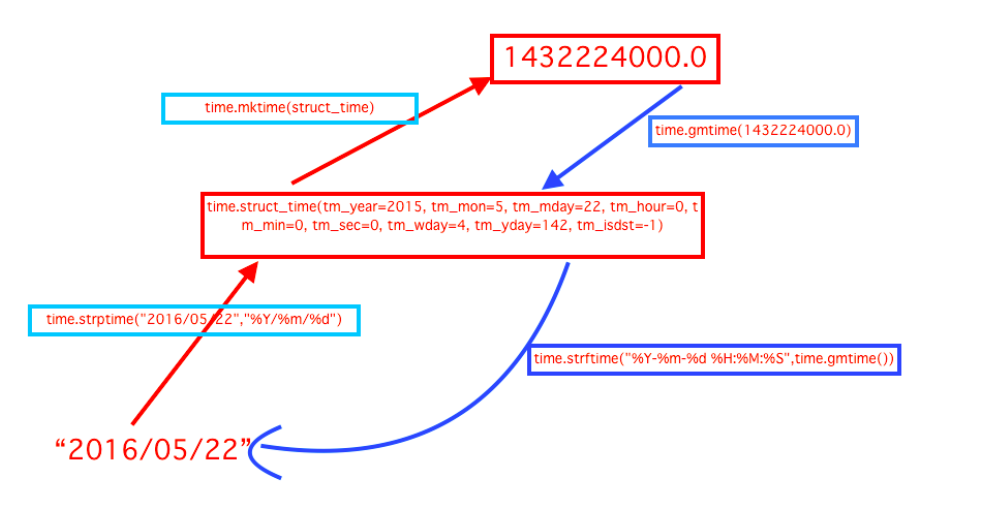
- time.gmtime([secs]):和localtime()方法类似,gmtime()方法是将一个时间戳转换为UTC时区(0时区)的struct_time。
- time.time():返回当前时间的时间戳。
- time.mktime(t):将一个struct_time转化为时间戳。
- time.sleep(secs):线程推迟指定的时间运行。单位为秒。
- time.asctime([t]):把一个表示时间的元组或者struct_time表示为这种形式:'Sun Oct 1 12:04:38 2017'。如果没有参数,将会将time.localtime()作为参数传入。
- time.ctime([secs]):把一个时间戳(按秒计算的浮点数)转化为time.asctime()的形式。如果参数未给或者为None的时候,将会默认time.time()为参数。它的作用相当于time.asctime(time.localtime(secs))。
time.strftime(format[, t]):把一个代表时间的元组或者struct_time(如由time.localtime()和time.gmtime()返回)转化为格式化的时间字符串。如果t未指定,将传入time.localtime()。
- 举例:time.strftime("%Y-%m-%d %X", time.localtime()) #输出'2017-10-01 12:14:23'
time.strptime(string[, format]):把一个格式化时间字符串转化为struct_time。实际上它和strftime()是逆操作。
- 举例:time.strptime('2017-10-3 17:54',"%Y-%m-%d %H:%M") #输出 time.struct_time(tm_year=2017, tm_mon=10, tm_mday=3, tm_hour=17, tm_min=54, tm_sec=0, tm_wday=1, tm_yday=276, tm_isdst=-1
字符串转时间格式对应表
Meaning Notes %aLocale’s abbreviated weekday name. %ALocale’s full weekday name. %bLocale’s abbreviated month name. %BLocale’s full month name. %cLocale’s appropriate date and time representation. %dDay of the month as a decimal number [01,31]. %HHour (24-hour clock) as a decimal number [00,23]. %IHour (12-hour clock) as a decimal number [01,12]. %jDay of the year as a decimal number [001,366]. %mMonth as a decimal number [01,12]. %MMinute as a decimal number [00,59]. %pLocale’s equivalent of either AM or PM. (1) %SSecond as a decimal number [00,61]. (2) %UWeek number of the year (Sunday as the first day of the week) as a decimal number [00,53]. All days in a new year preceding the first Sunday are considered to be in week 0. (3) %wWeekday as a decimal number [0(Sunday),6]. %WWeek number of the year (Monday as the first day of the week) as a decimal number [00,53]. All days in a new year preceding the first Monday are considered to be in week 0. (3) %xLocale’s appropriate date representation. %XLocale’s appropriate time representation. %yYear without century as a decimal number [00,99]. %YYear with century as a decimal number. %zTime zone offset indicating a positive or negative time difference from UTC/GMT of the form +HHMM or -HHMM, where H represents decimal hour digits and M represents decimal minute digits [-23:59, +23:59]. %ZTime zone name (no characters if no time zone exists). %%A literal '%'character.
时间转换图片
Python—time模块介绍的更多相关文章
- Python之模块介绍
模块介绍 模块,是用一些代码实现的某个功能的代码集合. 类似与函数式编程和面向过程编程,函数式编程则完成一个功能,其他代码用来调用,提供了代码的重用性和代码间的耦合.对于一个复杂的功能,可能需要多个函 ...
- python multiprocessing模块 介绍
一 multiprocessing模块介绍 python中的多线程无法利用多核优势,如果想要充分地使用多核CPU的资源(os.cpu\_count\(\)查看),在python中大部分情况需要使用多进 ...
- Python day18模块介绍2(使用BASE_DIR修改临时path,os模块)
1.BASE_DIR修改path(别人导入py项目时不会因为绝对路径无法解释) #sys修改环境变量 #使用BASE_DIR将绝对路径改为相对路径 import sys,os BASE_DIR=os. ...
- Python log 模块介绍
刚用Python log模块写了一个例子,记录一下. import logging import logging.handlers import os from datetime import dat ...
- python常用模块介绍
关于if __name__ == "__main__": 若执行文件为bin,调用文件为cal: 若在执行文件bin中执行print(__name__) 输出:__main__ 当 ...
- Python os模块介绍
os.getcwd() 获取当前工作目录,即当前python脚本工作的目录路径 os.chdir("dirname") 改变当前脚本工作目录:相当于shell下cd os.curd ...
- Python—sys模块介绍
sys.argv 命令行参数List,第一个元素是程序本身路径 sys.exit(n) 退出程序,正常退出时exit(0) sys.version 获取Python解释程序的版本信息 sys.maxi ...
- Python—os模块介绍
OS模块 我们平时工作中很常用到的一个模块,通过os模块调用系统命令,获得路径,获取操作系统的类型等都是使用该模块.os 模块提供了很多允许你的程序与操作系统直接交互的功能 得到当前工作目录,即当前P ...
- Python—randonm模块介绍
random是python产生伪随机数的模块 >>> random.randrange(1,10) #返回1-10之间的一个随机数,不包括10 >>> random ...
随机推荐
- Linux文件管理命令 cat
1.cat 命令:将文件内容连接后传送到标准输出或重定向到文件. 1)命令语法格式:cat [OPTION] [FILE]... 2)命令选项参数说明如下所示. -n(number):从第一行开始对文 ...
- AI学习---分类算法[K-近邻 + 朴素贝叶斯 + 决策树 + 随机森林 ]
分类算法:对目标值进行分类的算法 1.sklearn转换器(特征工程)和预估器(机器学习) 2.KNN算法(根据邻居确定类别 + 欧氏距离 + k的确定),时间复杂度高,适合小数据 ...
- 028实现strStr()
#pragma once #include "000库函数.h" /*********************自解**************/ //使用算法中的find 12ms ...
- Java多线程(一) 什么是线程
声明:本系列大多是翻译自https://www.javatpoint.com,加上自己的增删改,尽力写的系统而通俗易懂,后文不再重复声明. 点我跳过黑哥的卑鄙广告行为,进入正文. Java多线程系列更 ...
- shzr要填的各种坑
shzr要填的各种坑 如果大家看到我学了什么算法没写总结,或者做了什么题没写题解,欢迎让我填坑. 计划要写的: [ ] 点分治 [ ] 整体二分 [ ] CDQ分治 [ ] Min-Max容斥 [√] ...
- 转://Oracle 数据备份与恢复微实践
1.模拟控制文件丢失后的数据库恢复(完全恢复) 今天的主题是备份与恢复,目的就是保护数据的安全性,众所周知Oracle之所以在市场上占据了50%的份额,与它提供了强大的数据保护措施是分不开的,下面我们 ...
- 转://linux下hugepages理解
就Linux应用程序而言,使用的都是虚拟地址,当应用程序读写一个指定的虚拟地址时,内存管理单元会自动进行虚拟地址到物理地址的转换.一个虚拟地址可以映射到多个物理地址,但当前映射到哪一个物理地址取决于当 ...
- 【转】Android多进程总结一:生成多进程(android:process属性)
前言 正常情况下,一个apk启动后只会运行在一个进程中,其进程名为apk的包名,所有的组件都会在这个进程中运行,以下为DDMS的进程截屏: com.biyou.multiprocess为进程名,也是a ...
- Linux 系统安装
内容概要 VMware虚拟机软件应用 Linux系统安装设置 远程登录管理工具介绍 VMware 简介 VMware是一个虚拟PC的软件,可以在现有的操 作系统上虚拟出一个新的硬件 ...
- 【vue】vue中ref用法
1.获取当前元素: 例子: <div class="pop pos-a" :style="{ left: pop_x + 'px' ,top: pop_y + 'p ...