
eShopOnContainers 看微服务④:Catalog Service
服务简介
Catalog service(目录服务)维护着所有产品信息,包括库存、价格。所以该微服务的核心业务为:
- 产品信息的维护
- 库存的更新
- 价格的维护
架构模式
先看代码结构(下图)。

主要依赖:
1、HealthCheck 健康检查
2、WebHost
3、Entity Framework
4、Autofac
5、BuildingBlocks文件夹下的EventBus,RabbitMq
其中前四项在Identity Service里面都已经用到了。事件总线EventBus是第一次用到,我们后面会详细讲到。
这个服务采用简单的数据驱动的CRUD微服务架构,来执行产品信息的创建、读取、更新和删除(CRUD)操作。

这种类型的服务在单个 ASP.NET Core Web API 项目中即可实现所有功能,该项目包括数据模型类、业务逻辑类及其数据访问类。
启动流程
我们还是从程序启动处开始看,跟identit.API差别不大。
Program.cs
Main函数,用到两个dbcontext。IntegrationEventLogContext负责记录事件日志,CatalogContext负责产品。最终数据库如下:

BuildWebHost函数:
public static IWebHost BuildWebHost(string[] args) =>

            WebHost.CreateDefaultBuilder(args)

             .UseStartup<Startup>()//使用startup类

                .UseApplicationInsights()

                .UseHealthChecks("/hc")//健康检查

                .UseContentRoot(Directory.GetCurrentDirectory())

                .UseWebRoot("Pics")//Web 根 string

                ... ... ... ... 此处忽略N行代码

                .Build();
这里有一个UseWebRoot,用来设置web根: webroot。
默认情况下如果不指定,是 (Content Root Path)\wwwroot,前提是该路径存在。如果这个路径不存在,则使用一个没有文件操作的提供器。
startup.cs
public class Startup

    {

        public Startup(IConfiguration configuration)

        {

            Configuration = configuration;

        }

        public IConfiguration Configuration { get; }

        public IServiceProvider ConfigureServices(IServiceCollection services)

        {

            services.AddAppInsight(Configuration)

                .AddCustomMVC(Configuration)//健康检查,跨域等

                .AddCustomDbContext(Configuration)//两个dbcontext的连接字符串等属性

                .AddCustomOptions(Configuration)

                .AddIntegrationServices(Configuration)

                .AddEventBus(Configuration)//添加事件总线

                .AddSwagger();

            var container = new ContainerBuilder();

            container.Populate(services);

            return new AutofacServiceProvider(container.Build());

        }

        public void Configure(IApplicationBuilder app, IHostingEnvironment env, ILoggerFactory loggerFactory)

        {

            //Configure logs

            loggerFactory.AddAzureWebAppDiagnostics();

            loggerFactory.AddApplicationInsights(app.ApplicationServices, LogLevel.Trace);

            var pathBase = Configuration["PATH_BASE"];

            if (!string.IsNullOrEmpty(pathBase))

            {

                loggerFactory.CreateLogger("init").LogDebug($"Using PATH BASE '{pathBase}'");

                app.UsePathBase(pathBase);

            }

#pragma warning disable CS1998 // Async method lacks 'await' operators and will run synchronously

            app.Map("/liveness", lapp => lapp.Run(async ctx => ctx.Response.StatusCode = ));

#pragma warning restore CS1998 // Async method lacks 'await' operators and will run synchronously

            app.UseCors("CorsPolicy");//跨域

            app.UseMvcWithDefaultRoute();//路由

            app.UseSwagger()//Swagger生成API文档

              .UseSwaggerUI(c =>

              {

                  c.SwaggerEndpoint($"{ (!string.IsNullOrEmpty(pathBase) ? pathBase : string.Empty) }/swagger/v1/swagger.json", "Catalog.API V1");

              });

            ConfigureEventBus(app);//配置事件总线

        }

        protected virtual void ConfigureEventBus(IApplicationBuilder app)

        {

            var eventBus = app.ApplicationServices.GetRequiredService<IEventBus>();

            eventBus.Subscribe<OrderStatusChangedToAwaitingValidationIntegrationEvent, OrderStatusChangedToAwaitingValidationIntegrationEventHandler>();

            eventBus.Subscribe<OrderStatusChangedToPaidIntegrationEvent, OrderStatusChangedToPaidIntegrationEventHandler>();

        }

    }
这里有个app.UseCors("CorsPolicy"),实际上services.AddCors是写在AddCustomMVC扩展函数里面的。
services.AddCors(options =>

            {

                options.AddPolicy("CorsPolicy",

                    builder => builder.AllowAnyOrigin()

                    .AllowAnyMethod()

                    .AllowAnyHeader()

                    .AllowCredentials());

            });
需要注意的是UseCors必须放在 UseMvc 之前,且策略名称(CorsPolicy)必须是已经定义的。
业务实体
该服务的主要实体是商品CatalogItem,其中包含两个辅助类CatalogBrand,CatalogType:
我们在看CatalogItem.cs的时候会发现两个函数AddStock,RemoveStock
对于实体这一块:
- 进行数据库字段映射时,主键都使用了
ForSqlServerUseSequenceHiLo指定使用HI-LO高低位序列进行主键生成。 - 使用NoTracking提升查询速度
在CatalogController的构造方法中,明确指定以下代码来进行查询优化,这一点也是我们值得学习的地方。((DbContext)context).ChangeTracker.QueryTrackingBehavior = QueryTrackingBehavior.NoTracking; - 在进行种子数据的预置时,使用了
Polly开启了Retry机制。
private Policy CreatePolicy( ILogger<CatalogContextSeed> logger, string prefix,int retries = )

        {

            return Policy.Handle<SqlException>().

                WaitAndRetryAsync(

                    retryCount: retries,

                    sleepDurationProvider: retry => TimeSpan.FromSeconds(),

                    onRetry: (exception, timeSpan, retry, ctx) =>

                    {

                        logger.LogTrace($"[{prefix}] Exception {exception.GetType().Name} with message ${exception.Message} detected on attempt {retry} of {retries}");

                    }

                );

        }
public async Task SeedAsync(CatalogContext context,IHostingEnvironment env,IOptions<CatalogSettings> settings,ILogger<CatalogContextSeed> logger)

        {

            var policy = CreatePolicy(logger, nameof(CatalogContextSeed));

            await policy.ExecuteAsync(async () =>

            {

                ... ...

            });

        }
业务处理
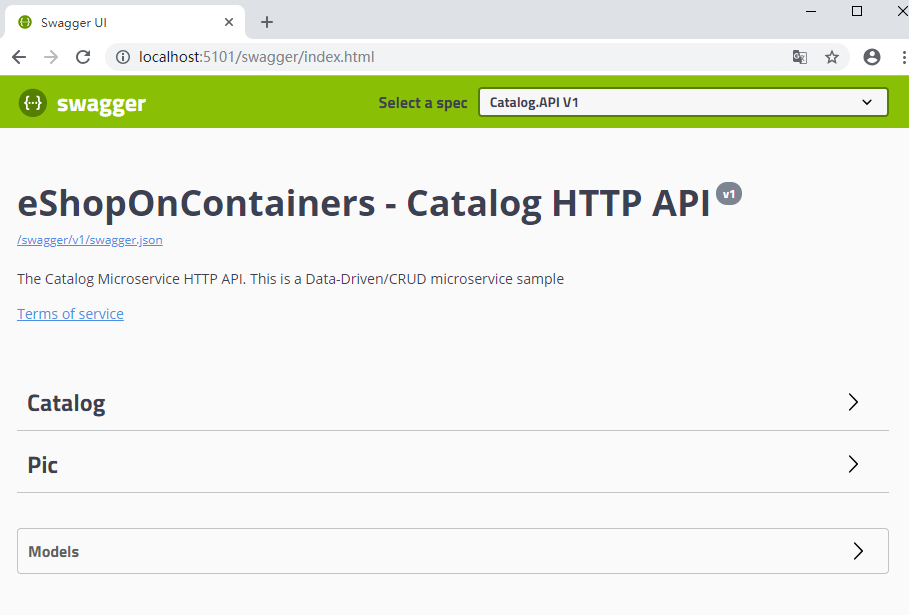
运行起来后,我们浏览器输入 http://localhost:5101
展开catalog
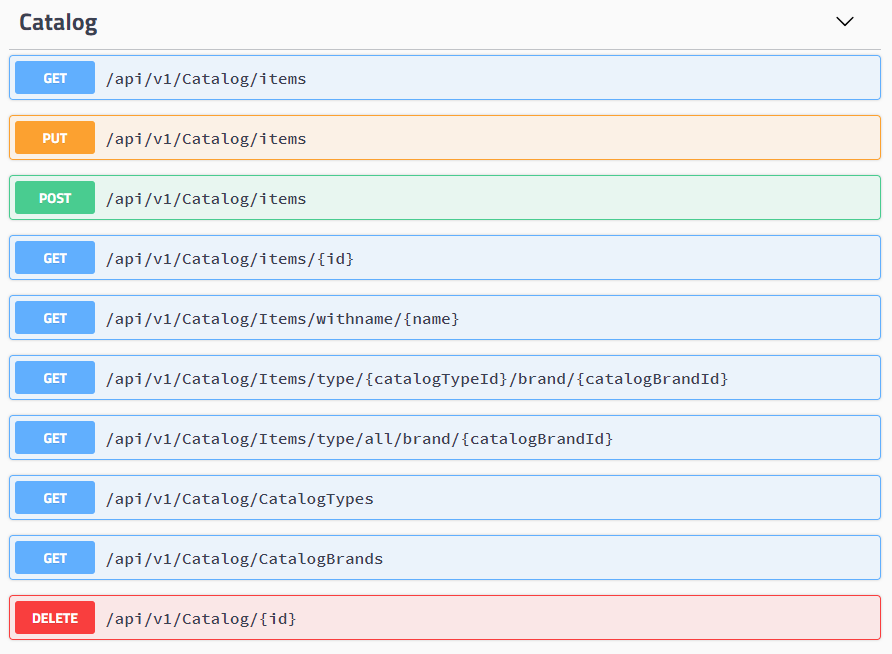
对应CatalogController.cs代码
   [Route("api/v1/[controller]")]//标记版本

    [ApiController]

    public class CatalogController : ControllerBase

    {

        private readonly CatalogContext _catalogContext;

        private readonly CatalogSettings _settings;

        private readonly ICatalogIntegrationEventService _catalogIntegrationEventService;

        public CatalogController(CatalogContext context, IOptionsSnapshot<CatalogSettings> settings, ICatalogIntegrationEventService catalogIntegrationEventService)

        {

            _catalogContext = context ?? throw new ArgumentNullException(nameof(context));

            _catalogIntegrationEventService = catalogIntegrationEventService ?? throw new ArgumentNullException(nameof(catalogIntegrationEventService));

            _settings = settings.Value;

            ((DbContext)context).ChangeTracker.QueryTrackingBehavior = QueryTrackingBehavior.NoTracking;

        }
... .... ...
   }
通过构造函数注入了3个对象
context,settings,catalogIntegrationEventService
他们分别在startup类的AddCustomDbContext,AddCustomOptions,AddIntegrationServices中被注册到了DI容器。
再看具体的action

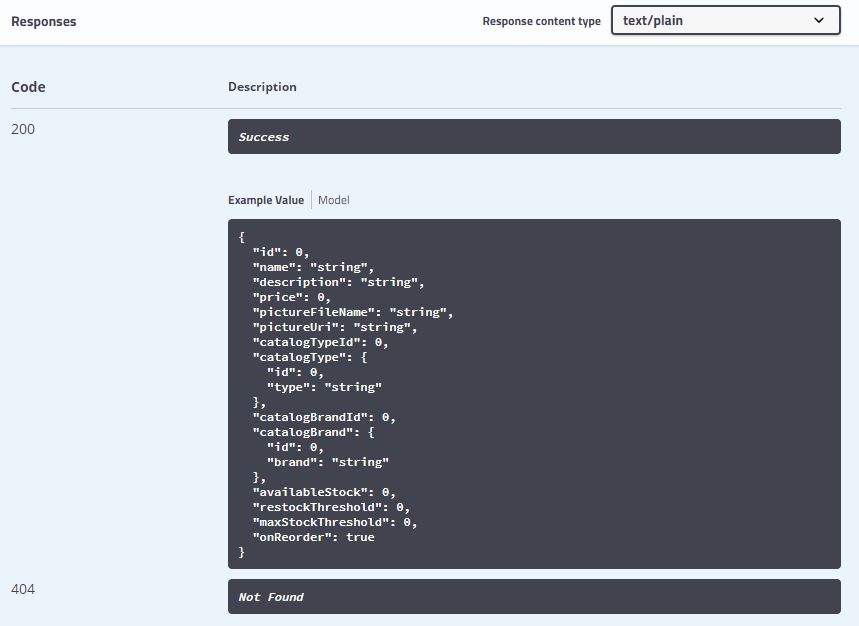
通过ProducesResponseType描述HttpStatusCode的返回状态,200,404
UpdateProduct函数
     [Route("items")]

        [HttpPut]

        [ProducesResponseType((int)HttpStatusCode.NotFound)]

        [ProducesResponseType((int)HttpStatusCode.Created)]

        public async Task<IActionResult> UpdateProduct([FromBody]CatalogItem productToUpdate)

        {

            var catalogItem = await _catalogContext.CatalogItems

                .SingleOrDefaultAsync(i => i.Id == productToUpdate.Id);

            if (catalogItem == null)

            {

                return NotFound(new { Message = $"Item with id {productToUpdate.Id} not found." });

            }

            var oldPrice = catalogItem.Price;

            var raiseProductPriceChangedEvent = oldPrice != productToUpdate.Price;

            // Update current product

            catalogItem = productToUpdate;

            _catalogContext.CatalogItems.Update(catalogItem);

            if (raiseProductPriceChangedEvent) // 保存产品数据,如果价格发生变化,通过事件总线发布集成事件

            {

                //创建要通过事件总线发布的集成事件

                var priceChangedEvent = new ProductPriceChangedIntegrationEvent(catalogItem.Id, productToUpdate.Price, oldPrice);

                // 通过本地事务实现原始目录数据库操作和IntegrationEventLog之间的原子性

                await _catalogIntegrationEventService.SaveEventAndCatalogContextChangesAsync(priceChangedEvent);

                // 通过事件总线发布,并将保存的事件标记为已发布

                await _catalogIntegrationEventService.PublishThroughEventBusAsync(priceChangedEvent);

            }

            else //保存更新后的产品,因为产品价格没有变化。

            {

                await _catalogContext.SaveChangesAsync();

            }

            return CreatedAtAction(nameof(GetItemById), new { id = productToUpdate.Id }, null);

        }
使用 PublishThroughEventBusAsync函数,通过事件总线发布事件
public async Task PublishThroughEventBusAsync(IntegrationEvent evt)

{

     try

     {

           await _eventLogService.MarkEventAsInProgressAsync(evt.Id);//标记事件,进行中

           _eventBus.Publish(evt);

           await _eventLogService.MarkEventAsPublishedAsync(evt.Id);//标记事件,发布

     }

     catch (Exception)

     {

           await _eventLogService.MarkEventAsFailedAsync(evt.Id);//标记事件,失败

     }

}
通过这个事件,修改产品价格时,同步更新购物车中保存的产品信息的价格。
我们先看看eshop如何实现多个context之间的原子性的 _catalogIntegrationEventService.SaveEventAndCatalogContextChangesAsync(priceChangedEvent)的实现代码:
        public async Task SaveEventAndCatalogContextChangesAsync(IntegrationEvent evt)

        {

            //在显式BeginTransaction()中使用多个dbcontext时,使用EF核心弹性策略:

            //See: https://docs.microsoft.com/en-us/ef/core/miscellaneous/connection-resiliency

            await ResilientTransaction.New(_catalogContext)

                .ExecuteAsync(async () => {

                    // 通过本地事务实现原始目录数据库操作和IntegrationEventLog之间的原子性

                    await _catalogContext.SaveChangesAsync();

                    await _eventLogService.SaveEventAsync(evt, _catalogContext.Database.CurrentTransaction.GetDbTransaction());

                });

        }
然后ResilientTransaction.cs
    public class ResilientTransaction

    {

        private DbContext _context;

        private ResilientTransaction(DbContext context) =>

            _context = context ?? throw new ArgumentNullException(nameof(context));

        public static ResilientTransaction New (DbContext context) =>

            new ResilientTransaction(context);

        public async Task ExecuteAsync(Func<Task> action)

        {

            //在显式BeginTransaction()中使用多个dbcontext时,使用EF核心弹性策略:

            //See: https://docs.microsoft.com/en-us/ef/core/miscellaneous/connection-resiliency

            var strategy = _context.Database.CreateExecutionStrategy();

            await strategy.ExecuteAsync(async () =>

            {

                using (var transaction = _context.Database.BeginTransaction())

                {

                    await action();

                    transaction.Commit();

                }

            });

        }

    }
我们这样把Catalog service梳理了一遍,肯定有些地方还是不明不白的,我们后面会继续讨论。
eShopOnContainers 看微服务④:Catalog Service的更多相关文章
- eShopOnContainers 看微服务③:Identity Service
引言 通常,服务所公开的资源和 API 必须仅限受信任的特定用户和客户端访问.那进行 API 级别信任决策的第一步就是身份认证——确定用户身份是否可靠. 在微服务场景中,身份认证通常统一处理.一般有两 ...
- [转]eShopOnContainers 看微服务 ①:总体概览
本文转自:https://www.cnblogs.com/tianyamoon/p/10081177.html 一.简介 eShopOnContainers是一个简化版的基于.NET Core和Doc ...
- eShopOnContainers 看微服务⑤:消息通信
1.消息通信 传统的单体应用,组件间的调用都是使用代码级的方法函数.比如用户登录自动签到,增加积分.我们可以在登录函数调用积分模块的某个函数,为了解耦我们使用以来注入并放弃new Class()这种方 ...
- eShopOnContainers 看微服务 ①:总体概览
一.简介 eShopOnContainers是一个简化版的基于.NET Core和Docker等技术开发的面向微服务架构的参考应用. 该参考应用是一个简化版的在线商城/电子商务微服务参考示例应用. 其 ...
- eShopOnContainers 看微服务 ②:配置 启动
一.什么是docker Docker 是一个开源项目,通过把应用程序打包为可移植的.自给自足的容器(可以运行在云端或本地)的方式,实现应用程序的自动化部署. 使用 Docker 的时候,需要创建一个应 ...
- 浅谈服务治理、微服务与Service Mesh(三) Service Mesh与Serverless
作为本系列文章的第三篇(前两篇<浅谈服务治理.微服务与Service Mesh(一)Dubbo的前世今生>,<浅谈服务治理.微服务与Service Mesh(二) Spring Cl ...
- 微服务之Service Fabric 系列 (一):概览、环境安装
参考 微软官方文档 service fabric 百家号 大话微服务架构之微服务框架微软ServiceFabric正式开源 一.概述 1.概念 Azure Service Fabric 是一款分 ...
- 【Azure 微服务】Service Fabric中微服务在升级时,遇见Warning - System.Collections.Generic.KeyNotFoundException 服务无法正常运行
问题描述 使用.Net Framework 4.5.2为架构的Service Fabric微服务应用,在升级后发布到Azure Fabric中,服务无法运行.通过Service Fabric Expl ...
- 【Azure 微服务】Service Fabric, 使用ARM Template方式来更新SF集群的证书(Renew SF Certificate)
问题描述 因证书过期导致Service Fabric集群挂掉(升级无法完成,节点不可用)一文中,描述了因为证书过期而导致了SF集群不可用,并且通过命令dd-AzServiceFabricCluster ...
随机推荐
- 并发、并行与多线程——C++
C++11标准在标准库中为多线程提供了组件. 并发: 并发指的是两个或多个独立的活动在同一时段内发生.同一时间段内可以交替处理多个操作.一个CPU交替处理多个任务,存在竞争关系,在逻辑上表现为一个时段 ...
- io读取遇到的问题
使用Inputstream输入流读取数据的时候总要使用一个额byte[]数组进行读取 byte[] b= new byte[1024]; while((len = in.read(b)) != -1) ...
- RobotFramework-RIDE环境搭建一:关于Python2和Python3的共存使用
最近在搭建Robot Framework自动化测试框架,由于Robot Framework 框架是基于Pytho语言开发的,要想使用Robot Framework 首先需要有Python环境. RID ...
- 学习笔记CB013: TensorFlow、TensorBoard、seq2seq
tensorflow基于图结构深度学习框架,内部通过session实现图和计算内核交互. tensorflow基本数学运算用法. import tensorflow as tf sess = tf.S ...
- 2019CVTE技术支持软件编程
题目:找出长度为M的数组S中求和为1的任意三个数组合个数,举例:S=[-2, 0, 1, 2, -1, 3],结果为:3个([-2, 0, 3], [-2, 1, 2], [0, 2, -1]). 思 ...
- 交换排序-C#实现
交换排序包括:冒泡排序和快速排序 具体代码如下: 冒泡排序: /// <summary> /// 冒泡排序 /// 稳定性:稳定 /// 时间复杂度:O(n2) /// </summ ...
- ubutu16.04 安装Tenda u12无线网卡驱动
ubutu16.04 安装Tenda u12无线网卡驱动 一些问题: 1) Tenda u12 linux版本的驱动支持 kernel 2.6 到 4.4,而前系统内版本核为4.10,所以编译不过去啦 ...
- web Function函数
javascript中函数定义 js中函数一般定义如下: function functionName(arg0,arg1,arg2,...,argN) { statements;}其中function ...
- zabbix使用邮箱告警
目的:使用自己的邮箱(目前我使用的是腾讯企业邮箱)发送告警邮件 1.配置Email:管理->报警媒介类型->Email->修改对应Email参数 2.修改admin用户的报警媒介Em ...
- day-09内存管理
内存管理 引用计数:垃圾回收机制的依据 # 1.变量的值被引用,该值的引用计数 +1# 2.变量的值被解绑,该值的引用计数 -1# 3.引用计数为0时就会被垃圾回收机制回收 引用计数会出现循环引用问 ...