
Android中实现短信发送的一种方式
SendSmsActivity.java:
package com.test.smsmangerdemo.sendsmsactivity;

import android.support.v7.app.AppCompatActivity;

import android.os.Bundle;

import android.content.Intent;

import android.app.PendingIntent;

import android.telephony.SmsManager;

import android.view.View;

import android.widget.Button;

import android.widget.EditText;

import android.widget.Toast;

/**

 *发送短信实例

 */

public class SendSmsActivity extends AppCompatActivity {

    EditText phone, content;

    Button send;

    @Override

    protected void onCreate(Bundle savedInstanceState) {

        super.onCreate(savedInstanceState);

        setContentView(R.layout.activity_send_sms);

        //获取 SMSManger管理器

        final SmsManager smsManager = SmsManager.getDefault();

        //初始化控件

        phone = (EditText) findViewById(R.id.et_phone);

        content = (EditText) findViewById(R.id.et_content);

        send = (Button) findViewById(R.id.btn_send);

        send.setOnClickListener(new View.OnClickListener() {

            @Override

            public void onClick(View v) {

                //创建一个 android.app.PendingIntent 对象

                PendingIntent pi = PendingIntent.getActivity(SendSmsActivity.this, 0, new Intent(), 0);

                //发送短信

                smsManager.sendTextMessage(phone.getText().toString(), null, content.getText().toString(),

                        pi, null);

                //提示短信发送完成

                Toast.makeText(SendSmsActivity.this, "短信发送完成", Toast.LENGTH_SHORT).show();

            }

        });

    }

}
AndroidMainfest.xml:
<?xml version="1.0" encoding="utf-8"?>

<manifest xmlns:android="http://schemas.android.com/apk/res/android"

    package="com.test.smsmangerdemo.sendsmsactivity" >

    <uses-permission android:name="android.permission.SEND_SMS"/>

    <application

        android:allowBackup="true"

        android:icon="@mipmap/ic_launcher"

        android:label="@string/app_name"

        android:supportsRtl="true"

        android:theme="@style/AppTheme" >

        <activity android:name=".SendSmsActivity" >

            <intent-filter>

                <action android:name="android.intent.action.MAIN" />

                <category android:name="android.intent.category.LAUNCHER" />

            </intent-filter>

        </activity>

    </application>

</manifest>
activity_send_sms.xml:
<?xml version="1.0" encoding="utf-8"?>

 <LinearLayout

xmlns:android="http://schemas.android.com/apk/res/android"

xmlns:tools="http://schemas.android.com/tools"

android:layout_width="match_parent"

android:layout_height="match_parent"

android:orientation="vertical"

tools:context="com.test.smsmangerdemo.sendsmsactivity.SendSmsActivity">

<LinearLayout

    android:layout_width="match_parent"

    android:layout_height="wrap_content"

    android:orientation="horizontal">

    <TextView

        android:layout_width="wrap_content"

        android:layout_height="wrap_content"

        android:text="收件人"/>

    <EditText

        android:id="@+id/et_phone"

        android:layout_width="match_parent"

        android:layout_height="wrap_content"

        android:layout_marginLeft="10dp"/>

</LinearLayout>

<LinearLayout

    android:layout_width="match_parent"

    android:layout_height="wrap_content"

    android:layout_marginTop="10dp"

    android:orientation="horizontal">

    <TextView

        android:layout_width="wrap_content"

        android:layout_height="wrap_content"

        android:text="发送内容"/>

    <EditText

        android:id="@+id/et_content"

        android:layout_width="match_parent"

        android:layout_height="wrap_content"

        android:layout_marginLeft="10dp"

        android:gravity="top"

        android:lines="5"

        android:text="你好"/>

</LinearLayout>

<Button

    android:layout_gravity="center_horizontal"

    android:layout_width="wrap_content"

    android:layout_height="wrap_content"

    android:text="发送"

    android:id="@+id/btn_send"

    />

</LinearLayout>
实现效果:
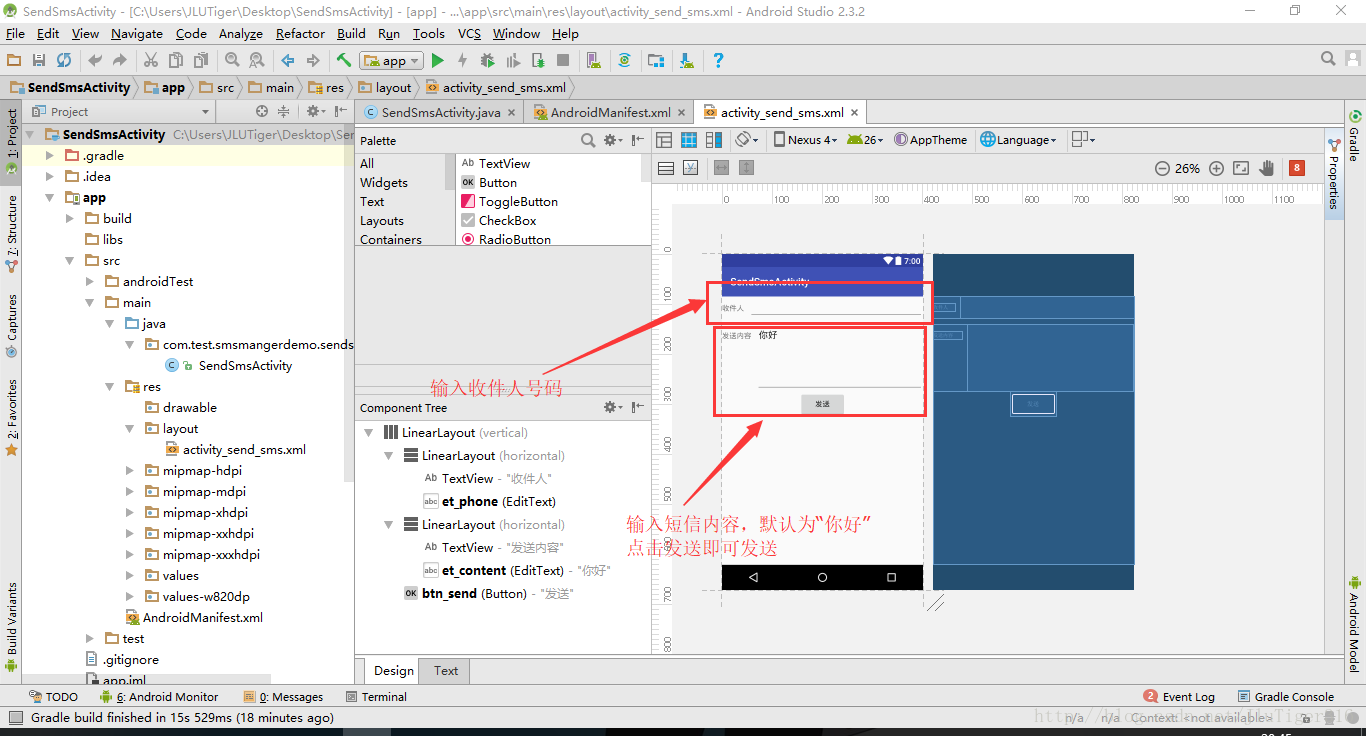
Android中实现短信发送的一种方式的更多相关文章
- Android中H5和Native交互的两种方式
Android中H5和Native交互的两种方式:http://www.jianshu.com/p/bcb5d8582d92 注意事项: 1.android给h5页面注入一个对象(WZApp),这个对 ...
- Java中实现短信发送
最近跟着做公司的项目偶然接触到的,顺势把这个给记录下来,给自己梳理一下. 采用引入第三方工具的方式,网上查了半天,发现简单的实现方式便是注册一个中国网建的账号,新建账号的时候会附带赠几条免费短信,彩信 ...
- laravel中实现短信发送验证码
前段时间想实现一个短信验证码的功能,但是卡了很长时间. 首先我用的是阿里云的短信服务业务,其首次接入流程如下: 在阿里云上开通短信服务后需要做的: 1,申请签名 2,申请模板 3,创建Acces ...
- Android中读取短信信息
Android中读取的短信文件有 ? 1 2 3 4 5 6 7 8 9 10 11 12 13 14 15 16 /** * 所有的短信 */ public static final Strin ...
- android 中管理短信
为了看代码方便,一边在网上google资料,一边看Android java 源代码. 偶然发现了一个类MmsSmsDatabaseHelper.java,原来android将所有的短信信息都存入了mm ...
- 暴力清除Android中的短信
有些短信程序有bug,当短信(特别是彩信)没有接收完整,或者是一些异常情况下,你会收到一条短信但是看不到或者看不了. 此时郁闷的事情就来了,系统会提醒你还有1条未读短信,但是你满世界都找不到这条短信. ...
- Android 网格布局短信发送界面
<?xml version="1.0" encoding="utf-8"?> <GridLayout xmlns:android=" ...
- Android中服务的生命周期与两种方式的区别
服务的生命周期跟Activity的生命周期类似.但是生命周期甚至比你关注服务如何创建和销毁更重要,因为服务能够在用户不知情的情况下在后台运行. 服务的生命周期---从创建到销毁---可以被分为以下两个 ...
- Android开发之短信验证码示例
在说Android中的短信验证码这个知识点前,我们首先来了解下聚合数据 聚合数据介绍 聚合数据是一家国内最大的基础数据API提供商,专业从事互联网数据服务.免费提供从天气查询.空气质量.地图坐标到金融 ...
随机推荐
- [Linux] Nginx 提供静态内容和优化积压队列
1.try_files指令可用于检查指定的文件或目录是否存在; NGINX会进行内部重定向,如果没有,则返回指定的状态代码.例如,要检查对应于请求URI的文件是否存在,请使用try_files指令和$ ...
- mysql全文索引之模糊查询
旧版的MySQL的全文索引只能用在MyISAM表格的char.varchar和text的字段上. 不过新版的MySQL5.6.24上InnoDB引擎也加入了全文索引,所以具体信息大家可以随时关注官网, ...
- C#设计模式之十外观模式(Facade Pattern)【结构型】
一.引言 快12点半了,要开始今天的写作了.很快,转眼设计模式已经写了十个了,今天我们要讲[结构型]设计模式的第五个模式,该模式是[外观模式],英文名称是:Facade Pattern.我们先从名字上 ...
- Github被微软收购,这里整理了16个替代品
微软斥资75亿美元收购以后,鉴于微软和开源竞争的历史,很多开发者都感到惊恐.毕竟,互联网上最大的一块可以自由的净土被微软染指,宝宝不开森.如果你真的担心微软会对Github有所动作,那么这里我列举了1 ...
- input 属性为 number,maxlength不起作用如何解决?
<input type="text" maxlength="5" /> 效果ok, 当 <input type="number ...
- 弹性盒模型,flex布局
弹性盒模型 弹性盒子是css3的一种新布局模式,由容器(父元素)和项目(子元素)组成. 弹性盒子是一种当页面需要适应不同的屏幕大小以及设备类型时确保元素拥有恰当的行为的布局方式. 引入弹性盒模型的 ...
- 深入理解Java虚拟机04--类结构文件
一.程序存储格式 统一的程序存储格式:不同平台的虚拟机于所有平台都统一使用程序存储格式——字节码(ByteCode); Java 虚拟机不关心 Class 文件的来源,而只和“Class文件" ...
- VR技术了解(作业)
增强现实技术 概念:将现实世界和虚拟世界无缝集成的新技术. 突出特点: 真实世界与虚拟的信息集成 实时交互 三维空间中增添定位虚拟物 应用 医疗领域:医生可以利用增强现实技术,轻易地进行手术部位的精确 ...
- selenium+pyquery爬取淘宝美食100页(无头静默模式)
import re from selenium import webdriver from selenium.webdriver.common.by import By from selenium.w ...
- go 开发中需要注意的与python的不同点
从python转golang开发已经3个月了,因为写过c++,所以对golang接受的还算快,这段经历也不是很痛苦.伯乐在线上看了一些大神关于python转golang过程中的不适应和吐槽,决定写下篇 ...