
WPF标注装饰器
标注
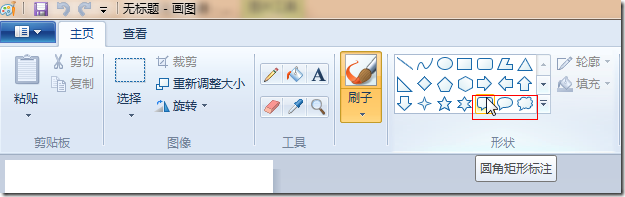
在许多地方我们都会用到标注,比如在画图中:
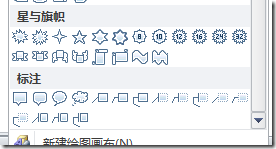
在Office中:
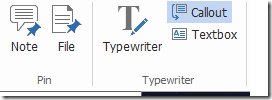
在Foxit Reader中:
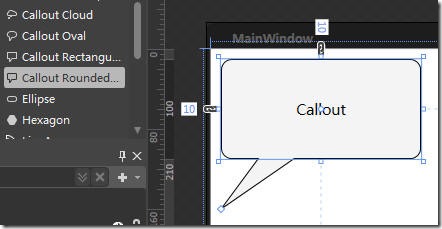
在Blend中:
等等。
简介
以前,因项目上需要做标注,简单找了一下,没发现适合要求的控件(包括Blend中的标注,标注的两个点距离是固定的)。所以自己简单的写了一个。后来又私下修改了几次,基本完成了圆角矩形的标注。
效果图如下:
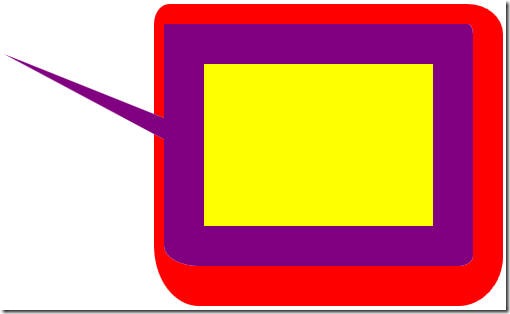
对应的XAML代码如下:
<local:CalloutDecorator Margin="5" AnchorOffsetX="150" AnchorOffsetY="50"

                        Background="Purple" BorderBrush="Red" BorderThickness="10,20,30,40"

                        CornerRadius="10,20,30,40" Dock="Left" FirstOffset="110"

                        Padding="40" SecondOffset="130">

    <Border Background="Yellow" />

</local:CalloutDecorator>
支持设置锚点(AnchorOffsetX和AnchorOffsetY)、与锚点相对应的两个点的坐标(FirstOffset
和SecondOffset)、朝向(Dock)、圆角信息(CornerRadius)、边框信息(BorderThickness、BorderBrush)、保留空间(Padding)、背景(Background)。
设置各项参数时需要注意,不能让与锚点相对应的两个点的坐标都边框以内,否则会产生奇怪的效果。
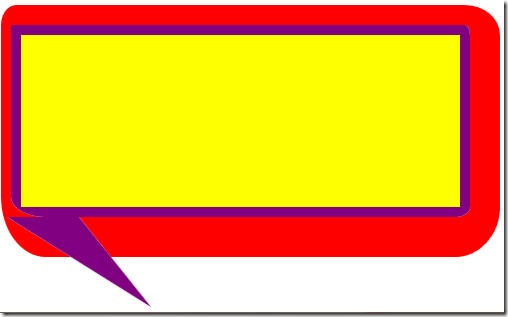
但是好在我们一般情况下都不会将边框设的过大,而将两个点设置的较小。
代码
代码中重载了WPF三个重要过程,测量(MeasureOverride)、布局(ArrangeOverride)、绘制(OnRender)。为了提高绘制效率,使用了缓存。代码较简单,也有注释,就不再多说了。
namespace YiYan127.WPF.Decorator
{
using System;
using System.Windows;
using System.Windows.Controls;
using System.Windows.Media; /// <summary>
/// 标注式装饰器
/// </summary>
public class CalloutDecorator : Border
{
#region Fields #region DependencyProperty public static readonly DependencyProperty DockProperty = DependencyProperty.Register(
"Dock",
typeof(Dock),
typeof(CalloutDecorator),
new FrameworkPropertyMetadata(Dock.Bottom, Refresh)); public static readonly DependencyProperty AnchorOffsetXProperty = DependencyProperty.Register(
"AnchorOffsetX",
typeof(double),
typeof(CalloutDecorator),
new FrameworkPropertyMetadata(20.0, Refresh),
DoubleGreatterThanZero); public static readonly DependencyProperty AnchorOffsetYProperty = DependencyProperty.Register(
"AnchorOffsetY",
typeof(double),
typeof(CalloutDecorator),
new FrameworkPropertyMetadata(20.0, Refresh),
DoubleGreatterThanZero); public static readonly DependencyProperty FirstOffsetProperty = DependencyProperty.Register(
"FirstOffset",
typeof(double),
typeof(CalloutDecorator),
new FrameworkPropertyMetadata(10.0, FrameworkPropertyMetadataOptions.AffectsArrange),
DoubleGreatterThanZero); public static readonly DependencyProperty SecondOffsetProperty = DependencyProperty.Register(
"SecondOffset",
typeof(double),
typeof(CalloutDecorator),
new FrameworkPropertyMetadata(20.0, FrameworkPropertyMetadataOptions.AffectsArrange),
DoubleGreatterThanZero); #endregion DependencyProperty /// <summary>
/// 刷新选项
/// </summary>
private const FrameworkPropertyMetadataOptions Refresh =
FrameworkPropertyMetadataOptions.AffectsMeasure | FrameworkPropertyMetadataOptions.AffectsRender
| FrameworkPropertyMetadataOptions.AffectsArrange; /// <summary>
/// 是否为Callout模式,为false的话,表示border模式
/// </summary>
private bool isCalloutMode; /// <summary>
/// 背景的缓存
/// </summary>
private StreamGeometry backgroundGeometryCache; /// <summary>
/// 标注的缓存
/// </summary>
private StreamGeometry calloutGeometryCache; #endregion Fields #region Properties /// <summary>
/// 引线朝向(左、上、右、下)
/// </summary>
public Dock Dock
{
get { return (Dock)GetValue(DockProperty); }
set { this.SetValue(DockProperty, value); }
} /// <summary>
/// X方向的锚点偏移(针对子控件)
/// </summary>
public double AnchorOffsetX
{
get { return (double)GetValue(AnchorOffsetXProperty); }
set { this.SetValue(AnchorOffsetXProperty, value); }
} /// <summary>
/// Y方向的锚点偏移(针对子控件)
/// </summary>
public double AnchorOffsetY
{
get { return (double)GetValue(AnchorOffsetYProperty); }
set { this.SetValue(AnchorOffsetYProperty, value); }
} /// <summary>
/// 在对应的轴上第一个偏移位置
/// </summary>
public double FirstOffset
{
get { return (double)GetValue(FirstOffsetProperty); }
set { this.SetValue(FirstOffsetProperty, value); }
} /// <summary>
/// 在对应的轴上的第二个偏移位置
/// </summary>
public double SecondOffset
{
get { return (double)GetValue(SecondOffsetProperty); }
set { this.SetValue(SecondOffsetProperty, value); }
} #endregion Properties #region Overrides /// <summary>
/// 重载测量过程
/// </summary>
/// <param name="constraint">约束</param>
/// <returns>需要的大小</returns>
protected override Size MeasureOverride(Size constraint)
{
this.isCalloutMode = (this.Child != null) && (!IsZero(this.AnchorOffsetX) && (!IsZero(this.AnchorOffsetY))); if (!this.isCalloutMode)
{
return base.MeasureOverride(constraint);
} Size borderSize = GetDesiredSize(this.BorderThickness);
Size paddingSize = GetDesiredSize(this.Padding); // 最少需要的大小
var basicSize = new Size(borderSize.Width + paddingSize.Width, borderSize.Height + paddingSize.Height); // 计算需要的实际大小
switch (Dock)
{
case Dock.Left:
case Dock.Right:
{
// 宽度不能小于0
double availableWidth = Math.Max(0, constraint.Width - basicSize.Width - this.AnchorOffsetX);
var availableSize = new Size(availableWidth, Math.Max(0.0, constraint.Height - basicSize.Height)); this.Child.Measure(availableSize);
Size desiredSize = this.Child.DesiredSize; return new Size(
desiredSize.Width + basicSize.Width + this.AnchorOffsetX,
desiredSize.Height + basicSize.Height);
} case Dock.Top:
case Dock.Bottom:
{
double availableHeight = Math.Max(0, constraint.Height - basicSize.Height - this.AnchorOffsetY);
var availableSize = new Size(Math.Max(0.0, constraint.Width - basicSize.Width), availableHeight); this.Child.Measure(availableSize);
Size desiredSize = this.Child.DesiredSize; return new Size(
desiredSize.Width + basicSize.Width,
desiredSize.Height + basicSize.Height + this.AnchorOffsetY);
}
} return basicSize;
} /// <summary>
/// 重载布局过程
/// </summary>
/// <param name="finalSize">可用的布局大小</param>
/// <returns>布局大小</returns>
protected override Size ArrangeOverride(Size finalSize)
{
if (!this.isCalloutMode)
{
return base.ArrangeOverride(finalSize);
} var boundaryRect = new Rect(finalSize);
var outterRect = new Rect(); switch (Dock)
{
#region 根据不同的Dock进行处理 case Dock.Left:
{
outterRect = DeflateRect(boundaryRect, new Thickness(this.AnchorOffsetX, 0, 0, 0));
break;
} case Dock.Right:
{
outterRect = DeflateRect(boundaryRect, new Thickness(0, 0, this.AnchorOffsetX, 0));
break;
} case Dock.Top:
{
outterRect = DeflateRect(boundaryRect, new Thickness(0, this.AnchorOffsetY, 0, 0));
break;
} case Dock.Bottom:
{
outterRect = DeflateRect(boundaryRect, new Thickness(0, 0, 0, this.AnchorOffsetY));
break;
} #endregion 根据不同的Dock进行处理
} Rect innerRect = DeflateRect(outterRect, this.BorderThickness);
Rect finalRect = DeflateRect(innerRect, this.Padding);
this.Child.Arrange(finalRect); var innerPoints = new BorderPoints(this.CornerRadius, this.BorderThickness, false);
if (!IsZero(innerRect.Width) && !IsZero(innerRect.Height))
{
var streamGeometry = new StreamGeometry();
using (StreamGeometryContext streamGeometryContext = streamGeometry.Open())
{
this.GenerateGeometry(streamGeometryContext, innerRect, innerPoints, boundaryRect);
} streamGeometry.Freeze();
this.backgroundGeometryCache = streamGeometry;
}
else
{
this.backgroundGeometryCache = null;
} if (!IsZero(outterRect.Width) && !IsZero(outterRect.Height))
{
var outterPoints = new BorderPoints(this.CornerRadius, this.BorderThickness, true);
var streamGeometry = new StreamGeometry();
using (StreamGeometryContext streamGeometryContext = streamGeometry.Open())
{
this.GenerateGeometry(streamGeometryContext, outterRect, outterPoints, boundaryRect);
if (this.backgroundGeometryCache != null)
{
this.GenerateGeometry(streamGeometryContext, innerRect, innerPoints, boundaryRect);
}
} streamGeometry.Freeze();
this.calloutGeometryCache = streamGeometry;
}
else
{
this.calloutGeometryCache = null;
} return finalSize;
} /// <summary>
/// 重载绘制
/// </summary>
/// <param name="dc"></param>
protected override void OnRender(DrawingContext dc)
{
if (!this.isCalloutMode)
{
base.OnRender(dc);
return;
} if (this.calloutGeometryCache != null && this.BorderBrush != null)
{
dc.DrawGeometry(this.BorderBrush, null, this.calloutGeometryCache);
} if (this.backgroundGeometryCache != null && this.Background != null)
{
dc.DrawGeometry(this.Background, null, this.backgroundGeometryCache);
}
} #endregion Overrides #region Private Methods /// <summary>
/// 验证类型为double且大于0
/// </summary>
/// <param name="value">值</param>
/// <returns>数据为double类型且大于0</returns>
private static bool DoubleGreatterThanZero(object value)
{
return (value is double) && ((double)value) > 0;
} /// <summary>
/// 获取期望的大小
/// </summary>
/// <param name="thickness">边框信息</param>
/// <returns>期望的大小</returns>
private static Size GetDesiredSize(Thickness thickness)
{
return new Size(thickness.Left + thickness.Right, thickness.Top + thickness.Bottom);
} /// <summary>
/// 返回在矩形中留出边框后的矩形
/// </summary>
/// <param name="rt">矩形</param>
/// <param name="thick">边框</param>
/// <returns>留出边框后的矩形</returns>
private static Rect DeflateRect(Rect rt, Thickness thick)
{
return new Rect(rt.Left + thick.Left, rt.Top + thick.Top, Math.Max(0.0, rt.Width - thick.Left - thick.Right), Math.Max(0.0, rt.Height - thick.Top - thick.Bottom));
} /// <summary>
/// 判断一个数是否为0
/// </summary>
/// <param name="value">数</param>
/// <returns>为0返回true,否则返回false</returns>
private static bool IsZero(double value)
{
return Math.Abs(value) < 2.22044604925031E-15;
} /// <summary>
/// 返回过两点的直线在Y坐标上的X坐标
/// </summary>
/// <param name="point1">第一个点</param>
/// <param name="point2">第二个点</param>
/// <param name="y">Y坐标</param>
/// <returns>对应的X坐标</returns>
private static double CalculateLineX(Point point1, Point point2, double y)
{
return point1.X - ((point1.X - point2.X) * (point1.Y - y) / (point1.Y - point2.Y));
} /// <summary>
/// 返回过两点的直线在X坐标上的Y坐标
/// </summary>
/// <param name="point1">第一个点</param>
/// <param name="point2">第二个点</param>
/// <param name="x">X坐标</param>
/// <returns>对应的Y坐标</returns>
private static double CalculateLineY(Point point1, Point point2, double x)
{
return point1.Y - ((point1.X - x) * (point1.Y - point2.Y) / (point1.X - point2.X));
} /// <summary>
/// 生成形状
/// </summary>
/// <param name="ctx">绘制上下文</param>
/// <param name="rect">绘制所在的矩形</param>
/// <param name="points">边框绘制点</param>
/// <param name="boundaryRect">绘制的外边界</param>
private void GenerateGeometry(StreamGeometryContext ctx, Rect rect, BorderPoints points, Rect boundaryRect)
{
var leftTopPt = new Point(points.LeftTop, 0.0);
var rightTopPt = new Point(rect.Width - points.RightTop, 0.0);
var topRightPt = new Point(rect.Width, points.TopRight);
var bottomRightPt = new Point(rect.Width, rect.Height - points.BottomRight);
var rightBottomPt = new Point(rect.Width - points.RightBottom, rect.Height);
var leftBottomPt = new Point(points.LeftBottom, rect.Height);
var bottomLeftPt = new Point(0.0, rect.Height - points.BottomLeft);
var topLeftPt = new Point(0.0, points.TopLeft); if (leftTopPt.X > rightTopPt.X)
{
double x = points.LeftTop / (points.LeftTop + points.RightTop) * rect.Width;
leftTopPt.X = x;
rightTopPt.X = x;
} if (topRightPt.Y > bottomRightPt.Y)
{
double y = points.TopRight / (points.TopRight + points.BottomRight) * rect.Height;
topRightPt.Y = y;
bottomRightPt.Y = y;
} if (rightBottomPt.X < leftBottomPt.X)
{
double x2 = points.LeftBottom / (points.LeftBottom + points.RightBottom) * rect.Width;
rightBottomPt.X = x2;
leftBottomPt.X = x2;
} if (bottomLeftPt.Y < topLeftPt.Y)
{
double y2 = points.TopLeft / (points.TopLeft + points.BottomLeft) * rect.Height;
bottomLeftPt.Y = y2;
topLeftPt.Y = y2;
} var vector = new Vector(rect.TopLeft.X, rect.TopLeft.Y);
leftTopPt += vector;
rightTopPt += vector;
topRightPt += vector;
bottomRightPt += vector;
rightBottomPt += vector;
leftBottomPt += vector;
bottomLeftPt += vector;
topLeftPt += vector; ctx.BeginFigure(leftTopPt, true, true); if (this.Dock == Dock.Top)
{
var secondOutPoint = new Point(this.SecondOffset, this.AnchorOffsetY);
var firstOutPoint = new Point(this.FirstOffset, this.AnchorOffsetY);
var calloutPoint = new Point(this.AnchorOffsetX, 0); ctx.LineTo(new Point(CalculateLineX(calloutPoint, firstOutPoint, rect.Top), rect.Top), true, false);
ctx.LineTo(calloutPoint, true, false);
ctx.LineTo(new Point(CalculateLineX(calloutPoint, secondOutPoint, rect.Top), rect.Top), true, false);
} ctx.LineTo(rightTopPt, true, false);
double sizeX = rect.TopRight.X - rightTopPt.X;
double sizeY = topRightPt.Y - rect.TopRight.Y;
if (!IsZero(sizeX) || !IsZero(sizeY))
{
ctx.ArcTo(topRightPt, new Size(sizeX, sizeY), 0.0, false, SweepDirection.Clockwise, true, false);
} if (this.Dock == Dock.Right)
{
var secondOutPoint = new Point(boundaryRect.Width - this.AnchorOffsetX, this.SecondOffset);
var firstOutPoint = new Point(boundaryRect.Width - this.AnchorOffsetX, this.FirstOffset);
var calloutPoint = new Point(boundaryRect.Width, this.AnchorOffsetY); ctx.LineTo(new Point(rect.Right, CalculateLineY(calloutPoint, firstOutPoint, rect.Right)), true, false);
ctx.LineTo(calloutPoint, true, false);
ctx.LineTo(new Point(rect.Right, CalculateLineY(calloutPoint, secondOutPoint, rect.Right)), true, false);
} ctx.LineTo(bottomRightPt, true, false);
sizeX = rect.BottomRight.X - rightBottomPt.X;
sizeY = rect.BottomRight.Y - bottomRightPt.Y;
if (!IsZero(sizeX) || !IsZero(sizeY))
{
ctx.ArcTo(rightBottomPt, new Size(sizeX, sizeY), 0.0, false, SweepDirection.Clockwise, true, false);
} if (this.Dock == Dock.Bottom)
{
var secondOutPoint = new Point(this.SecondOffset, boundaryRect.Height - this.AnchorOffsetY);
var firstOutPoint = new Point(this.FirstOffset, boundaryRect.Height - this.AnchorOffsetY);
var calloutPoint = new Point(this.AnchorOffsetX, boundaryRect.Height); ctx.LineTo(new Point(CalculateLineX(calloutPoint, secondOutPoint, rect.Bottom), rect.Bottom), true, false);
ctx.LineTo(calloutPoint, true, false);
ctx.LineTo(new Point(CalculateLineX(calloutPoint, firstOutPoint, rect.Bottom), rect.Bottom), true, false);
} ctx.LineTo(leftBottomPt, true, false);
sizeX = leftBottomPt.X - rect.BottomLeft.X;
sizeY = rect.BottomLeft.Y - bottomLeftPt.Y;
if (!IsZero(sizeX) || !IsZero(sizeY))
{
ctx.ArcTo(bottomLeftPt, new Size(sizeX, sizeY), 0.0, false, SweepDirection.Clockwise, true, false);
} if (this.Dock == Dock.Left)
{
var secondOutPoint = new Point(this.AnchorOffsetX, this.SecondOffset);
var firstOutPoint = new Point(this.AnchorOffsetX, this.FirstOffset);
var calloutPoint = new Point(0, this.AnchorOffsetY); ctx.LineTo(new Point(rect.Left, CalculateLineY(calloutPoint, firstOutPoint, rect.Left)), true, false);
ctx.LineTo(calloutPoint, true, false);
ctx.LineTo(new Point(rect.Left, CalculateLineY(calloutPoint, secondOutPoint, rect.Left)), true, false);
} ctx.LineTo(topLeftPt, true, false);
sizeX = leftTopPt.X - rect.TopLeft.X;
sizeY = topLeftPt.Y - rect.TopLeft.Y;
if (!IsZero(sizeX) || !IsZero(sizeY))
{
ctx.ArcTo(leftTopPt, new Size(sizeX, sizeY), 0.0, false, SweepDirection.Clockwise, true, false);
}
} #endregion Private Methods /// <summary>
/// 边框绘制点
/// </summary>
private struct BorderPoints
{
internal readonly double LeftTop;
internal readonly double TopLeft;
internal readonly double TopRight;
internal readonly double RightTop;
internal readonly double RightBottom;
internal readonly double BottomRight;
internal readonly double BottomLeft;
internal readonly double LeftBottom; /// <summary>
/// 构造函数
/// </summary>
/// <param name="borderCornerRadius">圆角信息</param>
/// <param name="boderThickness">边框信息</param>
/// <param name="outer">是否为外部</param>
internal BorderPoints(CornerRadius borderCornerRadius, Thickness boderThickness, bool outer)
{
double halfLeft = 0.5 * boderThickness.Left;
double halfTop = 0.5 * boderThickness.Top;
double halfRight = 0.5 * boderThickness.Right;
double halfBottom = 0.5 * boderThickness.Bottom;
if (outer)
{
if (IsZero(borderCornerRadius.TopLeft))
{
this.LeftTop = this.TopLeft = 0.0;
}
else
{
this.LeftTop = borderCornerRadius.TopLeft + halfLeft;
this.TopLeft = borderCornerRadius.TopLeft + halfTop;
} if (IsZero(borderCornerRadius.TopRight))
{
this.TopRight = this.RightTop = 0.0;
}
else
{
this.TopRight = borderCornerRadius.TopRight + halfTop;
this.RightTop = borderCornerRadius.TopRight + halfRight;
} if (IsZero(borderCornerRadius.BottomRight))
{
this.RightBottom = this.BottomRight = 0.0;
}
else
{
this.RightBottom = borderCornerRadius.BottomRight + halfRight;
this.BottomRight = borderCornerRadius.BottomRight + halfBottom;
} if (IsZero(borderCornerRadius.BottomLeft))
{
this.BottomLeft = this.LeftBottom = 0.0;
}
else
{
this.BottomLeft = borderCornerRadius.BottomLeft + halfBottom;
this.LeftBottom = borderCornerRadius.BottomLeft + halfLeft;
}
}
else
{
this.LeftTop = Math.Max(0.0, borderCornerRadius.TopLeft - halfLeft);
this.TopLeft = Math.Max(0.0, borderCornerRadius.TopLeft - halfTop);
this.TopRight = Math.Max(0.0, borderCornerRadius.TopRight - halfTop);
this.RightTop = Math.Max(0.0, borderCornerRadius.TopRight - halfRight);
this.RightBottom = Math.Max(0.0, borderCornerRadius.BottomRight - halfRight);
this.BottomRight = Math.Max(0.0, borderCornerRadius.BottomRight - halfBottom);
this.BottomLeft = Math.Max(0.0, borderCornerRadius.BottomLeft - halfBottom);
this.LeftBottom = Math.Max(0.0, borderCornerRadius.BottomLeft - halfLeft);
}
}
}
}
}
WPF标注装饰器的更多相关文章
- WPF装饰器
装饰器定义: 装饰器是一种特殊类型的 FrameworkElement,用于向用户提供可视化提示. 对于其他用户,装饰器可用于将功能控点添加到元素中或提供有关控件的状态信息. 装饰器可以在不改变原有的 ...
- WPF和Expression Blend开发实例:Adorner(装饰器)应用实例
装饰器-- 表示用于修饰 UIElement 的 FrameworkElement 的抽象类 简单来说就是,在不改变一个UIElement结构的情况下,将一个Visual对象加到它上面. 应用举例: ...
- (十)装饰器模式详解(与IO不解的情缘)
作者:zuoxiaolong8810(左潇龙),转载请注明出处,特别说明:本博文来自博主原博客,为保证新博客中博文的完整性,特复制到此留存,如需转载请注明新博客地址即可. LZ到目前已经写了九个设计模 ...
- Python学习笔记——基础篇2【第三周】——计数器、有序字典、元组、单(双)向队列、深浅拷贝、函数、装饰器
目录 1.Python计数器Counter 2.Python有序字典OrderredDict 3.Python默认字典default 4.python可命名元组namedtuple 5.Python双 ...
- Python系列之文件操作、冒泡算法、装饰器、及递归
文件处理 python对文件进行读写操作的方法与具体步骤,包括打开文件.读取内容.写入文件.文件中的内容定位.及关闭文件释放资源等 open().file(),这个两函数提供了初始化输入\输出(I\O ...
- python装饰器 & flask 通过装饰器 实现 单点登录验证
首先介绍装饰器,以下是一段标注了特殊输出的代码.用于帮助理解装饰器的调用过程. import time def Decorator_one(arg1): info = "\033[1;31; ...
- 基于TypeScript装饰器定义Express RESTful 服务
前言 本文主要讲解如何使用TypeScript装饰器定义Express路由.文中出现的代码经过简化不能直接运行,完整代码的请戳:https://github.com/WinfredWang/expre ...
- 涉及模式之 装饰器模式详解(与IO不解的情缘)
作者:zuoxiaolong8810(左潇龙),转载请注明出处,特别说明:本博文来自博主原博客,为保证新博客中博文的完整性,特复制到此留存,如需转载请注明新博客地址即可. LZ到目前已经写了九个设计模 ...
- Java设计模式系列-装饰器模式
原创文章,转载请标注出处:<Java设计模式系列-装饰器模式> 一.概述 装饰器模式作用是针对目标方法进行增强,提供新的功能或者额外的功能. 不同于适配器模式和桥接模式,装饰器模式涉及的是 ...
随机推荐
- log4j.xml 配置参数属性level使用心得
jdbc.sqlonly 只显示执行的sql语句.info级才可以显示,debug增加显示java源代码位置. jdbc.sqltiming 显示执行的sql语句以及语句执行时间, ...
- Linux 学习手记(3):Linux基本的文件管理操作
复制文件和目录 在Linux中使用命令cp来复制文件或者目录,使用方式: cp 源文件(文件夹) 目标文件(文件夹) cp命令常用参数: -r 递归复制整个目录 -v 显示详细信息 移动.重命名一个文 ...
- React入门--------JSX
React学习网站 React官方英文网站:http://reactjs.cn/react/docs/top-level-api.html React官方中文网站:http://www.css88.c ...
- .NET 面试基本技术整理
这篇文章主要 整理出来的大部分公司需要的技术 以及一些学习链接,进行恶补一下,以免面试官考倒你 其中也整理了一些面试题需要的可以点击链接 需要掌握的技术 基础概念需要 面向对象 OOD/OOP OOD ...
- 触发layoutSubviews的条件
1. init初始化不会触发layoutSubviews 2. addSubview会触发layoutSubviews 3. 设置view的Frame会触发layoutSubviews,当然前提是fr ...
- spring 管理 jdbc 事务
@Transactional 业务实现类 类名上方--这个类中的方法,执行操作前会打开事务. 默认:RuntimeException 自动回滚, 可以try catch 的异常,不会滚 方法名 ...
- java基础--温故而知新 (01)
1 myeclipse是一个eclipse插件.使用java语言开发.进程是javaw.exe--非命令行方式启动. 2 考这些术语的公司,往往都是世界一流的好公司.(技术广度+英语) java ...
- Linux网络编程&内核学习
c语言: 基础篇 1.<写给大家看的C语言书(第2版)> 原书名: Absolute Beginner's Guide to C (2nd Edition) 原出版社: Sams 作者: ...
- leveldb源码分析--Iterator遍历数据库
在DBImpl中有一个函数声明为Iterator* DBImpl::NewIterator(const ReadOptions& options) ,他返回一个可以遍历或者搜索数据库的迭代器句 ...
- Web Application Project is configured to use IIS. Unable to access the IIS metabase.(配置为使用IIS Web应用程序xxxx项目。无法访问IIS元数据库。)
这几天重装系统,装了win10,居然用vs2013打开项目出现下面这个提示错误,搞了很久才知道原因: Even though I am an administrator on the machine, ...