
如何将 Cortana 与 Windows Phone 8.1 应用集成 ( Voice command - Natural language recognition )
随着 Windows Phone 8.1 GDR1 + Cortana 中文版的发布,相信有很多用户或开发者都在调戏 Windows Phone 的语音私人助理 Cortana 吧,在世界杯的时候我亲测 Cortana 预测德国和阿根廷的比赛很准的。(题外话扯远了),可是作为开发者我们怎么将Cortana集成到应用中呢,今天我用一点时间给大家介绍一下如何使用 voice command 集成 Windows Phone 8.1 的应用。
首先要明确两个名词 Voice command & Voice Command Definition 即 VCD文件,相信做过windows Phone 8.0 开发的朋友应该有所了解,通过注册VCD文件 Windows phone 8.0 的应用当中就可以实现 voice command 的功能,如果你不了解请先读一下我之前的文章(这里我就不在过多介绍 8.0 Voice command 的重复内容了),Windows Phone 8 语音 - Speech for Windows Phone 8 快速了解一下Windows Phone 开发语音功能的前期准备工作。
简单的说在 Windows Phone 8.0 voice command 功能比较简单,主要是通过 Voice Command Name 判断预制在VCD文件中的几个命令。
在 Windows Phone 8.1 应用中 Cortana 提供了更强的自然语言识别(Natural language recognition)
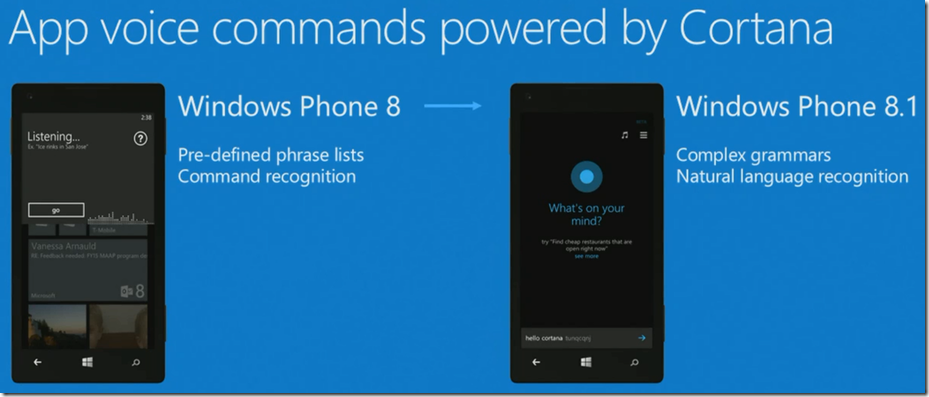
当然 VCD 文件的中的 grammars 也得到了扩充,并且区别两个OS版本的
http://schemas.microsoft.com/voicecommands/1.0 for Windows Phone 8.0 Voice Command and Cortana compatible.
http://schemas.microsoft.com/voicecommands/1.1 only for Widnows Phone 8.1 Cortnan.

详细内容请参考
Windows Phone 8.0: Voice command element and attribute reference for Windows Phone 8
Windows Phone 8.1: Voice command elements and attributes
通过 8.0 和 8.1 VCD 文件属性支持情况来看有一个最主要的区别在8.1 VCD中支持 PhraseTopic 这个属性。
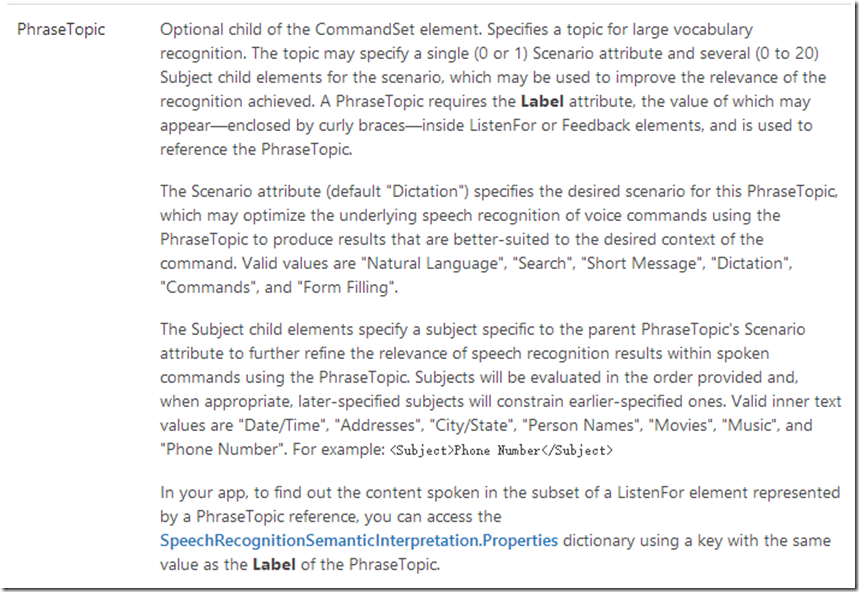
文字说的太抽象了还是贴出代码给大家说说吧:
这里我主要强调说一下 ListenFor 结点和 PhraseTopic 结点。 注意在 Listenfor 结点中的中括号 {dictatedSearchTerms} 是对应的 PhraseTopic 结点中的 Label 属性。同时我们可以把 PhraseTopic 理解成任意内容。最后都可以从Cortana回传到我们的应用当中来。
<VoiceCommands xmlns="http://schemas.microsoft.com/voicecommands/1.1">

    <!-- The CommandSet Name is used to programmatically access the CommandSet -->

    <CommandSet xml:lang="zh-CN" Name="chineseCommands">

        <!-- The CommandPrefix provides an alternative to your full app name for invocation -->

        <CommandPrefix> 微软 文档 </CommandPrefix>

        <!-- The CommandSet Example appears in the global help alongside your app name -->

        <Example> 搜索 构造 函数 </Example>

        <Command Name="MSDNSearch">

            <!-- The Command example appears in the drill-down help page for your app -->

            <Example> 搜索 构造 函数' </Example>

            <!-- ListenFor elements provide ways to say the command, including references to

            {PhraseLists} and {PhraseTopics} as well as [optional] words -->

            <ListenFor> 查找 {dictatedSearchTerms} </ListenFor>

            <ListenFor> 搜 {dictatedSearchTerms} </ListenFor>

            <ListenFor> 搜索  {dictatedSearchTerms} </ListenFor>

            <ListenFor> 查 {dictatedSearchTerms} </ListenFor>

            <ListenFor> 找 {dictatedSearchTerms} </ListenFor>

          <!--Feedback provides the displayed and spoken text when your command is triggered -->

            <Feedback> 查找 MSDN... </Feedback>

            <!-- Navigate specifies the desired page or invocation destination for the Command-->

            <Navigate Target="MainPage.xaml" />

        </Command>

        <Command Name="MSDNNaturalLanguage">

            <Example> 我 想 去 Windows 手机 开发 中心 </Example>

            <ListenFor> {naturalLanguage} </ListenFor>

            <Feedback> 启动 MSDN... </Feedback>

            <Navigate Target="MainPage.xaml" />

        </Command>

        <PhraseTopic Label="dictatedSearchTerms" Scenario="Search">

            <Subject> MSDN </Subject>

        </PhraseTopic>

        <PhraseTopic Label="naturalLanguage" Scenario="Natural Language">

            <Subject> MSDN </Subject>

        </PhraseTopic>

    </CommandSet>

</VoiceCommands>
了解完新的VCD文件,在这里我提醒下大家,其实在Windows Phone 8.0的应用中也可以兼容 Cortana的功能的,在8.0的应用当中我们只需要判断一下操作系统的版本然后选择不同的VCD文件向系统注册即可。
首先我们需要把两个版本的VCD文件都存放到项目中来

其次在注册VCD文件的时候根据系统版本进行一下判断即可。
        /// <summary>

        /// Installs the Voice Command Definition (VCD) file associated with the application.

        /// Based on OS version, installs a separate document based on version 1.0 of the schema or version 1.1.

        /// </summary>

        private async void InstallVoiceCommands()

        {

            const string wp80vcdPath = "ms-appx:///VoiceCommandDefinition_8.0.xml";

            const string wp81vcdPath = "ms-appx:///VoiceCommandDefinition_8.1.xml";

            const string chineseWp80vcdPath = "ms-appx:///ChineseVoiceCommandDefinition_8.0.xml";

            const string chineseWp81vcdPath = "ms-appx:///ChineseVoiceCommandDefinition_8.1.xml";

            try

            {

                bool using81orAbove = ((Environment.OSVersion.Version.Major >= )

                    && (Environment.OSVersion.Version.Minor >= ));

                string vcdPath = using81orAbove ? wp81vcdPath : wp80vcdPath;

                if (InstalledSpeechRecognizers.Default.Language.Equals("zh-CN", StringComparison.InvariantCultureIgnoreCase))

                {

                    vcdPath = using81orAbove ? chineseWp81vcdPath : chineseWp80vcdPath;

                }

                Uri vcdUri = new Uri(vcdPath);

                await VoiceCommandService.InstallCommandSetsFromFileAsync(vcdUri);

            }

            catch (Exception vcdEx)

            {

                Dispatcher.BeginInvoke(() =>

                {

                    MessageBox.Show(String.Format(

                        AppResources.VoiceCommandInstallErrorTemplate, vcdEx.HResult, vcdEx.Message));

                });

            }

        }
最后在应用当中获取用户的语音输入方法,注意这里也是需要通过 PhraseTopic 结点的 Label 名称获取的。
        /// <summary>

        /// Takes specific action for a retrieved VoiceCommand name.

        /// </summary>

        /// <param name="voiceCommandName"> the command name triggered to activate the application </param>

        private void HandleVoiceCommand(string voiceCommandName)

        {

            // Voice Commands can be typed into Cortana; when this happens, "voiceCommandMode" is populated with the

            // "textInput" value. In these cases, we'll want to behave a little differently by not speaking back.

            bool typedVoiceCommand = (NavigationContext.QueryString.ContainsKey("commandMode")

                && (NavigationContext.QueryString["commandMode"] == "text"));

            string phraseTopicContents = null;

            bool doSearch = false;

            switch (voiceCommandName)

            {

                case "MSDNNaturalLanguage":

                    if (NavigationContext.QueryString.TryGetValue("naturalLanguage", out phraseTopicContents)

                        && !String.IsNullOrEmpty(phraseTopicContents))

                    {

                        // We'll try to process the input as a natural language query; if we're successful, we won't

                        // fall back into searching, since the query will have already been handled.

                        doSearch = TryHandleNlQuery(phraseTopicContents, typedVoiceCommand);

                    }

                    break;

                case "MSDNSearch":

                    // The user explicitly asked to search, so we'll attempt to retrieve the query.

                    NavigationContext.QueryString.TryGetValue("dictatedSearchTerms", out phraseTopicContents);

                    doSearch = true;

                    break;

            }

            if (doSearch)

            {

                HandleSearchQuery(phraseTopicContents, typedVoiceCommand);

            }

        }
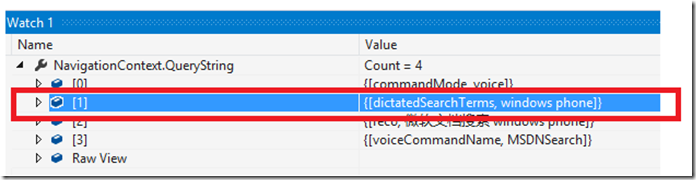
整个过程就这么简单,心动不如行动,赶快把你的应用加入Cortana 功能让小伙伴儿们调戏一番。
更多参考资料:
Quickstart: Voice commands (XAML)
源码下载:
MSDN Voice Search for Windows Phone 8.1
如何将 Cortana 与 Windows Phone 8.1 应用集成 ( Voice command - Natural language recognition )的更多相关文章
- Windows phone 8.1应用集成cortana语音命令
微软推出小娜已经有一段时间了,最近恰好在研究其用法,就随便写点记录一下自己的心得. 在研究时参考了@王博_Nick的博客:http://www.cnblogs.com/sonic1abc/p/3868 ...
- WAMP Server助你在Windows上快速搭建PHP集成环境
WAMP Server助你在Windows上快速搭建PHP集成环境 原文地址 我想只要爬过几天网的同学都会知道PHP吧,异次元的新版本就是基于PHP的WordPress程序制造出来的,还有国内绝大部分 ...
- 与众不同 windows phone (16) - Media(媒体)之编辑图片, 保存图片到相册, 与图片的上下文菜单“应用程序...”和“共享...”关联, 与 Windows Phone 的图片中心集成
原文:与众不同 windows phone (16) - Media(媒体)之编辑图片, 保存图片到相册, 与图片的上下文菜单"应用程序..."和"共享..." ...
- Windows系统的Jenkins持续集成环境
Windows系统的Jenkins持续集成环境 如题:本文将介绍如何在Windows环境下运用Jenkins部署持续集成环境.之所以写本文,是因为在最近工作当中,学习使用Jenkins时,确实遇到了一 ...
- Jenkins在Windows系统dotnet平台持续集成
之前写过一篇文章是在CentOS上构建.net自动化编译环境, 今天这篇是针对于Windows平台的环境. Jenkins是一个开源软件项目,旨在提供一个开放易用的软件平 ...
- 一步步部署基于Windows系统的Jenkins持续集成环境
如题:本文将介绍如何在Windows环境下运用Jenkins部署持续集成环境.之所以写本文,是因为在最近工作当中,学习使用Jenkins时,确实遇到了一些问题,而大多数教程文档都是基于Mac或是Lin ...
- windows linux—unix 跨平台通信集成控制系统----系统硬件信息获取
控制集成系统需要了解系统的各项硬件信息,之前我们设计的时候,习惯使用c函数来搞,后来可能发现程序的移植性收到了一些影响,比如unix内核的一些c函数在linux下面是没有的: 比如 苹果达尔文内核的如 ...
- windows linux—unix 跨平台通信集成控制系统----文件搜索
跨平台的网络通信,跟设备的集成控制,牵扯到在各种平台下的文件搜索问题,windows下面的已经有了. 地址如下: http://blog.csdn.net/wangyaninglm/article/d ...
- windows linux—unix 跨平台通信集成控制系统
首先,我们可以用到这个开源的开发包: mdk(Micro-Development-Kit)微量级软件开发包,提供几个常用类,主要实现了一个高性能的并发服务器引擎 使用c++开发,是一个跨平台的开发包, ...
随机推荐
- Unity3.0基于约定的自动注册机制
前文<Unity2.0容器自动注册机制>中,介绍了如何在 Unity 2.0 版本中使用 Auto Registration 自动注册机制.在 Unity 3.0 版本中(2013年),新 ...
- [外挂1] MFC 鼠标位置设置
a.取得窗口相对坐标 b.读出游戏窗口信息GetWindowRect c.移动鼠标指针SetCursorPos HWND gameh;//游戏窗口句柄 RECT r1;//RECT结构表示一个矩 ...
- Nutz Dao实体中索引注解的使用(@TableIndexes@Index)
Nutz是一组轻便小型的框架的集合, 各个部分可以被独立使用,把SSH的精华封装在一个1M左右的jar包中,Nutz不对其他任何第三方库产生依赖,如果不考虑数据库链接和日志的话,创建完美的Web应用只 ...
- 如何解决ASP.NET网站'__doPostBack' is undefined的脚本错误
最近碰到一个很奇怪的问题! 新发布一个ASP.NET的网站,基于.net 4.0 framework,基本没有用到什么特别新的技术,但是由于给客户预览用的服务器比较老,操作系统用的是Windows 2 ...
- css3动画animation
动画:animation animations这物似乎还是只在webkit,moz核心的浏览器上起作用 <!DOCTYPE html><html lang="en&qu ...
- JAVA学习Swing章节按钮组件JButton的简单学习
package com.swing; import java.awt.Container; import java.awt.Dimension; import java.awt.GridLayout; ...
- 使用Reveal查看任意App的技巧
转:http://www.jianshu.com/p/4dc8f94ca27c 前言 Reveal(http://revealapp.com)是一个很强大的iOS View Hierarchy工具,与 ...
- 【转】Xcode概览(Xcode 6版):循序渐进认识Xcode
该系列文章翻译自苹果的Xcode Overview文档,对大部分开发者来说,已经非常熟悉Xcode的功能和特性,不过伴随着iOS 8 SDK的发布,Xcode 6中也有些许调整,所以对该文档进行了翻译 ...
- #pragma data_seg 共享数据区(转)
原文地址:http://www.cnblogs.com/CBDoctor/archive/2013/01/26/2878201.html 1)#pragma data_seg()一般用于DLL中.也就 ...
- samba权限之easy举例说明--原创
实验环境RHEL5.0,samba3.023rc-2 一.何为browsealbe=no? 如图lingdao目录的权限为777 如图ling目录的共享设置和用户的ID和组 当用户lingdao_01 ...