
JQuery:JQuery的尺寸
JQuery:尺寸
介绍:
通过 jQuery,很容易处理元素和浏览器窗口的尺寸。
jQuery 提供多个处理尺寸的重要方法:width()、height()、innerHeight()、outerWidth()、outerHeight()
模型:
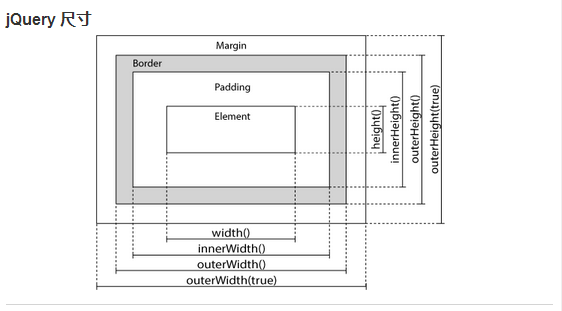
演练:
1、jQuery width() 和 height() 方法
width() 方法设置或返回元素的宽度(不包括内边距、边框或外边距)。
height() 方法设置或返回元素的高度(不包括内边距、边框或外边距)。
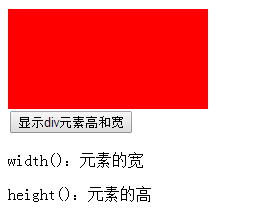
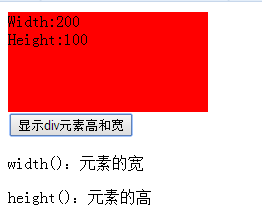
下面的例子返回指定的 <div> 元素的宽度和高度:
实例:
$("button").click(function(){
var txt="";
txt+="Width: " + $("#div1").width() + "</br>";
txt+="Height: " + $("#div1").height();
$("#div1").html(txt);
});
代码如下:
<!DOCTYPE html>

<html lang="zh-cn">

<head>

    <meta charset="utf-8">

    <title>JQuery的使用!!!</title>

    <script src="jquery-3.1.0.js"></script>

    <script>

        $(document).ready(function(){

            //显示div元素高和宽

            $("button").click(function(){

                var txt = "";

                txt += "Width:" + $("#div1").width() + "<br>";

                txt += "Height:" + $("#div1").height();

                $("#div1").html(txt);

            });

        });

    </script>

</head>

<body>

    <div id="div1" style="width:200px;height:100px;background-color:red"></div>

    <button>显示div元素高和宽</button>

    <p>width():元素的宽</p>

    <p>height():元素的高</p>

</body>

</html>
2、jQuery innerWidth() 和 innerHeight() 方法
innerWidth() 方法返回元素的宽度(包括内边距)。
innerHeight() 方法返回元素的高度(包括内边距)。
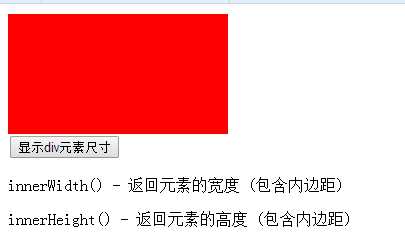
下面的例子返回指定的 <div> 元素的 inner-width/height:
实例:
$("button").click(function(){
var txt="";
txt+="Inner width: " + $("#div1").innerWidth() + "</br>";
txt+="Inner height: " + $("#div1").innerHeight();
$("#div1").html(txt);
});
代码如下:
<!DOCTYPE html>

<html lang="zh-cn">

<head>

    <meta charset="utf-8">

    <title>JQuery的使用!!!</title>

    <script src="jquery-3.1.0.js"></script>

    <script>

        $(document).ready(function(){

            //显示div元素尺寸

            $("button").click(function(){

                var txt = "";

                txt += "Width:" + $("#div1").innerWidth() + "<br>";

                txt += "Height:" + $("#div1").innerHeight();

                $("#div1").html(txt);

            });

        });

    </script>

</head>

<body>

    <div id="div1" style="width:200px;height:100px;padding:10px;margin:3px;background-color:red"></div>

    <button>显示div元素尺寸</button>

    <p>innerWidth() - 返回元素的宽度 (包含内边距)</p>

    <p>innerHeight() - 返回元素的高度 (包含内边距)</p>

</body>

</html>

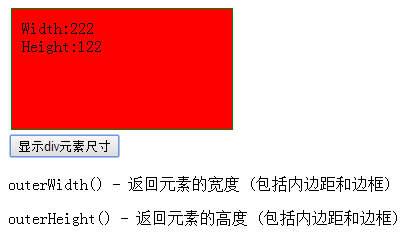
3、jQuery outerWidth() 和 outerHeight() 方法
outerWidth() 方法返回元素的宽度(包括内边距和边框)。
outerHeight() 方法返回元素的高度(包括内边距和边框)。
下面的例子返回指定的 <div> 元素的 outer-width/height:
实例
$("button").click(function(){
var txt="";
txt+="Outer width: " + $("#div1").outerWidth() + "</br>";
txt+="Outer height: " + $("#div1").outerHeight();
$("#div1").html(txt);
});
代码如下:
<!DOCTYPE html>

<html lang="zh-cn">

<head>

    <meta charset="utf-8">

    <title>JQuery的使用!!!</title>

    <script src="jquery-3.1.0.js"></script>

    <script>

        $(document).ready(function(){

            //显示div元素尺寸

            $("button").click(function(){

                var txt = "";

                txt += "Width:" + $("#div1").outerWidth() + "<br>";

                txt += "Height:" + $("#div1").outerHeight();

                $("#div1").html(txt);

            });

        });

    </script>

</head>

<body>

    <div id="div1" style="width:200px;height:100px;padding:10px;margin:3px;border:1px solid green;background-color:red"></div>

    <button>显示div元素尺寸</button>

    <p>outerWidth() - 返回元素的宽度 (包括内边距和边框)</p>

    <p>outerHeight() - 返回元素的高度 (包括内边距和边框)</p>

</body>

</html>

JQuery:JQuery的尺寸的更多相关文章
- 什么是jquery $ jQuery对象和DOM对象 和一些选择器
1什么是jQuery: jQuery就是将一些方法封装在一个js文件中.就是个js库 我们学习这些方法. 2为什么要学习jQuery: 原生js有以下问题: 1.兼容性问题2.代码重复3.DOM提供的 ...
- (转)整体把握jQuery -jQuery 的原型关系图
整体把握jQuery -jQuery 的原型关系图 (原)http://www.html5cn.org/article-6529-1.html 2014-7-2 17:12| 发布者: html5cn ...
- jQuery: jquery.json.js
http://api.jquery.com/jQuery.parseJSON/ http://www.json.org/json-zh.html http://fineui.codeplex.com/ ...
- JQuery --- 第一期 (初识jQuery, JQuery核心函数和工具方法)
个人学习笔记 初识jQuery 1.我的第一个JQuery <!DOCTYPE html> <html lang="en"> <head> & ...
- jQuery中的尺寸及位置的取和设
1.offset(); 获取位置值: $(selector).offset().left; $(selector).offset().top; 设置位置值: $(selector).offset({t ...
- jquery 操作css 尺寸
.height() 获取元素集合中的第一个元素的当前计算高度值,或设置每一个匹配元素的高度值. .height() 获取匹配元素集合中的第一个元素的当前计算高度值. 这个方法不接受参数. $(wind ...
- jQuery的相关尺寸获取 - 学习笔记
获取元素相对于文档的偏移量 获取当前元素相对于父级元素的偏移量 获取文档滚动距离 获取元素的宽度和高度 设置元素的宽度和高度 获取可视区域的宽度和高度 获取文档的宽度和高度 获取元素相对于文档的偏移量 ...
- jquery Jquery 遍历 获取设置 效果
speed: slow fast 毫秒 隐藏 显示 $(selector).hide(speed,callback) 隐藏. $(selector).show(speed,callback) 显示 $ ...
- [jQuery]jQuery DataTables插件自定义Ajax分页实现
前言 昨天在博客园的博问上帮一位园友解决了一个问题,我觉得有必要记录一下,万一有人也遇上了呢. 问题描述 园友是做前端的,产品经理要求他使用jQuery DataTables插件显示一个列表,要实现分 ...
- jQuery jQuery对象与dom对象的转换
jQuery对象本质上是一个构造函数,主要作用是返回jQuery对象的实例. jQuery选择器返回的是一个类似数组的对象,用下标运算取出的对象如$('body')[0],是dom对象,对此jquer ...
随机推荐
- CSS中zoom:1的作用 ,小标签大作用
CSS中zoom:1的作用兼容IE6.IE7.IE8浏览器,经常会遇到一些问题,可以使用zoom:1来解决,有如下作用:触发IE浏览器的haslayout解决ie下的浮动,margin重叠等一些问题. ...
- tomcat的安装
这个安装过程很清晰,转载一下:http://jingyan.baidu.com/article/8065f87fcc0f182330249841.html
- 连接mysql遇到的问题
1. 首先使用一个用户名不行时,可以新建一个用户名点击用户,输入名和密码,此时一定要记住密码,别忘了.不过也可以点击编辑用户改.此时连接时发现还是连接不上.出现错误信息为: Access denied ...
- Html - Bootstrap Panel面板
http://v3.bootcss.com/components/#panels Bootstrap Panel面板 <div class="panel panel-default&q ...
- 在client类中设置访问属性 address,business和individua
php 5.4中的traits,是新引入的特性,中文还真不知道如何准确翻译好.其实际的目的, 是为了有的场合想用多继承,但PHP又没多继承 ,于是就发明了这样的一个东西. Traits可以理解为一组能 ...
- node.js 资料
supervison可以调试nodejs,并能自动布署 键入命令: npm -g install supervisor
- ci获取当前url链接的分组,控制器,方法
public function role() { $ci= &get_instance();//ci控制器超级对象,就是把所有执行的方法打印出来 $directory = substr($ci ...
- PHP函数库(other)
PHP函数库(other) Session函数: session_abort — Discard session array changes and finish session session_ab ...
- 解决Ecshop因为动态ip问题登录后台自动退出
解决Ecshop因为动态ip问题登录后台自动退出 PHP 铁匠 2年前 (2013-07-21) 1130℃ 0评论 修改lib_base.php文件real_ip()函数,添加以下代码即可解 ...
- 数据库MySql阶段总结
S1数据库中最重要的是查询,对于查询要有一个好的理解模型是很关键的: 1. 每一个查询都会返回一个结果集,这个结果集可能是一个值,一个字段或者一个记录,甚至可能是一个表 返回一个值 SELECT * ...