
MyBatis入门(三)---多个参数
一、建立表
1.1、建立表,并插入数据
/*

SQLyog Enterprise v12.09 (64 bit)

MySQL - 5.6.27-log : Database - mybatis

*********************************************************************

*/

/*!40101 SET NAMES utf8 */;

/*!40101 SET SQL_MODE=''*/;

/*!40014 SET @OLD_UNIQUE_CHECKS=@@UNIQUE_CHECKS, UNIQUE_CHECKS=0 */;

/*!40014 SET @OLD_FOREIGN_KEY_CHECKS=@@FOREIGN_KEY_CHECKS, FOREIGN_KEY_CHECKS=0 */;

/*!40101 SET @OLD_SQL_MODE=@@SQL_MODE, SQL_MODE='NO_AUTO_VALUE_ON_ZERO' */;

/*!40111 SET @OLD_SQL_NOTES=@@SQL_NOTES, SQL_NOTES=0 */;

CREATE DATABASE /*!32312 IF NOT EXISTS*/`mybatis` /*!40100 DEFAULT CHARACTER SET utf8 */;

USE `mybatis`;

/*Table structure for table `author` */

DROP TABLE IF EXISTS `author`;

CREATE TABLE `author` (

  `author_id` int(11) unsigned NOT NULL AUTO_INCREMENT COMMENT '作者ID主键',

  `author_username` varchar(30) NOT NULL COMMENT '作者用户名',

  `author_password` varchar(32) NOT NULL COMMENT '作者密码',

  `author_email` varchar(50) NOT NULL COMMENT '作者邮箱',

  `author_bio` varchar(1000) DEFAULT '这家伙很赖,什么也没留下' COMMENT '作者简介',

  `register_time` datetime DEFAULT CURRENT_TIMESTAMP COMMENT '注册时间',

  PRIMARY KEY (`author_id`)

) ENGINE=InnoDB AUTO_INCREMENT=10 DEFAULT CHARSET=utf8;

/*Data for the table `author` */

insert  into `author`(`author_id`,`author_username`,`author_password`,`author_email`,`author_bio`,`register_time`)

values (1,'张三','','123@qq.com','张三是个新手,刚开始注册','2015-10-29 10:23:59'),(2,'李四','123asf','lisi@163.com','魂牵梦萦 ','2015-10-29 10:24:29'),(3,'王五','dfsd342','ww@sina.com','康熙王朝','2015-10-29 10:25:23'),(4,'赵六','123098sdfa','zhaoliu@qq.com','花午骨','2015-10-29 10:26:09'),(5,'钱七','zxasqw','qianqi@qq.com','这家伙很赖,什么也没留下','2015-10-29 10:27:04'),(6,'张三丰','','zhangsf@qq.com','这家伙很赖,什么也没留下','2015-10-29 11:48:00'),(7,'金庸','qwertyuiop','wuji@163.com','这家伙很赖,什么也没留下','2015-10-29 11:48:24'),(8,'知道了','','456789@qq.com','哈哈哈哈哈雅虎','2015-10-29 14:03:27'),(9,'不知道','','123456@qq.com','哈哈哈哈哈雅虎','2015-10-29 14:01:16');

/*!40101 SET SQL_MODE=@OLD_SQL_MODE */;

/*!40014 SET FOREIGN_KEY_CHECKS=@OLD_FOREIGN_KEY_CHECKS */;

/*!40014 SET UNIQUE_CHECKS=@OLD_UNIQUE_CHECKS */;

/*!40111 SET SQL_NOTES=@OLD_SQL_NOTES */;
二、创建项目
2.1、创建项目
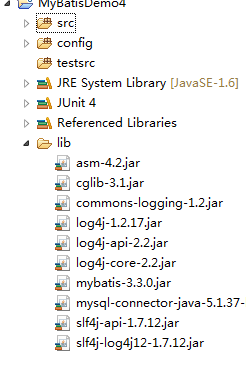
2.2、创建POJO类
package com.pb.mybatis.po;

import java.util.Date;

/**

 *

* @Title: Author.java

* @Package com.pb.mybatis.po

* @ClassName Author

* @Description: TODO(Blog作者类)

* @author 刘楠

* @date 2015-10-29 上午9:27:53

* @version V1.0

 */

public class Author {

    //作者ID

    private int authorId;

    //作者用户名

    private String authorUserName;

    //作者密码

    private String authorPassword;

    //作者邮箱

    private String authorEmail;

    //作者介绍

    private int authorBio;

    //注册时间

    private Date registerTime;

    /**

     * @return the authorId

     */

    public int getAuthorId() {

        return authorId;

    }

    /**

     * @param authorId the authorId to set

     */

    public void setAuthorId(int authorId) {

        this.authorId = authorId;

    }

    /**

     * @return the authorUserName

     */

    public String getAuthorUserName() {

        return authorUserName;

    }

    /**

     * @param authorUserName the authorUserName to set

     */

    public void setAuthorUserName(String authorUserName) {

        this.authorUserName = authorUserName;

    }

    /**

     * @return the authorPassword

     */

    public String getAuthorPassword() {

        return authorPassword;

    }

    /**

     * @param authorPassword the authorPassword to set

     */

    public void setAuthorPassword(String authorPassword) {

        this.authorPassword = authorPassword;

    }

    /**

     * @return the authorEmail

     */

    public String getAuthorEmail() {

        return authorEmail;

    }

    /**

     * @param authorEmail the authorEmail to set

     */

    public void setAuthorEmail(String authorEmail) {

        this.authorEmail = authorEmail;

    }

    /**

     * @return the authorBio

     */

    public int getAuthorBio() {

        return authorBio;

    }

    /**

     * @param authorBio the authorBio to set

     */

    public void setAuthorBio(int authorBio) {

        this.authorBio = authorBio;

    }

    /**

     * @return the registerTime

     */

    public Date getRegisterTime() {

        return registerTime;

    }

    /**

     * @param registerTime the registerTime to set

     */

    public void setRegisterTime(Date registerTime) {

        this.registerTime = registerTime;

    }

    /** (non Javadoc)

     * <p>Title: toString</p>

     * <p>Description:重写toString方法 </p>

     * @return

     * @see java.lang.Object#toString()

     */

    @Override

    public String toString() {

        return "Author [authorId=" + authorId + ", authorUserName="

                + authorUserName + ", authorPassword=" + authorPassword

                + ", authorEmail=" + authorEmail + ", authorBio=" + authorBio

                + ", registerTime=" + registerTime + "]";

    }

}
2.3、创建configruation
<?xml version="1.0" encoding="UTF-8"?>

<!DOCTYPE configuration

  PUBLIC "-//mybatis.org//DTD Config 3.0//EN"

  "http://mybatis.org/dtd/mybatis-3-config.dtd">

<configuration>

<properties resource="db.properties" />

<typeAliases>

<!--使用默认别名  -->

<package name="com.pb.mybatis.po"/>

</typeAliases>

<environments default="development">

<environment id="development">

    <transactionManager type="JDBC"/>

    <dataSource type="POOLED">

        <property name="driver" value="${jdbc.driver}"/>

        <property name="url" value="${jdbc.url}"/>

        <property name="username" value="${jdbc.username}"/>

        <property name="password" value="${jdbc.password}"/>

    </dataSource>

</environment>

</environments>

<mappers>

<!-- 加载映射 -->

<package name="com.pb.mybatis.mapper"/>

</mappers>

</configuration>
2.3、创建mapper接口
public interface AuthorMapper {

    /**

     *

     * @Title: findById

     * @Description: TODO(根据查找一个用户)

     * @param id

     * @return Author

     */

    public Author findAuthorById(int authorId);

}
2.4、创建mapper.xml
<?xml version="1.0" encoding="UTF-8"?>

<!DOCTYPE mapper

  PUBLIC "-//mybatis.org//DTD Mapper 3.0//EN"

  "http://mybatis.org/dtd/mybatis-3-mapper.dtd">

<mapper namespace="com.pb.mybatis.mapper.AuthorMapper">

<!--使用resultMap映射  type使用别名,-->

<resultMap type="Author" id="authorResultMap">

<!--主键  -->

<id property="authorId" column="author_id"/>

<!--普通属性与表中的字段对应  -->

<result property="authorUserName" column="author_username"/>

<result property="authorPassword" column="author_password"/>

<result property="authorEmail" column="author_email"/>

<result property="authorBio" column="author_bio"/>

<result property="registerTime" column="register_time"/>

</resultMap>

<!--根据查找一个用户  -->

<select id="findAuthorById" parameterType="int" resultMap="authorResultMap">

SELECT * FROM author

WHERE author_id=#{authorId}

</select>

</mapper>
三、传入多个ID,进行查找使用List
3.1、更改Mapper接口
/**

     *

     * @Title: findAuthors

     * @Description: TODO(根据多个ID进行查找)

     * @param idLists

     * @return List<Author>

     */

    public List<Author> findAuthors(List<Integer> idLists);
3.2、更改Mapper.xml
<!--根据多个ID查找  -->

<select id="findAuthors"  resultMap="authorResultMap">

SELECT * FROM author

WHERE author_id in

<foreach collection="list" item="item" index="index" open="(" close=")" separator=",">

#{item}

</foreach>

        <!-- collection:传入参数的名称 index:索引: item:collection的别名 -->

</select>
3.3、测试
@Test

    public void testFindAuthors() {

        //获取会话

        SqlSession sqlSession=sqlSessionFactory.openSession();

        //Mapper接口

        AuthorMapper authorMapper=sqlSession.getMapper(AuthorMapper.class);

        List<Integer> list=new ArrayList<Integer>();

        list.add(1);

        list.add(3);

        list.add(4);

        list.add(6);

        list.add(7);

        //调用方法

        List<Author> authors=authorMapper.findAuthors(list);

        System.out.println(authors);

        //关闭会话

        sqlSession.close();

    }
四、使用Map做为参数
4.1、在Mapper接口中增加相应方法
/**

     *

     * @Title: findAuthorsByMap

     * @Description: TODO(使用Map做为参数)

     * @param map

     * @return List<Author>

     */

    public List<Author> findAuthorsByMap(Map<String, Object> map);
4.2、更改Mapper.xml
<!--使用Map查找  -->

<select id="findAuthorsByMap" resultMap="authorResultMap">

SELECT * FROM author

<!--  参数使用Map的Key-->

WHERE author_username LIKE "%"#{username}"%"

or author_bio like"%"#{bio}"%"

</select>
4.3、测试
@Test

    public void testFindAuthorsByMap() {

        //获取会话

                SqlSession sqlSession=sqlSessionFactory.openSession();

                //Mapper接口

                AuthorMapper authorMapper=sqlSession.getMapper(AuthorMapper.class);

                Map<String, Object> map=new HashMap<String, Object>();

                map.put("username", "张");

                map.put("bio", "哈");

                //调用方法

                List<Author> authors=authorMapper.findAuthorsByMap(map);

                System.out.println(authors);

                //关闭会话

                sqlSession.close();

                for(Author a:authors){

                    System.out.println(a.toString());

                }

    }
五、直接使用多个参数
5.1、Mapper接口
/**

     *

     * @Title: findAuthorsByParams

     * @Description: TODO(使用多个参数

     * @param id

     * @param username

     * @return List<Author>

     */

    public List<Author> findAuthorsByParams(int authorId,String authorUserName);
5.2、Mapper.xml
<!--直接使用多个参数  -->

<select id="findAuthorsByParams" resultMap="authorResultMap">

SELECT * FROM author

WHERE author_id=#{0}

OR author_username LIKE "%"#{1}"%"

<!-- 其中,#{0}代表接收的是dao层中的第一个参数,#{1}代表dao层中第二参数,更多参数一致往后加即可。 -->

</select>
5.3、测试
@Test

    public void testFindAuthorsByParams() {

        //获取会话

                SqlSession sqlSession=sqlSessionFactory.openSession();

                //Mapper接口

                AuthorMapper authorMapper=sqlSession.getMapper(AuthorMapper.class);

                //调用方法

                List<Author> authors=authorMapper.findAuthorsByParams(6,"张");

                System.out.println(authors);

                //关闭会话

                sqlSession.close();

                for(Author a:authors){

                    System.out.println(a.toString());

                }

    }
六、直接使用多个参数注解写法
6.1、Mapper接口
public List<Author> findAuthorsByParams(@Param("id") int authorId,@Param("username")String authorUserName);
6.2、Mapper.xml
<!--使用注解的方式使用多个参数  -->

<select id="findAuthorsByParams" resultMap="authorResultMap">

SELECT * FROM author

WHERE author_id=#{id}

or author_username LIKE "%"#{username}"%"

<!-- 使用注解的方式。,直接使用Param中的参数即可 -->

</select>
MyBatis入门(三)---多个参数的更多相关文章
- mybatis入门(三):mybatis的基础特性
mybatis的知识点: 1.mybatis和hibernate本质区别和应用场景 hibernate:是一个标准的ORM框架(Ojbect relation mapper对象关系映射).入门门槛较高 ...
- <MyBatis>入门四 传入的参数处理
1.单个参数 传入单个参数时,mapper文件中 #{}里可以写任意值 /** * 传入单个参数 */ Employee getEmpById(Integer id); <!--单个参数 #{} ...
- <MyBatis>入门三 sqlMapper文件
增加 1.增删改在接口中的返回值 Integer.Long.Boolean.void 返回影响多少行 或 true | false 2.mapper 中 增删改没有返回值 (resultType或re ...
- Mybatis入门三
一.连接数据库的配置单独放在一个properties文件中 之前,我们是直接将数据库的连接配置信息写在了MyBatis的conf.xml文件中,如下: <?xml version="1 ...
- mybatis入门基础(三)----SqlMapConfig.xml全局配置文件解析
一:SqlMapConfig.xml配置文件的内容和配置顺序如下 properties(属性) settings(全局配置参数) typeAiases(类型别名) typeHandlers(类型处理器 ...
- mybatis入门系列三之类型转换器
mybatis入门系列三之类型转换器 类型转换器介绍 mybatis作为一个ORM框架,要求java中的对象与数据库中的表记录应该对应 因此java类名-数据库表名,java类属性名-数据库表字段名, ...
- mybatis入门系列二之输入与输出参数
mybatis入门系列二之详解输入与输出参数 基础知识 mybatis规定mapp.xml中每一个SQL语句形式上只能有一个@parameterType和一个@resultType 1. 返回 ...
- MyBatis 入门到精通(三) 高级结果映射
MyBatis的创建基于这样一个思想:数据库并不是您想怎样就怎样的.虽然我们希望所有的数据库遵守第三范式或BCNF(修正的第三范式),但它们不是.如果有一个数据库能够完美映射到所有应用程序,也将是非常 ...
- MyBatis入门基础(一)
一:对原生态JDBC问题的总结 新项目要使用mybatis作为持久层框架,由于本人之前一直使用的Hibernate,对mybatis的用法实在欠缺,最近几天计划把mybatis学习一哈,特将学习笔记记 ...
- MyBatis入门案例、增删改查
一.MyBatis入门案例: ①:引入jar包 ②:创建实体类 Dept,并进行封装 ③ 在Src下创建大配置mybatis-config.xml <?xml version="1.0 ...
随机推荐
- 在Visual Studio 2010中进行“项目重命名”的有效工具
地址:http://www.cnblogs.com/dudu/archive/2011/12/11/visual_studio_2010_project_rename.html 提示:这个工具一次 r ...
- ServiceStack 介绍
关于ServiceStack ServiceStack 官网介绍: Opensource .NET and Mono REST Web Services framework 什么是 ServiceSt ...
- c++中基类与派生类中隐含的this指针的分析
先不要看结果,看一下你是否真正了解了this指针? #include<iostream> using namespace std; class Parent{ public: int x; ...
- 【原创】C#搭建足球赛事资料库与预测平台(4) 比赛信息数据表设计
本博客所有文章分类的总目录:[总目录]本博客博文总目录-实时更新 开源C#彩票数据资料库系列文章总目录:[目录]C#搭建足球赛事资料库与预测平台与彩票数据分析目录 本篇文章开始将逐步介 ...
- Java 集合系列02之 Collection架构
概要 首先,我们对Collection进行说明.下面先看看Collection的一些框架类的关系图: Collection是一个接口,它主要的两个分支是:List 和 Set. List和Set都是接 ...
- LeetCode——Find the Duplicate Number
Description: Given an array nums containing n + 1 integers where each integer is between 1 and n (in ...
- Spring基础—— SpEL
一.SpEL:Spring 表达式语言,在使用的时候类似于 EL 表达式,但是需要注意的是,SpEL 使用在 Spring Config 文件中. 二.格式:使用 #{} 作为界定符,所有在大括号中的 ...
- 给文本框添加模糊搜索功能(“我记录”MVC框架下实现)
步骤: 1.在文本框中输入内容时,触发keyup事件: 2.在keyup事件的处理方法中,通过Ajax调用控制器的方法: 3.在控制器方法中,搜索满足条件的数据,这里分页获取数据,且只取第一页的数据, ...
- CSS 最核心的四个概念
本文将讲述 CSS 中最核心的几个概念,包括:盒模型.position.float等.这些是 CSS 的基础,也是最常用的几个属性,它们之间看似独立却又相辅相成.为了掌握它们,有必要写出来探讨一下,如 ...
- java 接口学习
你应该知道接口是一种契约,它与实现方式无关 但是类,即使是抽象类,你都能自定义成员变量,而成员变量往往就与实现方式有关. 这一点的实际意义不大. 但是有一点,类会暴露太多不必要,甚至不能暴露的东西,你 ...