
bigautocomplete实现联想输入,自动补全
bigautocomplete是一款Jquery插件。用它实现仿搜索引擎文本框自动补全插件功能很实用,使用也很简单,引入了插件之后写几行代码就可以实现,可以灵活设置。
先看效果图:
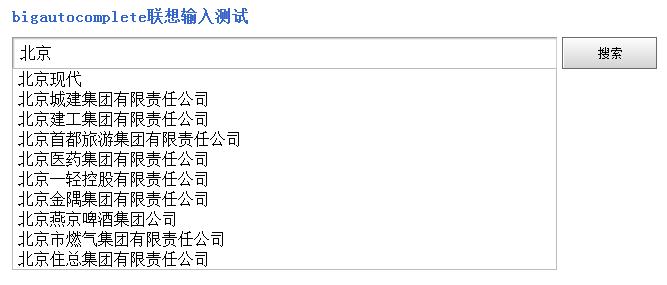
上图是通过ajax请求服务器返回的数据。下面简单介绍如何使用。
一、如何使用:
二、参数说明:
| 参数 | 说明 |
| data(可选): |
data:格式{data:[{title:null,result:{}},{title:null,result:{}}]}
url和data两个参数必须有一个,且只有一个生效,data优先。
|
| url(可选): | url为字符串,用来ajax后台获取数据,返回的数据格式为data参数一样。 |
| width(可选): | 下拉框的宽度,默认使用输入框宽度。 |
| callback(可选): | 选中行后按回车或单击时回调的函数,用于返回选中行的其他数据及做一些操作。 |
三、示例:
<input type="text" id="tt" value="" class="text" />
$(function(){

    $("#tt").bigAutocomplete({

        width:543,

        data:[{title:"中国好声音",result:{ff:"qq"}},

        {title:"中国移动网上营业厅"},

        {title:"中国银行"},

        {title:"中国移动"},

        {title:"中国好声音第三期"},

        {title:"中国好声音 第一期"},

        {title:"中国电信网上营业厅"},

        {title:"中国工商银行"},

        {title:"中国好声音第二期"},

        {title:"中国地图"}],

        callback:function(data){

            alert(data.title);

        }

    });

})
js中data里的result可以不写。
2、ajax请求:
<input type="text" id="company" value="" class="text" />
javascript代码:
$(function(){

    $("#tt").bigAutocomplete({

        width:543,

        url:'http://localhost/test/suggestCom',

        callback:function(data){

            //alert(data.title);

        }

    });

})
服务端返回数据格式:
{"data":[{"title":"\u5317\u4eac\u73b0\u4ee3"},{"title":"\u5317\u4eac\u57ce\u5efa\u96c6\u56e2\u6709\u9650\u8d23\u4efb\u516c\u53f8"},{"title":"\u5317\u4eac\u5efa\u5de5\u96c6\u56e2\u6709\u9650\u8d23\u4efb\u516c\u53f8"},{"title":"\u5317\u4eac\u9996\u90fd\u65c5\u6e38\u96c6\u56e2\u6709\u9650\u8d23\u4efb\u516c\u53f8"},{"title":"\u5317\u4eac\u533b\u836f\u96c6\u56e2\u6709\u9650\u8d23\u4efb\u516c\u53f8"},{"title":"\u5317\u4eac\u4e00\u8f7b\u63a7\u80a1\u6709\u9650\u8d23\u4efb\u516c\u53f8"},{"title":"\u5317\u4eac\u91d1\u9685\u96c6\u56e2\u6709\u9650\u8d23\u4efb\u516c\u53f8"},{"title":"\u5317\u4eac\u71d5\u4eac\u5564\u9152\u96c6\u56e2\u516c\u53f8"},{"title":"\u5317\u4eac\u5e02\u71c3\u6c14\u96c6\u56e2\u6709\u9650\u8d23\u4efb\u516c\u53f8"},{"title":"\u5317\u4eac\u4f4f\u603b\u96c6\u56e2\u6709\u9650\u8d23\u4efb\u516c\u53f8"}]}
服务端的代码:(以ThinkPHP示例)
public function suggestCom(){

        $wd = $_POST['keyword'];

        $keywords = $wd;

        $company_model = M('Company');

        $res = $company_model->where("name like '%".$keywords."%' or abbr like '%".$keywords."%' ")->limit(10)->select();

        foreach($res as $v){

            $suggestions[]= array('title' => $v['name']);

        }

        echo json_encode(array('data' => $suggestions));

    }
默认是POST过来的数据,名称是keyword,返回数据是和本地data一致的。
附上jquery.bigautocomplete.js和jquery.bigautocomplete.css文件代码:
jquery.bigautocomplete.js
(function($){

    var bigAutocomplete = new function(){

        this.currentInputText = null;//目前获得光标的输入框(解决一个页面多个输入框绑定自动补全功能)

        this.functionalKeyArray = [9,20,13,16,17,18,91,92,93,45,36,33,34,35,37,39,112,113,114,115,116,117,118,119,120,121,122,123,144,19,145,40,38,27];//键盘上功能键键值数组

        this.holdText = null;//输入框中原始输入的内容

        //初始化插入自动补全div,并在document注册mousedown,点击非div区域隐藏div

        this.init = function(){

            $("body").append("<div id='bigAutocompleteContent' class='bigautocomplete-layout'></div>");

            $(document).bind('mousedown',function(event){

                var $target = $(event.target);

                if((!($target.parents().andSelf().is('#bigAutocompleteContent'))) && (!$target.is(bigAutocomplete.currentInputText))){

                    bigAutocomplete.hideAutocomplete();

                }

            })

            //鼠标悬停时选中当前行

            $("#bigAutocompleteContent").delegate("tr", "mouseover", function() {

                $("#bigAutocompleteContent tr").removeClass("ct");

                $(this).addClass("ct");

            }).delegate("tr", "mouseout", function() {

                $("#bigAutocompleteContent tr").removeClass("ct");

            });

            //单击选中行后,选中行内容设置到输入框中,并执行callback函数

            $("#bigAutocompleteContent").delegate("tr", "click", function() {

                bigAutocomplete.currentInputText.val( $(this).find("div:last").html());

                var callback_ = bigAutocomplete.currentInputText.data("config").callback;

                if($("#bigAutocompleteContent").css("display") != "none" && callback_ && $.isFunction(callback_)){

                    callback_($(this).data("jsonData"));

                }

                bigAutocomplete.hideAutocomplete();

            })

        }

        this.autocomplete = function(param){

            if($("body").length > 0 && $("#bigAutocompleteContent").length <= 0){

                bigAutocomplete.init();//初始化信息

            }

            var $this = $(this);//为绑定自动补全功能的输入框jquery对象

            var $bigAutocompleteContent = $("#bigAutocompleteContent");

            this.config = {

                           //width:下拉框的宽度,默认使用输入框宽度

                           width:$this.outerWidth() - 2,

                           //url:格式url:""用来ajax后台获取数据,返回的数据格式为data参数一样

                           url:null,

                           /*data:格式{data:[{title:null,result:{}},{title:null,result:{}}]}

                           url和data参数只有一个生效,data优先*/

                           data:null,

                           //callback:选中行后按回车或单击时回调的函数

                           callback:null};

            $.extend(this.config,param);

            $this.data("config",this.config);

            //输入框keydown事件

            $this.keydown(function(event) {

                switch (event.keyCode) {

                case 40://向下键

                    if($bigAutocompleteContent.css("display") == "none")return;

                    var $nextSiblingTr = $bigAutocompleteContent.find(".ct");

                    if($nextSiblingTr.length <= 0){//没有选中行时,选中第一行

                        $nextSiblingTr = $bigAutocompleteContent.find("tr:first");

                    }else{

                        $nextSiblingTr = $nextSiblingTr.next();

                    }

                    $bigAutocompleteContent.find("tr").removeClass("ct");

                    if($nextSiblingTr.length > 0){//有下一行时(不是最后一行)

                        $nextSiblingTr.addClass("ct");//选中的行加背景

                        $this.val($nextSiblingTr.find("div:last").html());//选中行内容设置到输入框中

                        //div滚动到选中的行,jquery-1.6.1 $nextSiblingTr.offset().top 有bug,数值有问题

                        $bigAutocompleteContent.scrollTop($nextSiblingTr[0].offsetTop - $bigAutocompleteContent.height() + $nextSiblingTr.height() );

                    }else{

                        $this.val(bigAutocomplete.holdText);//输入框显示用户原始输入的值

                    }

                    break;

                case 38://向上键

                    if($bigAutocompleteContent.css("display") == "none")return;

                    var $previousSiblingTr = $bigAutocompleteContent.find(".ct");

                    if($previousSiblingTr.length <= 0){//没有选中行时,选中最后一行行

                        $previousSiblingTr = $bigAutocompleteContent.find("tr:last");

                    }else{

                        $previousSiblingTr = $previousSiblingTr.prev();

                    }

                    $bigAutocompleteContent.find("tr").removeClass("ct");

                    if($previousSiblingTr.length > 0){//有上一行时(不是第一行)

                        $previousSiblingTr.addClass("ct");//选中的行加背景

                        $this.val($previousSiblingTr.find("div:last").html());//选中行内容设置到输入框中

                        //div滚动到选中的行,jquery-1.6.1 $$previousSiblingTr.offset().top 有bug,数值有问题

                        $bigAutocompleteContent.scrollTop($previousSiblingTr[0].offsetTop - $bigAutocompleteContent.height() + $previousSiblingTr.height());

                    }else{

                        $this.val(bigAutocomplete.holdText);//输入框显示用户原始输入的值

                    }

                    break;

                case 27://ESC键隐藏下拉框

                    bigAutocomplete.hideAutocomplete();

                    break;

                }

            });

            //输入框keyup事件

            $this.keyup(function(event) {

                var k = event.keyCode;

                var ctrl = event.ctrlKey;

                var isFunctionalKey = false;//按下的键是否是功能键

                for(var i=0;i<bigAutocomplete.functionalKeyArray.length;i++){

                    if(k == bigAutocomplete.functionalKeyArray[i]){

                        isFunctionalKey = true;

                        break;

                    }

                }

                //k键值不是功能键或是ctrl+c、ctrl+x时才触发自动补全功能

                if(!isFunctionalKey && (!ctrl || (ctrl && k == 67) || (ctrl && k == 88)) ){

                    var config = $this.data("config");

                    var offset = $this.offset();

                    $bigAutocompleteContent.width(config.width);

                    var h = $this.outerHeight() - 1;

                    $bigAutocompleteContent.css({"top":offset.top + h,"left":offset.left});

                    var data = config.data;

                    var url = config.url;

                    var keyword_ = $.trim($this.val());

                    if(keyword_ == null || keyword_ == ""){

                        bigAutocomplete.hideAutocomplete();

                        return;

                    }

                    if(data != null && $.isArray(data) ){

                        var data_ = new Array();

                        for(var i=0;i<data.length;i++){

                            if(data[i].title.indexOf(keyword_) > -1){

                                data_.push(data[i]);

                            }

                        }

                        makeContAndShow(data_);

                    }else if(url != null && url != ""){//ajax请求数据

                        $.post(url,{keyword:keyword_},function(result){

                            makeContAndShow(result.data)

                        },"json")

                    }

                    bigAutocomplete.holdText = $this.val();

                }

                //回车键

                if(k == 13){

                    var callback_ = $this.data("config").callback;

                    if($bigAutocompleteContent.css("display") != "none"){

                        if(callback_ && $.isFunction(callback_)){

                            callback_($bigAutocompleteContent.find(".ct").data("jsonData"));

                        }

                        $bigAutocompleteContent.hide();

                    }

                }

            });

            //组装下拉框html内容并显示

            function makeContAndShow(data_){

                if(data_ == null || data_.length <=0 ){

                    return;

                }

                var cont = "<table><tbody>";

                for(var i=0;i<data_.length;i++){

                    cont += "<tr><td><div>" + data_[i].title + "</div></td></tr>"

                }

                cont += "</tbody></table>";

                $bigAutocompleteContent.html(cont);

                $bigAutocompleteContent.show();

                //每行tr绑定数据,返回给回调函数

                $bigAutocompleteContent.find("tr").each(function(index){

                    $(this).data("jsonData",data_[index]);

                })

            }

            //输入框focus事件

            $this.focus(function(){

                bigAutocomplete.currentInputText = $this;

            });

        }

        //隐藏下拉框

        this.hideAutocomplete = function(){

            var $bigAutocompleteContent = $("#bigAutocompleteContent");

            if($bigAutocompleteContent.css("display") != "none"){

                $bigAutocompleteContent.find("tr").removeClass("ct");

                $bigAutocompleteContent.hide();

            }

        }

    };

    $.fn.bigAutocomplete = bigAutocomplete.autocomplete;

})(jQuery)
jquery.bigautocomplete.css
@charset "utf-8";

.bigautocomplete-layout{display:none;background-color:#FFFFFF;border:1px solid #BCBCBC;position:absolute;z-index:9999 !important;max-height:220px;overflow-x:hidden;overflow-y:auto; text-align:left;}

.bigautocomplete-layout table{border-collapse:collapse;border-spacing:;background:none repeat scroll 0 0 #FFFFFF;width:100%;cursor:default;}

.bigautocomplete-layout table tr{background:none repeat scroll 0 0 #FFFFFF;}

.bigautocomplete-layout .ct{background:none repeat scroll 0 0 #D2DEE8 !important;}

.bigautocomplete-layout div{word-wrap:break-word;word-break:break-all;padding:1px 5px;}
css经过改写,以适应某些情况不兼容的bug。
页面html代码:
<!DOCTYPE html>

<html>

<head>

<meta http-equiv="Content-Type" content="text/html; charset=utf-8" />

<title>Jquery实现仿搜索引擎文本框自动补全插件</title>

<script src="js/jquery-1.7.min.js" type="text/javascript"></script>

<script src="js/bigautocomplete/jquery.bigautocomplete.js?v=2"></script>

<link rel="stylesheet" href="css/bigautocomplete/jquery.bigautocomplete.css" type="text/css" />

<script type="text/javascript">

$(function(){

    $("#tt").bigAutocomplete({

        width:543,

        url:'__MODULE__/test/suggestCom',

        callback:function(data){

            //alert(data.title);

        }

    });

})

</script>

</head>

<body>

<style type="text/css">

*{margin:0;padding:0;list-style-type:none;}

a,img{border:0;}

.demo{width:720px;margin:30px auto;}

.demo h2{font-size:16px;color:#3366cc;height:30px;}

.demo li{float:left;}

.text{width:529px;height:22px;padding:4px 7px;padding:6px 7px 2px\9;font:16px arial;border:1px solid #cdcdcd;border-color:#9a9a9a #cdcdcd #cdcdcd #9a9a9a;vertical-align:top;outline:none;margin:0 5px 0 0;}

.button{width:95px;height:32px;padding:0;padding-top:2px\9;border:0;background-position:0 -35px;background-color:#ddd;cursor:pointer}

</style>

<div class="demo">

    <h2>bigautocomplete联想输入测试</h2>

    <form action="" method="post" name="searchform" id="searchform" class="searchinfo">

        <ul>

            <li><input type="text" id="tt" value="" class="text" /></li>

            <li><input type="submit" value="搜索" class="button" /></li>

        </ul>

    </form>

</div>

</body>

</html>
bigautocomplete实现联想输入,自动补全的更多相关文章
- javascript 实现类似百度联想输入,自动补全功能
js 实现类似百度联想输入,自动补全功能 方案一: search是搜索框id="search" //点击页面隐藏自动补全提示框 document.onclick = functi ...
- autocomplete实现联想输入,自动补全
jQuery.AutoComplete是一个基于jQuery的自动补全插件.借助于jQuery优秀的跨浏览器特性,可以兼容Chrome/IE/Firefox/Opera/Safari等多种浏览器. 特 ...
- jQuery 邮箱下拉列表自动补全
综述 我想大家一定见到过,在某个网站填写邮箱的时候,还没有填写完,就会出现一系列下拉列表,帮你自动补全邮箱的功能.现在我们就用jQuery来实现一下. 博主原创代码,如有代码写的不完善的地方还望大家多 ...
- eclipse自动补全的设置
eclipse自动补全的设置 如果你用过Visual Studio的自动补全功能后,再来用eclipse的自动补全功能,相信大家会有些许失望. 但是eclipse其实是非常强大的,eclipse的 ...
- vim 添加php自动补全 并格式化代码
自动补全,修改/etc/vimrc的配置 vim /etc/vimrc 添加: filetype plugin on autocmd FileType php set omnifunc=phpcomp ...
- Eclipse自动补全设置
如果你用过Visual Studio的自动补全功能后,再来用eclipse的自动补全功能,相信大家会有些许失望. 但是eclipse其实是非常强大的,eclipse的自动补全没有VS那么好是因为ecl ...
- Autocomplete 自动补全(Webform实战篇)
开篇语 因为项目中需要用到一个自动补全的功能,功能描述: 需求一:新增收件人的时候,自动下拉显示出数据库中所有的收件人信息(显示的信息包括:姓名-收件地址-联系方式) 需求二:选中一个值得时候,分别赋 ...
- eclipse自动补全的设置(自动提示)
如果你用过Visual Studio的自动补全功能后,再来用eclipse的自动补全功能,相信大家会有些许失望. 但是eclipse其实是非常强大的,eclipse的自动补全没有VS那么好是因为e ...
- jQuery AutoComplete 自动补全
jQuery.AutoComplete是一个基于jQuery的自动补全插件.借助于jQuery优秀的跨浏览器特性,可以兼容Chrome/IE/Firefox/Opera/Safari等多种浏览器. 特 ...
随机推荐
- ViewPager图片轮转带点的
布局页面设置: <?xml version="1.0" encoding="utf-8"?><RelativeLayout xmlns:and ...
- Ubuntu下shell脚本运行异常:bash和dash的区别
Ubuntu下我用bash到语法写了一个shell脚本(准确的说是把书上的脚本敲进电脑),在ubuntu下,用sh test.sh来运行,但是出现了意料之外到结果,比如echo -e "\n ...
- web storage的用法
Web Storage分为两种: sessionStorage localStorage 从字面意思就可以很清楚的看出来,sessionStorage将数据保存在session中,浏览器关闭也就没了: ...
- [转] Eclipse 编辑相关快捷键
Eclipse的编辑功能非常强大,掌握了Eclipse快捷键功能,能够大大提高开发效率.Eclipse中有如下一些和编辑相关的快捷键. 1. [ALT+/] 此快捷键为用户编辑的好帮手,能为用户提供内 ...
- jqyery dataTable 基本用法
一:官方网站:[http://www.datatables.net/] 二:基本使用:[http://www.guoxk.com/node/jquery-datatables] 1.DataTable ...
- [Notes] Reading Notes on [Adaptive Robot Control – mxautomation J. Braumann 2015]
Reading sources: 1.Johannes Braumann, Sigrid Brell-Cokcan, Adaptive Robot Control (ARC ) Note: buil ...
- 近期oepnfire工作总结.
1.优化订阅好友流程,增加验证消息2.优化好友查询模块,实现对扩展字段的查询.如批量匹配通讯录.3.实现webservice接口方式消息推送功能,供其他系统调用.4.实现花名册版本(XEP-237), ...
- javascript学习第一课
1.基本知识: 1.1 词法结构 1.1.1 字符集 javascript程序是用Unicode字符集编写的. 1.1.2 区分大小写 javascript是区分大小写的语言.也即是关键字.变量.函数 ...
- Adding AirDrop File Sharing Feature to Your iOS Apps
http://www.appcoda.com/ios7-airdrop-programming-tutorial/ Adding AirDrop File Sharing Feature to You ...
- 1057. Stack (30)
分析: 考察树状数组 + 二分, 注意以下几点: 1.题目除了正常的进栈和出栈操作外增加了获取中位数的操作, 获取中位数,我们有以下方法: (1):每次全部退栈,进行排序,太浪费时间,不可取. (2) ...