
groovyConsole — the Groovy Swing console
1. Groovy : Groovy Console
The Groovy Swing Console allows a user to enter and run Groovy scripts. This page documents the features of this user interface.
2. Basics

Groovy Console is launched via
groovyConsoleorgroovyConsole.bat, both located in$GROOVY_HOME/binThe Console has an input area and an output area.
You type a Groovy script in the input area.
When you select
Runfrom theActionsmenu, the console compiles the script and runs it.Anything that would normally be printed on
System.outis printed in the output area.If the script returns a non-null result, that result is printed.
3. Features
3.1. Running Scripts
There are several shortcuts that you can use to run scripts or code snippets:
Ctrl+EnterandCtrl+Rare both shortcut keys forRun Script.If you highlight just part of the text in the input area, then Groovy runs just that text.
The result of a script is the the value of the last expression executed.
You can turn the System.out capture on and off by selecting
Capture System.outfrom theActionsmenu
3.2. Editing Files
You can open any text file, edit it, run it (as a Groovy Script) and then save it again when you are finished.
Select
File > Open(shortcut keyctrl+O) to open a fileSelect
File > Save(shortcut keyctrl+S) to save a fileSelect
File > New File(shortcut keyctrl+Q) to start again with a blank input area
3.3. History and results
You can pop-up a gui inspector on the last (non-null) result by selecting
Inspect Lastfrom theActionsmenu. The inspector is a convenient way to view lists and maps.The console remembers the last ten script runs. You can scroll back and forth through the history by selecting
NextandPreviousfrom theEditmenu.Ctrl-Nandctrl-Pare convenient shortcut keys.The last (non-null) result is bound to a variable named
_(an underscore).The last result (null and non-null) for every run in the history is bound into a list variable named
(two underscores). The result of the last run is[-1], the result of the second to last run is__[-2]and so forth.
3.4. Interrupting a script
The Groovy console is a very handy tool to develop scripts. Often, you will find yourself running a script multiple times until it works the way you want it to. However, what if your code takes too long to finish or worse, creates an infinite loop? Interrupting script execution can be achieved by clicking the interrupt button on the small dialog box that pops up when a script is executing or through the interrupt icon in the tool bar.

However, this may not be sufficient to interrupt a script: clicking the button will interrupt the execution thread, but if your code doesn’t handle the interrupt flag, the script is likely to keep running without you being able to effectively stop it. To avoid that, you have to make sure that the Script > Allow interruption menu item is flagged. This will automatically apply an AST transformation to your script which will take care of checking the interrupt flag (@ThreadInterrupt). This way, you guarantee that the script can be interrupted even if you don’t explicitly handle interruption, at the cost of extra execution time.
3.5. And more
You can change the font size by selecting
Smaller FontorLarger Fontfrom theActions menuThe console can be run as an Applet thanks to
groovy.ui.ConsoleAppletCode is auto indented when you hit return
You can drag’n’drop a Groovy script over the text area to open a file
You can modify the classpath with which the script in the console is being run by adding a new JAR or a directory to the classpath from the
ScriptmenuError hyperlinking from the output area when a compilation error is expected or when an exception is thrown
4. Embedding the Console
To embed a Swing console in your application, simply create the Console object, load some variables, and then launch it. The console can be embedded in either Java or Groovy code. The Java code for this is:
import groovy.ui.Console;

    ...

    Console console = new Console();

    console.setVariable("var1", getValueOfVar1());

    console.setVariable("var2", getValueOfVar2());

    console.run();

    ...
Once the console is launched, you can use the variable values in Groovy code.
5. Visualizing script output results
You can customize the way script output results are visualized. Let’s see how we can customize this. For example, viewing a map result would show something like this:
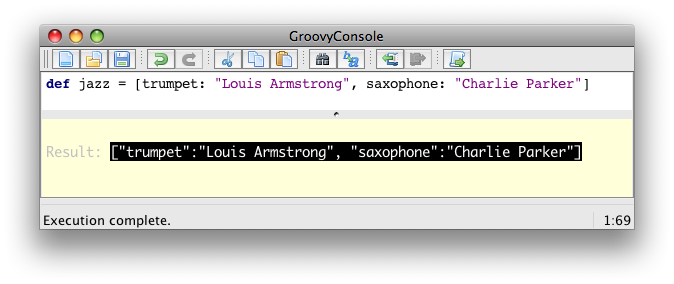
What you see here is the usual textual representation of a Map. But, what if we enabled custom visualization of certain results? The Swing console allows you to do just that. First of all, you have to ensure that the visualization option is ticked: View → Visualize Script Results — for the record, all settings of the Groovy Console are stored and remembered thanks to the Preference API. There are a few result visualizations built-in: if the script returns a java.awt.Image, a javax.swing.Icon, or a java.awt.Component with no parent, the object is displayed instead of its toString() representation. Otherwise, everything else is still just represented as text. Now, create the following Groovy script in ~/.groovy/OutputTransforms.groovy:
import javax.swing.*

transforms << { result ->

    if (result instanceof Map) {

        def table = new JTable(

            result.collect{ k, v ->

                [k, v?.inspect()] as Object[]

            } as Object[][],

            ['Key', 'Value'] as Object[])

        table.preferredViewportSize = table.preferredSize

        return new JScrollPane(table)

    }

}
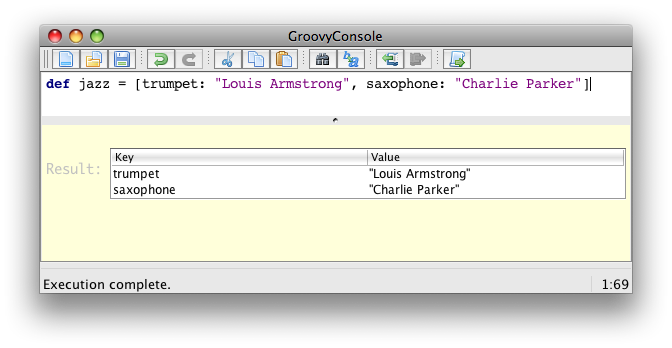
The Groovy Swing console will execute that script on startup, injecting a transforms list in the binding of the script, so that you can add your own script results representations. In our case, we transform the Map into a nice-looking Swing JTable. And we’re now able to visualize maps in a friendly and attractive fashion, as the screenshot below shows:
6. AST browser
Groovy Console can visualize the AST (Abstract Syntax Tree) representing the currently edited script, as shown by the screenshot below. This is particularly handy when you want to develop AST transformations.

groovyConsole — the Groovy Swing console的更多相关文章
- atitit.groovy 语法特性
atitit.groovy 语法特性 1. Groovy 1.6概览1 1.1. 多路赋值2 2. 新发布的Groovy2.0为这门语言带来了关键的静态特性:静态类型检查和静态编译:2 3. 参考3 ...
- 3 不用IDE开发groovy
1 不用IDE开发groovy 1.1 不用IDE开发的方法 可以在IDE中运行Groovy类或者脚本,但是Groovy也提供了其他运行途径.你能运行Groovy代码基于以下: · ...
- Groovy入门教程
Groovy入门教程 kmyhy@126.com 2009-5-13 一.groovy是什么 简单地说,Groovy 是下一代的java语言,跟java一样,它也运行在 JVM 中. 作为跑在JVM ...
- Groovy新手教程
Groovy新手教程 kmyhy@126.com 2009-5-13 一.groovy是什么 简单地说,Groovy 是下一代的java语言,跟java一样,它也执行在 JVM 中. 作为跑在JVM ...
- groovy 弹出菜单
import groovy.swing.* import javax.swing.* import java.awt.* def swing = new SwingBuilder() swing.fr ...
- Groovy常见语法汇总
一.groovy是什么 简单地说,Groovy 是下一代的java语言,跟java一样,它也运行在 JVM 中. 作为跑在JVM中的另一种语言,groovy语法与 Java 语言的语法很相似.同时,G ...
- Groovy 学习手册(2)
二. 工具 1. 控制台 groovyConsole: Groovy 控制台是一个非常易于使用和简单的轻量级的编辑器.你可以在里面做很多事情. 在编辑器里面可以书写代码,Windows 下,按下Ctr ...
- 愉快地使用Groovy Shell
这是一篇有关Groovy Shell的帖子,以及它如何在日常工作中为您提供帮助(只要您是软件开发人员).无论您使用哪种编程语言或技术,都可以从Groovy Shell中受益.唯一真正的要求是您能够编写 ...
- Groovy学习:第五章 学习回顾groovy
一.groovy是什么 简单地说,Groovy 是下一代的java语言,跟java一样,它也运行在 JVM 中. 作为跑在JVM中的另一种语言,groovy语法与 Java 语言的语法很相似.同时,G ...
随机推荐
- Java基础の乱弹琴二:break关键字
Java中的break一般用于 跳出一个switch或者循环. 跳出switch基本不用赘述. break跳出循环一般是跳出当前一层循环. 如若需要跳出多层循环可以在break后加标签,然后把标签标注 ...
- ZooKeeper系列4:ZooKeeper API简介及编程
问题导读: 1.ZooKeeper API 共包含几个包? 2.如何使用ZooKeeper API 创建zookeeper应用程序? 1)ZooKeeper API 简介 ZooKeeper AP ...
- Trie树-可持久化
// Made by xiper // updata time : 2015 / 12 / 8 // test status: √ // 使用前调用初始化函数 init() 同时 root[0] = ...
- python中的深拷贝和潜拷贝
>>> a = ['ace',['age',10]] >>> b = a[:] >>> c = list(a) >>> for ...
- Django项目中model增加了新字段怎样更新?
Django是不直接支持syncdb更新数据库的字段的,必须重新建立. 或者改一个表名新建一个表... 刚刚想出来一招: 自己在表上面先加一个字段,然后再在model上面改,貌似是可以的.
- 《The Django Book》实战--第二章--动态网页基础
这章演示了一些最基本的Django开发动态网页的实例,由于版本不一样,我用的是Django 1.,6.3,有些地方按书上的做是不行的,所以又改了一些,写出来让大家参考. 这是一个用python写的一个 ...
- Ajax类库需要注意的问题
构建Ajax类库时,注意四步就可以了: 1:创建Ajax 对象 2:链接服务器 3:发送请求 4:返回响应 下面是我自己写的一个Ajax类库: function ajax(url,fnn,fai) ...
- canvas模仿微信抢红包功能
1.原理:先创建一张img图片,用filter滤镜制作毛玻璃效果. 2.利用绝对定位,使canvas刚好盖在img上面. 3.利用canvas原生clip函数剪辑一个圆形. 地址:http://san ...
- 【WPF】FillRule
获取或设置如何组合此 GeometryGroup 中所包含对象的相交区域. Dependency property identifier field: FillRuleProperty FillRul ...
- ZooKeeper学习第五期--ZooKeeper管理分布式环境中的数据
引言 本节本来是要介绍ZooKeeper的实现原理,但是ZooKeeper的原理比较复杂,它涉及到了paxos算法.Zab协议.通信协议等相关知识,理解起来比较抽象所以还需要借助一些应用场景,来帮我们 ...