
iOS- 微信支付 (服务器调起支付 )以及回调不成功的原因 不看后悔
写的不错,给留个言哈...
一. 支付准备工作
1. 微信相关准备工作
(1) 向微信官方开通支付功能. 这个不是前端的工作.
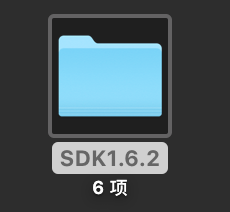
(2) 导入官方下载的微信支付SDK包. 我用的是微信开放平台下载的SDK 1.6.2
(3) 导入必要的库文件
SystemConfiguration.framework,
libz.dylib,
libsqlite3.0.dylib,
libc++.dylib,
CoreTelephoy.framework (坑一: 这个库是必要的,但是微信官方文档中没有说到要导入)
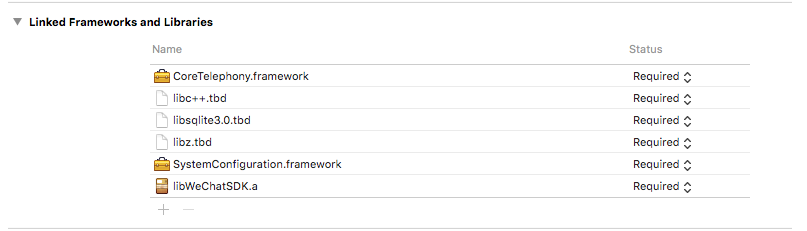
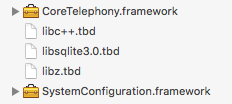
(4) 该项目中的Bundle Identifier 应该填向微信注册的Bundle Identifier
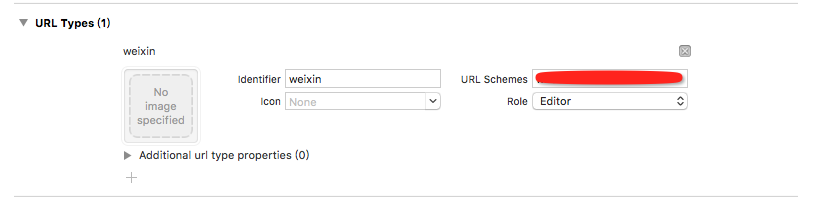
(5) 注册微信 (回调的时候用到,告诉微信,从微信返回到哪个APP)
Target --> info --> URL Types --> +按钮 --> 填写identifier 和 URL Schemes. 前一个是标识符,一般填@"weixin".后一个是注册的微信appId. 比如"wx19a984b788a8a0b1".(注释: 假的appid)
(6) 添加微信白名单
info.plist --> 右击 --> open as --> source Code --> 添加白名单
我是在<key>CFBundleVersion</key>这一行上面添加的. 注意保持正确的键值对.别插错了.
<key>LSApplicationQueriesSchemes</key>

    <array>

        <string>wechat</string>

        <string>weixin</string>

    </array>
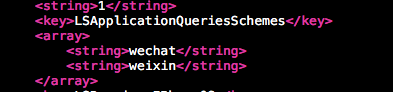
(7) 如果支付成功,回调方法不执行,或者回调不成功.请再次确认(4)(5)(6),是否填写正确.
(8) 运行一下,不报错.报错,再次确认(1)--(7)步骤.
二.代码相关
1. 在AppDelegate.h中
(1) 导入微信类 #import @"WXApi.h".
(2) 遵守微信代理方法 <WXApiDelegate>
2. 在APPDelegate.m中
(1) 注册微信
#pragma mark 注册微信

- (BOOL)application:(UIApplication *)application didFinishLaunchingWithOptions:(NSDictionary *)launchOptions

{

    //注册 微信

    /**

     参数1 : 微信Appid

     参数2 : 对项目的描述信息(用项目名称)

     */

    [WXApi registerApp:@"微信Appid" withDescription:@"云宴"];

    return YES;

}
(2) 跳转方法,并设置代理
#pragma mark 跳转处理

//被废弃的方法. 但是在低版本中会用到.建议写上

- (BOOL)application:(UIApplication *)application openURL:(NSURL *)url sourceApplication:(NSString *)sourceApplication annotation:(id)annotation

{

    return [WXApi handleOpenURL:url delegate:self];

}

//被废弃的方法. 但是在低版本中会用到.建议写上

- (BOOL)application:(UIApplication *)application handleOpenURL:(NSURL *)url

{

    return [WXApi handleOpenURL:url delegate:self];

}

//新的方法

- (BOOL)application:(UIApplication *)app openURL:(NSURL *)url options:(NSDictionary<NSString *,id> *)options

{

    return [WXApi handleOpenURL:url delegate:self];

}
(3) 微信回调方法 (注意: 不要写成Req方法了)
#pragma mark 微信回调方法

- (void)onResp:(BaseResp *)resp

{

    NSString * strMsg = [NSString stringWithFormat:@"errorCode: %d",resp.errCode];

    NSLog(@"strMsg: %@",strMsg);

    NSString * errStr       = [NSString stringWithFormat:@"errStr: %@",resp.errStr];

    NSLog(@"errStr: %@",errStr);

    NSString * strTitle;

    //判断是微信消息的回调 --> 是支付回调回来的还是消息回调回来的.

    if ([resp isKindOfClass:[SendMessageToWXResp class]])

    {

        strTitle = [NSString stringWithFormat:@"发送媒体消息的结果"];

    }

    NSString * wxPayResult;

    //判断是否是微信支付回调 (注意是PayResp 而不是PayReq)

    if ([resp isKindOfClass:[PayResp class]])

    {

        //支付返回的结果, 实际支付结果需要去微信服务器端查询

        strTitle = [NSString stringWithFormat:@"支付结果"];

        switch (resp.errCode)

        {

            case WXSuccess:

            {

                strMsg = @"支付结果:";

                NSLog(@"支付成功: %d",resp.errCode);

                wxPayResult = @"success";

                break;

            }
            case WXErrCodeUserCancel:

            {

                strMsg = @"用户取消了支付";

                NSLog(@"用户取消支付: %d",resp.errCode);

                wxPayResult = @"cancel";

                break;

            }

            default:

            {

                strMsg = [NSString stringWithFormat:@"支付失败! code: %d  errorStr: %@",resp.errCode,resp.errStr];

                NSLog(@":支付失败: code: %d str: %@",resp.errCode,resp.errStr);

                wxPayResult = @"faile";

                break;

            }

        }

        //发出通知 从微信回调回来之后,发一个通知,让请求支付的页面接收消息,并且展示出来,或者进行一些自定义的展示或者跳转

        NSNotification * notification = [NSNotification notificationWithName:@"WXPay" object:wxPayResult];

        [[NSNotificationCenter defaultCenter] postNotification:notification];

    }

}
3. 在ViewController.h (进行支付请求的类)
暂时没有任何操作
4. 在ViewController.m中(进行支付的请求的类)
(1) 导入微信库 #import @"WXApi.h"
(2) 监听APPDelegate.m中发送的通知
#pragma mark 监听通知

- (void)viewWillAppear:(BOOL)animated

{

    [super viewWillAppear:YES];

    //检测是否装了微信软件

    if ([WXApi isWXAppInstalled])

    {

        //监听通知

        [[NSNotificationCenter defaultCenter] addObserver:self selector:@selector(getOrderPayResult:) name:@"WXPay" object:nil];

    }

}
#pragma mark - 事件

- (void)getOrderPayResult:(NSNotification *)notification

{

    NSLog(@"userInfo: %@",notification.userInfo);

    if ([notification.object isEqualToString:@"success"])

    {

        UIAlertView * alertView = [[UIAlertView alloc] initWithTitle:@"提示信息" message:@"支付成功" delegate:self cancelButtonTitle:@"确定" otherButtonTitles:nil, nil];

        [alertView show];

    }

    else

    {

        [self alert:@"提示" msg:@"支付失败"];

    }

}

//客户端提示信息

- (void)alert:(NSString *)title msg:(NSString *)msg

{

    UIAlertView *alter = [[UIAlertView alloc] initWithTitle:title message:msg delegate:nil cancelButtonTitle:@"OK" otherButtonTitles:nil];

    [alter show];

}
(3) 移除通知
#pragma mark 移除通知

- (void)dealloc
{

    //移除通知

    [[NSNotificationCenter defaultCenter] removeObserver:self];

}
(4) 调起微信去支付
- (void)viewDidLoad

{

    [super viewDidLoad];

    [self pay_button];

}

#pragma mark - 实现方法

#pragma mark 创建支付按钮

- (void)pay_button

{

    self.payButton = [UIButton buttonWithType:UIButtonTypeCustom];

    self.payButton.frame = CGRectMake(, , , );

    self.payButton.backgroundColor = [UIColor orangeColor];

    [self.payButton setTitle:@"去支付" forState:UIControlStateNormal];

    [self.payButton addTarget:self action:@selector(payButtonClicked) forControlEvents:UIControlEventTouchUpInside];

    [self.view addSubview:self.payButton];

}

#pragma mark - 点击事件

- (void)payButtonClicked

{

    [self sendNetWorking_WXPay];

}

- (void)sendNetWorking_WXPay

{

    NSString * urlStr = [NSString stringWithFormat:@"%@%@",YYIP,@"wx/pay"];

    NSDictionary * parameter = @{

                                 @"pay_type"       : @"",

                                 @"total_price"    : @"",

                                 @"appointment_id" : @""

                                 };

    [self sendNetWorkingWith:urlStr andParameter:parameter];

}

#pragma mark 网络请求 -->> post

- (void)sendNetWorkingWith:(NSString *)url andParameter:(NSDictionary *)parameter

{

    AFHTTPSessionManager * manager = [AFHTTPSessionManager manager];

    [manager POST:url parameters:parameter progress:^(NSProgress * _Nonnull uploadProgress) {

    } success:^(NSURLSessionDataTask * _Nonnull task, id  _Nullable responseObject) {

        NSLog(@"%@",responseObject);

        //网络请求回来的8个参数.详见微信开发平台

        NSDictionary * result = responseObject[@"result"];

        NSString * appid         = result[@"appid"];

        NSString * noncestr      = result[@"noncestr"];

        NSString * package1      = result[@"package1"];

        NSString * partnerid     = result[@"partnerid"];

        NSString * paySign       = result[@"paySign"];

        NSString * prepayid      = result[@"prepayid"];

        NSString * timestamp     = result[@"timestamp"];

//        NSString * err_code      = result[@"err_code"];

//        NSString * timeStamp     = result[@"timeStamp"];

//        NSString * tradeid       = result[@"tradeid"];

    [self WXPayRequest:appid nonceStr:noncestr package:package1 partnerId:partnerid prepayId:prepayid timeStamp:timestamp sign:paySign];

    } failure:^(NSURLSessionDataTask * _Nullable task, NSError * _Nonnull error) {

        NSLog(@"%@",error);

    }];

}

#pragma mark - 调起微信支付

- (void)WXPayRequest:(NSString *)appId nonceStr:(NSString *)nonceStr package:(NSString *)package partnerId:(NSString *)partnerId prepayId:(NSString *)prepayId timeStamp:(NSString *)timeStamp sign:(NSString *)sign{

    //调起微信支付

    PayReq* wxreq             = [[PayReq alloc] init];

    wxreq.openID              = appId; // 微信的appid

    wxreq.partnerId           = partnerId;

    wxreq.prepayId            = prepayId;

    wxreq.nonceStr            = nonceStr;

    wxreq.timeStamp           = [timeStamp intValue];

    wxreq.package             = package;

    wxreq.sign                = sign;

    [WXApi sendReq:wxreq];

}
三.上代码
1. AppDelegate.h
#import <UIKit/UIKit.h>

#import "WXApi.h"

@interface AppDelegate : UIResponder <UIApplicationDelegate,WXApiDelegate>

@property (strong, nonatomic) UIWindow *window;

@end
2. AppDelegate.m
#import "AppDelegate.h"

@interface AppDelegate ()

@end

@implementation AppDelegate

#pragma mark 注册微信

- (BOOL)application:(UIApplication *)application didFinishLaunchingWithOptions:(NSDictionary *)launchOptions

{

    //注册 微信

    /**

     参数1 : 微信Appid

     参数2 : 对项目的描述信息(用项目名称)

     */

    [WXApi registerApp:@"wx09a984b788a8a0b0" withDescription:@"云宴"];

    return YES;

}

#pragma mark 跳转处理

//被废弃的方法. 但是在低版本中会用到.建议写上

- (BOOL)application:(UIApplication *)application openURL:(NSURL *)url sourceApplication:(NSString *)sourceApplication annotation:(id)annotation

{

    return [WXApi handleOpenURL:url delegate:self];

}

//被废弃的方法. 但是在低版本中会用到.建议写上

- (BOOL)application:(UIApplication *)application handleOpenURL:(NSURL *)url

{

    return [WXApi handleOpenURL:url delegate:self];

}

//新的方法

- (BOOL)application:(UIApplication *)app openURL:(NSURL *)url options:(NSDictionary<NSString *,id> *)options

{

    return [WXApi handleOpenURL:url delegate:self];

}

#warning 这一步中  不要错误的把req 当成了 resp

#pragma mark 微信回调方法

- (void)onResp:(BaseResp *)resp

{

    NSString * strMsg = [NSString stringWithFormat:@"errorCode: %d",resp.errCode];

    NSLog(@"strMsg: %@",strMsg);

    NSString * errStr       = [NSString stringWithFormat:@"errStr: %@",resp.errStr];

    NSLog(@"errStr: %@",errStr);

    NSString * strTitle;

    //判断是微信消息的回调

    if ([resp isKindOfClass:[SendMessageToWXResp class]])

    {

        strTitle = [NSString stringWithFormat:@"发送媒体消息的结果"];

    }

    NSString * wxPayResult;

    //判断是否是微信支付回调 (注意是PayResp 而不是PayReq)

    if ([resp isKindOfClass:[PayResp class]])

    {

        //支付返回的结果, 实际支付结果需要去微信服务器端查询

        strTitle = [NSString stringWithFormat:@"支付结果"];

        switch (resp.errCode)

        {

            case WXSuccess:

            {

                strMsg = @"支付结果:";

                NSLog(@"支付成功: %d",resp.errCode);

                wxPayResult = @"success";

                break;

            }

                case WXErrCodeUserCancel:

            {

                strMsg = @"用户取消了支付";

                NSLog(@"用户取消支付: %d",resp.errCode);

                wxPayResult = @"cancel";

                break;

            }

            default:

            {

                strMsg = [NSString stringWithFormat:@"支付失败! code: %d  errorStr: %@",resp.errCode,resp.errStr];

                NSLog(@":支付失败: code: %d str: %@",resp.errCode,resp.errStr);

                wxPayResult = @"faile";

                break;

            }

        }

        //发出通知

        NSNotification * notification = [NSNotification notificationWithName:@"WXPay" object:wxPayResult];

        [[NSNotificationCenter defaultCenter] postNotification:notification];

    }

}

@end
3. ViewController.h
#import <UIKit/UIKit.h>

@interface ViewController : UIViewController

@end
4. ViewController.m
#import "ViewController.h"

#import "AFHTTPSessionManager.h"

#import "WXApi.h"

#define YYIP       @"http:公司IP地址"

@interface ViewController ()

@property (nonatomic, strong) UIButton * payButton;

@end

@implementation ViewController

#pragma mark 监听通知

- (void)viewWillAppear:(BOOL)animated

{

    [super viewWillAppear:YES];

    //检测是否装了微信软件

    if ([WXApi isWXAppInstalled])

    {

        //监听通知

        [[NSNotificationCenter defaultCenter] addObserver:self selector:@selector(getOrderPayResult:) name:@"WXPay" object:nil];

    }

}

#pragma mark 移除通知

- (void)viewWillDisappear:(BOOL)animated

{

    [super viewWillDisappear:YES];

    //移除通知

    [[NSNotificationCenter defaultCenter] removeObserver:self];

}

- (void)viewDidLoad

{

    [super viewDidLoad];

    [self pay_button];

}

#pragma mark - 实现方法

#pragma mark 创建支付按钮

- (void)pay_button

{

    self.payButton = [UIButton buttonWithType:UIButtonTypeCustom];

    self.payButton.frame = CGRectMake(, , , );

    self.payButton.backgroundColor = [UIColor orangeColor];

    [self.payButton setTitle:@"去支付" forState:UIControlStateNormal];

    [self.payButton addTarget:self action:@selector(payButtonClicked) forControlEvents:UIControlEventTouchUpInside];

    [self.view addSubview:self.payButton];

}

#pragma mark - 点击事件

- (void)payButtonClicked

{
if ([WXApi isWXAppInstalled])
{
[self sendNetWorking_WXPay];
}
else
{
[self alert:@"提示" msg:@"未安装微信"];
}
}
- (void)sendNetWorking_WXPay

{

    NSString * urlStr = [NSString stringWithFormat:@"%@%@",YYIP,@"wx/pay"];

    NSDictionary * parameter = @{

                                 @"pay_type"       : @"",

                                 @"total_price"    : @"",

                                 @"appointment_id" : @""

                                 };

    [self sendNetWorkingWith:urlStr andParameter:parameter];

}

#pragma mark 网络请求 -->> post

- (void)sendNetWorkingWith:(NSString *)url andParameter:(NSDictionary *)parameter

{

    AFHTTPSessionManager * manager = [AFHTTPSessionManager manager];

    [manager POST:url parameters:parameter progress:^(NSProgress * _Nonnull uploadProgress) {

    } success:^(NSURLSessionDataTask * _Nonnull task, id  _Nullable responseObject) {

        NSLog(@"%@",responseObject);

        //网络请求回来的8个参数.详见微信开发平台

        NSDictionary * result = responseObject[@"result"];

        NSString * appid         = result[@"appid"];

        NSString * noncestr      = result[@"noncestr"];

        NSString * package1      = result[@"package1"];

        NSString * partnerid     = result[@"partnerid"];

        NSString * paySign       = result[@"paySign"];

        NSString * prepayid      = result[@"prepayid"];

        NSString * timestamp     = result[@"timestamp"];

//        NSString * err_code      = result[@"err_code"];

//        NSString * timeStamp     = result[@"timeStamp"];

//        NSString * tradeid       = result[@"tradeid"];

    [self WXPayRequest:appid nonceStr:noncestr package:package1 partnerId:partnerid prepayId:prepayid timeStamp:timestamp sign:paySign];

    } failure:^(NSURLSessionDataTask * _Nullable task, NSError * _Nonnull error) {

        NSLog(@"%@",error);

    }];

}

#pragma mark - 调起微信支付

- (void)WXPayRequest:(NSString *)appId nonceStr:(NSString *)nonceStr package:(NSString *)package partnerId:(NSString *)partnerId prepayId:(NSString *)prepayId timeStamp:(NSString *)timeStamp sign:(NSString *)sign{

    //调起微信支付

    PayReq* wxreq             = [[PayReq alloc] init];

    wxreq.openID              = appId; // 微信的appid

    wxreq.partnerId           = partnerId;

    wxreq.prepayId            = prepayId;

    wxreq.nonceStr            = nonceStr;

    wxreq.timeStamp           = [timeStamp intValue];

    wxreq.package             = package;

    wxreq.sign                = sign;

    [WXApi sendReq:wxreq];

}

#pragma mark - 事件

- (void)getOrderPayResult:(NSNotification *)notification

{

    NSLog(@"userInfo: %@",notification.userInfo);

    if ([notification.object isEqualToString:@"success"])

    {

        UIAlertView * alertView = [[UIAlertView alloc] initWithTitle:@"提示信息" message:@"支付成功" delegate:self cancelButtonTitle:@"确定" otherButtonTitles:nil, nil];

        [alertView show];

    }
    else if([notification.object isEqualToString:@"cancel"])
    {
     [self alert:@"提示" msg:@"用户取消了支付"];
    }

    else

    {

        [self alert:@"提示" msg:@"支付失败"];

    }

}

//客户端提示信息

- (void)alert:(NSString *)title msg:(NSString *)msg

{

    UIAlertView *alter = [[UIAlertView alloc] initWithTitle:title message:msg delegate:nil cancelButtonTitle:@"OK" otherButtonTitles:nil];

    [alter show];

}

@end
iOS- 微信支付 (服务器调起支付 )以及回调不成功的原因 不看后悔的更多相关文章
- Java微信公众平台开发之公众号支付(微信内H5调起支付)
官方文档点击查看准备工作:已通过微信认证的公众号,必须通过ICP备案域名(否则会报支付失败)借鉴了很多大神的文章,在此先谢过了 整个支付流程,看懂就很好写了 一.设置支付目录 在微信公众平台设置您的公 ...
- vue 微信内H5调起支付
在微信内H5调起微信支付,主要依赖于一个微信的内置对象WeixinJSBridge,这个对象在其他浏览器中无效. 主要代码: import axios from 'axios'; export def ...
- 企业号微信支付 公众号支付 H5调起支付API示例代码 JSSDK C# .NET
先看效果 1.本文演示的是微信[企业号]的H5页面微信支付 2.本项目基于开源微信框架WeiXinMPSDK开发:https://github.com/JeffreySu/WeiXinMPSDK 感谢 ...
- apiCloud 调微信支付,调支付宝支付
data里面的参数信息,需要从后台接口中调取,点击查看微信支付详情,https://docs.apicloud.com/Client-API/Open-SDK/wxPay 首先,需要在config.x ...
- 微信小程序调起支付API
官方文档: https://pay.weixin.qq.com/wiki/doc/api/wxa/wxa_api.php?chapter=7_7 https://developers.weixin.q ...
- PHP微信公众号JSAPI网页支付(上)
一.使用场景以及说明 使用场景:商户已有H5商城网站,用户通过消息或扫描二维码在微信内打开网页时,可以调用微信支付完成下单购买的流程. 说明:1.用户打开图文消息或者扫描二维码,在微信内置浏览器打开网 ...
- 微信支付 第三篇 微信调用H5页面进行支付
上一篇讲到拿到了 预支付交易标识 wx251xxxxxxxxxxxxxxxxxxxxxxxxxxxxx078700 第四步,是时候微信内H5调起支付了! 先准备网页端接口请求参数列表 微信文档中已经明 ...
- iOS微信支付集成
概述 iOS微信支付集成 详细 代码下载:http://www.demodashi.com/demo/10735.html 支付宝和微信都是业界的老大哥,相信大家都有所觉得文档.SDK都是各种坑吧(纯 ...
- iOS 微信支付流程详解
背景 自微信支付.支付宝支付入世以来,移动端的支付日渐火热.虚拟货币有取代实体货币的趋向(这句纯属扯淡,不用管),支付在app开发中是一项基本的功能,有必要去掌握.从难易程度上讲,不管是微信支付还是支 ...
随机推荐
- SNMP远程监控进程信息的OID
最近有个项目需要用snmp远程监控进程信息.于是我查了一下资料. 一.资料 .1.3.6.1.2.1.25.4.2.1.1.iso.org.dod.internet.mgmt.mib-2.host.h ...
- ubuntu 16.04 tmux
旧的鼠标选项 setw -g mode-mouse on set-option -g mouse-resize-pane on set-option -g mouse-select-pane on s ...
- sublime3 配置node build环境
折腾了很久,原来如此简单 1.package control 安装nodejs 2.修改Nodejs.sublime-settings文件,将nodejs路径修改成自己的 3.sublime tex ...
- iphone/ipad/ipod设置VPN(pptp连接方式)
一.点击桌面上的-设置-图标进入设置(如图) 二.点击-通用-进入通用设置 三.点击-VPN-进入VPN设置(如图) 四.点击添加VPN设置进行设置 五.选择并连接
- liunx CentOS 升级Python版本
CentOS python版本是V2.6.6,升级3.4.3. 1.下载 安装包:wget http://www.python.org/ftp/python/3.4.3/Python-3.4.3.tg ...
- Notes on how to use Webots, especially how to make a robot fly in the air
How to create a new project Wizard - New project directory Scene Tree Scene tree is a representati ...
- android studio 编译加速
1. http://www.52codes.net/article/658.html 2.http://my.oschina.net/sammy1990/blog/388846 3.http://st ...
- 替换GitBlit的证书为域证书
GitBlit(当前版本1.6.2,http://gitblit.org/) 是一个Git版本控制的服务端,使用java编写,功能上足够满足基本的版本控制要求,而且部署很简单方便,比如windows上 ...
- 阿里云centos试用
今天体验了下阿里云的centos,起初用的官方推荐的putty方式来管理,全部使用命令行管理起来还是很别扭的. 后来通过百度了解到winscp,有了这个工具,管理起来就爽很多啦.整个centos的管理 ...
- 网上收集的以及自己总结的iOS开发技巧
Objective-C 1.让Xcode的控制台支持LLDB类型的打印 这有什么用? 怎么说尼,笔者认为这个还是比较有用滴,为什么有用尼? 因为在Xcode断点调试的时候, 在控制台输入 po sel ...