
Snippet: align a TextView around an image
A few weeks ago I discovered the Spans on Android,after reading the wonderful post by Flavien Laurent.
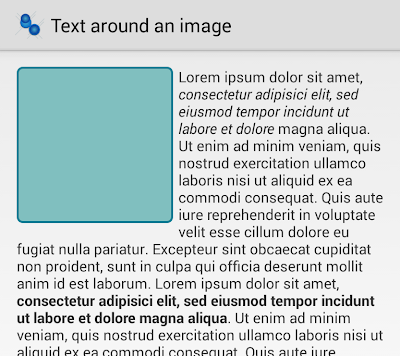
In this post I will describe how to realize a particular layout not very common on Android: a text around an image.
This layout is not an Android Pattern, but it can be useful in same cases.
As always it is just an example, and you should improve some points in your real project.
Use a simple layout:
    <ScrollView

        android:layout_width="match_parent"

        android:layout_height="match_parent">

        <RelativeLayout

            android:layout_width="match_parent"

            android:layout_height="match_parent">

            <TextView

                android:id="@+id/text"

                android:layout_width="match_parent"

                android:layout_height="wrap_content"></TextView>

            <ImageView

                android:id="@+id/icon"

                android:src="@drawable/rectangle"

                android:layout_width="150dp"

                android:layout_height="150dp"></ImageView>

        </RelativeLayout>

    </ScrollView>
To achieve our scope, we can use a LeadingMarginSpan.LeadingMarginSpan2.
This span allows the implementor to specify the number of lines of text to which this object is attached that the "first line of paragraph" margin width will be applied to.
    /**

     *

     */

    class MyLeadingMarginSpan2 implements LeadingMarginSpan.LeadingMarginSpan2 {

        private int margin;

        private int lines;

        MyLeadingMarginSpan2(int lines, int margin) {

            this.margin = margin;

            this.lines = lines;

        }

        /**

         * Apply the margin

         *

         * @param first

         * @return

         */

        @Override

        public int getLeadingMargin(boolean first) {

            if (first) {

                return margin;

            } else {

                return 0;

            }

        }

        @Override

        public void drawLeadingMargin(Canvas c, Paint p, int x, int dir,

                                      int top, int baseline, int bottom, CharSequence text,

                                      int start, int end, boolean first, Layout layout) {}

        @Override

        public int getLeadingMarginLineCount() {

            return lines;

        }

    };
We only need to calculate the number of lines where we would like applying a margin and the right margin.
In this case we will get number of lines = height of image and margin = width of image + little extra margin.
public class MainActivity extends Activity {

    @Override

    protected void onCreate(Bundle savedInstanceState) {

        super.onCreate(savedInstanceState);

        setContentView(R.layout.activity_main);

        mTextView = (TextView) findViewById(R.id.text);

        mImageView = (ImageView) findViewById(R.id.icon);

        final ViewTreeObserver vto = mImageView.getViewTreeObserver();

        vto.addOnGlobalLayoutListener(new ViewTreeObserver.OnGlobalLayoutListener() {

            @Override

            public void onGlobalLayout() {

                mImageView.getViewTreeObserver().removeOnGlobalLayoutListener(this);

                finalHeight = mImageView.getMeasuredHeight();

                finalWidth = mImageView.getMeasuredWidth();

                makeSpan();

            }

        });

    }

}
This code can be improved.
I am using a very simple (and raw) float textLineHeight = mTextView.getPaint().getTextSize(); to calculate the number of lines.
You can add paddings, margins or you can use a Rect to calculate the text bounds.
    /**

     * This method builds the text layout

     */

    private void makeSpan() {

        /**

         * Get the text

         */

        String plainText=getResources().getString(R.string.text_sample);

        int allTextStart = 0;

        int allTextEnd = htmlText.length() - 1;

        /**

         * Calculate the lines number = image height.

         * You can improve it... it is just an example

         */

        int lines;

        Rect bounds = new Rect();

        mTextView.getPaint().getTextBounds(plainText.substring(0,10), 0, 1, bounds);

        //float textLineHeight = mTextView.getPaint().getTextSize();

        float fontSpacing=mTextView.getPaint().getFontSpacing();

        lines = (int) (finalHeight/fontSpacing);

        /**

         * Build the layout with LeadingMarginSpan2

         */

        MyLeadingMarginSpan2 span = new MyLeadingMarginSpan2(lines, finalWidth +10 );

        mSpannableString.setSpan(span, allTextStart, allTextEnd,

                   Spanned.SPAN_EXCLUSIVE_EXCLUSIVE);

        mTextView.setText(mSpannableString);

    }
You can get code from GitHub:
Snippet: align a TextView around an image的更多相关文章
- textview 显示html方法解析
现在网络的繁盛时代,光文字是不能满足人们的胃口的,图片,flash,音频,视频就成为浏览网页的主流显示,在手机上也一样.在手机上显示从网络端获取的数据显示,大家很自然的想起两种方式,一种就是webvi ...
- Android之TextView文字绘制流程
一:TextView的onDraw()方法: 1.第一句restartMarqueeIfNeeded()绘制字幕滚动. protected void onDraw(Canvas canvas) { r ...
- TextView里的文 html
一.[Android实例]实现TextView里的文字有不同颜色 转eoe:http://www.eoeandroid.com/thread-4496-1-1.html import android. ...
- 自定义控件 TextView 歌词 Lrc
演示 <uses-permission android:name="android.permission.WRITE_EXTERNAL_STORAGE" /> < ...
- Android的TextView使用Html来处理图片显示、字体样式、超链接等
一.[Android实例]实现TextView里的文字有不同颜色 转eoe:http://www.eoeandroid.com/thread-4496-1-1.html import android. ...
- Android 获取View的高度或TextView的行数, 实现自适应的textview
大家都遇到过项目中需要获控件的的高度或者列如文章开头说TextView的行数 但是很多人在实际操作中getLineCount()获取到值是零,其实只是我们没在正确的位置获取. 这是因为activtiy ...
- 【转载】TextView源码解析
原文地址:https://github.com/7heaven/AndroidSdkSourceAnalysis/blob/master/article/textview%E6%BA%90%E7%A2 ...
- 关于textview显示特殊符号居中的问题
话说这是2017年的第一篇博客,也是一篇技术博客.先从简单的一篇解决问题开始吧,千里之行,始于足下! ------------------------------------------------- ...
- 奇葩问题-TextView无法获取值
问题场景 前几天写一个界面的时候,遇到一个非常奇葩的问题.app第一次安装的时候,这里针对用户第一次安装的时候,后来是不会出现这个问题了.我明明是对某个界面的一个textview赋值了,而且服务端也返 ...
随机推荐
- “”?: H3C SSH 配置+
开启ssh 服务 ssh service enable 创建用户 使用ssh local-user ssh 用户级别 authorization-attribute user-role level-1 ...
- 蛙蛙推荐:如何实时监控MySql状态
大多网站的性能瓶颈都会出在数据库上,所以想把Mysql监控起来,就搜索了下相关资料. 后来和同事讨论了下cacti和nagios有些老套和过时,graphite比较时尚,然后就搜了下相关的资料,最后搞 ...
- Web Api 中返回JSON的正确做法
在使用Web Api的时候,有时候只想返回JSON:实现这一功能有多种方法,本文提供两种方式,一种传统的,一种作者认为是正确的方法. JSON in Web API – the formatter b ...
- 用c#开发微信 (8) 微渠道 - 推广渠道管理系统 3 UI设计及后台处理
我们可以使用微信的“生成带参数二维码接口”和 “用户管理接口”,来实现生成能标识不同推广渠道的二维码,记录分配给不同推广渠道二维码被扫描的信息.这样就可以统计和分析不同推广渠道的推广效果. 前面二篇& ...
- Dynamic CRM 2013学习笔记(四十)流程3 - 对话(Dialog)用法图解
我们将用对话来实现一个简单的满意度调查,下一个问题依赖于上一个问题.对话是同步的,不同于工作流既可以是同步也可以是异步的:对话可以跟用户互动:对话只能手动开始:对话只支持 .Net Framework ...
- 某些版本的IIS可能有SessionID混淆的Bug
某公司为我服务的甲方公司开发一个挺重要的应用.已经上线了一年多了,不停的修修改改.也算正常使用.正所谓,秀恩爱,死得快.No 作就No Die.也少知道是那个Smarty Pants闲的蛋疼说新修改的 ...
- 关于CSS中清除浮动的方法
在使用CSS样式时会经常使用到浮动(float),这时如果没有清除浮动就会造成很多怪异的现象,因此对父级元素清除浮动是必须要做的,这样也是书写CSS的一个良好习惯. 目前常用的方法大致有三种. (1) ...
- ActiveReports 9实战教程(3): 图文并茂的报表形式
基于上面2节内容,我们搭建了AR9的开发环境,配置好了数据源.在本节,我们以官方提供的3个中文图文并茂的报表来展示AR9的功能,并通过实战的方式一一分享. 以往做报表相关的工作时,最害怕的是报表的UI ...
- 使用Jekyll官方的ReadMore摘要功能
今天才发现,Jekyll官方就支持ReadMore摘要功能,记录一下. 我之前的方法,在index.html中 {{ post.content ||split:'<!-- more --> ...
- JQuery文本框水印插件的简单实现
采用JQuery实现文本框的水印效果非常容易,效果如下: 代码片段,定义要应用水印效果的文本框的样式: .watermark { color: #cccccc; } 将JavaScript代码封装成J ...