
android之‘com.example.android.apis.view’的代码段
1.AutoCompleteTextView
ArrayAdapter<String> adapter = new ArrayAdapter<String>(this,

                android.R.layout.simple_dropdown_item_1line, COUNTRIES);

AutoCompleteTextView textView = (AutoCompleteTextView) findViewById(R.id.edit);

textView.setAdapter(adapter);
//this word for auto-completion by words
textView.setTokenizer(new MultiAutoCompleteTextView.CommaTokenizer());
static final String[] COUNTRIES = new String[] {

    "Afghanistan", "Albania", "Algeria", "American Samoa", "Andorra",

    "Angola", "Anguilla", "Antarctica", "Antigua and Barbuda", "Argentina",

    "Armenia", "Aruba", "Australia", "Austria", "Azerbaijan",

    "Bahrain", "Bangladesh", "Barbados", "Belarus", "Belgium",

    "Belize", "Benin", "Bermuda", "Bhutan", "Bolivia",

    "Bosnia and Herzegovina", "Botswana", "Bouvet Island", "Brazil", "British Indian Ocean Territory",

    "British Virgin Islands", "Brunei", "Bulgaria", "Burkina Faso", "Burundi",

    "Cote d'Ivoire", "Cambodia", "Cameroon", "Canada", "Cape Verde",

    "Cayman Islands", "Central African Republic", "Chad", "Chile", "China",

    "Christmas Island", "Cocos (Keeling) Islands"}
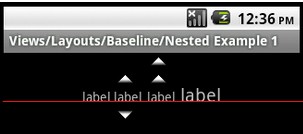
2.LinearLayout 的android:baselineAlignedChildIndex="2"属性作用。一张图片说明其作用
3.GridLayout 简化了对复杂布局的处理,包括性能提高不是一倍两倍。但是不支持SDK版本低于14的手机。不过有兼容包,不过我还没找到。
请看布局代码:
<?xml version="1.0" encoding="utf-8"?>

<!--

     Copyright (C) 2011 The Android Open Source Project

     Licensed under the Apache License, Version 2.0 (the "License");

     you may not use this file except in compliance with the License.

     You may obtain a copy of the License at

          http://www.apache.org/licenses/LICENSE-2.0

     Unless required by applicable law or agreed to in writing, software

     distributed under the License is distributed on an "AS IS" BASIS,

     WITHOUT WARRANTIES OR CONDITIONS OF ANY KIND, either express or implied.

     See the License for the specific language governing permissions and

     limitations under the License.

-->

<GridLayout xmlns:android="http://schemas.android.com/apk/res/android"

    android:layout_width="wrap_content"

    android:layout_height="wrap_content"

    android:layout_gravity="center"

    android:alignmentMode="alignBounds"

    android:columnCount="4"

    android:columnOrderPreserved="false"

    android:useDefaultMargins="false" >

    <EditText

        android:layout_columnSpan="3"

        android:layout_gravity="fill" />

    <Button android:text="/"/>

    <Button android:text="1" />

    <Button android:text="2" />

    <Button android:text="3" />

    <Button android:text="*" />

    <Button android:text="4" />

    <Button android:text="5" />

    <Button android:text="6" />

    <Button android:text="-" />

    <Button android:text="7" />

    <Button android:text="8" />

    <Button android:text="9" />

    <Button

        android:layout_gravity="fill_vertical"

        android:layout_rowSpan="3"

        android:text="+" />

    <Button

        android:layout_columnSpan="2"

        android:layout_gravity="fill"

        android:text="0" />

    <Button android:text="00" />

    <Button

        android:layout_columnSpan="3"

        android:layout_gravity="fill_horizontal"

        android:text="=" />

</GridLayout>
效果图如下:

android之‘com.example.android.apis.view’的代码段的更多相关文章
- 一起来学习android自定义控件3——边缘凹凸的View
前言 最近做项目的时候遇到一个卡劵的效果,由于自己觉得用图片来做的话可以会出现适配效果不好,再加上自己自定义view方面的知识比较薄弱,所以想试试用自定义View来实现.先看设计图效果 实现分析 上面 ...
- Android Studio开发基础之自定义View组件
一般情况下,不直接使用View和ViewGroup类,而是使用使用其子类.例如要显示一张图片可以用View类的子类ImageView,开发自定义View组件可分为两个主要步骤: 一.创建一个继承自an ...
- Android Animation学习(六) View Animation介绍
Android Animation学习(六) View Animation介绍 View Animation View animation系统可以用来执行View上的Tween animation和F ...
- Android 采用Layout Inflater创建一个View对象
接着上文<Android ListViewview入门>,本文使用android的Inflater来实现 在layouyt文件夹中新建一个list_item.xml的文件,添加如下代码: ...
- android 最简单的自定义圆点view
首先创建一个选择器,用来判断圆点状态,可以根本自己的需求改 <selector xmlns:android="http://schemas.android.com/apk/res/an ...
- Android UI性能优化实战, 识别View中的性能问题
出自:[张鸿洋的博客]来源:http://blog.csdn.net/lmj623565791/article/details/45556391 1.概述 2015年初google发布了Android ...
- Android群英传笔记系列三 view的自定义:实现一个模拟下载
1.实现效果:动态显示进度(分别显示了整个的动态改变的过程,然后完成后,弹出一个对话框) 2.实现过程:可以分为绘制一个圆,圆弧和文本三部分,然后在MainAcitivity中通过线程模拟 ...
- android 应用架构随笔四(View、ViewGroup)
View表示了用户界面的基本构建模块. 一个View占用了屏幕上的一个矩形区域并且负责界面绘制和事件处理.手机屏幕上所有看得见摸得着的都是View. Activity是四大组件中唯一一个用来和用户进行 ...
- Android进阶笔记08:Android 中Activity、Window和View之间的关系
1. Android 中Activity.Window和View之间的关系(比喻): Activity像一个工匠(控制单元),Window像窗户(承载模型),View像窗花(显示视图) LayoutI ...
随机推荐
- Swift-11-委托模式
委托是一种设计模式,它允许类或者结构体将一些需要它们负责的功能交由(或委托)给其他的类型的实例.委托模式很简单:定义协议来封装那些需要被委托的函数和方法,使其遵循者拥有这些被委托的函数和方法.委托模式 ...
- js引入img标签和图片
<!doctype html> <html lang="en"> <head> <meta charset="UTF-8&quo ...
- 2.TCP_IP互联线缆_TCP_UDP报文抓包详解
TCP_IP互联线缆_TCP_UDP报文抓包详解 2.1网线标准 直通线 交叉线 异种设备互联使用直通线 同种设备互联使用交叉线 TCP和UDP 端口寻址 TCP数据格式 TCP三次握手 UDP数据格 ...
- glOrtho、glFrustum && glPerspective
glOrtho :正交投影,摄像机可以位于裁剪体内,所以near和far可以取两个正值或者一正一负 glFrustum :透视投影,摄像机不可以位于裁剪体内,所以near和fa ...
- php sql分离
sql.php <?php $con = mysql_connect("localhost","root","root"); mysq ...
- c3p0参数解释
#最常用配置#initialPoolSize:连接池初始化时创建的连接数,default : 3,取值应在minPoolSize与maxPoolSize之间 c3p0.initialPoolSize= ...
- 用仿ActionScript的语法来编写html5——终篇,LegendForHtml5Programming1.0开源库件
一,LegendForHtml5Programming1.0库件是什么?它是一个javascript库,它模仿了ActionScript的语法,用于html5的开发,目前实现的功能相对较少,还不能称之 ...
- mysql:innodb monitor(show engine innodb status)探秘
在旧的版本里面是show innodb status命令,新版本后改动了一些:show engine innodb status; 我们最熟悉的,应当就是show innodb status命令,可以 ...
- SQLSERVER:大容量导入数据时保留标识值 (SQL Server)
从MSDN上看到实现大容量导入数据时保留标识值得方法包含三种: MSDN链接地址为:https://msdn.microsoft.com/zh-cn/library/ms178129.aspx 感觉M ...
- 30个最常用css选择器解析(zz)
你也许已经掌握了id.class.后台选择器这些基本的css选择器.但这远远不是css的全部.下面向大家系统的解析css中30个最常用的选择器,包括我们最头痛的浏览器兼容性问题.掌握了它们,才能真正领 ...