
android之‘com.example.android.apis.view’的代码段
1.AutoCompleteTextView
ArrayAdapter<String> adapter = new ArrayAdapter<String>(this,

                android.R.layout.simple_dropdown_item_1line, COUNTRIES);

AutoCompleteTextView textView = (AutoCompleteTextView) findViewById(R.id.edit);

textView.setAdapter(adapter);
//this word for auto-completion by words
textView.setTokenizer(new MultiAutoCompleteTextView.CommaTokenizer());
static final String[] COUNTRIES = new String[] {

    "Afghanistan", "Albania", "Algeria", "American Samoa", "Andorra",

    "Angola", "Anguilla", "Antarctica", "Antigua and Barbuda", "Argentina",

    "Armenia", "Aruba", "Australia", "Austria", "Azerbaijan",

    "Bahrain", "Bangladesh", "Barbados", "Belarus", "Belgium",

    "Belize", "Benin", "Bermuda", "Bhutan", "Bolivia",

    "Bosnia and Herzegovina", "Botswana", "Bouvet Island", "Brazil", "British Indian Ocean Territory",

    "British Virgin Islands", "Brunei", "Bulgaria", "Burkina Faso", "Burundi",

    "Cote d'Ivoire", "Cambodia", "Cameroon", "Canada", "Cape Verde",

    "Cayman Islands", "Central African Republic", "Chad", "Chile", "China",

    "Christmas Island", "Cocos (Keeling) Islands"}
2.LinearLayout 的android:baselineAlignedChildIndex="2"属性作用。一张图片说明其作用
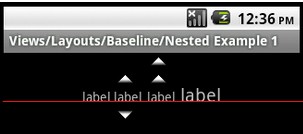
3.GridLayout 简化了对复杂布局的处理,包括性能提高不是一倍两倍。但是不支持SDK版本低于14的手机。不过有兼容包,不过我还没找到。
请看布局代码:
<?xml version="1.0" encoding="utf-8"?>

<!--

     Copyright (C) 2011 The Android Open Source Project

     Licensed under the Apache License, Version 2.0 (the "License");

     you may not use this file except in compliance with the License.

     You may obtain a copy of the License at

          http://www.apache.org/licenses/LICENSE-2.0

     Unless required by applicable law or agreed to in writing, software

     distributed under the License is distributed on an "AS IS" BASIS,

     WITHOUT WARRANTIES OR CONDITIONS OF ANY KIND, either express or implied.

     See the License for the specific language governing permissions and

     limitations under the License.

-->

<GridLayout xmlns:android="http://schemas.android.com/apk/res/android"

    android:layout_width="wrap_content"

    android:layout_height="wrap_content"

    android:layout_gravity="center"

    android:alignmentMode="alignBounds"

    android:columnCount="4"

    android:columnOrderPreserved="false"

    android:useDefaultMargins="false" >

    <EditText

        android:layout_columnSpan="3"

        android:layout_gravity="fill" />

    <Button android:text="/"/>

    <Button android:text="1" />

    <Button android:text="2" />

    <Button android:text="3" />

    <Button android:text="*" />

    <Button android:text="4" />

    <Button android:text="5" />

    <Button android:text="6" />

    <Button android:text="-" />

    <Button android:text="7" />

    <Button android:text="8" />

    <Button android:text="9" />

    <Button

        android:layout_gravity="fill_vertical"

        android:layout_rowSpan="3"

        android:text="+" />

    <Button

        android:layout_columnSpan="2"

        android:layout_gravity="fill"

        android:text="0" />

    <Button android:text="00" />

    <Button

        android:layout_columnSpan="3"

        android:layout_gravity="fill_horizontal"

        android:text="=" />

</GridLayout>
效果图如下:

android之‘com.example.android.apis.view’的代码段的更多相关文章
- 一起来学习android自定义控件3——边缘凹凸的View
前言 最近做项目的时候遇到一个卡劵的效果,由于自己觉得用图片来做的话可以会出现适配效果不好,再加上自己自定义view方面的知识比较薄弱,所以想试试用自定义View来实现.先看设计图效果 实现分析 上面 ...
- Android Studio开发基础之自定义View组件
一般情况下,不直接使用View和ViewGroup类,而是使用使用其子类.例如要显示一张图片可以用View类的子类ImageView,开发自定义View组件可分为两个主要步骤: 一.创建一个继承自an ...
- Android Animation学习(六) View Animation介绍
Android Animation学习(六) View Animation介绍 View Animation View animation系统可以用来执行View上的Tween animation和F ...
- Android 采用Layout Inflater创建一个View对象
接着上文<Android ListViewview入门>,本文使用android的Inflater来实现 在layouyt文件夹中新建一个list_item.xml的文件,添加如下代码: ...
- android 最简单的自定义圆点view
首先创建一个选择器,用来判断圆点状态,可以根本自己的需求改 <selector xmlns:android="http://schemas.android.com/apk/res/an ...
- Android UI性能优化实战, 识别View中的性能问题
出自:[张鸿洋的博客]来源:http://blog.csdn.net/lmj623565791/article/details/45556391 1.概述 2015年初google发布了Android ...
- Android群英传笔记系列三 view的自定义:实现一个模拟下载
1.实现效果:动态显示进度(分别显示了整个的动态改变的过程,然后完成后,弹出一个对话框) 2.实现过程:可以分为绘制一个圆,圆弧和文本三部分,然后在MainAcitivity中通过线程模拟 ...
- android 应用架构随笔四(View、ViewGroup)
View表示了用户界面的基本构建模块. 一个View占用了屏幕上的一个矩形区域并且负责界面绘制和事件处理.手机屏幕上所有看得见摸得着的都是View. Activity是四大组件中唯一一个用来和用户进行 ...
- Android进阶笔记08:Android 中Activity、Window和View之间的关系
1. Android 中Activity.Window和View之间的关系(比喻): Activity像一个工匠(控制单元),Window像窗户(承载模型),View像窗花(显示视图) LayoutI ...
随机推荐
- 在bash shell中使用getfattr查看文件扩展属性
getfattr用法 用于获取文件扩展属性,返回一系列键值对,参考Linux Man Page. 常用OPTIONS -n name, --name=name Dump the value of th ...
- Selenium2学习-021-WebUI自动化实战实例-019-设置浏览器窗口位置大小
前文简略讲述了如何获取浏览器窗口的位置和大小,此文讲述如何通过 webdriver 设置浏览器窗口的位置和大小. 直接上码了...... /** * Set browser size for expe ...
- Asp.net MVC中Route的理解
在Asp.net MVC中,对于一个请求,是通过路由找到对应的Controller类中的对应Action,并与model进行交互,最后返回到view. 就是说Asp.net MVC是用Route来定义 ...
- C# RichTextBox 滚动条 滚动到最后一行
使用RichTextBox控件用于显示数据时,滚动条只停留在开头,而我希望能够一直更新,显示最后一行的内容.解决方法记录于此. 转载自以下链接: http://blog.csdn.net/xelone ...
- notepad++代码折叠对应的树形结构快捷键
树形层次,从1开始计数 <!doctype html> <html lang="en" class="1"> <head clas ...
- 每日目标——HTML 头部标签学习 2015-8-27
<head> <title>bp</title> <meta http-equiv="Content-Type" content=&quo ...
- Android 退出app,后台推送的服务也停止了,怎么可以做到不停止后台服务呢?
service粘性等的那4种方式试了,三星的可以,小米老款手机可以,新款不行,华为新款也不行,还有魅族什么的,都不行,新款的手机上都有一个安全中心,只有在安全中心里面添加上允许app自启动才可以 怎么 ...
- AngularJs赋值问题
$scope.showUpgradeForm = function(item){ $scope.upgrade = item; $scope.upgrade.vercode++; // 其它操作 } ...
- WordPress 性能检测与速度优化
来源:SayBlog.Me [摘要]在如何提升WordPress性能与速度方面多花一些时间是值得的,本文下面为大家就如何提升WordPress运行效率列出了几点建议以供参考. 你的WordPress博 ...
- 分享书籍[writing idiomatic python ebook] 二
对多个变量设置相同的值时,用连等号一起赋值 x = 10 y = 10 z = 10 改成: x = y = z = 10 交换变量值时,可以避免定义新的临时变量 x = 10 y = 5 temp ...