
利用WCF双工模式实现即时通讯
概述
WCF陆陆续续也用过多次,但每次都是浅尝辄止,以将够解决问题为王道,这几天稍闲,特寻了些资料看,昨晚尝试使用WCF的双工模式实现了一个简单的即时通讯程序,通过服务端转发实现客户端之间的通讯。这只是个Demo,没有考虑异常处理和性能问题。解决方案结构如下:
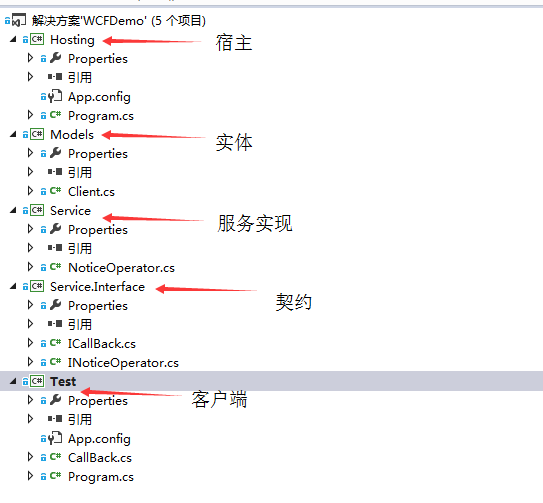
契约
using System;

using System.Collections.Generic;

using System.Linq;

using System.ServiceModel;

using System.Text;

using System.Threading.Tasks;

namespace Service.Interface

{

    [ServiceContract(CallbackContract = typeof(ICallBack))]

    public interface INoticeOperator

    {

        [OperationContract]

        void Register(String id);

        [OperationContract]

        void UnRegister(String id);

        [OperationContract]

        void SendMessage(String from, String to, String message);

    }

}
该接口定义了三个行为,分别是:
- 注册
- 注销
- 发消息
其中,在特性[ServiceContract(CallbackContract = typeof(ICallBack))]中指定了用于服务端回调客户方法的契约ICallBack,其定义如下:
using System;

using System.Collections.Generic;

using System.Linq;

using System.ServiceModel;

using System.Text;

using System.Threading.Tasks;

namespace Service.Interface

{

    public interface ICallBack

    {

        [OperationContract(IsOneWay = true)]

        void Notice(String message);

    }

}
实体
本Demo只有一个实体,用来表示已经注册用户的Id和对应的回调契约的具体实现的实例:
using Service.Interface;

using System;

using System.Collections.Generic;

using System.Linq;

using System.Text;

using System.Threading.Tasks;

namespace Models

{

    public class Client

    {

        public String Id { get; set; }

        public ICallBack CallBack { get; set; }

    }

}
契约的实现代码
using Models;

using Service.Interface;

using System;

using System.Collections.Generic;

using System.Linq;

using System.ServiceModel;

using System.Text;

using System.Threading.Tasks;

namespace Service

{

    public class NoticeOperator : INoticeOperator

    {

        private static List<Client> clientList = new List<Client>();

        public void Register(string id)

        {

            Console.WriteLine("register:" + id);

            ICallBack callBack = OperationContext.Current.GetCallbackChannel<ICallBack>();

            clientList.Add(new Client() { Id = id, CallBack = callBack });

        }

        public void UnRegister(string id)

        {

            Console.WriteLine("unRegister:" + id);

            Client client = clientList.Find(c => c.Id == id);

            if (client != null)

            {

                clientList.Remove(client);

            }

        }

        public void SendMessage(string from, string to, string message)

        {

            Client client = clientList.Find(c => c.Id == to);

            if (client != null)

            {

                String longMessage = String.Format("message from {0}  to {1} at {2} : {3}", from, to, DateTime.Now.ToString("HH:mm:ss"), message);

                Console.WriteLine(longMessage);

                client.CallBack.Notice(longMessage);

            }

        }

    }

}
Register方法用来把Client实体加入到一个列表中,模拟注册行为,Clinet实体包含了用户信息和实现了回调契约的一个实例对象。
UnRegister方法用来把一个Client从列表中移除,模拟注销行为。
SendMessage方法用来发送消息,第一个参数是发送者的Id,第二个参数是消息接受者的Id,第三个参数是发送内容,该方法先将消息在服务端打印出来,然后再回调消息接收者对应的回调契约的具体实现类的实例对象的Notice方法以达到服务端向客户端发送消息的目的。
宿主
using Service;

using Service.Interface;

using System;

using System.Collections.Generic;

using System.Linq;

using System.ServiceModel;

using System.ServiceModel.Description;

using System.Text;

using System.Threading.Tasks;

namespace Hosting

{

    class Program

    {

        static void Main(string[] args)

        {

            using (ServiceHost host = new ServiceHost(typeof(NoticeOperator)))

            {

                host.AddServiceEndpoint(typeof(INoticeOperator), new NetTcpBinding(), "net.tcp://127.0.0.1:9527/NoticeOperator");

                host.Opened += (s, e) => Console.WriteLine("service is running...");

                host.Open();

                Console.ReadLine();

            }

        }

    }

}
宿主是一个控制台应用程序,使用的绑定类型为NetTcpBinding,端口是华安的华府的终生代号。
客户端代码
实现回调接口
using Service.Interface;

using System;

using System.Collections.Generic;

using System.Linq;

using System.Text;

using System.Threading.Tasks;

namespace Test

{

    class CallBack : ICallBack

    {

        public void Notice(string message)

        {

            Console.WriteLine(message);

        }

    }

}
模拟注册,发消息和注销
using Service.Interface;

using System;

using System.Collections.Generic;

using System.Linq;

using System.ServiceModel;

using System.Text;

using System.Threading.Tasks;

namespace Test

{

    class Program

    {

        static void Main(string[] args)

        {

            InstanceContext context = new InstanceContext(new CallBack());

            using (ChannelFactory<INoticeOperator> factory = new DuplexChannelFactory<INoticeOperator>(context, new NetTcpBinding(), "net.tcp://127.0.0.1:9527/NoticeOperator"))

            {

                INoticeOperator proxy = factory.CreateChannel();

                String selfId = args[0];

                String friendId = args[1];

                proxy.Register(selfId);

                Console.WriteLine("----------Register------------");

                while(true)

                {

                    String message = Console.ReadLine();

                    if (message == "q")

                    {

                        proxy.UnRegister(selfId);

                        break;

                    }

                    else

                    {

                        proxy.SendMessage(selfId, friendId, message);

                    }

                }

            }

        }

    }

}
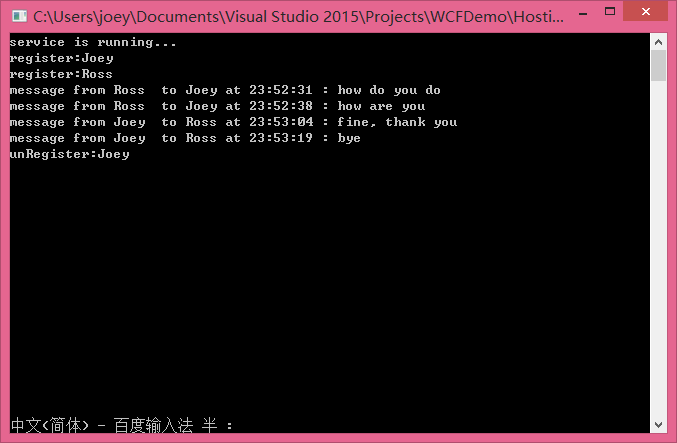
在CMD中运行test.exe Joey Ross表示Joey注册,要给他的朋友Ross发送消息;再起一个进程test.exe Ross Joey表示Ross注册,要给他的朋友Joey发送消息。进程启动后输入一些字符按回车即发送至了对方,输入q回车注销并退出程序。如下图所示:
Ross:
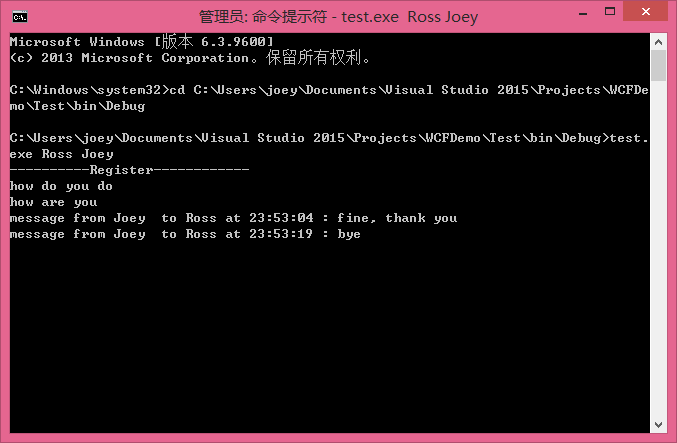
Joey:

服务端:
参考资料
- 无废话WCF入门教程五[WCF的通信模式]
- 同事 @麦枫 的代码
- 《WCF全面解析》
后记
这仅仅是个Demo,在实际项目中如果同时在线人数非常多,这样做的性能是否可行还需进一步对WCF双工模式的工作方式进行深入学习。
利用WCF双工模式实现即时通讯的更多相关文章
- [SignalR]SignalR与WCF双工模式结合实现服务端数据直推浏览器端
原文:[SignalR]SignalR与WCF双工模式结合实现服务端数据直推浏览器端 之前开发基于WinForm监控的软件,服务端基于Wcf实现,里面涉及双工模式,在客户端里面,采用心跳包机制保持与服 ...
- JAVA与.NET的相互调用——利用JNBridge桥接模式实现远程通讯
分布式开发的历史 利用Remote方式调用远程对象实现服务器与客户端之间通讯是一种常用的网络开发方式,在.NET与JAVA开发当中,对Remote远程对象早已有着足够的支持(对Remote远程对象调用 ...
- WCF 双工模式
WCF之消息模式分为:1.请求/答复模式2.单向模式3.双工模式 其中,请求/答复模式,在博文: WCF 入门教程一(动手新建第一个WCF程序并部署) WCF 入门教程二 中进行了详细介绍,此处将主要 ...
- android环境下的即时通讯
首先了解一下即时通信的概念.通过消息通道 传输消息对象,一个账号发往另外一账号,只要账号在线,可以即时获取到消息,这就是最简单的即使通讯.消息通道可由TCP/IP UDP实现.通俗讲就是把一个人要发送 ...
- 利用WCF的双工通讯实现一个简单的心跳监控系统 z
利用WCF的双工通讯实现一个简单的心跳监控系统 http://www.cnblogs.com/zuowj/p/5761011.html 何为心跳监控系统? 故名思义,就是监控某个或某些个程序的运行状态 ...
- 利用WCF的双工通讯实现一个简单的心跳监控系统
何为心跳监控系统? 故名思义,就是监控某个或某些个程序的运行状态,就好比医院里面的心跳监视仪一样,能够随时显示病人的心跳情况. 心跳监控的目的是什么? 与医院里面的心跳监视仪目的类似,监控程序运行状态 ...
- WCF学习之旅—TCP双工模式(二十一)
WCF学习之旅—请求与答复模式和单向模式(十九) WCF学习之旅—HTTP双工模式(二十) 五.TCP双工模式 上一篇文章中我们学习了HTTP的双工模式,我们今天就学习一下TCP的双工模式. 在一个基 ...
- WCF双工通讯以及客户端间的间接通讯
由于学习计划安排不当,对WCF的认知一直停滞不前,最近工作上又用回了WCF,重拾一下,看到蒋老师介绍双工通讯的博文,实践一下,积累一下.原想着WCF的双工通讯就是原本的客户端能调用服务端的方法之余,服 ...
- WCF学习之旅—HTTP双工模式(二十)
WCF学习之旅—请求与答复模式和单向模式(十九) 四.HTTP双工模式 双工模式建立在上文所实现的两种模式的基础之上,实现客户端与服务端相互调用:前面介绍的两种方法只是在客户端调用服务端的方法,然后服 ...
随机推荐
- WPF做12306验证码点击效果
一.效果 和12306是一样的,运行一张图上点击多个位置,横线以上和左边框还有有边框位置不允许点击,点击按钮输出坐标集合,也就是12306登陆的时候,需要向后台传递的参数. 二.实现思路 1.获取验证 ...
- gulp详细入门教程
本文链接:http://www.ydcss.com/archives/18 gulp详细入门教程 简介: gulp是前端开发过程中对代码进行构建的工具,是自动化项目的构建利器:她不仅能对网站资源进行优 ...
- SQL Server-聚焦计算列持久化(二十一)
前言 上一节我们结束了Hash Match Aggregate和Stream Aggregate的讲解,本系列我们来讲讲关于SQL Server中的计算列问题,简短的内容,深入的理解,Always t ...
- 计算机程序的思维逻辑 (60) - 随机读写文件及其应用 - 实现一个简单的KV数据库
57节介绍了字节流, 58节介绍了字符流,它们都是以流的方式读写文件,流的方式有几个限制: 要么读,要么写,不能同时读和写 不能随机读写,只能从头读到尾,且不能重复读,虽然通过缓冲可以实现部分重读,但 ...
- Adaboost提升算法从原理到实践
1.基本思想: 综合某些专家的判断,往往要比一个专家单独的判断要好.在"强可学习"和"弱科学习"的概念上来说就是我们通过对多个弱可学习的算法进行"组合 ...
- http status code
属于转载 http status code:200:成功,服务器已成功处理了请求,通常这表示服务器提供了请求的网页 404:未找到,服务器未找到 201-206都表示服务器成功处理了请求的状态代码,说 ...
- SharePoint 2013管理中心里【管理服务器上的服务】不见了
打开管理中心,准备配置Managed Metadata Service,发现"管理服务器上的服务"不见了 那我自己拼url直接访问:http://xxxx/_admin/Serve ...
- linux系统oracle-ora12505问题解决方案一
说明:(1)Linux版本 Linux version 2.6.32.12-0.7-default (geeko@buildhost) (gcc version 4.3.4 [gcc-4_3-bran ...
- BZOJ 2756: [SCOI2012]奇怪的游戏 [最大流 二分]
2756: [SCOI2012]奇怪的游戏 Time Limit: 40 Sec Memory Limit: 128 MBSubmit: 3352 Solved: 919[Submit][Stat ...
- 我的MYSQL学习心得(四) 数据类型
我的MYSQL学习心得(四) 数据类型 我的MYSQL学习心得(一) 简单语法 我的MYSQL学习心得(二) 数据类型宽度 我的MYSQL学习心得(三) 查看字段长度 我的MYSQL学习心得(五) 运 ...