
Android沉浸式状态栏实现
Step1:状态栏与导航栏半透明化
- 方法一:继承主题特定主题
在Android API 19以上可以使用*.TranslucentDecor有关的主题,自带相应半透明效果
例如:
<style name="FullBleedTheme" parent="android:Theme.Holo.Light.NoActionBar.TranslucentDecor">

<!-- API 19 theme customizations can go here. -->

</style>
- 方法二:自定义主题中使用一下设置
<item name="android:windowTranslucentStatus" tools:targetApi="kitkat">true</item>

<item name="android:windowTranslucentNavigation" tools:targetApi="kitkat">true</item>
- 方法三:在Activity中设置布局文件之后调用这些代码实现
if (Build.VERSION.SDK_INT >= Build.VERSION_CODES.KITKAT) {

    Window window = getWindow();

    // Translucent status bar

    window.addFlags(WindowManager.LayoutParams.FLAG_TRANSLUCENT_STATUS);

    // Translucent navigation bar

    window.addFlags(WindowManager.LayoutParams.FLAG_TRANSLUCENT_NAVIGATION);

}
SystemBarTint作者提供的变形方法如下
@TargetApi(19)

private void setTranslucentStatus(boolean on) {

    Window win = getWindow();

    WindowManager.LayoutParams winParams = win.getAttributes();

    final int bits = WindowManager.LayoutParams.FLAG_TRANSLUCENT_STATUS;

    if (on) {

        winParams.flags |= bits;

    } else {

        winParams.flags &= ~bits;

    }

    win.setAttributes(winParams);

}
Step2:此时状态栏占有的位置消失,方法同样有三
- 方法一:需要在布局文件根布局中添加一下代码
android:fitsSystemWindows="true"
- 方法二:在主题中设置如下:
<item name="android:fitsSystemWindows">true</item>
- 方法三:使用Java代码:
rootview.setFitsSystemWindows(true);
Step3:设定状态栏和导航栏背景色
这时候状态栏半透明,显示的颜色根据根布局的背景颜色而来,由此可以给根布局背景色位所需的颜色即可。
但是这样会给根布局的子布局控件的背景设置带来不便。
所以采用SystemBarTint实现沉浸式状态栏
方法如下:
SystemBarTintManager tintManager = new SystemBarTintManager(this);

            tintManager.setStatusBarTintEnabled(true);

            tintManager.setNavigationBarTintEnabled(true);

            tintManager.setTintColor(ContextCompat.getColor(this, R.color.colorPrimary));
几个问题
- 使用SystemBarTint不能给状态栏设置多个颜色,不能自动取色?
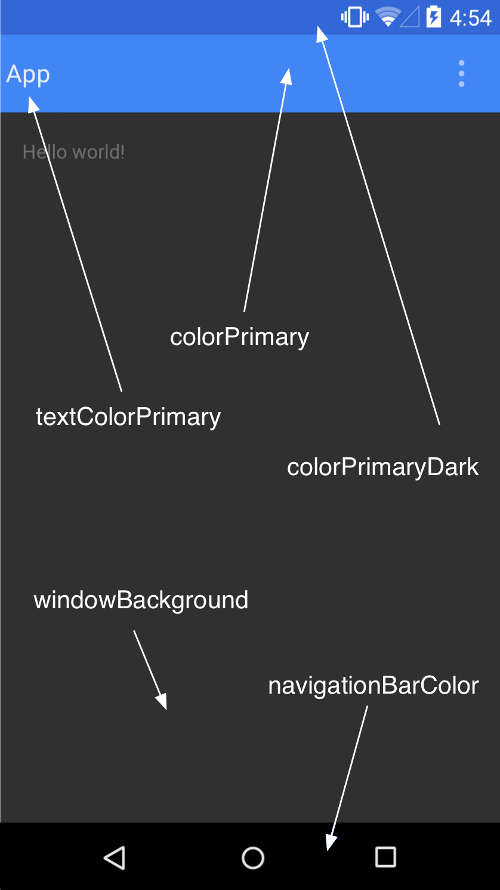
- Android5.0(API 21)之后ActionBar主题中几个颜色代表的意义
  <style name="AppTheme" parent="android:Theme.Material">

    <!-- Main theme colors -->

    <!--   your app branding color for the app bar -->

    <item name="android:colorPrimary">@color/primary</item>

    <!--   darker variant for the status bar and contextual app bars -->

    <item name="android:colorPrimaryDark">@color/primary_dark</item>

    <!--   theme UI controls like checkboxes and text fields -->

    <item name="android:colorAccent">@color/accent</item>

  </style>
参考资料
- SystemBarTint及其说明文档
- 使用材料主题 | Android Developers
- Android KITKAT 以上实现沉浸式状态栏
- SystemBarTint的使用(设置半透明状态栏)
Android沉浸式状态栏实现的更多相关文章
- Android 沉浸式状态栏 实现方式二 ( 更简单 )
以前写过一个沉浸式状态栏 的实现方式 Android 沉浸式状态栏 实现方式一 现在有个更为简单的实现方式 . 相关链接 http://www.apkbus.com/forum.php?mod=vie ...
- android 沉浸式状态栏的实现
本文介绍一种简单的实现沉浸式状态栏的方法,要高于或等于api19才可以. 实现android沉浸式状态栏很简单,添加代码两步就可以搞定. 一.在activity中添加 getWindow().addF ...
- [置顶]
Xamarin android沉浸式状态栏
虽然关于android "沉浸式"状态栏有很多博客介绍过,从小菜到大神无一例外.我第一次看到这种"沉浸"式的效果我也以为真的是这么叫,然而根本不是这么回事,完全 ...
- Android 沉浸式状态栏完美解决方案
现在搜索Android 沉浸式状态栏,真的是一堆一堆,写的特别多,但是真正用的舒服的真没有,在这里自己整理一下开发记录 注意,在使用这个步骤过程之前,请把之前设置的代码注释一下 把布局带有androi ...
- Android沉浸式状态栏(透明状态栏)最佳实现
Android沉浸式状态栏(透明状态栏)最佳实现 在Android4.4之前,我们的应用没法改变手机的状态栏颜色,当我们打开应用时,会出现上图中左侧的画面,在屏幕的顶部有一条黑色的状态栏,和应用的风格 ...
- 【Android实战】Android沉浸式状态栏实现(下)
之前的Android沉浸式状态栏实现并没有考虑软键盘的影响,接下来的内容将会针对这个问题给出解决方式,先看一下效果图 这个是一个留言板的效果图: 即弹出软键盘的时候并不会导致整个布局上移. 详细怎样实 ...
- android沉浸式状态栏设置(4.4以上版本)
其实设置比较简单,我用了小米和htc的几款机型都可以用. 主要代码就是这个(注意要在Activity的setContentView之前调用才行) /** * 开启沉浸式状态栏 * */ public ...
- Android 沉浸式状态栏
1,传统的手机状态栏是呈现出黑色或者白色条状的,有的和手机主界面有很明显的区别.这样就在一定程度上牺牲了视觉宽度,界面面积变小.看一下QQ的应用 2,实现起来也挺简单的,来一起看一下吧 MainAct ...
- Android 沉浸式状态栏攻略 让你的状态栏变色吧
转载请标明出处: http://blog.csdn.net/lmj623565791/article/details/48649563: 本文出自:[张鸿洋的博客] 一.概述 近期注意到QQ新版使用了 ...
随机推荐
- HDU-2686 Matrix 多进程DP
题目链接:http://acm.hdu.edu.cn/showproblem.php?pid=2686 经典的多进程DP,比较简单.f[x1][y1][x2][y2]表示起点到点(x1,y1)和(x2 ...
- ERROR: transport error 202: bind failed: Address already in use
早上上班,同事反应服务上不去,后台看了一下,发现tomcat挂掉了,重新启动tomcat时报错. ERROR: transport error 202: bind failed: Address al ...
- 安森美电量计采用内部电阻跟踪电流--电压HG-CVR
http://www.dianyuan.com/article/34608.html LC709203F应用:用于便携式设备单节锂电池的智能电量计http://files.cnblogs.com/fi ...
- Umbraco中的权限体系结构
分为管理用户体系,和成员用户体系,也就是 Users(用户)和Members(成员). 2.1. Users(用户) 用户是对功能操作权限定义的,首先看一下所有Action的Permissions: ...
- 超级MINI STLINK V2 官方固件自动升级 ST-Link 【worldsing 笔记】
简介: 支持所有带SWIM接口的STM8系列单片机 支持所有带SWD接口的STM32系列单片机 完全兼容Keil,STVP,STVD,IAR,COSMIC,STM32 ST-LINK Utility! ...
- iOS学习之NSBundle介绍和使用
iOS学习之NSBundle介绍和使用 http://blog.csdn.net/totogo2010/article/details/7672271 新建一个Single View Applicat ...
- poj 2251 搜索
Dungeon Master Time Limit: 1000MS Memory Limit: 65536K Total Submissions: 13923 Accepted: 5424 D ...
- cocos2d-x ScrollView、TableView
转自:http://codingnow.cn/cocos2d-x/1024.html 在游戏和应用中经常要实现左右滑动展示游戏帮助.以列表显示内容的UI效果,就像android中的Gallery和Li ...
- php join函数使用,很是方便
以前数组转换成用逗号隔开的字符串都是自己写一个数组,最后还要去除多余的一个逗号,好麻烦. 无意中发现join函数,原来一句话就可以了. $_array = array('a','b','c','d', ...
- 用csc命令行手动编译cs文件
一般初学c#时,用记事本写代码,然后用命令行执行csc命令行可以编译cs文件.方法有两种 1:配置环境,一劳永逸 一般来说在C:\Windows\Microsoft.NET\Framework\v4. ...