
一个Notification 进度条插件(android,NJS实现,直接就可使用)
参考文章:http://ask.dcloud.net.cn/article/503
如题,分享一个Notification 进度条插件(android,用js调用原生api实现,直接就可以使用).
参考1: http://ask.dcloud.net.cn/article/155
参考2:http://ask.dcloud.net.cn/question/2464
详细介绍: 最近有一个需求是,android更新资源包时,需要在通知栏里显示下载进度条,于是就搜索了下已有的解决方案
发现并没有现成的解决方案,于是参考了以上两个解决方案,结合了下,实现了直接能调用的js插件.
第一步(分析以上两种方案的缺陷):
第一种:功能上能实现需求,但是使用起来太麻烦,而且也不方便调试(需要离线打包后才能看到效果),
而且,我这里还遇到了一个问题,在 hbuild 6.9.2 中,我明明已经添加了自定义模块权限,但是却一直提示我 ***权限没有添加, 真的是把我弄的吐血了, 所以没办法,只能另谋他路.
第二种:使用起来很方便,但是却没有完全达到功能要求(只显示了普通通知,但没有显示进度条),而且在api <16 的机子上会报错.
于是在这个基础上,结合第一种方法.写了一个 工具类,实现android的通知栏控制(兼容了api11-16的通知显示)
源码:
/**

 * @description njs实现android原生功能

 * 1.通知栏消息

 * @see http://ask.dcloud.net.cn/article/503

 *

 * @author dailc

 * @version 1.0

 * @time 2016-01-08 08:38:20

 */

(function(obj) {

    var defaultTitle = '通知栏标题';

    var defaultContent = '通知内容';

    var defaultTicker = '通知提示';

    var defaultNotifyId = 1000;

    var defaultNumber = 1;

    /**

     * plusReady

     * @param {type} callback

     * @returns {Window}

     */

    obj.plusReady = function(callback) {

        if (window.plus) {

            setTimeout(function() { //解决callback与plusready事件的执行时机问题(典型案例:showWaiting,closeWaiting)

                callback();

            }, 0);

        } else {

            document.addEventListener("plusready", function() {

                callback();

            }, false);

        }

        return this;

    };

    /**

     * @description 比较两个版本大小

     * 比较版本大小,如果新版本nowVersion大于旧版本OldResourceVersion则返回true,否则返回false

     */

    function compareVersion(OldVersion, nowVersion) {

        if (!OldVersion || !nowVersion || OldVersion == '' || nowVersion == '') {

            return false;

        }

        //第二份参数 是 数组的最大长度

        var OldVersionA = OldVersion.split(".", 4);

        var nowVersionA = nowVersion.split(".", 4);

        for (var i = 0; i < OldVersionA.length && i < nowVersionA.length; i++) {

            var strOld = OldVersionA[i];

            var numOld = parseInt(strOld);

            var strNow = nowVersionA[i];

            var numNow = parseInt(strNow);

            //小版本到高版本

            if (numNow > numOld

                //||strNow.length>strOld.length

            ) {

                return true;

            } else if (numNow < numOld) {

                return false;

            }

        }

        //如果是版本  如 1.6 - 1.6.1

        if (nowVersionA.length > OldVersionA.length && 0 == nowVersion.indexOf(OldVersion)) {

            return true;

        }

    };

    /**

     * @description 通过push功能来推送消息

     */

    obj.sendNotificationByPush = function() {

        var options = {

            cover: false

        };

        var str = ": 欢迎使用Html5 Plus创建本地消息!";

        plus.push.createMessage(str, "LocalMSG", options);

    };

    (function() {

        /**

         * @constructor 创建通知栏进度条构造函数

         */

        function NotificationCustom() {

            if (plus.os.name != 'Android') {

                return;

            }

            //当前版本号

            var SystemVersion = plus.os.version;

            var Context = plus.android.importClass("android.content.Context");

            var main = plus.android.runtimeMainActivity();

            var NotificationManager = plus.android.importClass("android.app.NotificationManager");

            var nm = main.getSystemService(Context.NOTIFICATION_SERVICE)

                // Notification build 要android api16以上才能使用(4.1.2以上)

            var Notification = null;

            if (compareVersion('4.1.1', SystemVersion) == true) {

                Notification = plus.android.importClass("android.app.Notification");

            } else {

                Notification = plus.android.importClass("android.support.v4.app.NotificationCompat");

            }

            if (Notification) {

                this.notifyManager = nm;

                this.mNotificationBuild = new Notification.Builder(main);

                //设为true代表常驻状态栏

                this.mNotificationBuild.setOngoing(false);

                this.mNotificationBuild.setContentTitle(defaultTitle);

                this.mNotificationBuild.setContentText(defaultContent);

                this.mNotificationBuild.setTicker(defaultTicker);

                //默认的push图标

                this.mNotificationBuild.setSmallIcon(17301620);

                //设置默认声音

                //console.log('默认:'+plus.android.importClass("android.app.Notification").DEFAULT_SOUND);

                this.mNotificationBuild.setDefaults(plus.android.importClass("android.app.Notification").DEFAULT_SOUND);

                //this.mNotificationBuild.setNumber(defaultNumber)

            }

        };

        /**

         * @description 给android通知栏发送通知

         * @param {String} title 标题

         * @param {String} content  内容

         * @param {String} tickerTips  提示

         * @param {Number} notifyId id,默认为1000

         */

        NotificationCustom.prototype.setNotification = function(title, content, tickerTips,notifyId) {

            if (this.mNotificationBuild == null ||

                this.notifyManager == null) {

                return;

            }

            notifyId = (typeof(notifyId)=='number')?notifyId:defaultNotifyId;

            title = title || defaultTitle;

            content = content || defaultContent;

            tickerTips = tickerTips || defaultTicker;

            this.mNotificationBuild.setContentTitle(title);

            this.mNotificationBuild.setContentText(content);

            this.mNotificationBuild.setTicker(tickerTips);

            //默认有声音

            this.mNotificationBuild.setDefaults(plus.android.importClass("android.app.Notification").DEFAULT_SOUND);

            this.notifyManager.notify(notifyId, this.mNotificationBuild.build());

        };

        /**

         * @description 设置进度条

         * @param {Number} progress

         * @param {String} title 标题

         * @param {String} content  内容

         * @param {String} tickerTips  提示

         * @param {Number} notifyId id,默认为1000

         */

        NotificationCustom.prototype.setProgress = function(progress, title, content, tickerTips,notifyId) {

            if (this.mNotificationBuild == null ||

                this.notifyManager == null) {

                return;

            }

            notifyId = (typeof(notifyId)=='number')?notifyId:defaultNotifyId;

            title = title || '正在下载';

            content = content || '正在下载';

            tickerTips = tickerTips || '进度提示';

            //          tickerTips = tickerTips || defaultTicker;

            this.mNotificationBuild.setContentTitle(title);

            this.mNotificationBuild.setContentText(content);

            this.mNotificationBuild.setTicker(tickerTips);

            //进度条显示时,默认无声音

            this.mNotificationBuild.setDefaults(0);

            this.mNotificationBuild.setProgress(100, progress, false);

            this.notifyManager.notify(notifyId, this.mNotificationBuild.build());

        };

        /**

         * @description 完成进度条

         * @param {String} title 标题

         * @param {String} content  内容

         * @param {String} tickerTips  提示

         * @param {Number} notifyId id,默认为1000

         */

        NotificationCustom.prototype.compProgressNotification = function(title, content, tickerTips,notifyId) {

            if (this.mNotificationBuild == null ||

                this.notifyManager == null) {

                return;

            }

            notifyId = (typeof(notifyId)=='number')?notifyId:defaultNotifyId;

            title = title || '进度条显示完毕';

            content = content || '进度条显示完毕';

            tickerTips = tickerTips || '进度提示';

            this.mNotificationBuild.setContentTitle(title);

            this.mNotificationBuild.setContentText(content);

            this.mNotificationBuild.setTicker(tickerTips);

            this.mNotificationBuild.setProgress(0, 0, false);

            //默认有声音

            this.mNotificationBuild.setDefaults(plus.android.importClass("android.app.Notification").DEFAULT_SOUND);

            this.notifyManager.notify(notifyId, this.mNotificationBuild.build());

        };

        /**

         * @description 清除通知栏信息

         * @param {Number} notifyId id,默认为1000

         */

        NotificationCustom.prototype.clearNotification = function(notifyId) {

            notifyId = (typeof(notifyId)=='number')?notifyId:defaultNotifyId;

            if(this.notifyManager){

                this.notifyManager.cancel(notifyId);

            }

        };

        /**

         * @description 清除所有通知栏信息

         */

        NotificationCustom.prototype.clearAllNotification = function() {

            if(this.notifyManager){

                this.notifyManager.cancelAll();

            }

        };

        obj.plusReady(function() {

            obj.NotificationUtil = new NotificationCustom();

        });

    })();

})(window.NjsPhoneApi = {});
调用方法示例:
显示普通通知:
NjsPhoneApi.NotificationUtil.setNotification('测试标题'+staticI,'测试内容');
显示进度条代码:
function testProgress() {

        //插件调用

        NjsPhoneApi.NotificationUtil.setNotification("新版下载", "开始下载");

        var current = 0;

        NjsPhoneApi.NotificationUtil.setProgress(current); //插件调用

        function progress() {

            setTimeout(function() {

                current += 1;

                NjsPhoneApi.NotificationUtil.setProgress(current);

                if(current>=100){

                     NjsPhoneApi.NotificationUtil.compProgressNotification("下载完成");

                }else{

                    progress();

                }

            }, 100);

        };

        progress();

    };

testProgress();//调用显示进度条
取消单条通知:(传入参数为id,不传采用默认id)
NjsPhoneApi.NotificationUtil.clearNotification();
取消所有通知:
NjsPhoneApi.NotificationUtil.clearAllNotification();
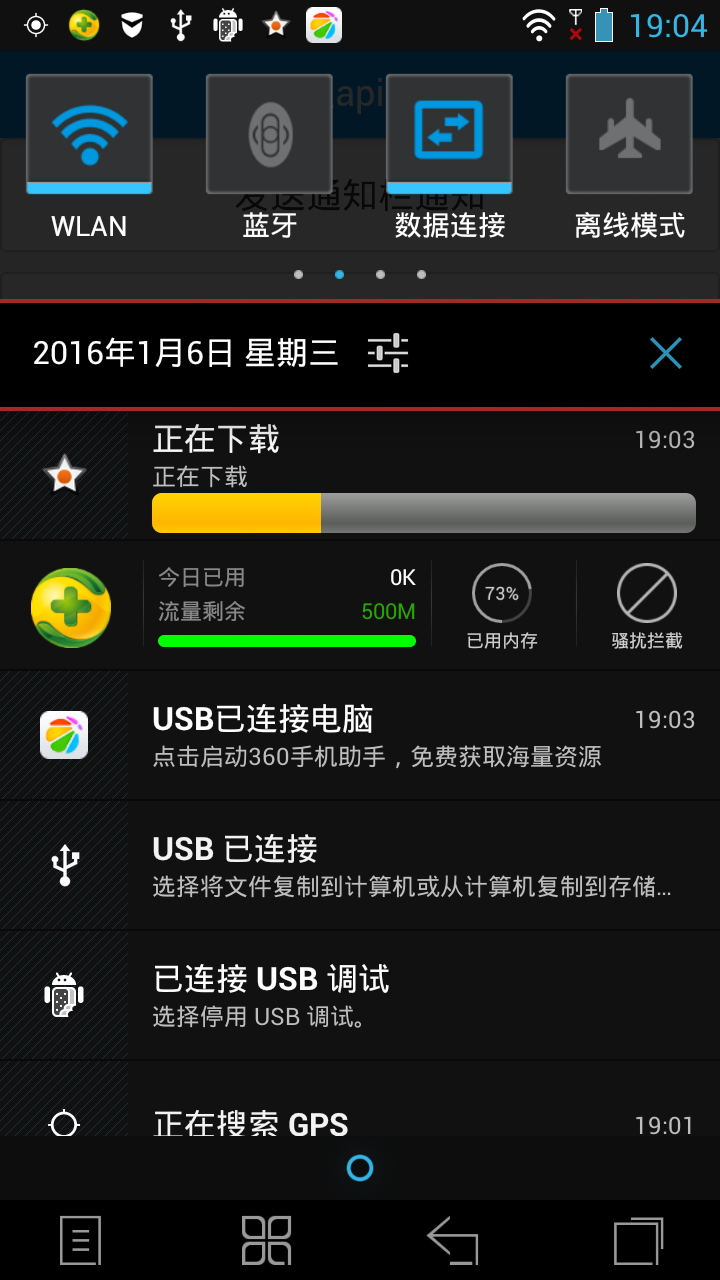
另外: 支持自定义id的通知,也就是说可以通过传入不同的id,同时显示不同的通知
效果图1:
效果图2:
示例源码:鉴于有一些朋友会有各式各样的奇怪错误,所以这里单独写了一个示例,测试了android机型(华为,联想)都是可以正常使用的.
示例源码中采用的是默认id

一个Notification 进度条插件(android,NJS实现,直接就可使用)的更多相关文章
- YprogressBar,html5进度条样式,js进度条插件
简介 YprogressBar是一款基于HTML5的进度条插件. YprogressBar是一款轻量级进度条插件,使用方便,资源占用少,模仿好压的解压界面,带有数字显示,同时支持在描述中增加参数,以动 ...
- 简单实用的纯CSS百分比圆形进度条插件
percircle是一款简单实用的纯CSS百分比圆形进度条插件.你不需要做任何设置,只需要按该圆形进度条插件提供的标准HTML结构来编写代码,就可以生成一个漂亮的百分比圆形进度条. 首先要做的就是引入 ...
- JQuery中简约的进度条插件推荐
JQuery Progress Bar是基于JQuery开发的进度条插件,秉承了JQuery的简约哲学.不仅容易使用,而且可以轻松定制外观.对于使用了JQuery框架的项目来说,需要使用进度条控件时这 ...
- 简单的jquery进度条插件LineProgressbar.js,myProgress.js
参考 http://www.lanrenzhijia.com/jquery/4121.html demo下载 <script src="js/jquery.lineProgress ...
- HTML5圆形百分比进度条插件circleChart
在页面中引入jquery和circleChart.min.js文件. <script src="path/to/jquery.min.js"></script&g ...
- 30款基于 jQuery & CSS3 的加载动画和进度条插件
我们所生活每一天看到的新技术或新设计潮流的兴起,Web 开发正处在上升的时代.HTML5 & CSS3 技术的发展让 Web 端可以实现的功能越来越强大. 加载动画和进度条使网站更具吸引力.该 ...
- 基于Jquery的进度条插件(实用)
Spin.js 最喜欢这款插件了,动画图片的长度.粗细.速度和角度都可以灵活控制,想要做成什么样都可以. 源码下载 在线演示 Percentage Loader 一款轻量的 jQuery 进 ...
- pace.js – 加载进度条插件
这儿只是简单介绍一下这个插件pace.js. 在页面中引入Pace.js,页面就会自动监测你的请求(包括Ajax请求),在事件循环滞后,会在页面记录加载的状态以及进度情况.此插件的兼容性很好,可以兼容 ...
- vue2-loading-bar 一款基于Vue2的进度条插件
自学了N久vue,奈何没有练手项目,终于决心拿个东西来试试手.基于对音乐的热爱,选择的第一个demo是音乐播放器.一般播放器都有进度条,于是无意间找到这个插件,就是vue2-loading-bar,这 ...
随机推荐
- HDU-3436 Queue-jumpers 树状数组 | Splay tree删除,移动
题目链接:http://acm.hdu.edu.cn/showproblem.php?pid=3436 树状数组做法<猛戳> Splay tree的经典题目,有删除和移动操作.首先要离散化 ...
- 【现代程序设计】【Homework-01】
1维的最大子数组之和 对于1维的最大子数组之和 假设f[i]表示:对于1..i这个序列中,包含i这个元素的最大序列的值 则对于f[i],0<i<=n; 应该有 f[i]=max(a[i], ...
- SQL2008-删除时间字段重复的方法
ID EMAgitation_ID YieldDateTime 1 2 2012-02-11 10:18:54.0002 2 ...
- HDFS的Java客户端操作代码(HDFS的查看、创建)
1.HDFS的put上传文件操作的java代码: package Hdfs; import java.io.FileInputStream; import java.io.FileNotFoundEx ...
- [iOS基础控件 - 4.3] APP列表 xib的使用
A.storyboard和xib 1.storyboard: 相对xib较重量级,控制整个应用的所有界面 2.xib: 轻量级,一般用来描述局部界面 B.使用 1.新建xib文件 New File ...
- kvo原理概述
kvo概述 kvo,全称Key-Value Observing,它提供了一种方法,当对象某个属性发生改变时,允许监听该属性值变化的对象可以接受到通知,然后通过kvo的方法响应一些操作. kvo实现原理 ...
- sublime Text 3的默认快捷键大全
Ctrl+M 光标跳至对应的括号 Alt+. 闭合当前标签 Ctrl+Shift+A 选择光标位置父标签对儿 Ctrl+Shift+[ 折叠代码 Ctrl+Shift+] 展开代码 Ctrl+KT 折 ...
- MySQL的安装——源码方式(实验环境下测试用,真实环境请忽略此文)
#虚拟机是最初的的系统,我们在虚拟机里安装scp [root@serv01 ~]# yum install /usr/bin/scp -y #安装过程略 #我们拷贝MySQL的源码包到目标机的/roo ...
- linux下Memcached安装以及PHP的调用
一:安装libevent 由于memcached安装时,需要使用libevent类库,所以先安装libevent 1.官网下载:http://libevent.org/ #wget https:/ ...
- How to add “Maven Managed Dependencies” library in build path eclipse
If you have m2e installed and the project already is a maven project but the maven dependencies are ...