
idea14使用maven创建web工程
参考博客:http://geeksun.iteye.com/blog/2179658
http://www.bubuko.com/infodetail-387387.html
----------------------------------------------------
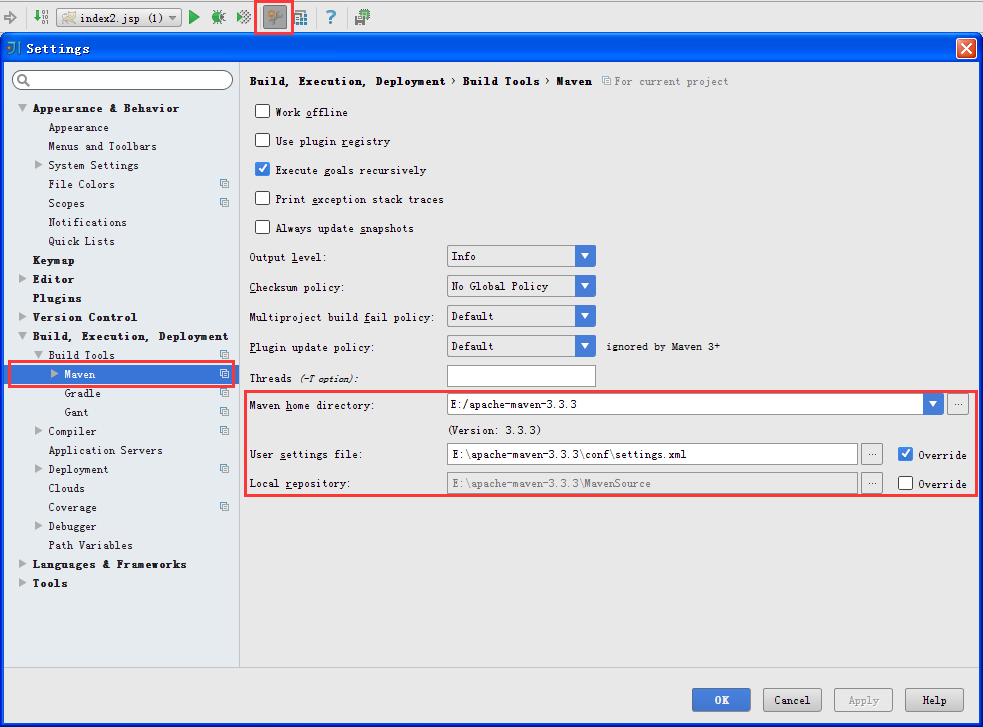
一、配置maven
二、创建一个maven项目
2.1

2.2

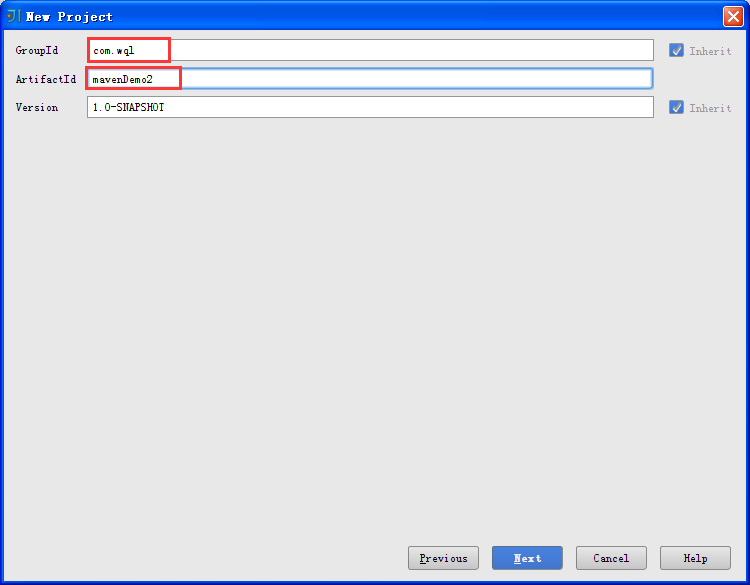
2.3 起好GroupId、ArtifacId
2.4 这个是选择自己电脑上的maven目录、setting.xml及本地仓库

2.5 起个项目名(注意:Project location的地址是E:\Spring3\mavenDemo2--因为工作区间有其他项目,而不是把该项目直接部署到E:\Spring3目录。)

2.6 左边的是新建的界面,还有一些配置要完成。先点击右边的Enable Auto-Import

2.7 配置服务器

2.8 配置的服务器是本地的Tomcat

29. 给服务器起个名字(随便取),下面的Warning 表示此服务器还没有部署项目

30. 现在给这个Tomcat部署此项目
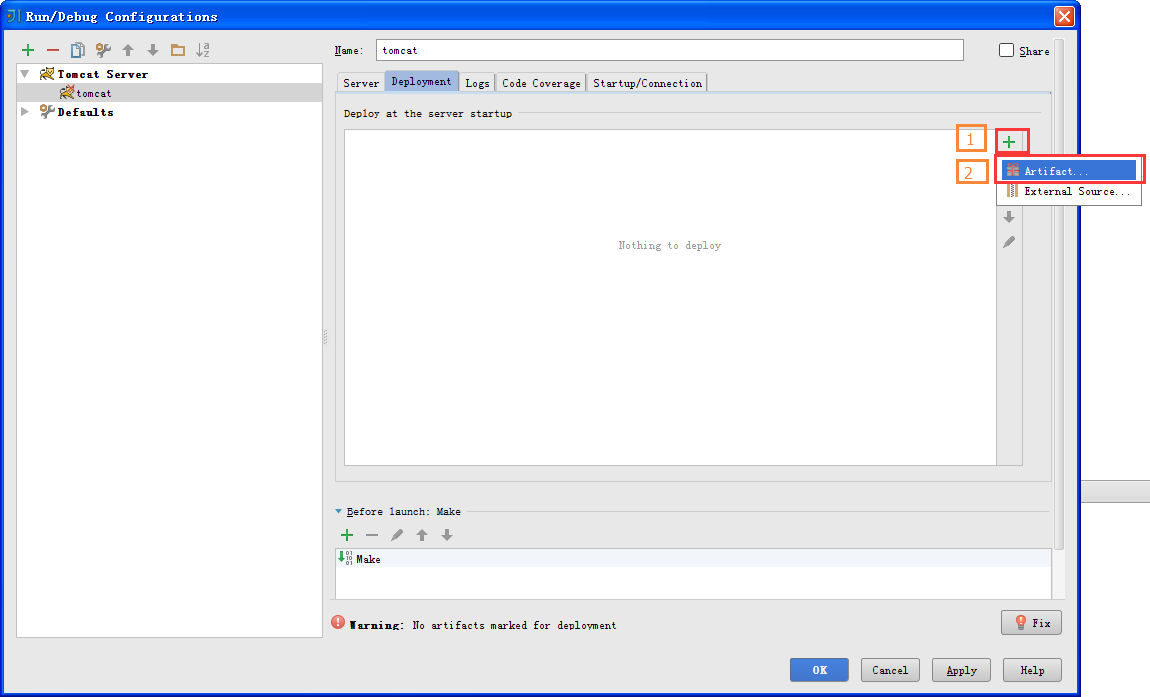
31. 部署的项目是以exploded结尾的war包

32. 配置好服务器后,看下下面红框中的内容——这是服务器在运行前要做的事:Make是编译的意思;Build...是发布指定的项目

33. 配好服务器,现在来配置一些项目的基本配置。下面的Project中的Project compoler output表示项目的编译地址,这里不用管它(默认的maven项目的编译地址是target目录,也就是这里的out目录)

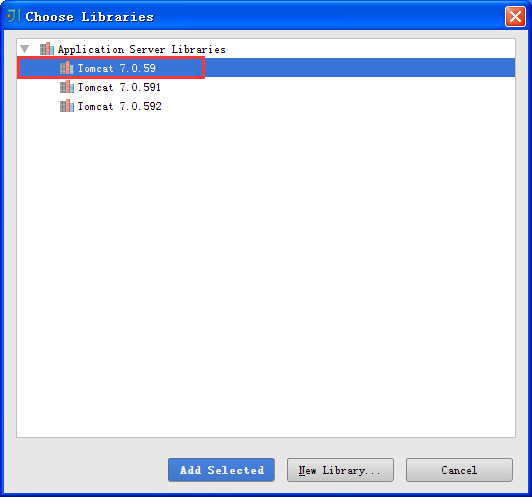
34. 点击左边的Modules,现在为此项目配置Tomcat的依赖包

35.点击Add Selected
36. 点击左边的Artifats,选择以exploded结尾的war包(这和刚才部署Tomcat时Tomcat的部署项目一致)
说明:IntelliJ IDEA中的Artifact指的是你的项目的一种输出形式,一般项目发布的输出形式都是.war格式打包的。
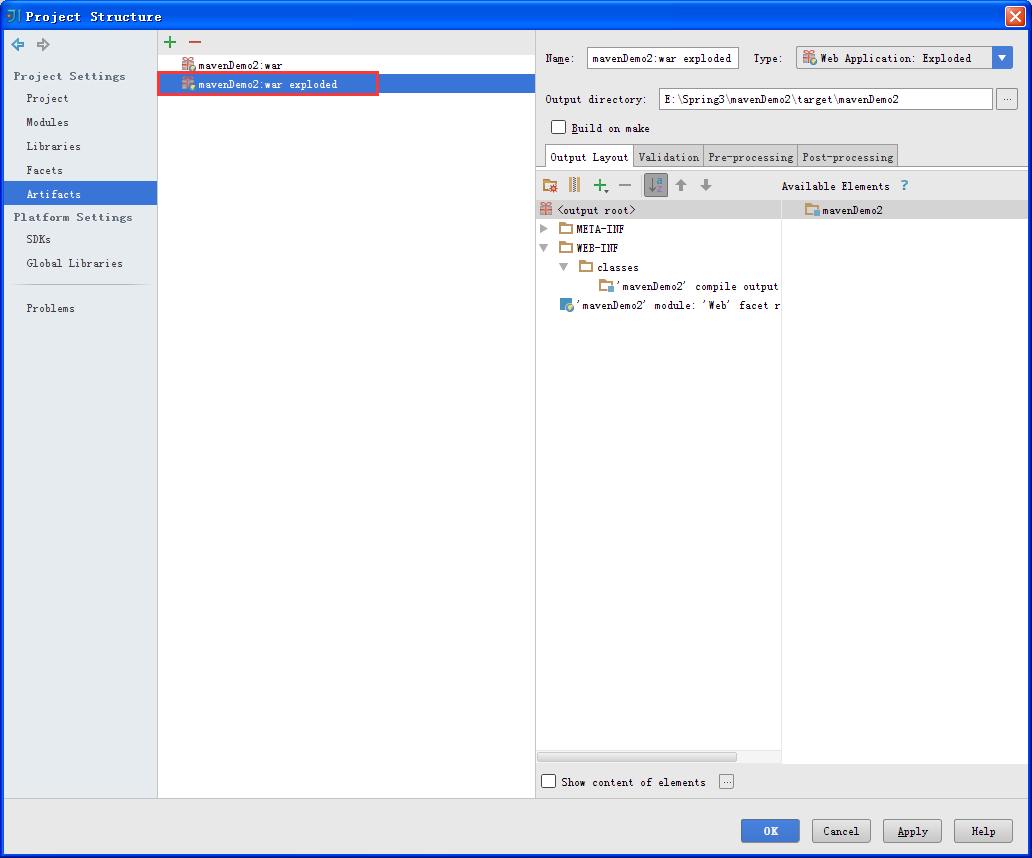
三、简单测试一下
3.1 配置pom.xml
<project xmlns="http://maven.apache.org/POM/4.0.0" xmlns:xsi="http://www.w3.org/2001/XMLSchema-instance"

  xsi:schemaLocation="http://maven.apache.org/POM/4.0.0 http://maven.apache.org/maven-v4_0_0.xsd">

  <modelVersion>4.0.0</modelVersion>

  <groupId>com.wql</groupId>

  <artifactId>mavenDemo2</artifactId>

  <packaging>war</packaging>

  <version>1.0-SNAPSHOT</version>

  <name>mavenDemo2 Maven Webapp</name>

  <url>http://maven.apache.org</url>

  <dependencies>

    <dependency>

      <groupId>junit</groupId>

      <artifactId>junit</artifactId>

      <version>3.8.1</version>

      <scope>test</scope>

    </dependency>

      <dependency>

          <groupId>javax.servlet</groupId>

          <artifactId>servlet-api</artifactId>

          <version>2.5</version>

      </dependency>

      <dependency>

          <groupId>javax.servlet.jsp</groupId>

          <artifactId>jsp-api</artifactId>

          <version>2.1</version>

          <scope>provided</scope>

      </dependency>

      <dependency>

          <groupId>javax.servlet</groupId>

          <artifactId>jstl</artifactId>

          <version>1.2</version>

      </dependency>

  </dependencies>

  <build>

    <finalName>mavenDemo2</finalName>

      <plugins>

          <plugin>

              <artifactId>maven-compiler-plugin</artifactId>

              <configuration>

                  <source>1.6</source>

                  <target>1.6</target>

              </configuration>

          </plugin>

          <plugin>

              <artifactId>maven-surefire-plugin</artifactId>

              <configuration>

                  <includes>

                      <include>**/*Tests.java</include>

                  </includes>

              </configuration>

          </plugin>

      </plugins>

  </build>

</project>
3.2 在src目录下新建java包

3.3 设置成Sources Root

3.4 在java包中新建包、java文件(Test.java)
package com.wql.test;

import javax.servlet.ServletException;

import javax.servlet.annotation.WebServlet;

import javax.servlet.http.HttpServlet;

import javax.servlet.http.HttpServletRequest;

import javax.servlet.http.HttpServletResponse;

import java.io.IOException;

/**

 * Created by Administrator on 15-12-2.

 */

@WebServlet("/mytest")

public class Test extends HttpServlet{

    @Override

    protected void doGet(HttpServletRequest req, HttpServletResponse resp) throws ServletException, IOException {

        doPost(req, resp);

    }

    @Override

    protected void doPost(HttpServletRequest req, HttpServletResponse resp) throws ServletException, IOException {

//        System.err.println("---");

        req.setCharacterEncoding("UTF-8");

        String name=req.getParameter("name");

        req.setAttribute("name",name);

        System.out.println(name);

        req.getRequestDispatcher("index2.jsp").forward(req, resp);

    }

}
3.5 在webapp目录下创建jsp文件 (注意:在idea14创建的maven项目中的webapp目录下创建jsp文件不支持EL表达式,所以加上<%@ page isELIgnored="false" %>,原因及解决方法目前还不知道。)
<%--

  Created by IntelliJ IDEA.

  User: Administrator

  Date: 15-11-3

  Time: 上午9:12

  To change this template use File | Settings | File Templates.

--%>

<%@ page contentType="text/html;charset=UTF-8" language="java" %>

<!-- 支持EL表达式 -->

<%@ page isELIgnored="false" %>

<html>

<head>

    <title></title>

</head>

<body>

<form action="mytest" method="post">

    <input name="name">

    return:${name}

    <input value="提交" type="submit">

</form>

</body>

</html>
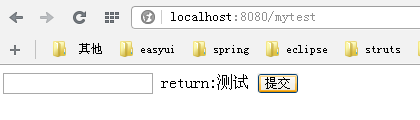
3.6 运行,结果如下(输入“测试”)
后记:此博客遗留两个问题:1.webapp目录下的WEB-INF里的web.xml的版本是2.3的,比一般建立的非maven项目WebContent目录下的WEB-INF里的web.xml低(2.5版本),这样在里面一些标签不支持,不知道如何设置;2.在webapp目录下创建jsp文件不支持EL表达式,建一个jsp加一个<%@ page isELIgnored="false" %>也比较麻烦,不知如何解决。
--------
1.已解决。解决方法:把正常的web.xml版本覆盖到webapp目录下的WEB-INF里的web.xml即可。
2.已解决。解决方法如下:
配置web.xml
<?xml version="1.0" encoding="UTF-8"?>

<web-app xmlns="http://java.sun.com/xml/ns/javaee"

         xmlns:xsi="http://www.w3.org/2001/XMLSchema-instance"

         xsi:schemaLocation="http://java.sun.com/xml/ns/javaee

          http://java.sun.com/xml/ns/javaee/web-app_3_0.xsd"

         version="3.0">

<display-name>Archetype Created Web Application</display-name>

    <welcome-file-list>

        <welcome-file>login.jsp</welcome-file>

    </welcome-file-list>

</web-app>
关键是将<?xml version="1.0" encoding="UTF-8"?>替换原来默认的描述文件。
总结:其实上面的2个问题就一句话:将web项目的web.xml的“xml version” 及web-app描述信息进行覆盖maven项目默认生成的描述信息。(如果能在创建时自动选择就好了)
idea14使用maven创建web工程的更多相关文章
- maven创建web工程Spring配置文件找不到问题解决方案
使用maven创建web工程,将Spring配置文件applicationContext.xml放在src/resource下,用eclipse编译时提示class path resource [ap ...
- maven创建web工程Spring配置文件找不到
使用maven创建web工程,将Spring配置文件applicationContext.xml放在src/resource下,用eclipse编译时提示class path resource [ap ...
- 在Eclipse中使用Maven创建Web工程
在Eclipse中使用Maven创建Web工程 1.创建maven Project工程,使用maven-archetype-webapp 2.在pom.xml文件中,设置打包类型为war <pa ...
- 初次使用maven创建web工程发现只有一个idea目录,src,webapp目录都不见了,解决方案
修bug系列2之 初次使用maven创建web项目的src目录不知所踪 窗外下着下雨,屋内的我学着maven,本以为轻轻松松,没想到还是遇到了bug.好了不说了,来看看我是怎么解决的. 在初次使用ma ...
- Maven创建Web工程并执行构建/测试/打包/部署
创建工程基本参考上一篇Java Application工程,不同的是命令参数变了,创建Web工程的命令如下: mvn archetype:generate -DgroupId=com.jsoft.te ...
- maven创建web工程,并导入到eclipse中
maven版本:3.1.0,eclipse版本:4.3 JDK:1.7 创建工程名是sa的maven工程 mvn archetype:create -DgroupId=com.bing-Dartifa ...
- 用maven创建web工程
1.打开eclipse,选择File->New->Other菜单,弹出下面的对话框,在Wizards中输入maven,会过滤出和maven相关的菜单,选中Maven Project菜单,然 ...
- 基于eclipse+maven创建web工程
Eclipse+Maven创建webapp项目<一> 1.开启eclipse,右键new——>other,如下图找到maven project 2.选择maven project,显 ...
- elcipse 中利用maven创建web工程
如何创建: http://huxiaoheihei.iteye.com/blog/1766986 遇到的问题: 1: 如果spring MVC配置了 <servlet> <servl ...
随机推荐
- HttpClient(4.3.5) - HTTP Header
An HTTP message can contain a number of headers describing properties of the message such as the con ...
- Ehcache(2.9.x) - API Developer Guide, Class Loading
About Class Loading Class loading, within the plethora of environments that Ehcache can be running, ...
- js解析json读取List中的实体对象示例
1.由后台action 传给前台是需要将map 转成json格式 复制代码代码如下: Map<String, List> resultMap: JSONObject json = JSON ...
- IIS6批量转移网站
IIS6.0有个导出配置的功能,但你却找不到界面上的直接导入配置功能,需要用到操作系统自带的iiscnfg.vbs脚本. 1.导出当前的IIS网站配置 打开Internet信息服务(IIS)---&g ...
- JavaScript学习笔记(12)——JavaScript自定义对象
<!DOCTYPE html> <html> <head> <meta charset="UTF-8"> <title> ...
- 终于解决了我的DISCUZ 无法连接到您的服务器,可能您的服务器处于防火墙后端 论坛云平台的问题~
事由:由于前几天折腾备份,将论坛源文件误删了大部分,于是我重新下载了源码,传到了空间. 然后问题来了,我关闭纵横搜索提示“无法连接到您的服务器,可能您的服务器处于防火墙后端”,设置纵横搜索页一直显示“ ...
- ssh 登陆指定 验证文件
当前用户jim ssh-keygen -t rsa 生成密钥 把pub结尾的公用密钥数据追加到192.168.1.3上的 /home/tom/.ssh/authKeys(文件名可能不一样) ssh - ...
- SQL正常工作日上班安排
alter proc [work] as declare @i int begin id into #restdate from dt_work where work_date in (select ...
- √GMAP.NET 地图
深入理解最强桌面地图控件GMAP.NET ---[更新]百度地图 enjoyeclipse 2013-11-18 22:23 阅读:3897 评论:20 深入理解最强桌面地图控件GMAP.NE ...
- C#调用IOS推送
C#调用IOS推送 使用的是 PushSharp 开源库 源码代码如下 点我