
iOS 全局竖屏 单个viewcontroller点击按钮支持横屏
注:由于当时的需求需要本文描述的方法只是视图旋转并不是真正的自动旋屏(不建议采用),末尾的第二个demo才是真正的自动旋屏且已正常上线APP,亲测有效。
问题描述:项目工程只支持竖屏,在播放器页面需要点击按钮进行横竖屏切换,并能根据手机的方向进行自动旋转
如图:只勾选了竖屏
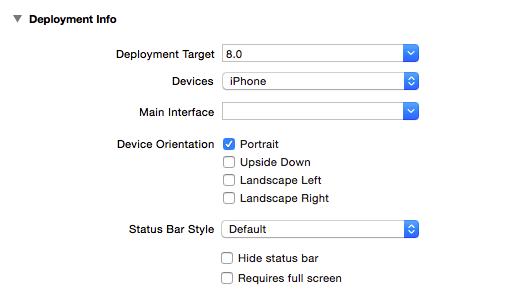
解决方法:(主要是采用视图transform的原理 横屏时调整视频视图上的每个控件坐标位置 竖屏在调整回去)
1.电池状态栏的显示与隐藏
首先在plist文件中添加View controller-based status bar appearance 设置为no
然后在控制器中通过[[UIApplication sharedApplication] setStatusBarHidden: withAnimation:NO]方法
[[UIApplication sharedApplication] setStatusBarHidden:NO withAnimation:NO];
来显示或者隐藏状态栏,一般情况下竖屏时状态栏会显示 横屏则隐藏
导航栏也进行隐藏换成自己的头部视图条
self.navigationController.navigationBarHidden = YES;
2.通知监测状态栏方向(自动旋转屏幕)
设置全局的orientation:
orientation = [UIDevice currentDevice].orientation;
通知:
[[NSNotificationCenter defaultCenter] addObserver:self selector:@selector(orientChange:) name:UIDeviceOrientationDidChangeNotification object:nil];
方法:
- (void)orientChange:(NSNotification *)noti {

//    UIDeviceOrientation orientation = [UIDevice currentDevice].orientation;

    orientation = [UIDevice currentDevice].orientation;

    NSLog(@"打印现在的设备方向:%ld",(long)orientation);

    switch (orientation)

    {

        case UIDeviceOrientationPortrait: {

            NSLog(@"屏幕竖直");

            isFullScreen = NO;

            [[UIApplication sharedApplication] setStatusBarHidden:NO withAnimation:NO];

//            [UIView animateWithDuration:0.25 animations:^{

//                playView.transform = CGAffineTransformMakeRotation(0);

//                playView.frame = CGRectMake(0, 0, widthAll, 300);

//                topView.frame = CGRectMake(0, 0, widthAll, 50);

//                footView.frame = CGRectMake(0, 250, widthAll, 50);

//                menuBtn.frame = CGRectMake(widthAll-100, 10, 100, 30);

//            }];

            [self shupinAction];

        }

             break;

        case UIDeviceOrientationLandscapeLeft: {

            isFullScreen = YES;

            NSLog(@"屏幕向左转");

            [[UIApplication sharedApplication] setStatusBarHidden:YES withAnimation:NO];

            [self rightHengpinAction];

//            [UIView animateWithDuration:0.25 animations:^{

//                playView.transform = CGAffineTransformMakeRotation(M_PI*0.5);

//                playView.frame = CGRectMake(0, 0, widthAll, heightAll);

//                topView.frame = CGRectMake(0, 0, heightAll, 50);

//                footView.frame = CGRectMake(0, widthAll-50, heightAll, 50);

//                menuBtn.frame = CGRectMake(heightAll-100, 10, 100, 30);

//            }];

        }

            break;

        case UIDeviceOrientationLandscapeRight: {

            isFullScreen = YES;

            NSLog(@"屏幕向右转");

            [[UIApplication sharedApplication] setStatusBarHidden:YES withAnimation:NO];

            [self leftHengpinAction];

//            [UIView animateWithDuration:0.25 animations:^{

//                playView.transform = CGAffineTransformMakeRotation(-M_PI*0.5);

//                playView.frame = CGRectMake(0, 0, widthAll, heightAll);

//                topView.frame = CGRectMake(0, 0, heightAll, 50);

//                footView.frame = CGRectMake(0, widthAll-50, heightAll, 50);

//                menuBtn.frame = CGRectMake(heightAll-100, 10, 100, 30);

//            }];

        }

            break;

        default:

            break;

    }

}
3.点击按钮进行横竖屏切换
添加按钮,设置点击方法
-(void)rotateScreeen:(UIButton *)btn

{

    NSLog(@"旋转屏幕");

    btn.selected = !btn.selected;

    if (btn.selected) {

        isFullScreen = YES;

        [[UIApplication sharedApplication] setStatusBarHidden:YES withAnimation:NO];

        if (orientation == UIDeviceOrientationPortrait) {

            NSLog(@"当前竖屏模式");

            [self rightHengpinAction];

        }else if(orientation == UIDeviceOrientationLandscapeLeft)

        {

            NSLog(@"当前左横屏模式");

            [self shupinAction];

        }else if(orientation == UIDeviceOrientationLandscapeRight)

        {

            NSLog(@"当前右横屏模式");

            [self shupinAction];

        }

    }else{

        isFullScreen = NO;

       [[UIApplication sharedApplication] setStatusBarHidden:NO withAnimation:NO];

        [self shupinAction];

    }

}
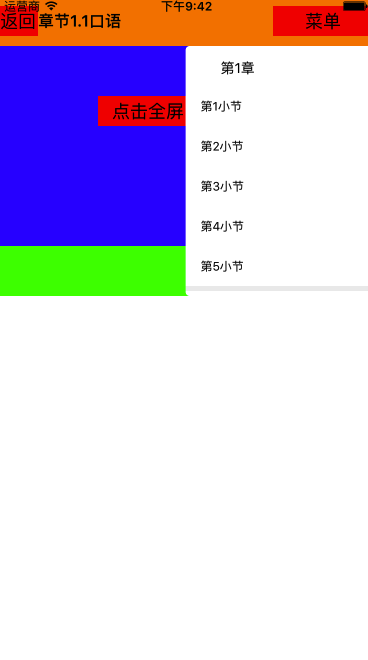
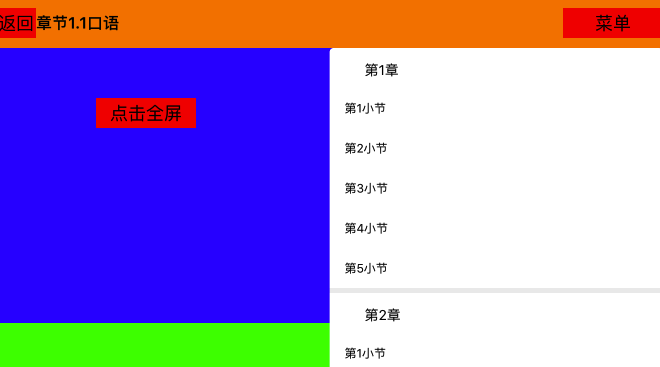
4.程序运行效果
竖屏效果:
横屏效果:
简单的demo下载地址(未作ui):http://download.csdn.net/user/wusangtongxue
(更新)第二次修改后的真正横屏demo地址:http://download.csdn.net/download/wusangtongxue/10049935
iOS 全局竖屏 单个viewcontroller点击按钮支持横屏的更多相关文章
- iOS设置竖屏,播放视频可以任性旋转的解决方法,亲测可用
之前在网上找了很多方法,都是强制横屏,但是如果设备关闭旋转锁定,强制横屏后把设备竖立起来,播放器也会跟着竖过来,但是就回不去了.现在项目要求让app默认都是竖屏,只有在全屏播放的时候可以自由旋转,于是 ...
- ios手机竖屏拍照图片旋转90°问题解决方法
手机拍照会给图片添加一个Orientaion信息(即拍照方向),如下: 用ios手机拍照,系统会给图片加上一个方向的属性, ios相机默认的拍照方向是后摄Home键在右为正,前摄Home键在左为正. ...
- COCOS2D-X暂时设置竖屏,过一阵子再设置回横屏
mainActivity.setRequestedOrientation(ActivityInfo.SCREEN_ORIENTATION_PORTRAIT);//竖屏 竖屏是JAVA代码 另外再改动C ...
- iOS 实现单个页面支持横竖屏,其他页面只能竖屏
最近在自己的项目里面 有需要做一个需求 : app中某一个页面支持横竖屏, 而其他页面只能竖屏. 1 2 实现方法如下: 1 首先需要Xcode中选中支持的屏幕方向 2 Appdelegate中 . ...
- IOS竖屏应用单个页面横屏的解决办法
昨天朋友问我,怎么实现在竖屏的应用里,显示一个横屏的应用,由于也没做过 就说不知道了,但是我觉得会有这样的API ,因为我手机里就安装有这种类型的软件 今天早上起来,就想做一个Demo出来,惯例的是查 ...
- mui 横屏 竖屏
在项目中只有某个页面需要横屏 ,其他的都是竖屏展示的. 假设a页面横屏 ,返回之后竖屏 b页面 a+ 将其设置为横屏显示: b+ 将其设置为竖屏显示 但是进入a页面之后再返回b页面时 b页面也会称为横 ...
- HTML5中判断横屏竖屏
在移动端中我们经常碰到横屏竖屏的问题,那么我们应该如何去判断或者针对横屏.竖屏来写不同的代码呢. 这里有两种方法: 一:CSS判断横屏竖屏 写在同一个CSS中 1 2 3 4 5 6 @media s ...
- Android时时监測手机的旋转角度 依据旋转角度确定在什么角度载入竖屏布局 在什么时候载入横屏布局
一.场景描写叙述: 最近开发中遇到个问题,就是我们在做横竖屏切换的功能时.横竖屏布局是操作系统去感知的,作为开发员没法确定Activity在什么时候载入横屏布局,在什么时候载入竖屏布局.因此为了找到载 ...
- ionic2/3 禁止屏幕旋转,禁止横屏,竖屏
ionic2/ionic3禁止屏幕旋转,及解除禁止旋转 1.添加插件: cmd到项目目录---> cordova plugin add cordova-plugin-screen-orienta ...
随机推荐
- 递归遍历树结构顺序显示并且添加到list集合
/// <summary> /// 给流程排序 by 于連偉 2015/06/15 /// </summary> /// <param name="lstNex ...
- LRESULT与wParam和lParam的问题
在微软vc提供的头文件中有定义在winnt.h中typedef long LONG;在windef.h中typedef LONG LRESULT; 所以LRESULT就是long,也就是长整形之所以取 ...
- C# 与 C++ 数据类型对照
C++ C#=====================================WORD ushortDWORD uintUCH ...
- 同时使用Binding&StringFormat 显示Text【项目】
Case ID (?unit) 红色的字根据一个后台boolean来做trigger,可以是Case or Open 蓝色的字binding到后台的一个string属性来切换任意的Unit单位 这样一 ...
- HTML5中script的async属性异步加载JS
HTML5中script的async属性异步加载JS HTML4.01为script标签定义了5个属性: charset 可选.指定src引入代码的字符集,大多数浏览器忽略该值.defer 可 ...
- linux环境新增用户和所属组
1.查看用户和组信息命令: 1.1 cat /etc/passwd /etc/passwd 存储有关本地用户的信息. 1)username UID到名称的一种映射,用户名 2)passw ...
- C#对HTML转译需要注意的问题
在做B/S程序时我们多少会用到一点HTML特殊符号转译. 如:“&”——>“&” , "<"——>"<" , " ...
- cocos2d-x 2.2 资源更新AssetsManager例子代码
转自:http://www.58player.com/blog-2327-601.html // // UpgradeLayer.h // AmazeDemo // // Created by lsw ...
- Car immobilizer hacking
Karsten Nohl <nohl@srlabs.de>
- Codeforces Round #308 (Div. 2) D. Vanya and Triangles 水题
D. Vanya and Triangles Time Limit: 20 Sec Memory Limit: 256 MB 题目连接 http://codeforces.com/contest/55 ...