
Android 高级UI设计笔记13:Gallery(画廊控件)之 循环显示图像
1. 循环显示图像的原理
循环显示有些类似于循环链表,最后一个结点的下一个结点又是第1个结点。循环显示图像也可以模拟这一点。
也许细心的读者从上一节实现的ImageAdapter类中会发现些什么。对!就是getView方法中的position参数和getCount方法的关系。position参数的值是不可能超过getCount方法返回的值的,也就是说,position参数值的范围是0 至 getCount() - 1。
如果这时Gallery组件正好显示到最后一个图像,position参数值正好为getCount() - 1。那么我们如何再让Gallery显示下一个图像呢?也就是说让position参数值再增1,对!将getCount()方法的返回值也增1。
那么这里还有一个问题,如果position参数值无限地增加,就意味着resIds数组要不断地增大,这样会大大消耗系统的资源。
想到这,就需要解决两个问题:
- 既要position不断地增加,又让resIds数组中保存的图像资源ID是有限的,该怎么做呢?
- getCount()方法返回值大小设定
对于getCount()方法非常好解决,可以让getCount方法返回一个很大的数,例如,Integer.MAX_VALUE。这时position参数值就可以随着Gallery组件的图像不断向前移动而增大。现在resIds数组只有15个元素,如果position的值超过数组边界,要想继续循环取得数组中的元素(也就是说,当position的值是15时,取resIds数组的第0个元素,是16时取第1个元素),最简单的方法就是取余,代码如下:
resIds[position % resIds.length]
针对上面的分析,在本节对ImageAdapter类做了如下两个改进:
(1)使getCount方法返回一个很大的值。建议返回Integer.MAX_VALUE。
(2)在getView方法中通过取余来循环取得resIds数组中的图像资源ID。
通过上面两点改进,可以使图像列表在向右移动时会循环显示图像。当然,这种方法从本质上说只是伪循环,也就是说,如果真把图像移动到getCount方法返回的值那里,那也就显示到最后一个图像的。不过在这里getCount方法返回的是Integer.MAX_VALUE,这个值超过了20亿,除非有人真想把图像移动到第20亿的位置,否则Gallery组件看着就是一个循环显示图像的组件。
2. Gallery组件实现循环显示图像的案例
(1)新建一个Android工程,工程目录如下:
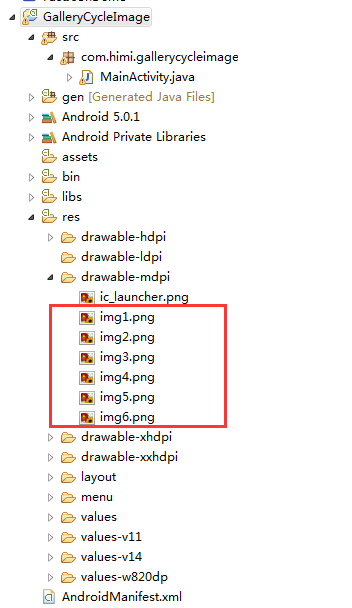
(2)首先我们来到主布局文件之中,如下:
 <?xml version="1.0" encoding="utf-8"?>

 <LinearLayout xmlns:android="http://schemas.android.com/apk/res/android"

     android:layout_width="fill_parent"

     android:layout_height="fill_parent"

     android:orientation="vertical" >

     <Gallery

         android:id="@+id/gallery"

         android:layout_width="fill_parent"

         android:layout_height="wrap_content"

         android:layout_marginTop="30dp" />

     <ImageSwitcher

         android:id="@+id/imageswitcher"

         android:layout_width="fill_parent"

         android:layout_height="wrap_content"

         android:layout_marginTop="30dp" />

 </LinearLayout>
(2)接着我们来到MainActivity,如下:
 package com.himi.gallerycycleimage;

 import android.app.Activity;

 import android.content.Context;

 import android.content.res.TypedArray;

 import android.os.Bundle;

 import android.view.View;

 import android.view.ViewGroup;

 import android.view.animation.AnimationUtils;

 import android.widget.AdapterView;

 import android.widget.AdapterView.OnItemSelectedListener;

 import android.widget.BaseAdapter;

 import android.widget.Gallery;

 import android.widget.Gallery.LayoutParams;

 import android.widget.ImageSwitcher;

 import android.widget.ImageView;

 import android.widget.ViewSwitcher.ViewFactory;

 public class MainActivity extends Activity implements OnItemSelectedListener, ViewFactory {

     private Gallery gallery;

     private ImageSwitcher imageSwitcher;

     private ImageAdapter imageAdapter;

     private int[] resIds = new int[] { R.drawable.img1, R.drawable.img2, R.drawable.img3, R.drawable.img4,

             R.drawable.img5, R.drawable.img6 };

     @Override

     public void onCreate(Bundle savedInstanceState) {

         super.onCreate(savedInstanceState);

         setContentView(R.layout.activity_main);

         gallery = (Gallery) findViewById(R.id.gallery);

         imageAdapter = new ImageAdapter(this);

         gallery.setAdapter(imageAdapter);

         gallery.setOnItemSelectedListener(this);

         imageSwitcher = (ImageSwitcher) findViewById(R.id.imageswitcher);

         // 设置ImageSwitcher组件的工厂对象

         imageSwitcher.setFactory(this);

         // 设置ImageSwitcher组件显示图像的动画效果

         imageSwitcher.setInAnimation(AnimationUtils.loadAnimation(this, android.R.anim.fade_in));

         imageSwitcher.setOutAnimation(AnimationUtils.loadAnimation(this, android.R.anim.fade_out));

     }

     public class ImageAdapter extends BaseAdapter {

         int mGalleryItemBackground;

         private Context mContext;

         public ImageAdapter(Context context) {

             mContext = context;

             TypedArray typedArray = obtainStyledAttributes(R.styleable.Gallery);

             mGalleryItemBackground = typedArray.getResourceId(R.styleable.Gallery_android_galleryItemBackground, 0);

         }

         // 第1点改进,返回一个很大的值,例如,Integer.MAX_VALUE

         public int getCount() {

             return Integer.MAX_VALUE;

         }

         public Object getItem(int position) {

             return position;

         }

         public long getItemId(int position) {

             return position;

         }

         public View getView(int position, View convertView, ViewGroup parent) {

             ImageView imageView = new ImageView(mContext);

             // 第2点改进,通过取余来循环取得resIds数组中的图像资源ID

             imageView.setImageResource(resIds[position % resIds.length]);

             imageView.setScaleType(ImageView.ScaleType.FIT_XY);

             imageView.setLayoutParams(new Gallery.LayoutParams(163, 106));

             imageView.setBackgroundResource(mGalleryItemBackground);

             return imageView;

         }

     }

     @Override

     public void onItemSelected(AdapterView<?> parent, View view, int position, long id) {

         // 选中Gallery中某个图像时,在ImageSwitcher组件中放大显示该图像

         imageSwitcher.setImageResource(resIds[position % resIds.length]);

     }

     @Override

     public void onNothingSelected(AdapterView<?> parent) {

     }

     // ImageSwitcher组件需要这个方法来创建一个View对象(一般为ImageView对象)

     // 来显示图像

     public View makeView() {

         ImageView imageView = new ImageView(this);

         imageView.setBackgroundColor(0xFF000000);

         imageView.setScaleType(ImageView.ScaleType.FIT_CENTER);

         imageView.setLayoutParams(new ImageSwitcher.LayoutParams(LayoutParams.FILL_PARENT, LayoutParams.FILL_PARENT));

         return imageView;

     }

 }
与此同时,在上面的ImageAdapter类的构造方法中获得了Gallery组件的属性信息。这些信息被定义在res\values\attrs.xml文件中,代码如下:
 <?xml version="1.0" encoding="utf-8"?>

 <resources>

   <declare-styleable name="Gallery">

     <attr name="android:galleryItemBackground" />

   </declare-styleable>

 </resources>
上面的属性信息用于设置Gallery的背景风格。
(3)布署程序到手机上如下:
- 应用程序初次启动

- 滑动一下

Android 高级UI设计笔记13:Gallery(画廊控件)之 循环显示图像的更多相关文章
- Android 高级UI设计笔记07:RecyclerView 的详解
1. 使用RecyclerView 在 Android 应用程序中列表是一个非常重要的控件,适用场合非常多,如新闻列表.应用列表.消息列表等等,但是从Android 一出生到现在并没有非常 ...
- Android 高级UI设计笔记11:Gallery(画廊控件)之Gallery基本使用
1. 这里要向大家介绍Android控件Gallery(画廊控件) Gallery控件主要用于横向显示图像列表,不过按常规做法.Gallery组件只能有限地显示指定的图像.也就是说,如果为Galler ...
- Android 高级UI设计笔记12:ImageSwitcher图片切换器
1. ImageSwitcher ImageSwitcher是Android中控制图片展示效果的一个控件,如:幻灯片效果...,颇有感觉啊.做相册一绝 2. 重要方法 setImageURI(Uri ...
- Android 高级UI设计笔记14:Gallery(画廊控件)之 3D图片浏览
1. 利用Gallery组件实现 3D图片浏览器的功能,如下: 2. 下面是详细的实现过程如下: (1)这里我是测试性代码,我的图片是自己添加到res/drawable/目录下的,如下: 但是开发中不 ...
- Android 高级UI设计笔记06:仿微信图片选择器(转载)
仿微信图片选择器: 一.项目整体分析: 1. Android加载图片的3个目标: (1)尽可能的去避免内存溢出. a. 根据图片的显示大小去压缩图片 b. 使用缓存对我们图片进行管理(LruCache ...
- Android 高级UI设计笔记21:Android SegmentView(分段选择控件)
1. 分段控制(SegmentView) 首先我们先看看什么是SegmentView的效果,如下: 分段控制这个View控件是ios7的分段控制,和QQ消息页面顶部的效果一样,android没有这个控 ...
- Android 高级UI设计笔记19:PopupWindow使用详解
1. PopupWindow使用 PopupWindow这个类用来实现一个弹出框,可以使用任意布局的View作为其内容,这个弹出框是悬浮在当前activity之上的. 2. PopupWindow使用 ...
- Android 高级UI设计笔记08:Android开发者常用的7款Android UI组件(转载)
Android开发是目前最热门的移动开发技术之一,随着开发者的不断努力和Android社区的进步,Android开发技术已经日趋成熟,当然,在Android开源社区中也涌现了很多不错的开源UI项目,它 ...
- Android 高级UI设计笔记03:使用ListView实现左右滑动删除Item
1. 这里就是实现一个很简单的功能,使用ListView实现左右滑动删除Item: (1)当我们在ListView的某个Item,向左滑动显示一个删除按钮,用户点击按钮,即可以删除该项item,并且有 ...
随机推荐
- [iOS微博项目 - 2.3] - 用户取消对app的授权
github: https://github.com/hellovoidworld/HVWWeibo A.用户取消对app的授权 用户可以在微博网站上取消对某个应用(app)的授权 1.打开& ...
- python 遍历删除日志
#! /usr/bin/python2.6#-*- encoding:UTF-8 -*- import osimport os.pathimport time root_dir = os.getcwd ...
- 一键安装GitLab7
1. Install and configure the necessary dependencies If you install Postfix to send email please sele ...
- HDU 4035Maze(概率DP)
HDU 4035 Maze 体会到了状态转移,化简方程的重要性 题解转自http://blog.csdn.net/morgan_xww/article/details/6776947 /** dp ...
- 判断时间大小 yyyy-MM-dd 格式
// yyyy-MM-dd function bigThanToday(someDate){ var date = new Date(); var dateStr = date.getFullYear ...
- uva 542 - France '98(概率)
题目链接:uva 542 - France '98 题目大意:有16支球队比赛,给出16支球队的名称,然后给出16*16的表格,g[i][j] 表示i队胜j队的概率,问说16支球队获得总冠军的概率. ...
- MVVM解决方案的一般结构
解决方案的结构一般是三个解决方案文件夹,分别是: Models ViewModels Views 当然需要的话可以扩充,如Services.UnitTest等等. 然后每个解决方案文件夹里面包含各自的 ...
- Oracle 将不同列的值拼接成一个 字符串
利用拼接操作符“||”或者 CONCAT('','')函数,将不同列的值 拼接成一个 字符串 -- 方法一:推荐 SELECT S.TEAM ||'**'|| S.NAME ||'**'|| S. ...
- erlang: Programming Rules and Conventions。
http://www.erlang.se/doc/programming_rules.shtml#HDR33 http://www.erlang.org/eeps/eep-0008.html
- CacheView。
1. ChromeCacheView 2. MozillaCacheView