
安卓Design包之TabLayout控件的简单使用
Google在2015的IO大会上,给我们带来了更加详细的Material Design设计规范,同时,也给我们带来了全新的Android Design Support Library,在这个support库里面,Google给我们提供了更加规范的MD设计风格的控件。最重要的是,Android Design Support Library的兼容性更广,直接可以向下兼容到Android 2.2。这不得不说是一个良心之作。
使用方法很简单,只需要添加一句依赖
compile 'com.android.support:design:24.0.0'
接下来几天我们将共同学习这里面的几个新控件,
首先带来的是TabLayout
Tab滑动切换View并不是一个新的概念,但是Google却是第一次在support库中提供了完整的支持,
而且,Design library的TabLayout 既实现了固定的选项卡 - view的宽度平均分配,
也实现了可滚动的选项卡 - view宽度不固定同时可以横向滚动。选项卡可以在程序中动态添加,
但大部分时间我们都不会这样用,通常滑动布局都会和ViewPager配合起来使用,所以,我们需要ViewPager来帮忙:
通过一句话setupWithViewPager,我们就把ViewPager和TabLayout结合了起来。
上个运行图:
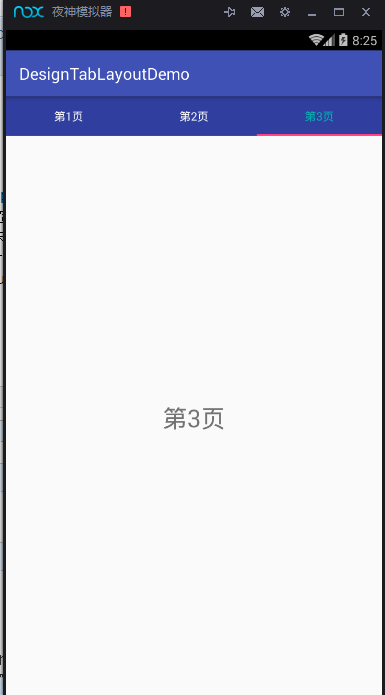
看代码
首先是主页面的XML文件
<?xml version="1.0" encoding="utf-8"?>

<LinearLayout

    xmlns:android="http://schemas.android.com/apk/res/android"

    xmlns:tools="http://schemas.android.com/tools"

    xmlns:app="http://schemas.android.com/apk/res-auto"

    android:layout_width="match_parent"

    android:layout_height="match_parent"

    android:orientation="vertical"

    tools:context="com.example.nanchen.designtablayoutdemo.MainActivity">

    <android.support.design.widget.TabLayout

        android:layout_width="match_parent"

        app:tabBackground="@color/colorPrimaryDark"

        app:tabTextColor="@android:color/white"

        app:tabSelectedTextColor="#04b4ae"

        android:layout_height="wrap_content"

        android:id="@+id/main_tab_layout"/>

    <android.support.v4.view.ViewPager

        android:layout_width="match_parent"

        android:layout_height="0dp"

        android:layout_weight="1"

        android:id="@+id/main_vp"/>

</LinearLayout>
其中由于必须TabLayout控件是Design包下的,所以必须加上
xmlns:app="http://schemas.android.com/apk/res-auto"

这样才可以使用自定义它的属性。它的属性有很多,这样简单使用几个,更多的大家可以去尝试。
这里,我只滚动了三个,若是你的APP tab标签多的话,
app:tabMode="scrollable"
必须指定这个属性,不然你会发现看不到,如果标签数少,还是建议设置为固定的,那样才会等分。
其次是Fragment的XML文件
<FrameLayout xmlns:android="http://schemas.android.com/apk/res/android"

             xmlns:tools="http://schemas.android.com/tools"

             android:layout_width="match_parent"

             android:layout_height="match_parent"

             tools:context="com.example.nanchen.designtablayoutdemo.BlankFragment">

    <!-- TODO: Update blank fragment layout -->

    <TextView

        android:layout_width="match_parent"

        android:layout_height="match_parent"

        android:textSize="30sp"

        android:gravity="center"

        android:id="@+id/fg_text"

        android:text="@string/hello_blank_fragment"/>

</FrameLayout>
MainActivity.java
package com.example.nanchen.designtablayoutdemo;

import android.os.Bundle;

import android.support.design.widget.TabLayout;

import android.support.v4.view.ViewPager;

import android.support.v7.app.AppCompatActivity;

import java.util.ArrayList;

import java.util.List;

public class MainActivity extends AppCompatActivity {

    @Override

    protected void onCreate(Bundle savedInstanceState) {

        super.onCreate(savedInstanceState);

        setContentView(R.layout.activity_main);

        ViewPager vp = (ViewPager) findViewById(R.id.main_vp);

        TabLayout tabLayout = (TabLayout) findViewById(R.id.main_tab_layout);

        List<String> list = new ArrayList<>();

        for (int i = 1; i < 4; i++) {

//            list.add(String.format(Locale.CHINA,"第02d%页",i));

            list.add("第"+i+"页");

        }

        vp.setAdapter(new MyAdapter(getSupportFragmentManager(),list));

        tabLayout.setupWithViewPager(vp);

    }

}
FragmenT用于存放下面的数据
package com.example.nanchen.designtablayoutdemo;

import android.os.Bundle;

import android.support.annotation.Nullable;

import android.support.v4.app.Fragment;

import android.view.LayoutInflater;

import android.view.View;

import android.view.ViewGroup;

import android.widget.TextView;

/**

 * A simple {@link Fragment} subclass.

 */

public class BlankFragment extends Fragment {

    public BlankFragment() {

        // Required empty public constructor

    }

    public static BlankFragment newInstance(String text) {

        Bundle args = new Bundle();

        args.putString("text",text);

        BlankFragment fragment = new BlankFragment();

        fragment.setArguments(args);

        return fragment;

    }

    @Override

    public View onCreateView(LayoutInflater inflater, ViewGroup container,

                             Bundle savedInstanceState) {

        // Inflate the layout for this fragment

        return inflater.inflate(R.layout.fragment_blank, container, false);

    }

    @Override

    public void onViewCreated(View view, @Nullable Bundle savedInstanceState) {

        super.onViewCreated(view, savedInstanceState);

        TextView text = (TextView) view.findViewById(R.id.fg_text);

        String str = getArguments().getString("text");

        text.setText(str);

    }

}
需要一个PagerAdapter
自定义一个。
package com.example.nanchen.designtablayoutdemo;

import android.support.v4.app.Fragment;

import android.support.v4.app.FragmentManager;

import android.support.v4.app.FragmentPagerAdapter;

import java.util.List;

/**

 * Created by 南尘 on 2016/7/12.

 */

public class MyAdapter extends FragmentPagerAdapter {

    private List<String> list;

    public MyAdapter(FragmentManager fm, List<String> list) {

        super(fm);

        this.list = list;

    }

    @Override

    public Fragment getItem(int position) {

        return BlankFragment.newInstance(list.get(position));

    }

    @Override

    public int getCount() {

        return list.size();

    }

    @Override

    public CharSequence getPageTitle(int position) {

        return list.get(position);

    }

}
代码已同步至:https://github.com/nanchen2251/designNavigation-and-tabLayout
安卓Design包之TabLayout控件的简单使用的更多相关文章
- 安卓Design包之TabLayout控件的使用
转自: 安卓Design包之TabLayout控件的简单使用 Google在2015的IO大会上,给我们带来了更加详细的Material Design设计规范,同时,也给我们带来了全新的Android ...
- 安卓Design包之Toolbar控件的使用
转自:ToolBar的使用 ToolBar的出现是为了替换之前的ActionBar的各种不灵活使用方式,相反,ToolBar的使用变得非常灵活,因为它可以让我们自由往里面添加子控件.低版本要使用的话, ...
- 安卓Design包之超强控件CoordinatorLayout与SnackBar的简单使用
在前面的Design中,学习使用了TabLayout,NavigationView与DrawerLayout实现的神奇效果,今天就带来本次Design包中我认为最有意义的控件CoordinatorLa ...
- 安卓Design包之CollapsingToolbarLayout(可折叠的工具栏布局)的简单使用
转自: CollapsingToolbarLayout的使用 注意:使用前需要添加Design依赖包,使用toolbar时需要隐藏标题头 CollapsingToolbarLayout作用是提供了一个 ...
- 安卓Design包之CoordinatorLayout配合AppBarLayout,ToolBar,TabLaout的使用
转载: CoordinatorLayout配合AppBarLayout,Toolbar和TabLayout的使用 控件的简单介绍: AppBarLayout:它是继承LinerLayout实现的一个V ...
- WebBrowser控件的简单应用2
原文:WebBrowser控件的简单应用2 第一个简单应用里面讲述的是如何模拟调用当前网页的元素的事件或者赋值/取值.这次的应用讲述的是1:如何处理弹出新页面的事件(总是在我的浏览器里面现实新页面)2 ...
- vs2005中的WebBrowser控件的简单应用
原文:vs2005中的WebBrowser控件的简单应用 这个控件被封装了一下,和以前的调用方式稍有不同.事件还是那几个,变化不大.方法变了不少.从网上能查到的资料不多,贴出一些代码来作参考.看看这段 ...
- 安卓Design包之NavigationView结合DrawerLayout,toolbar的使用,FloatingActionButton
注意:使用前需要添加Design依赖包,使用toolbar时需要隐藏标题头 FloatingActionButton 悬浮按钮:FloatingActionButton是重写ImageView的,所有 ...
- 【转】Appium基于安卓的各种FindElement的控件定位方法实践
原文地址:http://blog.csdn.net/zhubaitian/article/details/39754041#t11 AppiumDriver的各种findElement方法的尝试,尝试 ...
随机推荐
- ASP.NET Aries 入门开发教程3:开发一个列表页面及操控查询区
前言: Aries框架毕竟是开发框架,所以重点还是要写代码的,这样开发人员才不会失业,哈. 步骤1:新建html 建一个Html,主要有三步: 1:引入Aries.Loader.js 2:弄一个tab ...
- 【原】FMDB源码阅读(一)
[原]FMDB源码阅读(一) 本文转载请注明出处 —— polobymulberry-博客园 1. 前言 说实话,之前的SDWebImage和AFNetworking这两个组件我还是使用过的,但是对于 ...
- 在Sublime Text 3上安装代码格式化插件CodeFormatter
1.了解CodeFormatter插件 在Sublime Text 3中编写代码,为了能让我们的代码格式变得漂亮整洁,需要一个能自动格式代码的插件.这里发现CodeFormatter插件不错,它能支持 ...
- javascript单元测试框架mochajs详解
关于单元测试的想法 对于一些比较重要的项目,每次更新代码之后总是要自己测好久,担心一旦上线出了问题影响的服务太多,此时就希望能有一个比较规范的测试流程.在github上看到牛逼的javascript开 ...
- 《JavaScript设计模式与开发实践》整理
最近在研读一本书<JavaScript设计模式与开发实践>,进阶用的. 一.高阶函数 高阶函数是指至少满足下列条件之一的函数. 1. 函数可以作为参数被传递. 2. 函数可以作为返回值输出 ...
- css3圆形百分比进度条的实现原理
原文地址:css3圆形百分比进度条的实现原理 今天早上起来在查看jquery插件机制的时候,一不小心点进了css3圆形百分比进度条的相关文章,于是一发不可收拾,开始折腾了... 关于圆形圈的实现,想必 ...
- VS2015使用scanf报错的解决方案
1.在程序最前面加: #define _CRT_SECURE_NO_DEPRECATE 2.在程序最前面加: #pragma warning(disable:4996) 3.把scanf改为scanf ...
- [原创]关于Hibernate中的级联操作以及懒加载
Hibernate: 级联操作 一.简单的介绍 cascade和inverse (Employee – Department) Casade用来说明当对主对象进行某种操作时是否对其关联的从对象也作类似 ...
- [Hadoop in Action] 第7章 细则手册
向任务传递定制参数 获取任务待定的信息 生成多个输出 与关系数据库交互 让输出做全局排序 1.向任务传递作业定制的参数 在编写Mapper和Reducer时,通常会想让一些地方可以配 ...
- [斜率优化DP]【学习笔记】【更新中】
参考资料: 1.元旦集训的课件已经很好了 http://files.cnblogs.com/files/candy99/dp.pdf 2.http://www.cnblogs.com/MashiroS ...