
Install mcrypt for php on Mac OSX 10.10 Yosemite for a Development Server
mcrypt is a file encryption method using secure techniques to exchange data. It is required for some web apps for example Magento, the shopping cart software or a php framework likeLaravel. This tutorial has been tested in OSX 10.10 Yosemite.
This guide is really for users with the version of PHP that shipped with OSX Yosemite which is version 5.5.14. Other downloadable AMP stacks already have mcrypt baked in.
Command Line Tools
First up you will need the OSX 10.10 version of Command Line Tools which you can download via the Apple available updates in the App store.
Run in the Terminal
xcode-select --install
Getting it on in OS X Yosemite 10.10
This tutorial works mostly in the Terminal, launch it from /Applications/Utilities, change directory (cd) to the home account and make a directory that you will work in, call it mcrypt
cd ~ ; mkdir mcrypt ; cd mcrypt
Get libmcrypt 2.5.8 from Sourceforge, this is direct download link.
Get the php code in a tar.gz or .bz2 format- (version 5.5.14 is the one that currently ships with OSX 10.10)
Move both of these files that you downloaded into your working directory – mcrypt in this instance, and go back to Terminal
cd ~/mcrypt
Expand both files via the command line or just double click them in the Finder:
tar -zxvf libmcrypt-2.5.8.tar.gz
tar -zxvf php-5.5.9.tar.gz
Remove the compressed archives
rm *.gz
Any errors on the command line including C++ and g++ mostly are due to the command line tools missing.
Configuring libmcrypt
cd libmcrypt-2.5.8
./configure
make
sudo make install
With the libmcrypt configured and libraries now installed, time for to make the mcrypt extension.
Install Autoconf
Install autoconf – some more Terminal heavy lifting:
cd ~/mcrypt
curl -O http://ftp.gnu.org/gnu/autoconf/autoconf-latest.tar.gz
tar xvfz autoconf-latest.tar.gz
cd autoconf-2.69/
./configure
make
sudo make install
Compile mcrypt php Extension
cd ../php-5.5.9/ext/mcrypt/
/usr/bin/phpize
Output should be similar to:
Configuring for:
PHP Api Version: 20121113
Zend Module Api No: 20121212
Zend Extension Api No: 220121212
./configure
make
sudo make install
The result of this should be similar to:
Installing shared extensions: /usr/lib/php/extensions/no-debug-non-zts-20121212/
Enabling mcrypt.so php Extension
Open /etc/php.ini and add the line below at the end
extension=mcrypt.so
If there is no php.ini file, then you need to make one from php.ini.default in the same location like so:
sudo cp /etc/php.ini.default /etc/php.ini
And allow write capability
sudo chmod u+w /etc/php.ini
Then add the line as above in your favourite text editor:
sudo nano /etc/php.ini
or
sudo vi /etc/php.ini
and add in the line:
extension=mcrypt.so
Restart Apache
sudo apachectl restart
That’s it, create a php page with the function phpinfo(); to see if it loaded correctly.
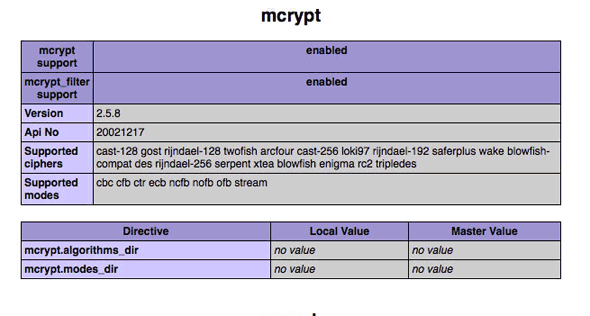
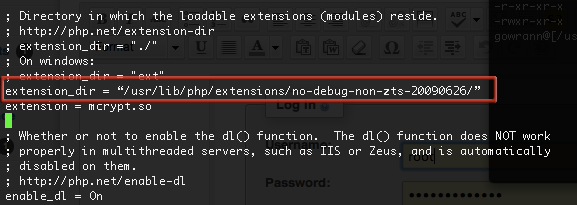
If it didn’t load you may need to declare the extensions directory in /etc/php.ini
extension_dir = "/usr/lib/php/extensions/no-debug-non-zts-20100525/"
Hopefully it wasn’t too much of a nightmare…

tales-from-the-mcrypt-yosemite-osx-php
转自:http://coolestguidesontheplanet.com/install-mcrypt-php-mac-osx-10-10-yosemite-development-server/
Install mcrypt for php on Mac OSX 10.10 Yosemite for a Development Server的更多相关文章
- 在OSX狮子(Lion)上安装MYSQL(Install MySQL on Mac OSX)
这篇文章简述了在Mac OSX狮子(Lion)上安装MySQL Community Server最新版本v10.6.7的过程. MySQL是最流行的开源数据库管理系统.首先,从MySQL的下载页面上下 ...
- Mac OSX 下配置 LNMP开发环境
不久前负责了一个项目需要配置PHP7的开发环境,因为之前所有的项目用的是PHP5的,所以研究了这些东西,但是很遗憾,电脑出了问题,不得已重装了系统,然后你懂得...什么都没有了,要重新来过.. 虽然本 ...
- Mac OSX操作系统安装和配置Zend Server 6教程(1)
作为web开发人员,应该熟悉掌握各种系统下安装和配置web服务器与站点的技术. 随着越来越多的开发人员选择Zend Server服务器,慧都推出了在Mac OSX系统安装和配置Zend Server ...
- XE6移动开发环境搭建之IOS篇(7):在Mac OSX 10.8中安装Xcode4.6.3(有图有真相)
网上能找到的关于Delphi XE系列的移动开发环境的相关文章甚少,本文尽量以详细的图文内容.傻瓜式的表达来告诉你想要的答案. 原创作品,请尊重作者劳动成果,转载请注明出处!!! 在安装Xcode前, ...
- 虚拟机VMware 9安装苹果MAC OSX 10.8图文教程
前些天虚拟机VMware Workstation 9出来,相信大家都已经熟悉VM9了,至于MAC OSX 10.8系统,那也是出来一段时间了,本篇文章就是来讲解VMware Workstation 9 ...
- 深度学习框架-caffe安装-环境[Mac OSX 10.12]
深度学习框架-caffe安装 [Mac OSX 10.12] [参考资源] 1.英文原文:(使用GPU) [http://hoondy.com/2015/04/03/how-to-install-ca ...
- 深度学习框架-caffe安装-Mac OSX 10.12
p.p1 { margin: 0.0px 0.0px 0.0px 0.0px; font: 12.0px ".PingFang SC"; color: #454545 } p.p2 ...
- Mac OSX Yosemite 10.10 brew 错误:mktemp: mkdtemp failed on /tmp/git-LIPo: No such file or directory
这个问题困扰了我非常久非常久.使得我不得不花一点时间来说一下解决方法. 事情是这种:前两天兴高採烈的更新了一下宝贝mac到10.10. 一切看起来都那么美好,可是. .当我又一次安装magento的时 ...
- Webstorm 10 for mac osx 注册机,序列号,kegen
小菜最近get到mac体验机会,早就耳闻mac非常适合做开发,于是迫不及待的安装各种开发工具,不知不觉,轮到前端开发神器webstorm了,看了一下官网的价格,心拔凉拔凉的. 果断搜索注册机,搜到的结 ...
随机推荐
- uva 12587 二分枚举
思路:维护一个森林,二分枚举最小的最大值. #include<set> #include<map> #include<cmath> #include<queu ...
- CF 118E Bertown roads 桥
118E Bertown roads 题目:把无向图指定边的方向,使得原图变成有向图,问能否任意两点之间互达 分析:显然如果没有桥的话,存在满足题意的方案.输出答案时任意从一个点出发遍历一遍即可. 求 ...
- tmux使用
1.配置文件的使用 在~/.tmux.conf中添加: setw -g mouse-resize-pane on setw -g mouse-select-pane on setw -g mouse- ...
- 获取input中的值
先在input标签中添加一个id='getvalue'document.getElementById("getvalue").value;
- Web前端学习笔记3
1.meta标签. 1.1 <meta charset="utf-8"> charset:字符集 1.2 <meta name="keywords&qu ...
- 锋利的jQuery第2版学习笔记8~11章
第8章,用jQuery打造个性网站 网站结构 文件结构 images文件夹用于存放将要用到的图片 styles文件夹用于存放CSS样式表,个人更倾向于使用CSS文件夹 scripts文件夹用于存放jQ ...
- Hibernate总结--MyEclipse的小bug
今天笔者在写一个用S2SH的程序的时候,出现了下面的错误: org.springframework.beans.factory.BeanCreationException: Error creatin ...
- 用viewpager实现图片轮播
应用中常常遇到图片轮播的需求,这时候就需要用到viewpager这个组件.viewpager是android support v4 中提供的一个组件.viewpager使用需要以下几步骤: 1.在布局 ...
- Java之ConnectionPool连接池
1.初始化(根据配置信息进行初始化)2.产生一个新的数据库连接3.有存储已经使用的连接集合,空闲连接集合4.提供给外部调用获取连接的方法5.提供给外部释放连接(不是关闭连接,而是将连接闲置)6.销毁连 ...
- QtPropertyBrowser+vs2010的安装与配置(转)
这一篇文章有些问题,后又写了一篇,地址是http://www.cnblogs.com/aminxu/p/4552410.html 转自http://blog.csdn.net/jingwenlai_s ...