
css 选择器之子元素
/*html*/

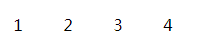
<div class="wrap">

    <span>1</span>

    <span>2</span>

    <span>3</span>

    <span>4</span>

</div>

/*css*/

.wrap{

    display:table;

    width: 200px;

}

.wrap span{

    display:table-cell;

    text-align:center;

}
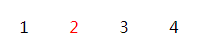
nth-child(n)
//选择父元素下的第二个子元素,且为span

.wrap span:nth-child(2){

    color:red;

}
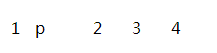
但是如果子元素是混乱的,比如:
<div class="wrap">

    <span>1</span>

    <p>p</p>

    <span>2</span>

    <span>3</span>

    <span>4</span>

</div>
nth-child(2)会选择第2个子元素,而且子元素必须是span,但是没找到(第二个子元素为p)
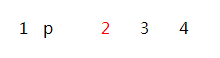
.wrap span:nth-child(3){

    color:red;

}
nth-child(3)会选择第3个子元素,而且子元素必须是span

相关
- nth-last-child(n) 从后往前找子元素
nth-of-type(n)
//选择父元素下的第二个span

.wrap span:nth-of-type(2){

    color:red;

}
同样的html,nth-of-type(2) 会找到子元素的第2个span,不管有没有其他元素阻碍
相关
- nth-last-of-type(n) 从后往前找子元素
only-child
<div class="wrap">

    <span>1</span>

</div>

/*css*/

.wrap span:only-child{

    color:red;

}
只有父元素下有一个子元素时,才会生效
当有其他任意标签时,不生效
only-child应用比较少
相关
- last-child 最后一个子元素
only-of-type
对比于only-child,only-of-type允许父元素下有其他类的子元素
// 这时会选中唯一的span元素

<div class="wrap">

    <span>1</span>

    <i>2</i>

</div>

.wrap span:only-of-type{

    color:red;

}
相关
- first-of-type 选中第一个指定子元素
- last-of-type 选中最后一个指定子元素
css 选择器之子元素的更多相关文章
- 深入学习jQuery选择器系列第二篇——过滤选择器之子元素选择器
× 目录 [1]通用形式 [2]反向形式 [3]首尾元素 [4]唯一元素 前面的话 在上一篇中已经介绍过基础选择器和层级选择器,本文开始介绍过滤选择器.过滤选择器是jQuery选择器中最为庞大也是最为 ...
- jQuery选择器之子元素过滤选择器Demo
测试代码: 07-子元素过滤选择器.html <!DOCTYPE html PUBLIC "-//W3C//DTD XHTML 1.0 Transitional//EN" & ...
- jQuery选择器之子元素选择器
<!DOCTYPE html> <html> <head> <meta http-equiv="Content-type" content ...
- jquery选择器之子元素
HTML代码: :first-child 匹配第一个子元素,每个父元素的第一个子元素 :last-child 匹配最后一个子元素,每个父元素的最后一个子元素 <!DOCTYPE html> ...
- css3类选择器之结合元素选择器和多类选择器
css3类选择器之结合元素选择器和多类选择器用法: <!DOCTYPE html> <html lang="en"> <head> <me ...
- weex中css不能使用子元素选择器
weex中css不能使用子元素选择器 刚入手可能会有错误,有误导地方请谅解,不过都是亲身踩坑
- 用css完成根据子元素不同书写样式
我们需要达到的效果: 需要什么 1张图片的, 2张图片的, 3张图片的样式各不相同.可以使用js完成子元素的判断,但是这里我使用css来完成 核心知识点 使用css选择器完成子元素的判断 例子: 用c ...
- CSS选择器之伪类选择器(伪元素)
selection [CSS4]应用于文档中被用户高亮的部分(比如使用鼠标或其他选择设备选中的部分).(IE8及以下不支持)(火狐-moz-selection) first-line 选择每个 < ...
- CSS选择器之伪类选择器(元素)
:first-child 选择某个元素的第一个子元素(IE6不支持) :last-child 选择某个元素的最后一个子元素 :first-of-type [CSS3]选择一个上级元素下的第一个同类子元 ...
随机推荐
- [POI2006]Periods of Words
题目大意: 给定一个长度为$n(n\leq10^6)$的字符串$S$,定义一个串$S$的最大周期为一个不为$S$的字符串$Q$,满足$Q$为$S$的前缀且$S$为$QQ$的前缀.求字符串$S$的每一个 ...
- 一次快速改写 SQL Server 高效查询的范例
原文:一次快速改写 SQL Server 高效查询的范例 最近線上系統突然出現匯出資料超過 10 筆時,查詢逾時的狀況,在仔細查找之後. 發現了問題原因,透過應用端與數據端兩邊同時調整,將查詢的效率提 ...
- 【Linux】Centos7安装之后,双系统的情况下,怎么能在CentOS7下访问Windows的磁盘
想要在CentOS7下访问Windows的NTFS格式的磁盘,需要在Linux下下载ntfs-3g步骤1: 进入root用户下,使用yum命令下载ntfs-3g.[前提是已经添加了常用源:http:/ ...
- [置顶]
kubernetes资源对象--ResourceQuotas
概念 Resource Quotas(资源配额,简称quota)是对namespace进行资源配额,限制资源使用的一种策略. K8S是一个多用户架构,当多用户或者团队共享一个K8S系统时,SA使用qu ...
- python对文件写操作报错UnicodeEncodeError
2017-04-25 python连mongodb数据库并将提取部分数据写入本地文件时,出现UnicodeEncodeError. 解决方法:指定文件字符集为utf-8,在文件头部加入以下代码 imp ...
- How does a single thread handle asynchronous code in JavaScript?
原文:https://www.quora.com/How-does-a-single-thread-handle-asynchronous-code-in-JavaScript ----------- ...
- 启动sping的时候可以使用system.in.read()暂停
启动sping的时候可以使用system.in.read()暂停 只要不输入就可以不会停了:
- 联想Y430P CentOS 7.3 无线网络的配置
# uname -a # 查看内核/操作系统/CPU信息的Linux系统信息命令 [root@www ~]# uname -a Linux www SMP Tue Nov :: UTC x86_64 ...
- Windows虚拟内存如何设置
当我们在运行一些大型的软件,或者是刚刚退出游戏的时候经常会提示"你的虚拟内存过低"的提示,出现这种情况一般是:一:你的物理内存比较小,运行大的软件比较吃力:二:你运行了许多窗口或者 ...
- modal html
<!DOCTYPE html> <html lang="en"> <head> <meta charset="UTF-8&quo ...