
iOS流布局UICollectionView系列七——三维中的球型布局
iOS流布局UICollectionView系列七——三维中的球型布局
一、引言
通过6篇的博客,从平面上最简单的规则摆放的布局,到不规则的瀑布流布局,再到平面中的圆环布局,我们突破了线性布局的局限,在后面,我们将布局扩展到了空间,在Z轴上进行了平移,我们实现了一个类似UIPickerView的布局模型,其实我们还可以再进一步,类比于平面布局,picKerView只是线性排列布局在空间上的旋转与平移,这次,我们更加充分了利用一下空间的尺寸,来设计一个圆球的布局模型。以下是前几篇博客地址:
1.初识与简单实用UICollectionView:http://my.oschina.net/u/2340880/blog/522613
2.UICollectionView的代理方法:http://my.oschina.net/u/2340880/blog/522682
3.实用FlowLayout进行更灵活布局:http://my.oschina.net/u/2340880/blog/522748
4.自定义FlowLayout进行瀑布流布局:http://my.oschina.net/u/2340880/blog/522806
5.平面圆环布局的实现:http://my.oschina.net/u/2340880/blog/523064
6.将布局从平面应用到空间:http://my.oschina.net/u/2340880/blog/523341
二、将布局扩展为空间球型
在viewController中先实现一些准备代码:
- (void)viewDidLoad {

    [super viewDidLoad];

    // Do any additional setup after loading the view, typically from a nib.

    MyLayout * layout = [[MyLayout alloc]init];

     UICollectionView * collect  = [[UICollectionView alloc]initWithFrame:CGRectMake(0, 0, 320, 400) collectionViewLayout:layout];

    collect.delegate=self;

    collect.dataSource=self;

    //这里设置的偏移量是为了无缝进行循环的滚动,具体在上一篇博客中有解释

    collect.contentOffset = CGPointMake(320, 400);

    [collect registerClass:[UICollectionViewCell class] forCellWithReuseIdentifier:@"cellid"];

    [self.view addSubview:collect];

}

-(NSInteger)numberOfSectionsInCollectionView:(UICollectionView *)collectionView{

    return 1;

}

//我们返回30的标签

-(NSInteger)collectionView:(UICollectionView *)collectionView numberOfItemsInSection:(NSInteger)section{

    return 30;

}

-(UICollectionViewCell *)collectionView:(UICollectionView *)collectionView cellForItemAtIndexPath:(NSIndexPath *)indexPath{

    UICollectionViewCell * cell  = [collectionView dequeueReusableCellWithReuseIdentifier:@"cellid" forIndexPath:indexPath];

    cell.backgroundColor = [UIColor colorWithRed:arc4random()%255/255.0 green:arc4random()%255/255.0 blue:arc4random()%255/255.0 alpha:1];

    UILabel * label = [[UILabel alloc]initWithFrame:CGRectMake(0, 0, 30, 30)];

    label.text = [NSString stringWithFormat:@"%ld",(long)indexPath.row];

    [cell.contentView addSubview:label];

    return cell;

}

- (void)didReceiveMemoryWarning {

    [super didReceiveMemoryWarning];

    // Dispose of any resources that can be recreated.

}

//这里对滑动的contentOffset进行监控,实现循环滚动

-(void)scrollViewDidScroll:(UIScrollView *)scrollView{

    if (scrollView.contentOffset.y<200) {

        scrollView.contentOffset = CGPointMake(scrollView.contentOffset.x, scrollView.contentOffset.y+10*400);

    }else if(scrollView.contentOffset.y>11*400){

        scrollView.contentOffset = CGPointMake(scrollView.contentOffset.x, scrollView.contentOffset.y-10*400);

    }

    if (scrollView.contentOffset.x<160) {

        scrollView.contentOffset = CGPointMake(scrollView.contentOffset.x+10*320,scrollView.contentOffset.y);

    }else if(scrollView.contentOffset.x>11*320){

        scrollView.contentOffset = CGPointMake(scrollView.contentOffset.x-10*320,scrollView.contentOffset.y);

    }

}
这里面的代码比较上一篇博客中的并没有什么大的改动,只是做了横坐标的兼容。
在我们的layout类中,将代码修改成如下:
-(void)prepareLayout{

    [super prepareLayout];


}

//返回的滚动范围增加了对x轴的兼容

-(CGSize)collectionViewContentSize{

    return CGSizeMake( self.collectionView.frame.size.width*([self.collectionView numberOfItemsInSection:0]+2), self.collectionView.frame.size.height*([self.collectionView numberOfItemsInSection:0]+2));

}

-(BOOL)shouldInvalidateLayoutForBoundsChange:(CGRect)newBounds{

    return YES;

}

-(UICollectionViewLayoutAttributes *)layoutAttributesForItemAtIndexPath:(NSIndexPath *)indexPath{

    UICollectionViewLayoutAttributes * atti = [UICollectionViewLayoutAttributes layoutAttributesForCellWithIndexPath:indexPath];

    //获取item的个数

    int itemCounts = (int)[self.collectionView numberOfItemsInSection:0];

    atti.center = CGPointMake(self.collectionView.frame.size.width/2+self.collectionView.contentOffset.x, self.collectionView.frame.size.height/2+self.collectionView.contentOffset.y);

    atti.size = CGSizeMake(30, 30);


    CATransform3D trans3D = CATransform3DIdentity;

    trans3D.m34 = -1/900.0;


    CGFloat radius = 15/tanf(M_PI*2/itemCounts/2);

    //根据偏移量 改变角度

    //添加了一个x的偏移量

    float offsety = self.collectionView.contentOffset.y;

    float offsetx = self.collectionView.contentOffset.x;

    //分别计算偏移的角度

    float angleOffsety = offsety/self.collectionView.frame.size.height;

    float angleOffsetx = offsetx/self.collectionView.frame.size.width;

    CGFloat angle1 = (float)(indexPath.row+angleOffsety-1)/itemCounts*M_PI*2;

    //x,y的默认方向相反

    CGFloat angle2 = (float)(indexPath.row-angleOffsetx-1)/itemCounts*M_PI*2;

    //这里我们进行四个方向的排列

   if (indexPath.row%4==1) {

        trans3D = CATransform3DRotate(trans3D, angle1, 1.0,0, 0);

    }else if(indexPath.row%4==2){

        trans3D = CATransform3DRotate(trans3D, angle2, 0, 1, 0);

    }else if(indexPath.row%4==3){

        trans3D = CATransform3DRotate(trans3D, angle1, 0.5,0.5, 0);

    }else{

        trans3D = CATransform3DRotate(trans3D, angle1, 0.5,-0.5,0);

    }


    trans3D = CATransform3DTranslate(trans3D, 0, 0, radius);


    atti.transform3D = trans3D;

    return atti;

}

-(NSArray<UICollectionViewLayoutAttributes *> *)layoutAttributesForElementsInRect:(CGRect)rect{

    NSMutableArray * attributes = [[NSMutableArray alloc]init];

    //遍历设置每个item的布局属性

    for (int i=0; i<[self.collectionView numberOfItemsInSection:0]; i++) {

        [attributes addObject:[self layoutAttributesForItemAtIndexPath:[NSIndexPath indexPathForItem:i inSection:0]]];

    }

    return attributes;

}
布局效果如下:
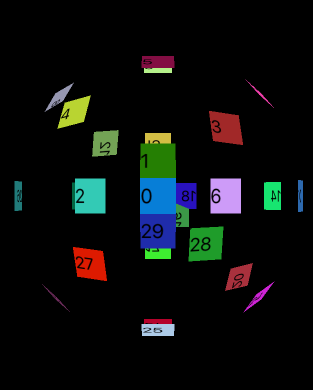
滑动屏幕,这个圆球是可以进行滚动的。
TIP:这里我们只平均分配了四个方向上的布局,如果item更加小也更加多,我们可以分配到更多的方向上,使球体更加充实
iOS流布局UICollectionView系列七——三维中的球型布局的更多相关文章
- iOS流布局UICollectionView使用FlowLayout进行更灵活布局
一.引言 前面的博客介绍了UICollectionView的相关方法和其协议中的方法,但对布局的管理类UICollectionViewFlowLayout没有着重探讨,这篇博客介绍关于布局的相关设置和 ...
- iOS 流布局 UICollectionView使用(使用FlowLayout进行更灵活布局)
在UICollectionView的布局中,如果每个item的大小都一样那么是十分简单的事情,但是,如果我们想要的每个item大小不一样呢,这个时候,就要对UICollectionViewFlowLa ...
- iOS 流布局 UICollectionView使用(简单使用)
简介 UICollectionView是iOS6之后引入的一个新的UI控件,它和UITableView有着诸多的相似之处,其中许多代理方法都十分类似.简单来说,UICollectionView是比UI ...
- Spark系列(七)Master中的资源调度
资源调度 说明: Application的调度算法有两种,分别为spreadOutApps和非spreadOutApps spreadOutApps 在spark-submit脚本中,可以指定要多少个 ...
- iOS 流布局 UICollectionView使用(UICollectionVIew的代理方法)
UICollectionViewDataSource协议 这个协议主要用于collectionView相关数据的处理,包含方法如下: 设置分区数(这个是可选实现的) - (NSInteger)numb ...
- 【iOS系列】-oc中特有的语法
[iOS系列]-oc中特有的语法 oc数据类型: 1,基本类型 2,对象类型 3,id 4,BOOL 5,block 6,SEL 1:category 使用继承关系来扩充一个类,有一个弊病,高耦合性 ...
- Alamofire源码解读系列(七)之网络监控(NetworkReachabilityManager)
Alamofire源码解读系列(七)之网络监控(NetworkReachabilityManager) 本篇主要讲解iOS开发中的网络监控 前言 在开发中,有时候我们需要获取这些信息: 手机是否联网 ...
- iOS开发UI篇—iPad开发中得modal介绍
iOS开发UI篇—iPad开发中得modal介绍 一.简单介绍 说明1: 在iPhone开发中,Modal是一种常见的切换控制器的方式 默认是从屏幕底部往上弹出,直到完全盖住后面的内容为止 说明2: ...
- 【转】iOS开发工具系列(按功能分)
http://www.cocoachina.com/newbie/basic/2014/0417/8187.html 这是我们多篇iOS开发工具系列篇中的一篇,此前的文章比如:那些不能错过的Xcode ...
随机推荐
- PS Tips: powershell 将文件以utf8格式打开并另存
1. powershell 将文件以utf8格式打开并另存 Get-Content .\rep_position_liquidity.csv -Encoding UTF8 | Set-Content ...
- jqGrid怎么设置初始化页面时不加载数据(不向服务器请求数据)
最近做一些表格一直用到jqGrid,今天遇到一个问题: 1.就是页面加载的时候数据不显示,点击搜索才根据请求从服务器返回并显示内容. 2.默认不从服务器请求数据(不然在开发者工具下会显示请求不到数据的 ...
- 【共享单车】—— React后台管理系统开发手记:AntD Table高级表格
前言:以下内容基于React全家桶+AntD实战课程的学习实践过程记录.最终成果github地址:https://github.com/66Web/react-antd-manager,欢迎star. ...
- 【oracle11g,17】存储结构: 段的类型,数据块(行连接、行迁移,块头),段的管理方式,高水位线
一.段的类型: 1.什么是段:段是存储单元. 1.段的类型有: 表 分区表 簇表 索引 索引组织表(IOT表) 分区索引 暂时段 undo段 lob段(blob ,clob) 内嵌表(record类型 ...
- 黑马程序猿——JAVA高新技术——反射
----------android培训.java培训.java学习型技术博客.期待与您交流!------------ 一.对于反射的概念 对于JAVA反射机制是在执行状态中,对于随意一个类.都可以知道 ...
- Win7系统管理员设置了系统策略,禁止进行此安装,怎么办
系统管理员设置了系统策略,禁止进行此安装,怎么办 最佳答案 尝试方法一: windows开始菜单,运行里面输入gpedit.msc打开组策略, 在"计算机配置"→管理模板→ ...
- node - 关于package.json
2018-8-3(首次更新) 一.关于版本号: 文章来自:https://blog.csdn.net/yancloudfrontend/article/details/72867314 指定版本:比如 ...
- laravel性能优化技巧(转)
说明 性能一直是 Laravel 框架为人诟病的一个点,所以调优 Laravel 程序算是一个必学的技能. 接下来分享一些开发的最佳实践,还有调优技巧,大家有别的建议也欢迎留言讨论. 这里是简单的列表 ...
- mui 本地打包
第一步:下载HBuilder离线打包Android版SDK 网址:http://ask.dcloud.net.cn/article/38 第二步:导入项目 启动带ADT的eclipse程序,菜单中选择 ...
- [Python]BeautifulSoup—HTML解析包
在用Python写爬虫时,一个常见的操作是对抓下的HTML做分析处理,得到想要的内容.一般的方法为使用Python的re库中.用正則表達式来解析文本.只是这样的方法适用于全部的文本.而针对于特定格式的 ...