
iOS流布局UICollectionView系列七——三维中的球型布局
iOS流布局UICollectionView系列七——三维中的球型布局
一、引言
通过6篇的博客,从平面上最简单的规则摆放的布局,到不规则的瀑布流布局,再到平面中的圆环布局,我们突破了线性布局的局限,在后面,我们将布局扩展到了空间,在Z轴上进行了平移,我们实现了一个类似UIPickerView的布局模型,其实我们还可以再进一步,类比于平面布局,picKerView只是线性排列布局在空间上的旋转与平移,这次,我们更加充分了利用一下空间的尺寸,来设计一个圆球的布局模型。以下是前几篇博客地址:
1.初识与简单实用UICollectionView:http://my.oschina.net/u/2340880/blog/522613
2.UICollectionView的代理方法:http://my.oschina.net/u/2340880/blog/522682
3.实用FlowLayout进行更灵活布局:http://my.oschina.net/u/2340880/blog/522748
4.自定义FlowLayout进行瀑布流布局:http://my.oschina.net/u/2340880/blog/522806
5.平面圆环布局的实现:http://my.oschina.net/u/2340880/blog/523064
6.将布局从平面应用到空间:http://my.oschina.net/u/2340880/blog/523341
二、将布局扩展为空间球型
在viewController中先实现一些准备代码:
- (void)viewDidLoad {

    [super viewDidLoad];

    // Do any additional setup after loading the view, typically from a nib.

    MyLayout * layout = [[MyLayout alloc]init];

     UICollectionView * collect  = [[UICollectionView alloc]initWithFrame:CGRectMake(0, 0, 320, 400) collectionViewLayout:layout];

    collect.delegate=self;

    collect.dataSource=self;

    //这里设置的偏移量是为了无缝进行循环的滚动,具体在上一篇博客中有解释

    collect.contentOffset = CGPointMake(320, 400);

    [collect registerClass:[UICollectionViewCell class] forCellWithReuseIdentifier:@"cellid"];

    [self.view addSubview:collect];

}

-(NSInteger)numberOfSectionsInCollectionView:(UICollectionView *)collectionView{

    return 1;

}

//我们返回30的标签

-(NSInteger)collectionView:(UICollectionView *)collectionView numberOfItemsInSection:(NSInteger)section{

    return 30;

}

-(UICollectionViewCell *)collectionView:(UICollectionView *)collectionView cellForItemAtIndexPath:(NSIndexPath *)indexPath{

    UICollectionViewCell * cell  = [collectionView dequeueReusableCellWithReuseIdentifier:@"cellid" forIndexPath:indexPath];

    cell.backgroundColor = [UIColor colorWithRed:arc4random()%255/255.0 green:arc4random()%255/255.0 blue:arc4random()%255/255.0 alpha:1];

    UILabel * label = [[UILabel alloc]initWithFrame:CGRectMake(0, 0, 30, 30)];

    label.text = [NSString stringWithFormat:@"%ld",(long)indexPath.row];

    [cell.contentView addSubview:label];

    return cell;

}

- (void)didReceiveMemoryWarning {

    [super didReceiveMemoryWarning];

    // Dispose of any resources that can be recreated.

}

//这里对滑动的contentOffset进行监控,实现循环滚动

-(void)scrollViewDidScroll:(UIScrollView *)scrollView{

    if (scrollView.contentOffset.y<200) {

        scrollView.contentOffset = CGPointMake(scrollView.contentOffset.x, scrollView.contentOffset.y+10*400);

    }else if(scrollView.contentOffset.y>11*400){

        scrollView.contentOffset = CGPointMake(scrollView.contentOffset.x, scrollView.contentOffset.y-10*400);

    }

    if (scrollView.contentOffset.x<160) {

        scrollView.contentOffset = CGPointMake(scrollView.contentOffset.x+10*320,scrollView.contentOffset.y);

    }else if(scrollView.contentOffset.x>11*320){

        scrollView.contentOffset = CGPointMake(scrollView.contentOffset.x-10*320,scrollView.contentOffset.y);

    }

}
这里面的代码比较上一篇博客中的并没有什么大的改动,只是做了横坐标的兼容。
在我们的layout类中,将代码修改成如下:
-(void)prepareLayout{

    [super prepareLayout];


}

//返回的滚动范围增加了对x轴的兼容

-(CGSize)collectionViewContentSize{

    return CGSizeMake( self.collectionView.frame.size.width*([self.collectionView numberOfItemsInSection:0]+2), self.collectionView.frame.size.height*([self.collectionView numberOfItemsInSection:0]+2));

}

-(BOOL)shouldInvalidateLayoutForBoundsChange:(CGRect)newBounds{

    return YES;

}

-(UICollectionViewLayoutAttributes *)layoutAttributesForItemAtIndexPath:(NSIndexPath *)indexPath{

    UICollectionViewLayoutAttributes * atti = [UICollectionViewLayoutAttributes layoutAttributesForCellWithIndexPath:indexPath];

    //获取item的个数

    int itemCounts = (int)[self.collectionView numberOfItemsInSection:0];

    atti.center = CGPointMake(self.collectionView.frame.size.width/2+self.collectionView.contentOffset.x, self.collectionView.frame.size.height/2+self.collectionView.contentOffset.y);

    atti.size = CGSizeMake(30, 30);


    CATransform3D trans3D = CATransform3DIdentity;

    trans3D.m34 = -1/900.0;


    CGFloat radius = 15/tanf(M_PI*2/itemCounts/2);

    //根据偏移量 改变角度

    //添加了一个x的偏移量

    float offsety = self.collectionView.contentOffset.y;

    float offsetx = self.collectionView.contentOffset.x;

    //分别计算偏移的角度

    float angleOffsety = offsety/self.collectionView.frame.size.height;

    float angleOffsetx = offsetx/self.collectionView.frame.size.width;

    CGFloat angle1 = (float)(indexPath.row+angleOffsety-1)/itemCounts*M_PI*2;

    //x,y的默认方向相反

    CGFloat angle2 = (float)(indexPath.row-angleOffsetx-1)/itemCounts*M_PI*2;

    //这里我们进行四个方向的排列

   if (indexPath.row%4==1) {

        trans3D = CATransform3DRotate(trans3D, angle1, 1.0,0, 0);

    }else if(indexPath.row%4==2){

        trans3D = CATransform3DRotate(trans3D, angle2, 0, 1, 0);

    }else if(indexPath.row%4==3){

        trans3D = CATransform3DRotate(trans3D, angle1, 0.5,0.5, 0);

    }else{

        trans3D = CATransform3DRotate(trans3D, angle1, 0.5,-0.5,0);

    }


    trans3D = CATransform3DTranslate(trans3D, 0, 0, radius);


    atti.transform3D = trans3D;

    return atti;

}

-(NSArray<UICollectionViewLayoutAttributes *> *)layoutAttributesForElementsInRect:(CGRect)rect{

    NSMutableArray * attributes = [[NSMutableArray alloc]init];

    //遍历设置每个item的布局属性

    for (int i=0; i<[self.collectionView numberOfItemsInSection:0]; i++) {

        [attributes addObject:[self layoutAttributesForItemAtIndexPath:[NSIndexPath indexPathForItem:i inSection:0]]];

    }

    return attributes;

}
布局效果如下:
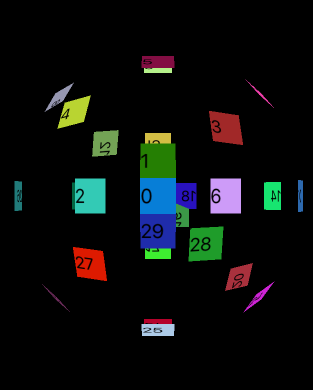
滑动屏幕,这个圆球是可以进行滚动的。
TIP:这里我们只平均分配了四个方向上的布局,如果item更加小也更加多,我们可以分配到更多的方向上,使球体更加充实
iOS流布局UICollectionView系列七——三维中的球型布局的更多相关文章
- iOS流布局UICollectionView使用FlowLayout进行更灵活布局
一.引言 前面的博客介绍了UICollectionView的相关方法和其协议中的方法,但对布局的管理类UICollectionViewFlowLayout没有着重探讨,这篇博客介绍关于布局的相关设置和 ...
- iOS 流布局 UICollectionView使用(使用FlowLayout进行更灵活布局)
在UICollectionView的布局中,如果每个item的大小都一样那么是十分简单的事情,但是,如果我们想要的每个item大小不一样呢,这个时候,就要对UICollectionViewFlowLa ...
- iOS 流布局 UICollectionView使用(简单使用)
简介 UICollectionView是iOS6之后引入的一个新的UI控件,它和UITableView有着诸多的相似之处,其中许多代理方法都十分类似.简单来说,UICollectionView是比UI ...
- Spark系列(七)Master中的资源调度
资源调度 说明: Application的调度算法有两种,分别为spreadOutApps和非spreadOutApps spreadOutApps 在spark-submit脚本中,可以指定要多少个 ...
- iOS 流布局 UICollectionView使用(UICollectionVIew的代理方法)
UICollectionViewDataSource协议 这个协议主要用于collectionView相关数据的处理,包含方法如下: 设置分区数(这个是可选实现的) - (NSInteger)numb ...
- 【iOS系列】-oc中特有的语法
[iOS系列]-oc中特有的语法 oc数据类型: 1,基本类型 2,对象类型 3,id 4,BOOL 5,block 6,SEL 1:category 使用继承关系来扩充一个类,有一个弊病,高耦合性 ...
- Alamofire源码解读系列(七)之网络监控(NetworkReachabilityManager)
Alamofire源码解读系列(七)之网络监控(NetworkReachabilityManager) 本篇主要讲解iOS开发中的网络监控 前言 在开发中,有时候我们需要获取这些信息: 手机是否联网 ...
- iOS开发UI篇—iPad开发中得modal介绍
iOS开发UI篇—iPad开发中得modal介绍 一.简单介绍 说明1: 在iPhone开发中,Modal是一种常见的切换控制器的方式 默认是从屏幕底部往上弹出,直到完全盖住后面的内容为止 说明2: ...
- 【转】iOS开发工具系列(按功能分)
http://www.cocoachina.com/newbie/basic/2014/0417/8187.html 这是我们多篇iOS开发工具系列篇中的一篇,此前的文章比如:那些不能错过的Xcode ...
随机推荐
- cocurrent包ExecutorService线程池
16. 执行器服务 ExecutorService java.util.concurrent.ExecutorService 接口表示一个异步执行机制,使我们能够在后台执行任务.因此一个 Execut ...
- 一个简单功能的SQL 实现
1.假设有一张表示cj表 Name Subject Result 张三 语文 80 张三 数学 90 张三 物理 85 李四 语文 85 李四 数学 92 李四 物理 89 要求查询结果: 姓名 语文 ...
- ESB 12种跑法
ESB 12种跑法 请求响应: MQ-MQ MQ-Webservice Webservice-MQ Webservice-Webservi ...
- SQL Server 系统函数
一组内置函数,对 SQL Server 中的值.对象和设置执行操作,并返回有关它们的信息. 系统函数 功能 APP_NAME() 返回当前会话的应用程序名称(如果应用程序进行了设置) CASE表达 ...
- 关于BufferedInputStream和BufferedOutputStream的实现原理的理解
在介绍FileInputStream和FileOutputStream的例子中,使用了一个byte数组来作为数据读入的缓冲区,以文件存取为例,硬盘存取的速度远低于内存中的数据存取速度.为了减少对硬盘的 ...
- 前后台JSON传值得一个问题和异常处理net.sf.json.JSONException: Unquotted string '"name"'
项目中做导入的时候遇到个bug,用JSON.stringify()序列号json对象传给后台:然后后台通过getPatameter()获取值时,前台的英文引号变成了中文引号. 原来代码如下:(自己排查 ...
- ElasticSearch 组合过滤器
1.布尔过滤器 前篇文章中(term精确查找)的两个例子都是单个过滤器(filter)的使用方式. 在实际应用中,我们很有可能会过滤多个值或字段.比方说,怎样用 Elasticsearch 来表达下面 ...
- 基于HDFS的SparkStreaming案例实战和内幕源码解密
一:Spark集群开发环境准备 启动HDFS,如下图所示: 通过web端查看节点正常启动,如下图所示: 2.启动Spark集群,如下图所示: 通过web端查看集群启动正常,如下图所示: 3.启动sta ...
- oracle deadlock
Basic operation su - oracle sqlplus / as sysdba show parameter background show parameter user_dump_d ...
- asp.net敏感词过滤
敏感词过滤是一个能够让用户发表评论的网站的一个很重要的功能(你懂的~) 下面开始全套流程: 1.需要有一套比较完整的词库,由于我的词库很少所以就不贴上来了,网上找找应该很多 2.设计一个可以将词库导入 ...