
Lucene简单总结
Lucene
API
Document
Document:文档对象,是一条原始数据
| 文档编号 | 文档内容 |
|---|---|
| 1 | 谷歌地图之父跳槽FaceBook |
| 2 | 谷歌地图之父加盟FaceBook |
| 3 | 谷歌地图创始人拉斯离开谷歌加盟Facebook |
| 4 | 谷歌地图之父跳槽Facebook与Wave项目取消有关 |
| 5 | 谷歌地图之父拉斯加盟社交网站Facebook |
==一条记录就是一个document,document的每一个字段就是一个Field==
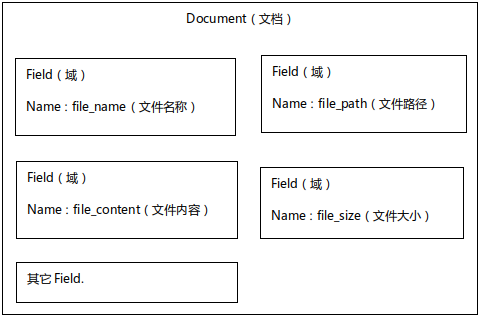
Field
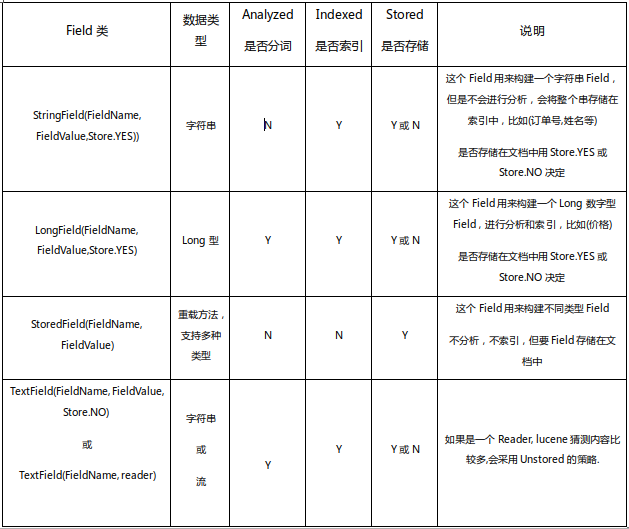
创建索引
private final static File INDEX_FILE = new File("E:\\DevelopTools\\indexDir");

public static void indexCreate(Document doc) throws Exception {
    // 创建目录对象,指定索引库的存放位置;FSDirectory文件系统;RAMDirectory内存
    Directory dir = FSDirectory.open(INDEX_FILE);
    // 创建分词器对象
    Analyzer analyzer = new IKAnalyzer();
    // 创建索引写入器配置对象,第一个参数版本VerSion.LATEST,第二个参数分词器
    IndexWriterConfig conf = new IndexWriterConfig(Version.LATEST, analyzer);
    // 创建索引写入器
    IndexWriter indexWriter = new IndexWriter(dir, conf);
    // 向索引库写入文档对象
    indexWriter.addDocument(doc);
    // 提交
    indexWriter.commit();
    // 关闭
    indexWriter.close();
}
@Test
public void createTest() throws Exception {
//
Document doc = new Document();
doc.add(new LongField("id", 1, Store.YES));
doc.add(new TextField("title", "谷歌地图之父跳槽FaceBook", Store.YES));
doc.add(new TextField("context", "据国外媒体报道,曾先后负责谷歌地图和Wave开发工作的拉斯·拉斯姆森(Lars Rasmussen)已经离开谷歌,并将加盟Facebook。", Store.YES));
indexCreate(doc);
}查询索引
public static void indexSearcher(Query query, Integer n) throws IOException {
    // 初始化索引库对象
    Directory dir = FSDirectory.open(INDEX_FILE);
    // 索引读取工具
    IndexReader indexReader = DirectoryReader.open(dir);
    // 索引搜索对象
    IndexSearcher indexSeracher = new IndexSearcher(indexReader);
    // 执行搜索操作,返回值topDocs
    TopDocs topDocs = indexSeracher.search(query, n);
    // 匹配搜索条件的总记录数
    System.out.println("一共命中:" + topDocs.totalHits + "条数据");
    // 获得得分文档数组对象,得分文档对象包含得分和文档编号
    ScoreDoc[] scoreDocs = topDocs.scoreDocs;
    for (ScoreDoc scoreDoc : scoreDocs) {
        int docID = scoreDoc.doc;
        float score = scoreDoc.score;
        System.out.println("文档编号:" + docID);
        System.out.println("文档得分:" + score);
        // 获取文档对象,通过索引读取工具
        Document document = indexReader.document(docID);
        System.out.println("id:" + document.get("id"));
        System.out.println("title:" + document.get("title"));
        System.out.println("context:" + document.get("context"));
    }
    indexReader.close();
}
@Test
public void searchTest() throws Exception {
//单一字段的查询解析器
// 创建查询解析器对象
QueryParser parser = new QueryParser("title", new IKAnalyzer());
// 创建查询对象
Query query = parser.parse("谷歌");
//根据Query搜索,返回评分最高的n条记录
indexSearcher(query, 10);
/*多字段的查询解析器
MultiFieldQueryParser parser = new MultiFieldQueryParser(new String[]{"id","title"}, new IKAnalyzer());
Query query = parser.parse("1");*/
}各种其他查询方式
//词条查询,查询条件必须是最小粒度不可再分割的内容
Query query = new TermQuery(new Term("title", "谷歌"));

//通配符查询, ?:匹配一个字符, *:匹配多个字符
Query query = new WildcardQuery(new Term("title", "*歌*"));

//模糊查询, 参数:1-词条,查询字段及关键词,关键词允许写错;2-允许写错的最大编辑距离,并且不能大于2(0~2)
Query query = new FuzzyQuery(new Term("title", "facebool"), 1);

//数值范围查询,查询非String类型的数据或者说是一些继承Numeric类的对象的查询,参数1-字段;2-最小值;3-最大值;4-是否包含最小值;5-是否包含最大值
Query query = NumericRangeQuery.newLongRange("id", 2l, 4l, true, true);

//组合查询, 交集: Occur.MUST + Occur.MUST, 并集:Occur.SHOULD + Occur.SHOULD, 非:Occur.MUST_NOT
BooleanQuery query = new BooleanQuery();
Query query1 = NumericRangeQuery.newLongRange("id", 2l, 4l, true, true);
Query query2 = new WildcardQuery(new Term("title", "*歌*"));
query.add(query1, Occur.SHOULD);
query.add(query2, Occur.SHOULD);
修改索引
//本质先删除再添加,先删除所有满足条件的文档,再创建文档, 因此,修改索引通常要根据唯一字段
public static void indexUpdate(Term term, Document doc) throws IOException {
    Directory dir = FSDirectory.open(INDEX_FILE);
    Analyzer analyzer = new IKAnalyzer();
    IndexWriterConfig conf = new IndexWriterConfig(Version.LATEST, analyzer);
    IndexWriter indexWriter = new IndexWriter(dir, conf);
    indexWriter.updateDocument(term, doc);
    indexWriter.commit();
    indexWriter.close();
    }
@Test
public void updateTest() throws Exception {
Term term = new Term("title", "facebook");
Document doc = new Document();
doc.add(new LongField("id", 1L, Store.YES));
doc.add(new TextField("title", "谷歌地图之父跳槽FaceBook", Store.YES));
doc.add(new TextField("context", "河马程序员加盟FaceBook", Store.YES));
indexUpdate(term, doc);
}删除索引
// 执行删除操作(根据词条),要求id字段必须是字符串类型
public static void indexDelete(Term term) throws IOException {
    Directory dir = FSDirectory.open(INDEX_FILE);
    Analyzer analyzer = new IKAnalyzer();
    IndexWriterConfig conf = new IndexWriterConfig(Version.LATEST, analyzer);
    IndexWriter indexWriter = new IndexWriter(dir, conf);
    indexWriter.deleteDocuments(term);
    indexWriter.commit();
    indexWriter.close();
    }

public static void indexDeleteAll() throws IOException {
    Directory dir = FSDirectory.open(INDEX_FILE);
    Analyzer analyzer = new IKAnalyzer();
    IndexWriterConfig conf = new IndexWriterConfig(Version.LATEST, analyzer);
    IndexWriter indexWriter = new IndexWriter(dir, conf);
    indexWriter.deleteAll();
    indexWriter.commit();
    indexWriter.close();
    }
@Test
public void deleteTest() throws Exception {
/*
* Term term = new Term("context", "facebook"); indexDelete(term);
*/
indexDeleteAll();
}Lucene简单总结的更多相关文章
- Lucene 简单API使用
本demo 简单模拟实现一个图书搜索功能. 模拟向数据库添加数据的时候,添加书籍索引. 提供搜索接口,支持按照书名,作者,内容进行搜索. 按默认规则排序返回搜索结果. Jar依赖: <prope ...
- Lucene 简单手记http://www.cnblogs.com/hoojo/archive/2012/09/05/2671678.html
什么是全文检索与全文检索系统? 全文检索是指计算机索引程序通过扫描文章中的每一个词,对每一个词建立一个索引,指明该词在文章中出现的次数和位置,当用户查询时,检索程序就根据事先建立的索引进行查找,并将查 ...
- Lucene简单介绍
[2016.6.11]以前写的笔记,拿出来放到博客里面~ 相关软件: Solr, IK Analyzer, Luke, Nutch;Tomcat; 1.是什么: Lucene是apache软件基金会j ...
- lucene简单搜索demo
方法类 package com.wxf.Test; import com.wxf.pojo.Goods; import org.apache.lucene.analysis.standard.Stan ...
- lucene简单使用demo
测试结构目录: 1.索引库.分词器 Configuration.java package com.test.www.web.lucene; import java.io.File; import or ...
- Lucene简单了解和使用
一,Lucene简介 1 . Lucene 是什么? Lucene 是一个开放源代码的全文检索引擎工具包,但它不是一个完整的全文检索引擎,而是一个全文检索引擎的架构,提供了完整的查询引擎和索引引擎, ...
- lucene简单使用
lucene7以上最低要求jdk1.8 lucene下载地址: http://archive.apache.org/dist/lucene/java/ <dependency> <g ...
- lucene 简单搜索步骤
1.创建IndexReader实例: Directory dir = FSDirectory.open(new File(indexDir)); IndexReader reader = Direct ...
- Lucene入门的基本知识(四)
刚才在写创建索引和搜索类的时候发现非常多类的概念还不是非常清楚,这里我总结了一下. 1 lucene简单介绍 1.1 什么是lucene Lucene是一个全文搜索框架,而不是应用产品.因此它并不 ...
随机推荐
- C#中正则表达式的构建与匹配
使用方法 [1]用用命名空间System.Text.RegularExpressions [2]构造正则表达式 在使用正则表达式时,要先构造正则表达式,这就用到了Regex类,其构建方式有两种: 基本 ...
- 关于“importer.GetNPOTScale() == TextureImporter::kNPOTKeep”问题的简单处理方法
在运行NGUI打包图集的时候碰到下图所示的错误,这个错误导致图片无法正确的规格进行图集生成.结果是图片变成各种诡异的尺寸!! 通过关键字搜索,发现国外有讨论这个问题的解决方案: 将图片转换为textu ...
- [LeetCode]19. Remove Nth Node From End of List删除链表的倒数第N个节点
Given a linked list, remove the n-th node from the end of list and return its head. Example: Given l ...
- jsp---tomcat===》》内置对象
1.内置对象: request: 方法:getParameter("txtName"):获取和页面上的name属性对象的value值 返回String ...
- 粗看ES6之JSON
标签: es6 ES6新增JSON特性不是特别多,只是针对JSON某些情况下的写法上有一些优化: 当key值和value值对应变量名相同时 json对像中的方法书写 示例代码如下: <!DOCT ...
- IE浏览器在线更新GitHub客户端
在IE中输入网址:http://github-windows.s3.amazonaws.com/GitHub.application
- android 屏幕单击位置测试
<RelativeLayout xmlns:android="http://schemas.android.com/apk/res/android" xmlns:tools= ...
- 解决javascript四舍五入不准确
function roundFixed(num, fixed) { var pos = num.toString().indexOf('.'), decimal_places = num.toStri ...
- vos套餐设置
为实现对客户不同时段按不同费率计算,可以在vos里设置套餐, 具体案例: 1. 2.时段费率 套餐里没包含的时间段是不能打电话的 即:周一到周五 21:30—24:00 00:00- ...
- Windows计算下载文件的SHA256 MD5 SHA1
引用自 http://blog.163.com/licanli2082@126/blog/static/35748686201284611330/ certutil -hashfile yourfil ...