
vue.js实践应用
对于vue.js,不想多比比,直接搞上源码+图片
<!DOCTYPE html>
<html>
<head>
<meta charset="utf-8">
<meta name="viewport" content="width=device-width, initial-scale=1, maximum-scale=1, user-scalable=no">
<title>Bootstrap 实例 - 模态框(Modal)插件</title>
<link rel="stylesheet" href="http://cdn.static.runoob.com/libs/bootstrap/3.3.7/css/bootstrap.min.css">
<script src="http://cdn.static.runoob.com/libs/jquery/2.1.1/jquery.min.js"></script>
<script src="http://cdn.static.runoob.com/libs/bootstrap/3.3.7/js/bootstrap.min.js"></script>
<script src="http://apps.bdimg.com/libs/vue/1.0.14/vue.js"></script>
<!--<script src="https://cdn.bootcss.com/vue/1.0.27/vue.js"></script>-->
</head>
<body>
<!-- 2.0往上的版本已经不支持v-for中的$index和$key了 -->
<div class="container-fluid" id="box1">
<h2 class="text-center">创建模态框(Modal)</h2>
<form role="form" class="clearfix form">
<div class="form-group">
<label for="name" class="h3">名称:</label>
<input type="text" class="form-control" id="name" v-model="username" placeholder="请输入名称">
</div>
<div class="form-group">
<label for="age" class="h3">年龄:</label>
<input type="text" class="form-control" id="age" v-model="age" placeholder="请输入你的年龄">
</div>
<div class="form-group pull-right">
<input v-on:click = "add()" type="button" class="btn btn-primary" value="确定">
<input type="reset" class="btn btn-success" value="取消">
</div>
</form>
<table class="table text-center table-hover">
<thead>
<tr>
<th class="text-center">序号</th>
<th class="text-center">姓名</th>
<th class="text-center">年龄</th>
<th class="text-center">操作</th>
</tr>
</thead>
<tbody>
<tr v-for="item in mydata">
<td>{{$index+1}}</td>
<td>{{item.name}}</td>
<td>{{item.age}}</td>
<td>
<a class="btn btn-primary btn-sm" data-toggle="modal" data-target="#myModal">删除</a>
</td>
</tr>
<tr v-show="mydata!=''">
<td colspan="4" class="text-right">
<button v-on:click="newindex = -5" class="btn btn-danger btn-sm" data-toggle="modal" data-target="#myModal">删除全部</button>
</td>
</tr>
<tr v-show="mydata==''"><td colspan="4" class="text-center text-moted">暂无数据</td></tr>
</tbody>
</table>
<!-- 模态框(Modal) -->
<div role="dialog" class="modal fade bs-example-model-lg" id="myModal">
<div class="modal-content">
<div class="modal-header">
<button type="button" class="close" data-dismiss="modal">
×
</button>
<h4 class="modal-title">
模态框(Modal)标题{{newindex}}
</h4>
</div>
<div class="modal-body">
您确定删除吗?
</div>
<div class="modal-footer">
<button type="button" class="btn btn-success" data-dismiss="modal">
{{reset}}
</button>
<button type="button" v-on:click="delectmsg(newindex)" class="btn btn-danger" data-dismiss="modal">
{{enter}}
</button>
</div>
</div>
</div>
</div>
<script>
window.onload = function () {
new Vue({
el: '#box1',
data: {
mydata:[],
username:'',
age:'',
newindex: -100,
enter:"确定",
reset:"取消"
},
methods:{
add:function () {
this.mydata.push({
name:this.username,
age:this.age
});
this.username = '';
this.age = '';
},
delectmsg:function (n) {
if(n == -5){
this.mydata = [];
}else {
this.mydata.splice(n,1);
}
}
}
});
};
</script>
</body>
</html>
图片示意
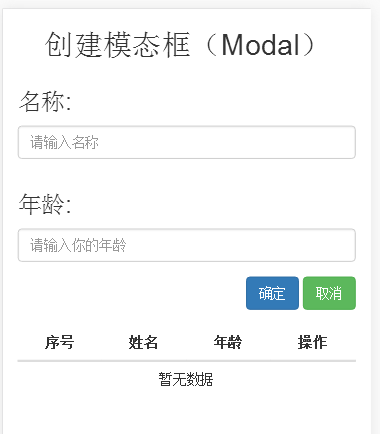
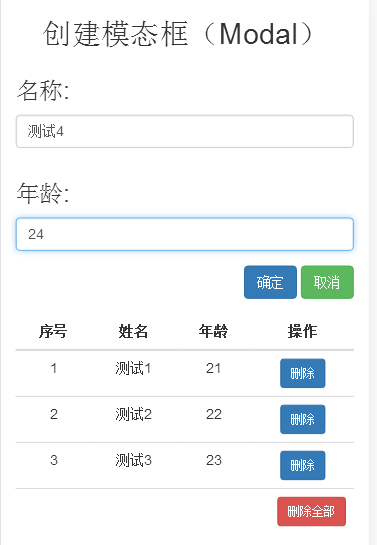

直接复制代码保存为以.html或是.htm结尾的文件测试下即可,简单粗暴,好用
不过在此我要说出一个问题,就是vue.js低版本的在v-for 这个标签中可以使用$index这个内置变量。意义为索引,但是在高版本中就取消了,替换的内容不知道修改为什么了。搜了一些,都是一些带有vue的模板(可兼容html5的代码模板)
关于v-for版本2.0与1.x的区别
<!DOCTYPE html>

<html>

    <head>

        <meta charset="UTF-8">

        <title></title>

        <style type="text/css">

            a{display: block;}

        </style>

    </head>

    <body>

        <div id="for5">

            <a v-for="(item,index) in items" v-on:click="onclick(index)" href="javascript:void(0)">{{ index }}{{ item.text }}</a>

        </div>

        <input type="text" name="" id="index" value=""/>

    <script src="https://cdn.bootcss.com/vue/2.5.13/vue.js" type="text/javascript" charset="utf-8"></script>

    <script type="text/javascript">

        new Vue({

            el: '#for5',

            data: {

                items: [

                    { text: '巴士' },

                    { text: '快车' },

                    { text: '专车' },

                    { text: '顺风车' },

                    { text: '出租车' },

                    { text: '代驾' }

                ]

            },

            methods: {

                onclick:function(index){

                    console.log(index);

                    document.getElementById('index').value = index;

//                  window.location.href = "http://www.baidu.com";

                    window.location.href = "#";

                }

            }

        })

    </script>

    </body>

</html>
变化如下:
- el处需id,写body报错;
- 参数index需写在item后面;
- 作为事件参数时不用加$符。
此外,也可以提供第二个的参数为键名:
<div v-for="(value, key) in object">

  {{ key }} : {{ value }}

</div>
第三个参数为索引:
<div v-for="(value, key, index) in object">

  {{ index }}. {{ key }} : {{ value }}

</div>
欢迎各位大神留言沟通
vue.js cdn引入 http://www.bootcdn.cn/
我推荐使用百度静态资源库 http://cdn.code.baidu.com/
详细可参考 https://vuefe.cn/v2/guide/list.html
vue.js实践应用的更多相关文章
- 一个简单的 vue.js 实践教程
https://segmentfault.com/a/1190000006776243?utm_source=tuicool&utm_medium=referral 感觉需要改善的地方有: ( ...
- Vue.js组件间通信方式总结
平时在使用Vue框架的业务开发中,组件不仅仅要把模板的内容进行复用,更重要的是组件之间要进行通信.组件之间通信分为三种:父-子:子-父:跨级组件通信.下面,就组件间如何通信做一些总结. 1.父组件到子 ...
- vue.js+boostrap最佳实践
一.为什么要写这篇文章 最近忙里偷闲学了一下vue.js,同时也复习了一下boostrap,发现这两种东西如果同时运用到一起,可以发挥很强大的作用,boostrap优雅的样式和丰富的组件使得页面开发变 ...
- Vue.js最佳实践
Vue.js最佳实践 第一招:化繁为简的Watchers 场景还原: created(){ this.fetchPostList() }, watch: { searchInputValue(){ t ...
- 基于 Vue.js 之 iView UI 框架非工程化实践记要 使用 Newtonsoft.Json 操作 JSON 字符串 基于.net core实现项目自动编译、并生成nuget包 webpack + vue 在dev和production模式下的小小区别 这样入门asp.net core 之 静态文件 这样入门asp.net core,如何
基于 Vue.js 之 iView UI 框架非工程化实践记要 像我们平日里做惯了 Java 或者 .NET 这种后端程序员,对于前端的认识还常常停留在 jQuery 时代,包括其插件在需要时就引 ...
- Vue.js最佳实践--给大量子孙组件传值(provide/inject)
开发中有个需求,有个Parent组件(例如div)下,输入框,下拉框,radiobutton等可编辑的子孙组件几百个,根据某个值统一控制Parent下面的所有控件的disabled状态 类似于这样,给 ...
- 《Vue.js 2.x实践指南》 已出版
<Vue.js 2.x实践指南>其实在一年前就已经完稿了,只是由于疫情的缘故耽搁了很久才下厂印刷.阅读本书需要具备HTML.CSS和JS基础,本书针对的用户群体主要是:想要快速学习vue技 ...
- 前端开发工具vue.js开发实践总结
最近有很长时间没有更新博客了,换了公司,全部的心思都放在项目上了.通过这次项目的上线,让我感受最深的是前后端分离后,前端页面的模块化管理,以及前端页面的数据邦定.在接触vue.js之前,我之前端要用到 ...
- vue.js组件化开发实践
前言 公司目前制作一个H5活动,特别是有一定统一结构的活动,都要码一个重复的轮子.后来接到一个基于模板的活动设计系统的需求,便有了下面的内容.借油开车. 组件化 需求一到,接就是怎么实现,技术选型自然 ...
随机推荐
- Java中的阻塞队列-ArrayBlockingQueue(一)
最近在看一些java基础的东西,看到了队列这章,打算对复习的一些知识点做一个笔记,也算是对自己思路的一个整理,本章先聊聊java中的阻塞队列 参考文章: http://ifeve.com/java-b ...
- python面试题——前端(23题)
2.谈谈你对websocket协议的认识. 3.什么是magic string ? 4.如何创建响应式布局? 5.你曾经使用过哪些前端框架? 6.什么是ajax请求?并使用jQuery和XMLHttp ...
- Python基础 整形、布尔值、if条件判断、while循环、运算符、格式化输出
1,计算机基础.2,python历史. 宏观上:python2 与 python3 区别: python2 源码不标准,混乱,重复代码太多, python3 统一 标准,去除重复代码.3,python ...
- Vue.js 插件开发
Vue.js 的插件应当有一个公开方法 install .这个方法的第一个参数是 Vue 构造器 , 第二个参数是一个可选的选项对象: MyPlugin.install = function (Vue ...
- 将pugixml库编译成动态库的做法
作者:朱金灿 来源:http://blog.csdn.net/clever101 pugixml库默认是编译成静态库的.要把pugixml库编译成一个动态库,需要对代码做一些修改,具体是将 // If ...
- SpringCloud的学习记录(2)
这一章节主要讲如何搭建eureka-client项目. 在我们生成的Demo项目上右键点击New->Module->spring Initializr, 然后next, 填写Group和A ...
- Struts2_HelloWorld_7_2
第一个程序的流程图: Struts2.x 的作用:把请求和展现分开.
- Python-Django框架学习笔记——第二课:Django的搭建
Django 环境搭建 一. 版本选择 Django 1.5.x 支持 Python 2.6.5 Python 2.7, Python 3.2 和 3.3. Django 1.6.x 支持 Pytho ...
- webpack-dev-server启动后, localhost:8080返回index.html的原理
webpack-dev-server是一个采用Node.js Express实现的微型服务器, 内部使用webpack-dev-middleware来响应发送到服务器监听单口的HTTP请求. webp ...
- 【CCPC-Wannafly Winter Camp Day4 (Div1) H】命命命运(概率DP)
点此看题面 大致题意: 有\(6\)个人玩大富翁,共有\(n\)块地,进行\(500\)轮,已知每个人掷骰子掷出\(1\sim6\)的概率.当某人到达一块未被占领的地时,他可以占领它.求最后每个人占有 ...