
C#与数据库连接简单测试
效果展示
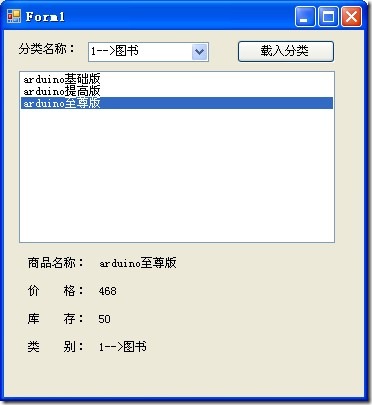
数据库代码
create database OneDb

go

USE OneDb;

GO

CREATE TABLE classify   --分类表

(

    id int primary key identity(1,1),

    name nvarchar(20) not null

)

GO

CREATE TABLE product  --产品表

(

    id int primary key identity(1,1),

    name nvarchar(20) not null,

    price decimal,

    number int default 0,

    c_id int FOREIGN KEY references classify(id)

)

GO

--添加分类测试数据

insert into classify(name) values('图书');

insert into classify(name) values('家电');

insert into classify(name) values('服饰');

--添加商品测试数据

insert into product(name,price,number,c_id) values('arduino基础版',168,50,1);

insert into product(name,price,number,c_id) values('arduino提高版',268,50,1);

insert into product(name,price,number,c_id) values('arduino至尊版',468,50,1);

insert into product(name,price,number,c_id) values('比基尼',68,50,3);

insert into product(name,price,number,c_id) values('虎皮裙',168,50,3);

insert into product(name,price,number,c_id) values('长靴',368,50,3);

insert into product(name,price,number,c_id) values('电冰箱',3268,50,2);

insert into product(name,price,number,c_id) values('烘干机',2268,50,2);

GO

select * from classify;

go

select * from product order by c_id;

go
c# 代码form1.cs
using System;

using System.Collections.Generic;

using System.ComponentModel;

using System.Data;

using System.Drawing;

using System.Linq;

using System.Text;

using System.Windows.Forms;

using System.Data.SqlClient;

namespace AdoTestForm

{

    public partial class Form1 : Form

    {

        public Form1()

        {

            InitializeComponent();

        }

        private void Form1_Load(object sender, EventArgs e)

        {

            comboBox1.Text = "全部分类";

            //确定数据库连接字符串

            string constr = "server=QT-201303030913;database=OneDb;uid=sa;pwd=daxiang";

            //实例化一个数据库连接的对象

            SqlConnection conn = new SqlConnection(constr);

            //打开数据库连接

            conn.Open();

            //实例化SqlCommand对象(该对象主要用于执行Sql命令)

            SqlCommand cmd = new SqlCommand();

            //指定要执行的SQL语句或者存储过程名称

            cmd.CommandText = "select id,name from classify";

            //确定上面为CommandText类型所赋的值是SQL语句还是存储过程名称

            cmd.CommandType = CommandType.Text;

            //指定该命令所用的数据库连接

            cmd.Connection = conn;

            //声明一个SqlDataReader(数据流对象),并将cmd执行后的结果交给它

            SqlDataReader sdr = cmd.ExecuteReader();

            //循环整个SqlDataReader对象,将里面的值取出来添加到ListBox中

            //sdr.Read()的作用是前进到下一条记录,这也说明SqlDataReader中的数据是一行行放置的

            while (sdr.Read())

            {

                //将数据流中的第一列的值添加到listBox1的项中

                comboBox1.Items.Add(sdr[0]+"-->"+sdr["name"]);

                //上面这句也可以用下面这句代替,sdr["name"]表示当前sdr的name列的值

                //comboBox1.Items.Add(str["name"]);

            }

            //关闭数据流

            sdr.Close();

            //关闭数据库连接

            conn.Close();

        }

        private void button1_Click(object sender, EventArgs e)

        {

            if (comboBox1.Text != "全部分类")

            {

                string constr = "server=QT-201303030913;database=OneDb;uid=sa;pwd=daxiang";

                //实例化一个数据库连接的对象

                SqlConnection conn = new SqlConnection(constr);

                //打开数据库连接

                conn.Open();

                //实例化SqlCommand对象(该对象主要用于执行Sql命令)

                SqlCommand cmd = new SqlCommand();

                //获取分类的id

                //int i = comboBox1.Text.IndexOf("-->");//获取字符串中-->所在位置索引

                string id = comboBox1.Text.Substring(0, 1);//只获取-->之前的字符

                //指定要执行的SQL语句和存储过程名字

                cmd.CommandText = "select * from product where c_id=" + id;

                //去顶上面的CommandText属性所赋值到底是sql还是存储过程名称

                cmd.CommandType = CommandType.Text;

                //指定该命令所用的数据库连接

                cmd.Connection = conn;

                //声明一个SqlDataReader(数据流对象),并将cmd执行后的结果交给它

                SqlDataReader sdr = cmd.ExecuteReader();

                //清空listBox中的项

                listBox1.Items.Clear();

                //循环整个SqlDataReader对象,将里面的值取出来添加到ListBox中

                //sdr.Read()的作用是前进到下一条记录,这也说明SqlDataReader中的数据是一行行放置的

                while (sdr.Read())

                {

                    //将数据流中的第一列的值添加到listBox1的项中

                    listBox1.Items.Add(sdr["name"]);

                }

                //关闭数据流

                sdr.Close();

                //关闭数据库连接

                conn.Close();

            }

        }

        private void listBox1_SelectedIndexChanged(object sender, EventArgs e)

        {

            if (listBox1.SelectedItems.Count > 0)

            {

                string constr = "server=QT-201303030913;database=OneDb;uid=sa;pwd=daxiang";

                //实例化一个数据库连接的对象

                SqlConnection conn = new SqlConnection(constr);

                //打开数据库连接

                conn.Open();

                //实例化SqlCommand对象(该对象主要用于执行Sql命令)

                SqlCommand cmd = new SqlCommand();

                //获取分类的id

                //int i = comboBox1.Text.IndexOf("-->");//获取字符串中-->所在位置索引

                string id = comboBox1.Text.Substring(0, 1);//只获取-->之前的字符

                //指定要执行的SQL语句和存储过程名字

                cmd.CommandText = "select * from product where c_id=" + id;

                //去顶上面的CommandText属性所赋值到底是sql还是存储过程名称

                cmd.CommandType = CommandType.Text;

                //指定该命令所用的数据库连接

                cmd.Connection = conn;

                //声明一个SqlDataReader(数据流对象),并将cmd执行后的结果交给它

                SqlDataReader sdr = cmd.ExecuteReader();

                //循环整个SqlDataReader对象,将里面的值取出来添加到ListBox中

                //sdr.Read()的作用是前进到下一条记录,这也说明SqlDataReader中的数据是一行行放置的

                while (sdr.Read())

                {

                    if (sdr["name"].ToString() == listBox1.SelectedItem.ToString())

                    {

                        lbl_name.Text = sdr["name"].ToString();

                        lbl_price.Text = sdr["price"].ToString();

                        lbl_number.Text = sdr["number"].ToString();

                        lbl_c_id.Text = comboBox1.Text;

                    }

                }

                //关闭数据流

                sdr.Close();

                //关闭数据库连接

                conn.Close();

            }

        }

    }

}
C#与数据库连接简单测试的更多相关文章
- 利用EasyMock生成数据库连接简单测试示例
package demo.mock; import java.sql.Connection; import java.sql.PreparedStatement; import java.sql.Re ...
- TODO:Golang UDP连接简单测试慎用Deadline
TODO:Golang UDP连接简单测试慎用Deadline UDP 是User Datagram Protocol的简称, 中文名是用户数据报协议,是OSI(Open System Interco ...
- .net orm比较之dapper和Entity Framework6的简单测试比较
.net orm比较之dapper和Entity Framework6的简单测试比较
- 构建ASP.NET MVC4+EF5+EasyUI+Unity2.x注入的后台管理系统(37)-文章发布系统④-百万级数据和千万级数据简单测试
原文:构建ASP.NET MVC4+EF5+EasyUI+Unity2.x注入的后台管理系统(37)-文章发布系统④-百万级数据和千万级数据简单测试 系列目录 我想测试EF在一百万条数据下的显示时间! ...
- ORACLE 数据库简单测试
ORACLE 数据库简单测试 操作系统:Windows 7 – ORACLE:oracle database 10.2.0.4 一.目的 测试 启动监听程序.数据库 非同一个用户的情况,用户是否可以 ...
- Javascript的简单测试环境
在<JavaScript忍者秘籍>2.4测试条件基础知识中,作者给出了一个精简版的assert和assert组的实现,对于初学者而言,这无疑是一个很好的例子,既让我们得到了一个好用的小工具 ...
- struts2+hibernate+spring注解版框架搭建以及简单测试(方便脑补)
为了之后学习的日子里加深对框架的理解和使用,这里将搭建步奏简单写一下,目的主要是方便以后自己回来脑补: 1:File--->New--->Other--->Maven--->M ...
- struts2+hibernate+spring配置版框架搭建以及简单测试(方便脑补)
为了之后学习的日子里加深对框架的理解和使用,这里将搭建步奏简单写一下,目的主要是方便以后自己回来脑补: 1:File--->New--->Other--->Maven--->M ...
- [20190423]简单测试latch nowilling等待模式.txt
[20190423]简单测试latch nowilling等待模式.txt --//我对这个问题的理解就是如果参数willing=0,表示无法获取该latch,直接退出,再寻找类似的latch.--/ ...
随机推荐
- 打造你的前端神器-webstorm11
说起前端编辑器,用过dw,sublime,hbuilder,webstorm也不陌生,之前的版本8有用过一下,但是觉得比sublime重量太多,但是随着后来用node的开始,发现需要打造个web前端神 ...
- 解决ie7下overflow:hidden失效问题
但父亲元素下面的子节点或者孙子节点有position:relative:或者absolute时,父亲即使设置了overflow:hidden:依然会溢出 解决方法可以: 在父亲元素上加上*positi ...
- js中的string.format函数代码
String.prototype.format = function(args) { if (arguments.length > 0) { var result = this; if (arg ...
- SQLserver备份数据库示例
BACKUP DATABASE [yee]TO DISK = N'D:\数据库备份\yee2015.9.11.bak'WITH NAME = N'yee - 备份', NOFORMAT, NO ...
- 修改pip源为国内网站
import os,sys,platformini="""[global]index-url = https://pypi.doubanio.com/simple/[in ...
- GitHub for window 使用教程
Git是目前最先进的分布式版本控制系统,作为一个程序员,我们需要掌握其用法. 一:下载GitHub for Windows 二:安装GitHub 下载之后点击进行安装过程,安装之后桌面上会有两个 ...
- MySQL三:存储引擎
阅读目录 一 什么是存储引擎 二 mysql支持的存储引擎 三 使用存储引擎 一 什么是存储引擎 mysql中建立的库===>文件夹 库中建立的表===>文件 现实生活中我们用来存储数据的 ...
- spring download
http://maven.springframework.org/release/org/springframework/spring/
- (C#)为应用程式设定运行权限(System.Security类下的GenericIdentity,GenericPrincipal,PrincipalPermission)
最近看书<编写高质量代码改善C#程序的157个建议>,知识点备忘: System.Security.Principal.GenericIdentity==>表示一般用户 System ...
- python#模拟发送电子邮件
#-*- coding:utf-8 -*- #模拟发送电子邮件 from email.mime.text import MIMEText from_addr = 'aa@sss.com' passwo ...