
富文本 文字图片点击,(TextView)
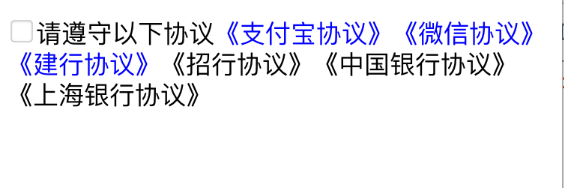
textview上的富文本支持 文字,图片的点击事件
- (void)protocolIsSelect:(BOOL)select {

    NSMutableAttributedString *attributedString = [[NSMutableAttributedString alloc] initWithString:@"请遵守以下协议《支付宝协议》《微信协议》《建行协议》《招行协议》《中国银行协议》《上海银行协议》"];

    [attributedString addAttribute:NSLinkAttributeName

                             value:@"zhifubao://"

                             range:[[attributedString string] rangeOfString:@"《支付宝协议》"]];

    [attributedString addAttribute:NSLinkAttributeName

                             value:@"weixin://"

                             range:[[attributedString string] rangeOfString:@"《微信协议》"]];

    [attributedString addAttribute:NSLinkAttributeName

                             value:@"jianhang://"

                             range:[[attributedString string] rangeOfString:@"《建行协议》"]];

    UIImage *image = [UIImage imageNamed:select == YES ? @"new_feature_share_true" : @"new_feature_share_false"];

    CGSize size = CGSizeMake(font + , font + );

    UIGraphicsBeginImageContextWithOptions(size, false, );

    [image drawInRect:CGRectMake(, , size.width, size.height)];

    UIImage *resizeImage = UIGraphicsGetImageFromCurrentImageContext();

    UIGraphicsEndImageContext();

    NSTextAttachment *textAttachment = [[NSTextAttachment alloc] init];

    textAttachment.image = resizeImage;

    NSMutableAttributedString *imageString = [NSMutableAttributedString attributedStringWithAttachment:textAttachment];

    [imageString addAttribute:NSLinkAttributeName

                        value:@"checkbox://"

                        range:NSMakeRange(, imageString.length)];

    [attributedString insertAttributedString:imageString atIndex:];

    [attributedString addAttribute:NSFontAttributeName value:[UIFont systemFontOfSize:font] range:NSMakeRange(, attributedString.length)];

    _textview.attributedText = attributedString;

    _textview.linkTextAttributes = @{NSForegroundColorAttributeName: [UIColor blueColor],

                                     NSUnderlineColorAttributeName: [UIColor lightGrayColor],

                                     NSUnderlineStyleAttributeName: @(NSUnderlinePatternSolid)};

    _textview.delegate = self;

    _textview.editable = NO;        //必须禁止输入,否则点击将弹出输入键盘

    _textview.scrollEnabled = NO;

}

- (BOOL)textView:(UITextView *)textView shouldInteractWithURL:(NSURL *)URL inRange:(NSRange)characterRange {

    if ([[URL scheme] isEqualToString:@"jianhang"]) {

        NSLog(@"建行支付---------------");

        return NO;

    } else if ([[URL scheme] isEqualToString:@"zhifubao"]) {

        NSLog(@"支付宝支付---------------");

        return NO;

    } else if ([[URL scheme] isEqualToString:@"weixin"]) {

        NSLog(@"微信支付---------------");

        return NO;

    } else if ([[URL scheme] isEqualToString:@"checkbox"]) {

        self.isSelect = !self.isSelect;

        [self protocolIsSelect:self.isSelect];

        return NO;

    }

    return YES;

}
在简书看到的,来源于:http://www.jianshu.com/p/480db0cc7380
富文本 文字图片点击,(TextView)的更多相关文章
- iOS开发富文本制作 图片和文字/NSMutableParagraphStyle/NSMutableAttributedString
/NSMutableParagraphStyle/NSMutableAttributedString 组合使 NSString * titlestr=@"日产GT-R"; NSMu ...
- YYLabel 自动布局 富文本文字点击事件
YYLabel显示多行除了需要设置numberOfLines = 0以外,还需要设置preferredMaxLayoutWidth最大的宽度值才可以生效多行效果 YYLabel中的NSMutableA ...
- wxParse解析富文本内容使点击图片可以选中并实现放大缩小
wxParse解析富文本内容不多说,之前写过步骤介绍,主要是在使用过程中发现解析的富文本内容里有图片时有的可以点击放大缩小,有的点击却报错,找不到imgUrls. 经过排查发现:循环解析的富文本内容正 ...
- react-quill 富文本编辑器 ---- 图片处理
import React,{Component} from 'react'; import ReactQuill,{ Quill } from 'react-quill'; import 'react ...
- 使用vue-quill-editor富文本 实现图片上传
1. 下载并引入 import { quillEditor, Quill } from "vue-quill-editor"; import { container, ImageE ...
- kindeditor 富文本粘贴 图片
<script type="text/javascript" src="../../Scripts/Plugins/kindeditor/kindeditor.js ...
- 使用KindEditor富文本编辑器,点击批量上传按钮没有选择图片按钮
问题:批量上传没有选择图片按钮
- Kindeditor JS 富文本编辑器图片上传指定路径
js //================== KindEditor.ready(function (K) { var hotelid = $("#hotelid").val(); ...
- php将富文本内容图片上传到oss并替换
/** * php 提取html中图片并替换 */ //要替换的内容 //提取图片路径的src的正则表达式 $match_str = '/(<img([^>]*)\s*src=(\'|\& ...
随机推荐
- spring test: 配置文件优先级
application.properties 默认 application-xxx.properties 高 systemEnvironment 高 test/main/resources/ 同名文件 ...
- put get & push pull
总要有一个容器,一个生产方,一个消费方
- netty在rpc MQ中的应用
https://files.cnblogs.com/files/yszzu/netty-rpc-parent.zip https://github.com/apache/rocketmq/blob/m ...
- SQLServer连接查询之Cross Apply和Outer Apply的区别及用法
https://blog.csdn.net/wikey_zhang/article/details/77480118 先简单了解下cross apply的语法以及会产生什么样的结果集吧! 示例表: S ...
- linux 网卡配置文件详解2018-03-07
转自:https://www.cnblogs.com/ienino/p/7717092.html 配置文件位置:/etc/sysconfig/network-scripts/ifcfg-eth0 1. ...
- 26-----BBS论坛
BBS论坛(二十六) 26.发布帖子前台代码逻辑完成 (1)front/hooks.py from .views import bp from flask import session,g from ...
- 转 Comparison of Red Hat and Oracle Linux kernel versions and release strings
Originally derived from Red Hat Enterprise Linux (RHEL), Oracle Linux (OL) contains minor difference ...
- 20181031 temp
https://wiki.jenkins.io/display/JENKINS/M2+Release+Plugin https://issues.jenkins-ci.org/browse/JENKI ...
- java高级篇
Method对象可以得到任何一个类的任何方法的定义(只需要传入方法的名字和参数即可) class Ming { private void speak() { System.out.println(&q ...
- A. Yet Another Problem with Strings 分块 + hash
http://codeforces.com/gym/101138/problem/A 感觉有一种套路就是总长度 <= 某一个数的这类题,大多可以分块 首先把集合串按长度分块,对于每一个询问串, ...