
Python脚本开发练习
打印乘法口诀表
#!/usr/bin/python

#coding=utf-8

print("Hello,World....")

print("你好,欢迎来到Python的世界....")

i=1;

while i <= 9 :

    #print i

    j=1

    while j <= i:

        #print i,j

        print "%d*%d=%d"%(j,i,j*i),

        j+=1

    print('\n')

    i+=1
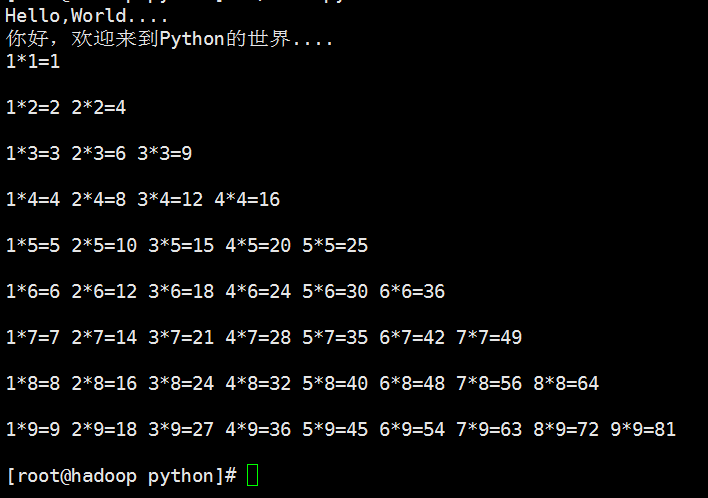
结果:
Python文件处理
#!/usr/bin/python

#coding=utf-8

import sys

import os

import shutil

#创建目录

def mkdir(path):

    #去除首位空格

    path = path.strip()

    #去除尾部\符号

    path = path.rstrip('\\')

    #判断路径是否存在

    isExists = os.path.exists(path)

    if not isExists:

       os.makedirs(path)

#写文件

def Write(filename,context,model):

    #去除首位空格

    filename = filename.strip()

    #读取目录名称

    path = os.path.dirname(filename)

    #如果目录不存在则创建目录

    mkdir(path)

    #读取文件名称

    name = os.path.basename(filename)

    fp = open(filename,model)

    fp.write(context+'\n')

    fp.close()

    print name

#删除文件

def deleteFile(filename):

    filename = filename.strip()

    if os.path.exists(filename):

       os.remove(filename)

#删除目录

def deleteDir(path,model):

    if os.path.exists(path):

       if model == 'rf':

          #强制删除目录以及目录下所有文件

          shutil.rmtree(path)

       else:

          #只有目录为空的时候才可以删除

          os.removedirs(path)

mkdir('/etl/etldata/tmp/p')

deleteDir('/etl/etldata/tmp','rf')

mkdir('/etl/etldata/script/python/test')

Write('/etl/etldata/script/python/p/testfile.csv','','w');

Write('/etl/etldata/script/python/p/testfile.csv','','a');

#deleteFile('/etl/etldata/script/python/p/testfile.csv')

deleteDir('/etl/etldata/script/python/p','rf')

#deleteDir('/etl/etldata/script/python1/test','rf')
Python面向对象
#定义Student类

class Student:

    #定义getName方法,获取姓名

    def getName(self):

        print("My Name is Jim")

    #定义getAge方法,获取年龄

    def getAge(self):

        print("My Age is 18")

#实例化一个对象

s = Student()

s.getName()

s.getAge()

#添加属性

s.addres = '大连'

#获取属性

print(s.addres)

#coding:utf-8

#print("Hello,world")

#定义Student类

class Student:

    #定义初始化函数

    def __init__(self,name="InitName",weight=60,height=170):

        self.name = name

        self.weight = weight

        self.height = height

        self.age = 18.6

    def __str__(self):

        return self.name

    #定义getName方法,获取姓名

    def getName(self):

        print("My Name is %s" % (self.name) )

    #定义getAge方法,获取年龄

    def getAge(self):

        print("My Age is %f" % (self.age))

#实例化一个对象

s = Student('Jim')

print type(s)

s.getName()

s.getAge()

print(s.weight)

print(s)
#coding:utf-8

import xlrd

import os

import sys

import cx_Oracle

import time

import sys

import codecs

import shutil

reload(sys)

sys.setdefaultencoding('utf-8')

#定义连接oracle数据库函数

def conn_orcl(hostname='192.168.0.18',user='jim',passwd='jim',database='orcl'):

    print time.strftime('%Y-%m-%d %H:%M:%S',time.localtime(time.time())),": Start connect to Oracle..."

    #user

    #passwd

    #hostname = 192.168.0.18

    #database = 'orcl'

    conn_str=user+'/'+passwd+'@'+hostname+'/'+database

    try:

        conn = cx_Oracle.connect(conn_str)

    #conn = cx_Oracle.connect('scott/tiger1@192.168.0.18/orcl')

        print time.strftime('%Y-%m-%d %H:%M:%S',time.localtime(time.time())),": connect to %s Succeed" % (database)

        return conn

    except:

        print time.strftime('%Y-%m-%d %H:%M:%S',time.localtime(time.time())),": Connect to %s Failed" % (database)

        return

#执行sql语句【增加、删除、修改】

def sqlDML(sql,db):

    #include: insert,update,delete

    cr = db.cursor()

    try:

        cr.execute(sql)

        cr.close()

        db.commit()

        print time.strftime('%Y-%m-%d %H:%M:%S',time.localtime(time.time())),": Excute Succeed"

    except:

        print time.strftime('%Y-%m-%d %H:%M:%S',time.localtime(time.time())),": Excute Failed"

#查询语句,返回元组tuple

def sqlSelect(sql,db):

    c = db.cursor()

    try:

        c.execute(sql)

        print time.strftime('%Y-%m-%d %H:%M:%S',time.localtime(time.time())),": Excute Succeed"

        return c

    except:

        print time.strftime('%Y-%m-%d %H:%M:%S',time.localtime(time.time())),": Excute Failed"

        return

#创建目录

def mkdir(path):

    #去除首位空格

    path = path.strip()

    #去除尾部\符号

    path = path.rstrip('\\')

    #判断路径是否存在

    isExists = os.path.exists(path)

    if not isExists:

       os.makedir(path)

#递归创建目录

def mkdirs(path):

    #去除首位空格

    path = path.strip()

    #去除尾部\符号

    path = path.rstrip('\\')

    #判断路径是否存在

    isExists = os.path.exists(path)

    if not isExists:

       os.makedirs(path)

#删除目录

def rmdir(path):

    #去除首位空格

    path = path.strip()

    #去除尾部\符号

    path = path.rstrip('\\')

    #判断路径是否存在

    isExists = os.path.exists(path)

    if isExists:

       os.rmdir(path)

#递归删除目录

def rmdirs(path):

    #去除首位空格

    path = path.strip()

    #去除尾部\符号

    path = path.rstrip('\\')

    #判断路径是否存在

    isExists = os.path.exists(path)

    if isExists:

       #os.removedirs(path)

       shutil.rmtree(path)

#删除文件

def deleteFile(filename):

    filename = filename.strip()

    if os.path.exists(filename):

       os.remove(filename)

#写文件

def writeText(filename,context,model):

    #去除首位空格

    filename = filename.strip()

    #读取目录名称

    path = os.path.dirname(filename)

    #如果目录不存在则创建目录

    mkdir(path)

    #读取文件名称

    name = os.path.basename(filename)

    fp = open(filename,model)

    fp.write(context+'\n')

    fp.close()

def excel_to_csv(exclefilename,sheetname,csvfilename):

    data = xlrd.open_workbook(exclefilename)

    table = data.sheet_by_name(sheetname)

    print "excel文件为:%s" % (exclefilename)

    print "sheet页名称为:%s" %(sheetname)

    #获取行数和列数

    nrows = table.nrows

    print "行数:",nrows

    ncols = table.ncols

    print "列数:", ncols

    #定义分割符

    format = ','

    #先删除目标csv文件

    deleteFile(csvfilename)

    #默认去掉首行标题

    for i in range(1,nrows):

        s=''

        for j in range(0,ncols):

            s = s + str(table.row_values(i)[j]) + format

            #print table.row_values(i)[j]

        #print s

        #保存成csv文件

        writeText(csvfilename,s,'a')

    print time.strftime('%Y-%m-%d %H:%M:%S',time.localtime(time.time())),": translate %s to %s Succeed" % (exclefilename,csvfilename)

        #print table.row_values(i)[0]

#将数据文件加载到oracle数据库中

def load_to_db(db,filename,tabname,colnum):

    s=''

    for i in range(1,colnum+1):

        if i == colnum:

           s = s + ':' + str(i)

        else:

           s = s + ':' + str(i) + ','

    sql = 'insert into %s values(%s)' %(tabname,s)

    print sql

    cr = db.cursor()

    f =  codecs.open(filename)

    lines = f.readlines()

    for i in range(0,len(lines)):

        s = []

        for j in range(0,colnum):

            s.append(str(lines[i].strip("\n").split(',')[j]))

            #print s[j]

        #lines[i].strip("\n").split(',')[0]

        cr.execute(sql,s)

        #print s

        f.close()

    cr.close()

    db.commit()

excel_to_csv('/etl/etldata/script/car/20170920.xlsx','标签','/etl/etldata/script/python_test/lab.csv')

db = conn_orcl('192.168.11.43','jim','jim')

sql = 'delete from car_lab'

sqlDML(sql,db)

load_to_db(db,'/etl/etldata/script/python_test/lab.csv','car_lab',12)

#db = conn_orcl('192.168.11.43','jim','jim')

#sql = 'create table car_info_1 as select * from car_info where 1=2'

#sql = 'select * from car'

#c = sqlSelect(sql,db)

#print type(c)

#excel_to_csv('/etl/etldata/script/car/20170919.xlsx','太平洋汽车','/etl/etldata/script/python_test/lab.csv')

'''

for x in c :

       #返回的是元组tuple

       print type(x),len(x)

       print x[0],x[1],x[2],x[3]

'''

#sqlDML(sql,db)

#data = xlrd.open_workbook('car.xlsx')

#通过名称获取

#table = data.sheet_by_name(u'Sheet3')

#通过索引顺序获取

#table = data.sheets()[0]

#通过索引顺序获取

#table = data.sheet_by_index(0)

#获取整行和整列的值(数组)

#table.row_values(i)

#table.col_values(i)

#获取行数和列数

#nrows = table.nrows

#ncols = table.ncols
Python常用函数收集汇总:
#coding:utf-8

#filename:tools.py

#pyton常用函数收集汇总

import time

import sys

import os

import shutil

reload(sys)

sys.setdefaultencoding( "utf-8" )

#获取常用时间格式的函数

#'%Y-%m-%d' 2017-11-18

#'%Y%m%d'   20171118

#%Y%m%d%H'  2017111817

#空或其他   2017-11-18 17:26:35

def getTime(*format):

    now = ''

    try:

        format = format[0]

    except :

        pass

    if format == '%Y-%m-%d':

        now = time.strftime('%Y-%m-%d',time.localtime(time.time()))

    elif format == '%Y%m%d':

        now = time.strftime('%Y%m%d',time.localtime(time.time()))

    elif format == '%Y%m%d%H':

        now = time.strftime('%Y%m%d%H',time.localtime(time.time()))

    else :

        now = time.strftime('%Y-%m-%d %H:%M:%S',time.localtime(time.time()))

    return now

#创建目录

def mkdir(path):

    #去除首位空格

    path = path.strip()

    #去除尾部\符号

    path = path.rstrip('\\')

    #判断路径是否存在

    isExists = os.path.exists(path)

    if not isExists:

       os.makedirs(path)

#写字符到到文件中

def writeFile(filename,context,model):

    #去除首位空格

    filename = filename.strip()

    #读取目录名称

    path = os.path.dirname(filename)

    #如果目录不存在则创建目录

    mkdir(path)

    #读取文件名称

    name = os.path.basename(filename)

    fp = open(filename,model)

    fp.write(context+'\n')

    fp.close()

    #print name

#删除文件

def deleteFile(filename):

    filename = filename.strip()

    if os.path.exists(filename):

       os.remove(filename)

#删除目录

def deleteDir(path,model):

    if os.path.exists(path):

       if model == 'rf':

          #强制删除目录以及目录下所有文件

          shutil.rmtree(path)

       else:

          #只有目录为空的时候才可以删除

          os.removedirs(path)

#判断文件是否存在

def isExistsFile(filename):

    result = False

    result = os.path.isfile(filename)

    return result

#读取文件内容

def getLines(filename):

    file_object = open(filename,'rb')

    lines = file_object.readlines()

    return lines

#获取本身脚本名称

def getSelfName():

    return sys.argv[0]

print getSelfName()
from selenium import webdriver

from pyquery import PyQuery as pq

#获取网页 urllib2获取

def getHtml(url):

    request = urllib2.Request(url)

    response = urllib2.urlopen(request,data=None)

    #html = unicode(response.read(),'utf-8')

    html = unicode(response.read(),'gbk')

    return html

#获取网页 PhantomJS获取

def getHtml2(url):

    driver = webdriver.PhantomJS(executable_path='/home/shutong/phantomjs/bin/phantomjs')

    driver.get(url)

    html = driver.page_source

    driver.quit()

    return html
Python操作phantomjs
#coding:utf-8

import os

import re

import sys

import time

sys.path.append('/home/shutong/crawl/script/media')

from tools import *

#import tushare as ts

from selenium import webdriver

from selenium.webdriver.common.keys import Keys

reload(sys)

sys.setdefaultencoding('utf-8')

driver = webdriver.PhantomJS()

url = "https://www.baidu.com/"

driver.get(url)

driver.get_screenshot_as_file('1.png')

elem = driver.find_element_by_id("kw")

elem.send_keys(u"北京")

driver.get_screenshot_as_file('2.png')

elem.send_keys(Keys.RETURN)

time.sleep(5)

driver.refresh()

driver.get_screenshot_as_file('3.png')
Python常用工具函数
#coding:utf-8

#filename:tools.py

#pyton常用函数收集汇总

import time

import sys

import os

import shutil

import MySQLdb

import urllib2

from pyquery import PyQuery as pq

from lxml import etree

import urllib

import sys

import httplib

import datetime

import json

from selenium import webdriver

from urlparse import urljoin

httplib.HTTPConnection._http_vsn = 10

httplib.HTTPConnection._http_vsn_str = 'HTTP/1.0'

#设置utf-8模式

reload(sys)

sys.setdefaultencoding( "utf-8" )

#获取常用时间格式的函数

#'%Y-%m-%d' 2017-11-18

#'%Y%m%d'   20171118

#%Y%m%d%H'  2017111817

#空或其他   2017-11-18 17:26:35

def getTime(*format):

    now = ''

    try:

        format = format[0]

    except :

        pass

    if format == '%Y-%m-%d':

        now = time.strftime('%Y-%m-%d',time.localtime(time.time()))

    elif format == '%Y%m%d':

        now = time.strftime('%Y%m%d',time.localtime(time.time()))

    elif format == '%Y%m%d%H':

        now = time.strftime('%Y%m%d%H',time.localtime(time.time()))

    else :

        now = time.strftime('%Y-%m-%d %H:%M:%S',time.localtime(time.time()))

    return now

#创建目录

def mkdir(path):

    #去除首位空格

    path = path.strip()

    #去除尾部\符号

    path = path.rstrip('\\')

    #判断路径是否存在

    isExists = os.path.exists(path)

    if not isExists:

       #os.mkdirs(path)

       os.makedirs(path)

#写文件

def Write(filename,context,model):

    #去除首位空格

    filename = filename.strip()

    #读取目录名称

    path = os.path.dirname(filename)

    #如果目录不存在则创建目录

    mkdir(path)

    #读取文件名称

    name = os.path.basename(filename)

    fp = open(filename,model)

    fp.write(context+'\n')

    fp.close()

    #print name

#写字符到到文件中

def writeFile(filename,context,model):

    #去除首位空格

    filename = filename.strip()

    #读取目录名称

    path = os.path.dirname(filename)

    #如果目录不存在则创建目录

    mkdir(path)

    #读取文件名称

    name = os.path.basename(filename)

    fp = open(filename,model)

    fp.write(context+'\n')

    fp.close()

    #print name

#删除文件

def deleteFile(filename):

    filename = filename.strip()

    if os.path.exists(filename):

       os.remove(filename)

#删除目录

def deleteDir(path,model):

    if os.path.exists(path):

       if model == 'rf':

          #强制删除目录以及目录下所有文件

          shutil.rmtree(path)

       else:

          #只有目录为空的时候才可以删除

          os.removedirs(path)

#判断文件是否存在

def isExistsFile(filename):

    result = False

    result = os.path.isfile(filename)

    return result

#读取文件内容

def getLines(filename):

    file_object = open(filename,'rb')

    lines = file_object.readlines()

    return lines

#处理字符

def repstr(name):

    name = str(name).replace('(','(').replace(')',')').replace(',',':')

    return str(name).strip()

#保存字符串

def saveFile(filename,*name):

    format = ','

    context = repstr(name[0])

    for i in name[1:]:

        context = context + format + repstr(i)

    Write(filename,context,'a')

#保存字符串

def saveFile2(filename,*name):

    format = ','

    context = name[0]

    for i in name[1:]:

        context = context + format + str(i)

    context = str(context).replace('(','(').replace(')',')')

    Write(filename,context,'a')

#给数组去重

def uniqList(v_list):

    return list(set(v_list))

#获取网页函数1

def getHtml(url,*code):

    headers = {'User-Agent':'Mozilla/5.0 (Windows NT 6.1; WOW64; rv:23.0) Gecko/20100101 Firefox/23.0'}

    request = urllib2.Request(url,headers=headers)

    response = urllib2.urlopen(request,data=None,timeout=60)

    if code:

        if code[0] == 'gbk':

            html = unicode(response.read(),'gbk')

        else:

            html = unicode(response.read(),str(code[0]))

    else:

        html = unicode(response.read(),'utf-8')

    return html

#获取网页函数2

def getHtml_JS(url,*path):

    driver = ''

    if path:

       print path[0]

       driver = webdriver.PhantomJS(executable_path=path[0])

    else:

       driver = webdriver.PhantomJS(executable_path='/home/shutong/phantomjs/bin/phantomjs')

    #driver.set_page_load_timeout(60)

    driver.get(url)

    html = driver.page_source

    driver.quit()

    return html

#定义MySql数据库连接

def conn_mysql(host='192.168.11.43',user='root',passwd='root',db='edw'):

    conn = ''

    try:

        conn= MySQLdb.connect(

        host= host,

        port = 3306,

        user=user,

        passwd=passwd,

        db =db,

        )

        #print "连接mysql成功"

    except :

        #pass

        print "连接mysql失败"

    return conn

#执行sql语句返回结果

def excute_sql(conn,sql):

    #conn = conn_mysql(host='192.168.122.194',user='root',passwd='123456',db='label')

    cur = conn.cursor()

    cur.execute('set character_set_client = utf8')

    cur.execute('set character_set_server = utf8')

    cur.execute('set character_set_connection = utf8')

    cur.execute('set character_set_results = utf8')

    cur.execute('set collation_connection = utf8_general_ci')

    cur.execute('set collation_server = utf8_general_ci')

    result = cur.fetchmany(cur.execute(sql))

    cur.close()

    conn.commit()

    conn.close()

    return result

#处理url

def process_url(url,url_value):

    if url_value.startswith('http://'):

        pass

    else:

        url_value = urljoin(url,url_value)

    return str(url_value)

#参数:

#1.filename 输出文件

#2.industry_id 行业ID

#3.url_type_id

#4.v_url_name

#5.v_url_value

#6.web_type_id pc端[0]/移动端[1]

def process_data(inputfile,outputfile,industry_id,url_type_id,v_url_name,v_url_value,web_type_id):

    for line in getLines(inputfile):

        line = line.strip()

        url_name = ''

        url_value = ''

        web_type_id = str(web_type_id)

        web_name_id = line.split(',')[-2]

        date_id = line.split(',')[-1]

        #开始处理数据

        url_name = line.split(',')[v_url_name]

        url_value = str(line.split(',')[v_url_value]).replace('http://','')

        saveFile(outputfile,industry_id,url_type_id,url_name,url_value,web_type_id,web_name_id,date_id)

#获取本身脚本名称

def getSelfName():

    return sys.argv[0]
Python脚本开发练习的更多相关文章
- 如何在python脚本开发做code review
在软件项目开发中,我们经常提到一个词“code review”.code review中文翻译过来就是代码评审或复查,简而言之就是编码完成后由其他人通过阅读代码来检查代码的质量(可编译.可运行.可读. ...
- 基于Django的独立运行的python脚本开发
Django框架很方便,比如其方便的ORM,如果写基于Django的独立运行脚本,主要在脚本前面加上以下代码: import sys,os,django sys.path.append(os.path ...
- python 脚本开发实战-当当亚马逊图书采集器转淘宝数据包
开发环境python2.7.9 os:win-xp exe打包工具pyinstaller 界面tkinter ============================================= ...
- 基于Django的独立运行python脚本开发
Django框架很方便,比如其方便的ORM,如果写基于Django的独立运行脚本,主要在脚本前面加上以下代码: import sys,os,django sys.path.append(os.path ...
- python 全栈开发,Day94(Promise,箭头函数,Django REST framework,生成json数据三种方式,serializers,Postman使用,外部python脚本调用django)
昨日内容回顾 1. 内容回顾 1. VueX VueX分三部分 1. state 2. mutations 3. actions 存放数据 修改数据的唯一方式 异步操作 修改state中数据的步骤: ...
- 如何在Windows下开发Python:在cmd下运行Python脚本+如何使用Python Shell(command line模式和GUI模式)+如何使用Python IDE
http://www.crifan.com/how_to_do_python_development_under_windows_environment/ 本文目的 希望对于,如何在Windows下, ...
- Python测试开发-浅谈如何自动化生成测试脚本
Python测试开发-浅谈如何自动化生成测试脚本 原创: fin 测试开发社区 前天 阅读文本大概需要 6.66 分钟. 一 .接口列表展示,并选择 在右边,点击选择要关联的接口,区分是否要登录, ...
- 某互联网后台自动化组合测试框架RF+Sikuli+Python脚本
某互联网后台自动化组合测试框架RF+Sikuli+Python脚本 http://www.jianshu.com/p/b3e204c8651a 字数949 阅读323 评论1 喜欢0 一.**Robo ...
- Redis的Python实践,以及四中常用应用场景详解——学习董伟明老师的《Python Web开发实践》
首先,简单介绍:Redis是一个基于内存的键值对存储系统,常用作数据库.缓存和消息代理. 支持:字符串,字典,列表,集合,有序集合,位图(bitmaps),地理位置,HyperLogLog等多种数据结 ...
随机推荐
- 杂项:UUID
ylbtech-杂项:UUID UUID 是 通用唯一识别码(Universally Unique Identifier)的缩写,是一种软件建构的标准,亦为开放软件基金会组织在分布式计算环境领域的一部 ...
- mybatis 学习三 关键文件解析
1: mybatis-config.xml <?xml version="1.0" encoding="UTF-8" ?> <!DOCTYP ...
- Git学习笔记(三)远程库(GitHub)协同开发,fork和忽略特殊文件
远程库 远程库,通俗的讲就是不再本地的git仓库!他的工作方式和我们本地的一样,但是要使用他就需要先建立连接! 远程库有两种,一个是自己搭建的git服务器:另一种就是使用GitHub,这个网站就是提供 ...
- openGL一些概念01
顶点数据: 顶点数据是一系列顶点的集合. 一个顶点(Vertex)是一个3d坐标的数据的集合. 而顶点数据是用顶点属性(Vertex Attribute)表示的,它可以包含任何我们想用的数据. (但是 ...
- EF事务封装
public class EFTransaction:ITransaction { DbContextTransaction originalTransaction = null; MyDbConte ...
- 修改linux内核启动logo及显示位置
转载于:http://blog.chinaunix.net/uid-28458801-id-3484269.html 在此基础上我又添加了我的一些不同的地方,仅供参考 内核版本: 2.6.35.3 l ...
- 数据库访问优化漏斗法则- 四、减少数据库服务器CPU运算
数据库访问优化漏斗法则这个优化法则归纳为5个层次:1.减少数据访问次数(减少磁盘访问)2.返回更少数据(减少网络传输或磁盘访问)3.减少交互次数(减少网络传输)4.减少服务器CPU开销(减少CPU及内 ...
- 关于static的继承问题
今天研究了一下被static修饰的变量和方法,在子类中继承的问题,网上也看了别人的博客,自己也动手试了一下 代码如下 //父类 package com.xujingyang.test; public ...
- Boost中实现线程安全
博客转载自: http://www.cnblogs.com/lvdongjie/p/4447142.html 1 boost原子变量和线程 #include <boost/thread.hpp& ...
- spoj14846 Bribe the Prisoners
看来我还是太菜了,这么一道破题做了那么长时间...... 传送门 分析 我首先想到的是用状压dp来转移每一个人是否放走的状态,但是发现复杂度远远不够.于是我们考虑区间dp,dpij表示i到j区间的所有 ...