
win7 64位下 mongodb安装及命令运行
有网友老催我把框架加上mongodb的支持,于是偶尔抽空看了看相关的文章。
今天有缘,就把mongodb安装了一下,中间遇到了小小的问题,So,把整个过程记录一下:
1:先上官网:http://www.mongodb.org/downloads

2:用cmd运行目录下bin下的mongod.exe来安装服务:
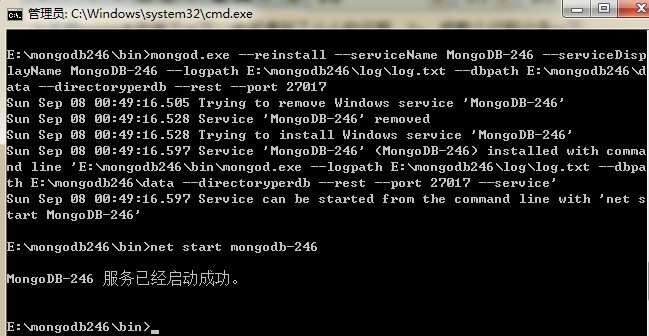
--reinstall 是重新安装,首次安装没有开--reset参数,所以用了重装参数。
--install 是安装。
(后来重启电脑后,那个删不掉的服务自己消失了)
如果看不懂E文,可以复制拿去Google翻译文档。
E:\mongodb246\bin>mongod.exe -helpAllowed options:

General options:  -h [ --help ]               show this usage information  --version                   show version information  -f [ --config ] arg         configuration file specifying additional options  -v [ --verbose ]            be more verbose (include multiple times for more                              verbosity e.g. -vvvvv)  --quiet                     quieter output  --port arg                  specify port number - 27017 by default  --bind_ip arg               comma separated list of ip addresses to listen on                              - all local ips by default  --maxConns arg              max number of simultaneous connections - 20000 by                              default  --logpath arg               log file to send write to instead of stdout - has                              to be a file, not directory  --logappend                 append to logpath instead of over-writing  --pidfilepath arg           full path to pidfile (if not set, no pidfile is                              created)  --keyFile arg               private key for cluster authentication  --setParameter arg          Set a configurable parameter  --auth                      run with security  --cpu                       periodically show cpu and iowait utilization  --dbpath arg                directory for datafiles - defaults to \data\db\  --diaglog arg               0=off 1=W 2=R 3=both 7=W+some reads  --directoryperdb            each database will be stored in a separate                              directory  --ipv6                      enable IPv6 support (disabled by default)  --journal                   enable journaling  --journalCommitInterval arg how often to group/batch commit (ms)  --journalOptions arg        journal diagnostic options  --jsonp                     allow JSONP access via http (has security                              implications)  --noauth                    run without security  --nohttpinterface           disable http interface  --nojournal                 disable journaling (journaling is on by default                              for 64 bit)  --noprealloc                disable data file preallocation - will often hurt                              performance  --noscripting               disable scripting engine  --notablescan               do not allow table scans  --nssize arg (=16)          .ns file size (in MB) for new databases  --profile arg               0=off 1=slow, 2=all  --quota                     limits each database to a certain number of files                              (8 default)  --quotaFiles arg            number of files allowed per db, requires --quota  --repair                    run repair on all dbs  --repairpath arg            root directory for repair files - defaults to                              dbpath  --rest                      turn on simple rest api  --slowms arg (=100)         value of slow for profile and console log  --smallfiles                use a smaller default file size  --syncdelay arg (=60)       seconds between disk syncs (0=never, but not                              recommended)  --sysinfo                   print some diagnostic system information  --upgrade                   upgrade db if neededWindows Service Control Manager options:  --install                install Windows service  --remove                 remove Windows service  --reinstall              reinstall Windows service (equivalent to --remove                           followed by --install)  --serviceName arg        Windows service name  --serviceDisplayName arg Windows service display name  --serviceDescription arg Windows service description  --serviceUser arg        account for service execution  --servicePassword arg    password used to authenticate serviceUserReplication options:  --oplogSize arg       size to use (in MB) for replication op log. default is                        5% of disk space (i.e. large is good)Master/slave options (old; use replica sets instead):  --master              master mode  --slave               slave mode  --source arg          when slave: specify master as <server:port>  --only arg            when slave: specify a single database to replicate  --slavedelay arg      specify delay (in seconds) to be used when applying                        master ops to slave  --autoresync          automatically resync if slave data is staleReplica set options:  --replSet arg           arg is <setname>[/<optionalseedhostlist>]  --replIndexPrefetch arg specify index prefetching behavior (if secondary)                          [none|_id_only|all]Sharding options:  --configsvr           declare this is a config db of a cluster; default port                        27019; default dir /data/configdb  --shardsvr            declare this is a shard db of a cluster; default port                        27018
安装好后,浏览器运行:http://127.0.0.1:28017 打开有东西就说明装上了,按理是localhost:端口可上的,不知我电脑是有缓存还是咋的,没反应,换上IP刷新就好了。
打开是这么个界面:

目前着实没看出什么信息,基本正常到此,可能会被卡住,不知道后续干什么了。
3:链接进入命令模式:
正常来说,在cmd命令下,运行E:\>mongodb246\bin\mongo.exe,(路径自己弄对)直接就连上了:

之后可以运行点命令测试下,如:
相关基础命令可以看:http://docs.mongodb.org/manual/tutorial/getting-started/

再接下来,就是怎么用代码开发的问题了,详情见:http://docs.mongodb.org/manual/tutorial/install-mongodb-on-windows/
剩下的抽空再看了~~~
win7 64位下 mongodb安装及命令运行的更多相关文章
- win7 64位下如何安装配置mysql-5.7.4-m14-winx64
win7 64位下如何安装配置mysql-5.7.4-m14-winx641. mysql-5.7.4-m14-winx64.zip下载 官方网站下载地址:http://dev.mysql.com/g ...
- [转]win7 64位下完美安装64位oracle 11g
最近在网上搜如何在win764位的情况下安装64位的oracle,并且使用PLSQL Developer来管理oracle. 于是开始在oracle官网下载数据库,下载是一件很简单的事情,问题是在百度 ...
- win7 64位下如何安装配置mysql-5.7.7-rc-winx64
距离上次安装MySQL已经过去好久了.步骤这些,有可能会忘记.简单记录一下吧.(参考了一些网络上的博客.) 1.mysql-5.7.5-m15-winx64.zip下载 官方网站下载地址: http: ...
- win7 64位下如何安装配置mysql-5.7.4-m14-winx64(安装记录)
1. mysql-5.7.4-m14-winx64.zip下载 官方网站下载地址:http://dev.mysql.com/get/Downloads/MySQL-5.6/mysql-5.6.17 ...
- win7(64)位下WinDbg64调试VMware10下的win7(32位)
win7(64)位下WinDbg64调试VMware10下的win7(32位) 一 Windbg32位还是64位的选择 参考文档<Windbg 32位版本和64位版本的选择> http:/ ...
- [转]win7 64位下android开发环境的搭建
本文转自:http://www.cfanz.cn/index.php?c=article&a=read&id=65289 最近换了新电脑,装了win7 64位系统,安装了各种开发环境, ...
- win7 64位下android开发环境的搭建
本文转自:http://www.cfanz.cn/index.php?c=article&a=read&id=65289 最近换了新电脑,装了win7 64位系统,安装了各种开发环境, ...
- 2 pygraphviz在windows10 64位下的安装问题(反斜杠的血案)
可以负责任的说,这篇文档是windows10安装pygraphviz中,在中文技术网站中最新的文档,没有之一.是自己完全结合各种问题,包括调试等,总结出来的. 问题来源:主要是可视化RvNN网络的树结 ...
- 偶然碰到的Win7 64位下CHM 的问题解决
最近下了几个沪江资料,都是chm格式的,但是在win7 64位下,都显示不了里面的音频和视频flash之类的控件,虽然可以通过源文件的方式打开视频文件,但是很麻烦. 网上似乎碰到的人也不是很多, ...
随机推荐
- Duilib源码分析(五)UI布局—Layout与各子控件
接下来,继续分析duilib之UI布局Layout,目前提供的布局有:VerticalLayout.HorizontalLayout.TileLayout.TabLayout.ChildLayout分 ...
- Normalization
In creating a database, normalization is the process of organizing it into tables in such a way that ...
- WriteableBitmap 给透明的控件截图的问题
在WP开发中,我们经常会用到截取某一部分区域,然后分享到微博等等,Writeablebitmap 是一个很好的辅助,但是它本身也有一个限制:只有一个 SaveJpeg 方法,因此透明的区域无法保存,都 ...
- UWP学习记录4-设计和UI之控件和模式1
UWP学习记录4-设计和UI之控件和模式1 1.控件和事件简介 在 UWP 应用开发中,控件是一种显示内容或支持交互的 UI 元素. 控件是用户界面的构建基块. 我们提供了超过 45 种控件供你使用, ...
- sizeof(转载)
原文地址:http://blog.sina.com.cn/s/blog_5da08c340100bmwu.html 转载至:http://www.cnblogs.com/wangkangluo1/ar ...
- UWP Jenkins + NuGet + MSBuild 手把手教你做自动UWP Build 和 App store包
背景 项目上需要做UWP的自动安装包,在以前的公司接触的是TFS来做自动build. 公司要求用Jenkins来做,别笑话我,之前还真不晓得这个东西. 会的同学请看一下指出错误,不会的同学请先自行脑补 ...
- 标准io与文件io
A: 代码重复: 语句块1: while(判断) { 语句块2: 语句块1: } 上面可以改写为: while(1) { 语句块1: if(判断) break: 语句块2: } B: 标准IO和文件I ...
- ci框架登陆之后每隔几分钟就需要重新登录的问题
一个简单的登陆写好之后,发现每次进入需要登陆之后才能进入的页面都会跳转到登录页面,猜测应该是session被清了,打印出来,果然为空,但是我没有设置session的生存周期,按照默认的应该是24小时, ...
- linux下tar安装mysql
>>>>>>>>>>>>>>>>>>>> 到官网下载 mysql-5.6.12- ...
- GAMBIT、ICEM、HYPERMESH耦合面的处理方法
前两天在论坛里碰到有朋友问关于使用fluent仿真流固耦合,使用hypermesh作为前处理时的耦合面的方法,刚好今天有点时间,借此机会总结一下GAMBIT.ICEM和HYPERMESH这三款软件作为 ...