
Struts2基础入门
Struts2基础入门
创建一个web工程
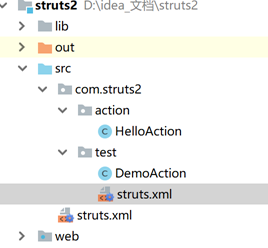
0)导包并且创建一个核心配置文件
<?xml version="1.0" encoding="UTF-8"?>

<!DOCTYPE struts PUBLIC

    "-//Apache Software Foundation//DTD Struts Configuration 2.3//EN"

    "http://struts.apache.org/dtds/struts-2.3.dtd">

<struts>

    <!-- i18n:国际化. 解决post提交乱码 -->

    <constant name="struts.i18n.encoding" value="UTF-8"></constant>

    <!-- 指定访问action时的后缀名

        http://localhost:8080/struts2_day01/hello/HelloAction.action

        http://localhost:8080/struts2_day01/hello/HelloAction.do

    -->

    <constant name="struts.action.extension" value="action,do"></constant>

    <!-- 指定struts2是否以开发模式运行

            1.热加载主配置.(不需要重启即可生效)

            2.提供更多错误信息输出,方便开发时的调试

     -->

    <constant name="struts.devMode" value="true"></constant>

    <!-- package:将Action配置封装.就是可以在Package中配置很多action.

            name属性: 给包起个名字,起到标识作用.随便起.不能其他包名重复.

            namespace属性:给action的访问路径中定义一个命名空间

            extends属性: 继承一个 指定包

            abstract属性:包是否为抽象的; 标识性属性.标识该包不能独立运行.专门被继承

      -->

    <package name="hello" namespace="/hello" extends="struts-default" >

        <!-- action元素:配置action类

                name属性: 决定了Action访问资源名.

                class属性: action的完整类名

                method属性: 指定调用Action中的哪个方法来处理请求

         -->

        <action name="HelloAction" class="com.struts2.action.HelloAction" method="hello" >

            <!-- result元素:结果配置

                    name属性: 标识结果处理的名称.与action方法的返回值对应.

                    type属性: 指定调用哪一个result类来处理结果,默认使用转发.

                    标签体:填写页面的相对路径

            -->

            <result name="success" type="dispatcher" >/hello.jsp</result>

        </action>

    </package>

    <!-- 引入其他struts配置文件 -->

    <include file="com/struts2/test/struts.xml"></include>

    <!--<include file="cn/itheima/c_default/struts.xml"></include>-->

</struts>
src下的struts.xml
package com.struts2.action;

/**

 * @author: 肖德子裕

 * @date: 2018/11/19 22:15

 * @description:

 */

public class HelloAction {

    public String hello(){

        System.out.println("hello word");

        return "success";

    }

}
HelloAction
1)测试动态方法调用方式
package com.struts2.test;

/**

 * @author: 肖德子裕

 * @date: 2018/11/20 8:58

 * @description:

 */

public class DemoAction {

    public String add(){

        System.out.println("添加用户!");

        return "success";

    }

    public String delete(){

        System.out.println("删除用户!");

        return "success";

    }

    public String update(){

        System.out.println("修改用户!");

        return "success";

    }

    public String find(){

        System.out.println("查找用户!");

        return "success";

    }

}
DemoAction
<?xml version="1.0" encoding="UTF-8"?>

<!DOCTYPE struts PUBLIC

    "-//Apache Software Foundation//DTD Struts Configuration 2.3//EN"

    "http://struts.apache.org/dtds/struts-2.3.dtd">

<struts>

        <!-- 动态方法调用方式1:配置动态方法调用是否开启常量;默认是关闭的,需要开启;不建议使用 -->

        <!-- http://localhost:8080/demo/DemoAction!add.action -->

        <constant name="struts.enable.DynamicMethodInvocation" value="false"></constant>

        <package name="demo" namespace="/demo" extends="struts-default" >

            <!-- 动态方法调用方式2:通配符方式;使用{1}取出星号填充的内容;建议使用 -->

            <action name="DemoAction_*" class="com.struts2.test.DemoAction" method="{1}" >

                <result name="success" >/hello.jsp</result>

            </action>

        </package>

</struts>
struts.xml
2)在web中配置拦截器
<?xml version="1.0" encoding="UTF-8"?>

<web-app xmlns="http://xmlns.jcp.org/xml/ns/javaee"

         xmlns:xsi="http://www.w3.org/2001/XMLSchema-instance"

         xsi:schemaLocation="http://xmlns.jcp.org/xml/ns/javaee http://xmlns.jcp.org/xml/ns/javaee/web-app_4_0.xsd"

         version="4.0">

    <!-- struts2核心过滤器 -->

    <filter>

        <filter-name>struts2</filter-name>

        <filter-class>org.apache.struts2.dispatcher.ng.filter.StrutsPrepareAndExecuteFilter</filter-class>

    </filter>

    <filter-mapping>

        <filter-name>struts2</filter-name>

        <url-pattern>/*</url-pattern>

    </filter-mapping>

</web-app>
3)测试访问hello word
http://localhost:8080/hello/HelloAction.action
4)测试访问增删改查
http://localhost:8080/demo/DemoAction_add.action
Struts2基础入门的更多相关文章
- Struts2入门1 Struts2基础知识
Struts2入门1 Struts2基础知识 20131130 代码下载: 链接: http://pan.baidu.com/s/11mYG1 密码: aua5 前言: 之前学习了Spring和Hib ...
- SpringMVC基础入门
一.SpringMVC基础入门,创建一个HelloWorld程序 1.首先,导入SpringMVC需要的jar包. 2.添加Web.xml配置文件中关于SpringMVC的配置 1 2 3 4 5 6 ...
- SpringMVC基础入门,创建一个HelloWorld程序
ref:http://www.admin10000.com/document/6436.html 一.SpringMVC基础入门,创建一个HelloWorld程序 1.首先,导入SpringMVC需要 ...
- (转)Struts2快速入门
http://blog.csdn.net/yerenyuan_pku/article/details/66187307 Struts2框架的概述 Struts2是一种基于MVC模式的轻量级Web框架, ...
- 1、Struts2基本入门
一.了解了这几个主要的优点,会促使你考虑使用Struts2 : 1.POJO表单及POJO操作 - Struts2 去除掉了Struts框架中的Action Forms部分.在Struts2框架下,你 ...
- js学习笔记:webpack基础入门(一)
之前听说过webpack,今天想正式的接触一下,先跟着webpack的官方用户指南走: 在这里有: 如何安装webpack 如何使用webpack 如何使用loader 如何使用webpack的开发者 ...
- 「译」JUnit 5 系列:基础入门
原文地址:http://blog.codefx.org/libraries/junit-5-basics/ 原文日期:25, Feb, 2016 译文首发:Linesh 的博客:JUnit 5 系列: ...
- .NET正则表达式基础入门
这是我第一次写的博客,个人觉得十分不容易.以前看别人写的博客文字十分流畅,到自己来写却发现十分困难,还是感谢那些为技术而奉献自己力量的人吧. 本教程编写之前,博主阅读了<正则指引>这本入门 ...
- 从零3D基础入门XNA 4.0(2)——模型和BasicEffect
[题外话] 上一篇文章介绍了3D开发基础与XNA开发程序的整体结构,以及使用Model类的Draw方法将模型绘制到屏幕上.本文接着上一篇文章继续,介绍XNA中模型的结构.BasicEffect的使用以 ...
随机推荐
- .net iis6中配置伪静态
1.右键点击 要设置网站的网站 2.属性 ——>主目录 ——>配置——> 3.如右侧窗口,找到 .aspx 扩展名——>编辑——>复制 可执行文件的路径——>关闭 ...
- node Error: Could not locate the bindings file. Tried:解决
问题描述: Error: Could not locate the bindings file. Tried: → C:\code\xxx\node_modules\deasync\build\dea ...
- 拿到返回值,Callable示例
- C#用委托实现异步,异步与多线程的异同
异步与多线程的区别(转) 一.异步和多线程有什么区别?其实,异步是目的,而多线程是实现这个目的的方法.异步是说,A发起一个操作后(一般都是比较耗时的操作,如果不耗时的操作就没有必要异步了),可以继续自 ...
- poj 1155 输入输出问题
http://acm.hust.edu.cn/vjudge/problem/16417 重做了一遍poj 1155 题目大意:给定一棵树,1为根结点表示电视台,有m个叶子节点表示客户,有n-m-1个中 ...
- 《Head First 设计模式》之代理模式
代理模式(Proxy):控制对象访问 ——为另一个对象提供一个替身或占位符来访问这个对象. 要点: 代理模式有许多变体,如:缓存代理.同步代理.防火墙代理和写入时复制代理 代理在结构上类似装饰者,但目 ...
- Flask文件目录----- __init__ 文件
import os from flask import Flask def create_app(test_config=None): # 创建和设置app app = Flask(name, ins ...
- Java Knowledge series 3
JVM & Bytecode Abstract & Object Object in Java (1) 所有东西都是对象object.可将对象想象成一种新型变量:它保存着数据,但可要求 ...
- Android 极光推送JPush---自定义提示音
极光推送提供三种方法实现Notification通知 三方开发平台发送普通消息,客户端设置PushNotificationBuilder,实现基础的Notification通知 三方开放平台发送普通消 ...
- wechat开发笔记之1.线上环境搭建与测试
Wechat开发笔记 线上环境搭建: 申请一个wechat公众平台. 手机个人微信可以用webwechat来测试. Website:https://web.weixin.qq.com/ 手机客户端扫一 ...